- Artificial Intelligence, Machine Learning, Python, Web Scraping: Feedbacks/Queries -

World Wide Web
Table of Contents
Web Technology -|- PHP |-| Javascript [+] To-Do Application |*| MySQL Summary |=| PowerBI and Pivot Tables [=] PHP vs. JavaScript [/] Web Scraping in Python |:| Job Description (JD) Templates |:| UI/UX (User Interface) Design |:| Work-flow for International Travels |:| Software Architect |:| DevOps EngineerGood Scripting and Programming Practices |:| Testing Methods and Activities |:| API Design |:| Load Balancer |:| Content Delivery Network: CDN |:| Back-end Design for a Web App |:| Summary of Tech Stacks |:| Empathy Map |:| Platform-agnostic Physical Diagram |:| SDLC: Phases |:| IaaS vs PaaS |:| JavaScript Charting |:| SQL Tables to Create a Hiring Tracker Dashboard
Agile, Scrum and Jira |:| Example workflows of testing stages |:| Example User Stories: Web App Dev. Projects |:| Steps to Create ER Diagrams |:| Working with GitHub |:| Web App Development Checklist |:| Methods of Linting |:| Working in Angular |:| Refactoring of Codebase |:| Methods to Estimate Story Points |:| Data Modeling and Data Engineering |:| Testing using pytest |:| Testing using unittest |:| GUI Creation using Tkinter
Programming for the World Wide Web
Write Mathematical Equations in HTML Pages
MathJax is JavaScript display engine for mathematics that works in all browsers. MathML is an XML-based language for describing mathematical notation. AsciiMath is an easy-to-write markup language for mathematics. LaTeX and TeX are another notation system for mathematical equations in HTML pages. Some example scripts for MathML is given below. xmlns="http://www.w3.org/1998/Math/MathML" needs to be added to <math> tag.- <mfrac><mn>1</mn>mn>2</mn></mfrac> =
- <math><msqrt><mo>(</mo><mfrac><mn>A</mn><mn>B</mn></mfrac><mo>)</mo></msqrt></math> =
<mrow> <munderover> <mo>Σ</mo><mrow><mi>n</mi><mo>=</mo><mn>1</mn></mrow><mrow><mo>+</mo><mn>∞</mn> </mrow></munderover> <mfrac><mn>1</mn><msup><mi>n</mi><mn>2</mn></msup></mfrac> </mrow>
: The HTML code is
<mrow>
<munderover><mi>∫</mi><mn>-π</mn><mn>+π</mn></munderover>
<mrow>
<mi>f</mi><mo>(</mo><mi>x</mi><mo>)</mo> <mi>d</mi><mi>x</mi>
</mrow>
</mrow>
Web Technology

Ref: aws.amazon.com/what-is/sdlc - "The software development lifecycle (SDLC) is the cost-effective and time-efficient process that development teams use to design and build high-quality software. The goal of SDLC is to minimize project risks through forward planning so that software meets customer expectations during production and beyond. This methodology outlines a series of steps that divide the software development process into tasks you can assign, complete, and measure."
Software Engineering Concepts, Idioms and Terms
Traditional software is native meaning it is compiled for and installed on a specific operating system like Windows or Linux. Web apps are hosted on a remote server and accessed through the internet. Web App: An application program on a server that is delivered or can be accessed only through browsers. Data Structures: Specialized formats, such as arrays, trees, and hash tables, used to organize, store, and manage data efficiently. Alpha testing: The testing that occurs within a software development team or company. Beta testing: The testing that happens using client or selected end users. Metric: The measure of whether a product feature or task is quantifiable or countable.
A starter kit in web development is a pre-built template or foundational package of code, files, and configurations designed to help developers launch a new project quickly. Instead of writing everything from scratch, a starter kit (often called a boilerplate or skeleton) gives dev team a head start by handling basic setup, tooling, and common architecture. This is not same as a template.
| Feature | Template | Starter Kit |
| Scope and Focus | Focuses primarily on the visual presentation, UI design, or document layout (e.g. HTML/CSS files, page mock-ups, or graphic design forms) | Focuses on functionality and architecture, offering a working environment with boilerplate code, dependencies, and core utilities pre-integrated |
| Interactivity and Logic | Usually passive or static, developers fill in the blanks or swap out text, images, and styling | Active and operational containing active logic, configuration files, and setup scripts that run out of the box |
| Use Case | Best for consistent formatting or visual styling across pages or documents quickly | Starting a software or web project from scratch to avoid reinventing basic features like user login and database wiring |
Archival database: An historical copy of a database saved at a significant point in time for use in recovery or restoration of the database. Bootstrap: A short computer program that is permanently resident or easily loaded into a computer and whose execution brings a larger program, such an operating system or its loader, into memory. Truth table: A table that describes a logic function by listing all possible combinations of input values, and indicating, for each combination, the output value. Code audit, code inspection, code review and code walk-through: testing and approval steps or process for codebases.
A codebase is the complete collection of source code files and supporting assets such configuration files, build and deployment scripts, test scripts and documentation. Polyglot Tech Stack: use of languages from different family such as React (front-end) + Python (back-end) or Java (front-end) + Python (back-end). A webhook is a lightweight, event-driven communication that automatically sends data between applications via HTTP.
Refactoring in software development means restructuring existing code to improve its readability, and maintainability without changing its external behaviour and features.
A release cycle is the structured process used to move a web application change from planning and development into production and then monitor its performance. It ensures that new features, bug fixes, and security updates are delivered in a controlled, tested, and repeatable manner.
Code smells refer to duplicated code, deep nesting, excessively long functions, long Parameter lists or overly complex logic - though it is not a bug or a syntax error - the app will likely still run and function as intended. Smoke testing is a quick check that confirms whether a new software build works well enough for extensive testing. In the context of AWS web app deployment, artefacts are the compiled code, packages, or configuration files produced during the build process that are then deployed to a runtime environment.
Web App Deployment Steps / Stages ↴
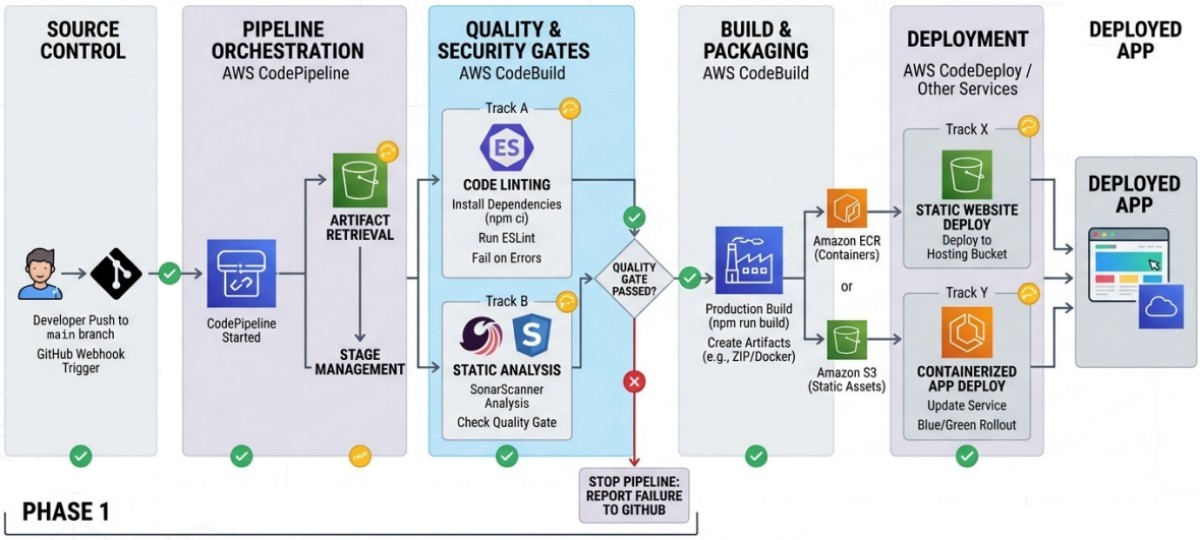
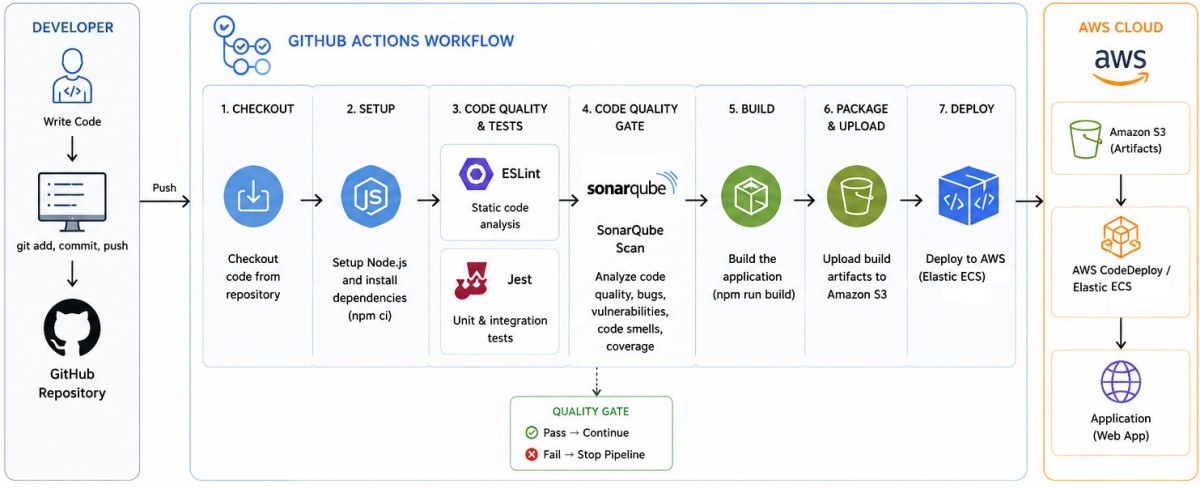
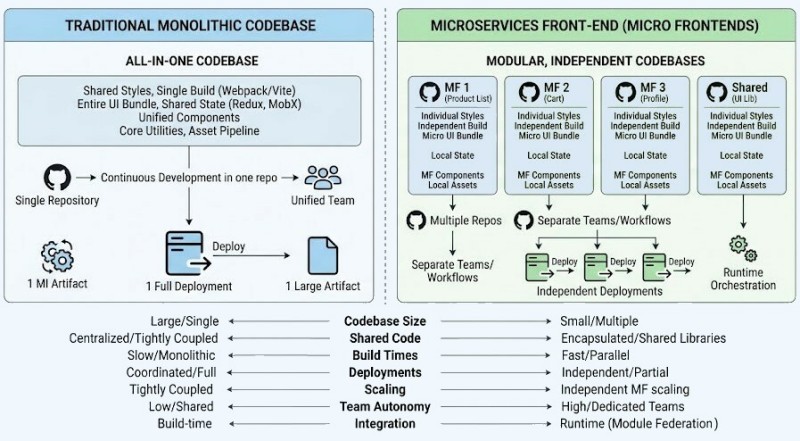
Client-server architecture is the foundation upon which most web applications are built. Model-View-Controller (MVC) architecture is another pattern that builds upon the the client-server model. Layered Architecture organizes the application into horizontal layers with well-defined functionalities and communication protocols. Service-Oriented Architecture breaks down applications into modular independent services. Microservices front-end is a specific type of this architecture.
A Cloud-Native web application is designed specifically to run efficiently in cloud environments by leveraging cloud services, automation, and scalability from the start. On a static website, individual webpages include static content. They might also contain client-side scripts but they must not use any server-side scripting languages such as PHP or JavaServer Pages (JSP).
A cloud (such as Azure or AWS) landing zone is the standardized and recommended approach for all organizations utilizing cloud services. It provides a consistent way to set up and manage cloud (AWS or Azure) environment at scale. It ensures consistency across organization by aligning with key requirements for security, compliance, and operational efficiency through platform and application landing zones. A cloud landing zone typically consists of one platform landing zone and one or more application landing zones.
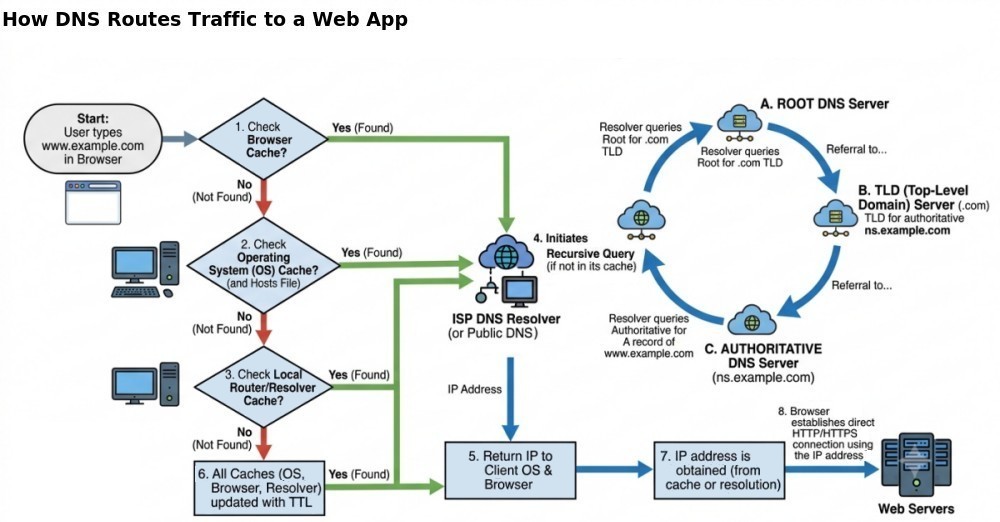
An SPA (Single-page application) is a web app implementation that loads only a single web document, and then dynamically updates that page as the user interacts with it typically via JavaScript APIs. DNS, or the Domain Name System, translates human readable domain names to machine readable Internet Protocol (IP) addresses. DNS service such as Amazon Route 53 performs this action.
Web apps designed for internal use for employees need to have provision for remote access. For a intranet-only access, the traffic routes through internal local switches and routers. No public IP address exists. For the hybrid access, an entry point for external traffic is required. Remote users are placed virtually inside the intranet using VPN connections. Palo Alto GlobalProtect is a network security client and remote access solution. It acts as VPN that securely connects remote machines to corporate networks, protecting traffic across on-premises, public, and private clouds. When in the office, internal DNS resolves this to a private IP. When accessing remotely, public DNS resolves this to the external IP of the VPN gateway. A simple flowchart for hybrid access is shown below. ↴
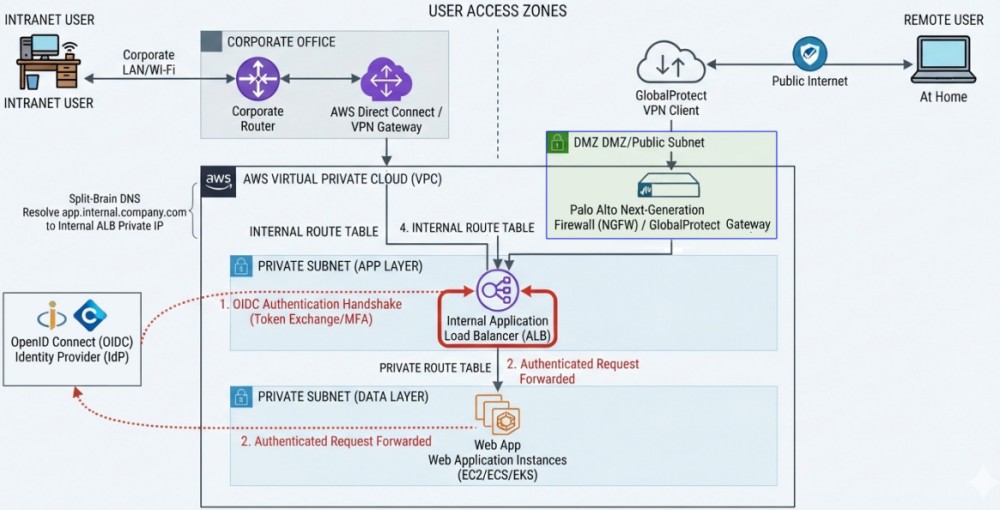
[ Remote  Device / Browser   ]
           │   Initial Request by typing intranet portal address
           ▼
(Personal or Public Internet)
           │
           '─> GlobalProtect Redirects to IdP ──> [ OpenID MFA ]
                                                  - Validates Credentials
                                                  - Performs MFA
           .--- OIDC Token <──────────────────────┘
           |
           ▼
[ GlobalProtect Firewall     ]
           | Validates Token, Establishes VPN Tunnel
           │
           ▼ Secure Encrypted Tunnel
[ Internal Corporate Network ]
           │
           ▼
[   Intranet Portal          ]
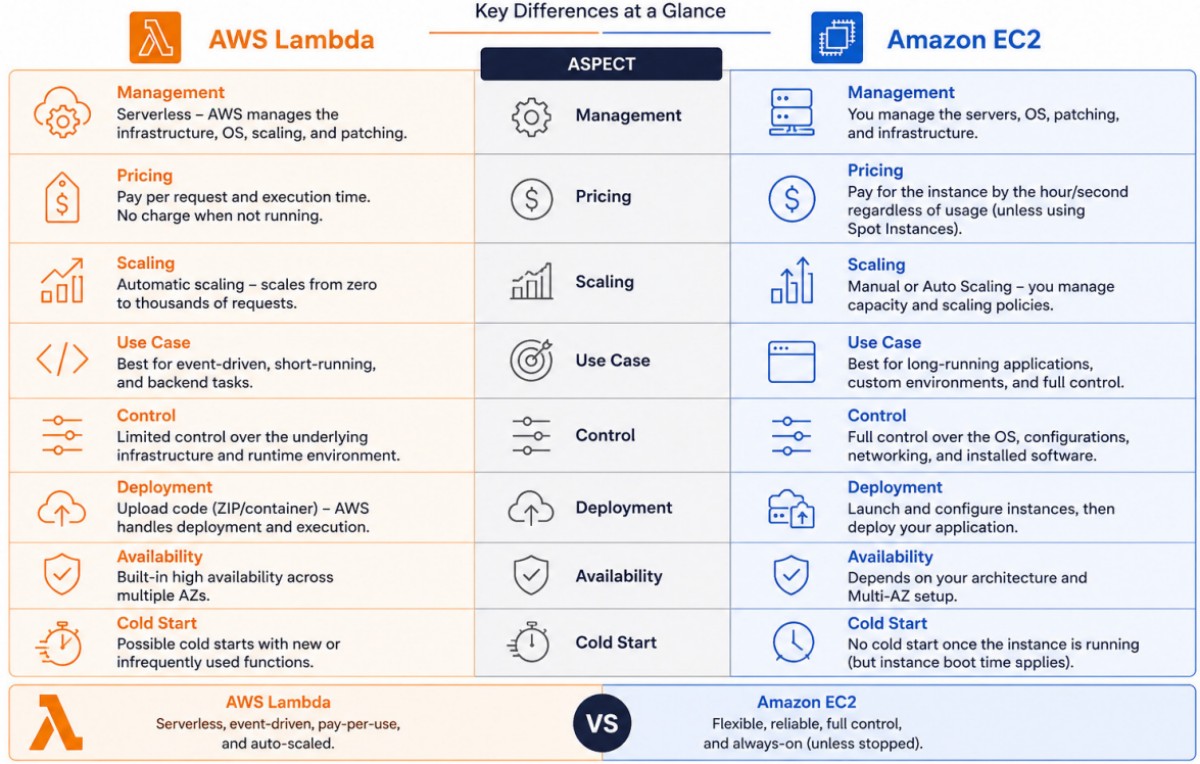
AWS Components: the keywords "fully managed" in description imply that the service is a PaaS. The term serverless means subscribers do not have to provision, patch, or manage underlying servers. Developers just need to upload the code, and AWS automatically handles scaling, high availability, and infrastructure management. An AWS Region is a physical location where AWS clusters data centers and operates regional services, like AWS EC2 and Amazon S3.
| AWS Transit Gateway | It a cloud router that connects multiple Virtual Private Clouds (VPCs) and on-premises networks through a central hub. |
| AWS CodeCommit | A fully managed version control service that helps you privately store and manage Git repositories, without needing to manage your own source control system. |
| AWS CodeBuild | A fully managed build service that helps you compile source code, run unit tests, and produce artifacts that are ready to deploy. |
| AWS Amplify | A fully managed service for deploying and hosting full stack web applications, with built-in CI/CD workflows. Flexible deployment options, including custom pipelines, monorepos, or multiple repos. |
| AWS CodeDeploy | A fully managed deployment service that automates software deployments to a variety of compute services such as EC2 or on-premises servers. |
| AWS CodePipeline | A fully managed delivery service to model the full release process for building code, deploying to pre-production environments, testing, and releasing it to production. |
| AWS Device Farm | App testing service to test web and mobile apps across desktop browsers and real mobile devices hosted in the AWS Cloud. |
| Amazon CloudWatch | AWS service that collects and visualizes logs and metrics from your app hosted in the AWS Cloud. |
| Amazon Pinpoint | AWS service that helps you send push notifications, in-app notifications, emails, text messages, and voice messages. |
| Amazon API Gateway | A fully managed AWS that enables developers to create a serverless REST API using the API Gateway REST API console. Use REST APIs, and choose from supported frameworks and protocols. |
| Amazon Lambda | A serverless* compute service that lets subscribers run code without provisioning or managing servers. |
| AWS AppSync | A fully managed API service that automates the operation and maintenance of GraphQL backends. |
| AWS EC2 | Elastic Compute Cloud (EC2) provides resizable compute capacity in the cloud which provides a full management console and APIs to manage the compute resources. |
| AWS ECS | Elastic Container Serives (ECS) is a fully managed container orchestration service. It make it easy to deploy, manage, and scale Docker containers on AWS. |
| Amazon EKS | Amazon Elastic Kubernetes Service is a fully-managed, certified Kubernetes conformant service that simplifies the process of building, securing, operating, and maintaining Kubernetes clusters. |
| Amazon Fargate | A serverless compute engine for containers that removes the need to provision or manage servers. It works directly with ECS and EKS. |
| AWS S3 | Simple Storage Service (Amazon S3) provides a simple web services interface to store and retrieve any amount of data, at any time, from anywhere on the web. |
| AWS RDS | A fully managed Relational Database Service (Amazon RDS) makes it easy to set up, operate, and scale a relational database in the cloud. |
| AWS CloudFront | It provides a high performance, globally distributed content delivery system with low latency, high data transfer speeds, and seamless integration with Amazon S3. |
| AWS Elastic Beanstalk | It provides a "lift and shift" path to companies to move their existing codebases quickly while maintaining compatibility with legacy systems and gaining cloud benefits. |
| AWS Step Functions | It is a fully managed serverless workflow orchestration service that allows building distributed applications, automate processes, and coordinate microservices using visual workflows. |
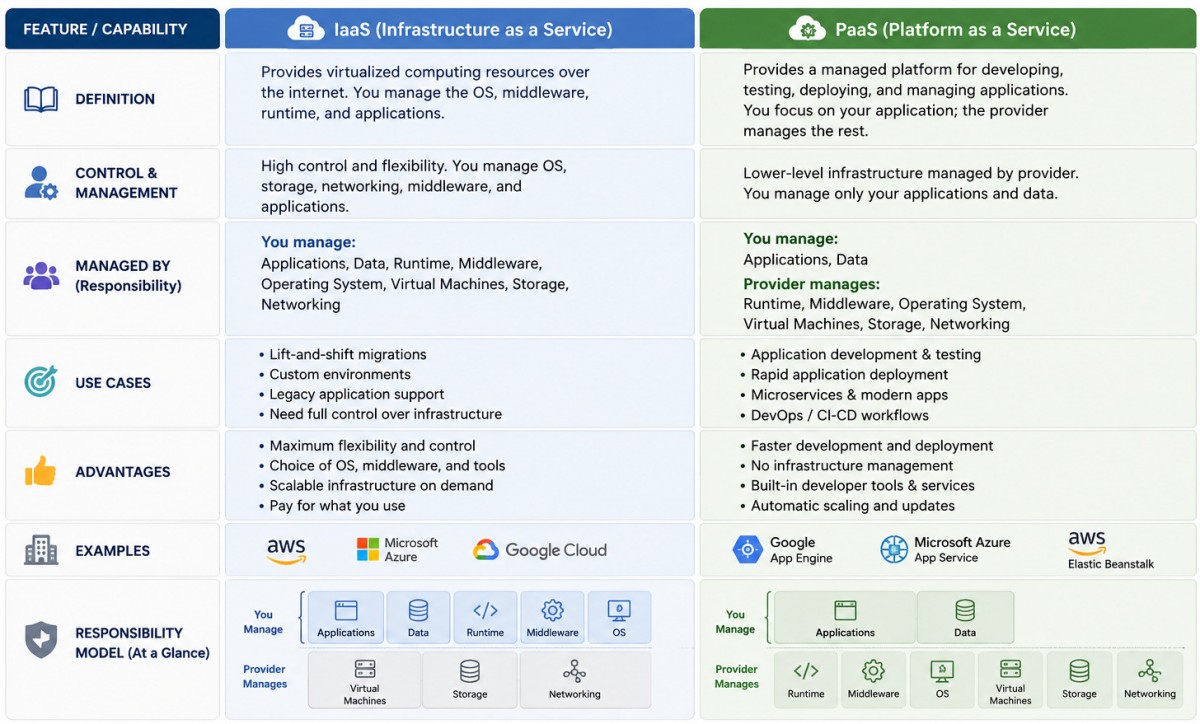
From cloud.google.com/learn/paas-vs-iaas-vs-saas: "IaaS (Infrastructure as a Service) and PaaS (Platform as a Service) are core cloud computing models. IaaS provides raw, virtualized computing hardware over the internet (like renting an empty lot), while PaaS provides a ready-made software environment for developers to build and deploy apps (like renting an unfurnished house)." In IaaS model, the providers manage the "hardware, network, and virtualization" whereas the subscribers manage the "Operating System (OS), middleware, and data/back-end". In PaaS model, the provider manages the "OS, development tools and back-end" whereas the subscribers manage only the "code and data". The term "fully-managed" is frequently used to describe PaaS.
A cloud server is a virtualized server that runs in the cloud on infrastructure owned by a cloud service provider. A serverless architecture is a way to build and run applications and services without having to manage infrastructure. Your application still runs on servers, but all the server management is done by AWS. You no longer have to provision, scale, and maintain servers to run your applications, databases, and storage systems.SaaS (Software as a Service) is a cloud computing model where softwares are hosted by a third-party provider and accessed by users over the internet, typically through a web browser. Common examples include web-based email, cloud storage services, and modern business tools. Multi-tenant architecture allows a single instance of SaaS software to serve multiple customers, optimizing resources and reducing costs.
Code Repository Platforms like GitHub hosts the codes and manage collaboration about commits (act of saving the staged snapshot locally). Developers can commit directly via some IDE. Push to a remote repository: Act of uploading local commits to a shared platform like GitHub. Pull requests are proposals to merge code changes into a project. IaC: Infrastructure as a Code is DevOps practice where IT infrastructure (servers, networks, databases) are managed and provisioned using machine-readable definition files rather than manual configuration.
A rollback is the process of reverting an application, database, or system to a previous, stable state. Technical debt refers to the future costs associated with relying on shortcuts or suboptimal decisions made during software development.
A playbook is a standardized, step-by-step guide or blueprint for building, deploying, and/or operating the software.
| Aspect of Plabook | Pros (Advantages) | Cons (Limitations) |
| Standardization | Ensures people follow a consistent process | Can discourage alternative approaches |
| Repeatability | Tasks can be performed repeatedly with predictable results | May become rigid for unusual situations |
| Knowledge Sharing | Captures organizational knowledge and best practices | Requires effort to document properly |
| Onboarding | Helps new team members become productive faster | New users may follow it without understanding why |
| Quality | Reduces omissions and human errors | Poor design can standardize bad practices |
| Efficiency | Reduces time spent deciding what to do next | Maintaining can become time-consuming |
| Troubleshooting | Provides predefined steps for common problems | May not cover novel or unexpected problems |
| Automation | Can be converted into scripts/workflows | Automation can make incorrect assumptions harder to detect |
| Compliance | May provides evidence for adherence to procedures | Excessive documentation can create excuses |
| Scalability | Makes processes easier to transfer between teams/projects | Playbook designed for one environment may not scale well to another |
| Decision making | Provides decision trees, recommended actions | Can reduce flexibility and expert judgment |
| Maintenance | Creates a single reference for a process | Quickly becomes obsolete if not regularly updated |
Signs off on business alignment (Signs off on value delivery): This is usually a Product Manager. They ensure the delivery methodology and scope defined in playbook align with commercial goals and timelines.
Signs off on technical standards: They verify that the architecture guidelines, tech stack choices, coding standards, and deployment pipelines outlined in the playbook adhere to engineering excellence and scalability requirements.
Signs off on execution workflows: They validate the communication protocols, change management processes, and definition of done (DoD). This may include signs off on agile governance to validate the meeting cadences (daily stand-ups, retrospectives), Jira/triage workflows, and blocker escalation paths.
An API endpoint is a location (specific URL or path) where an application programming interface (API) receives API calls, also known as API requests, for resources on its server. It is like the service desks of a bank. Path Parameters are variables inside the URL path used to identify an exact item. Query Parameters are added to the end of a URL using a question mark, typically used for searching, sorting, or pagination. Two types of API endpoints widely used for web app are: REST API and GraphQL.
An API gateway is a software layer that acts as an intermediary between client devices and servers. It is a central point that accepts all API calls and routes them to requested services. Clients send requests to the API gateway instead of calling services directly. The gateway forwards those requests to the appropriate back-end services. It also handles cross-cutting concerns such as authentication, logging, and load balancing.
As per article paloaltonetworks.com/cyberpedia/sandboxing: "Sandboxing is a security control that isolates the execution of untrusted or potentially malicious code in a tightly controlled environment. It allows systems to evaluate, test, or execute files, scripts, or processes without exposing the host or network to compromise. The core principle is containment: any process running in the sandbox can’t interact with the underlying system or escape its designated boundaries. In cloud-native environments, sandboxing is not a security afterthought — it is foundational. Sandboxing provides the execution boundaries necessary to run untrusted or partially trusted code without compromising adjacent systems or infrastructure."
Monolithic architecture is a single, unified unit, making it ideal for small, simple applications with fast initial development. Microservices consist of small, independent services, offering high scalability, agility, and flexibility for complex, large-scale applications.
Containers vs. Virtual Machines: Both containers and virtual machines are technologies used to run applications in isolated environments, but they differ in architecture, resource usage, and use cases. Containers refer to OS-level virtualization (share the host OS kernel) and VMs are used for Hardware-level virtualization (have their own guest OS). Containers are lightweight, fast, and ideal for modern cloud-native and microservice applications. Virtual Machines provide stronger isolation and support multiple operating systems on the same hardware.
Reference - aws.amazon.com/what-is/serverless-computing: "Serverless computing is an application development model where you can build and deploy applications on third-party managed server infrastructure. All applications require servers to run. But in the serverless model, a cloud provider manages the routine work; they provision, scale, and maintain the underlying infrastructure. The cloud provider handles several tasks, such as operating system management, security patches, file system and capacity management, load balancing, monitoring, and logging. As a result, your developers can focus on application design and still receive the benefits of cost-effective, efficient, and massively scalable server infrastructure."
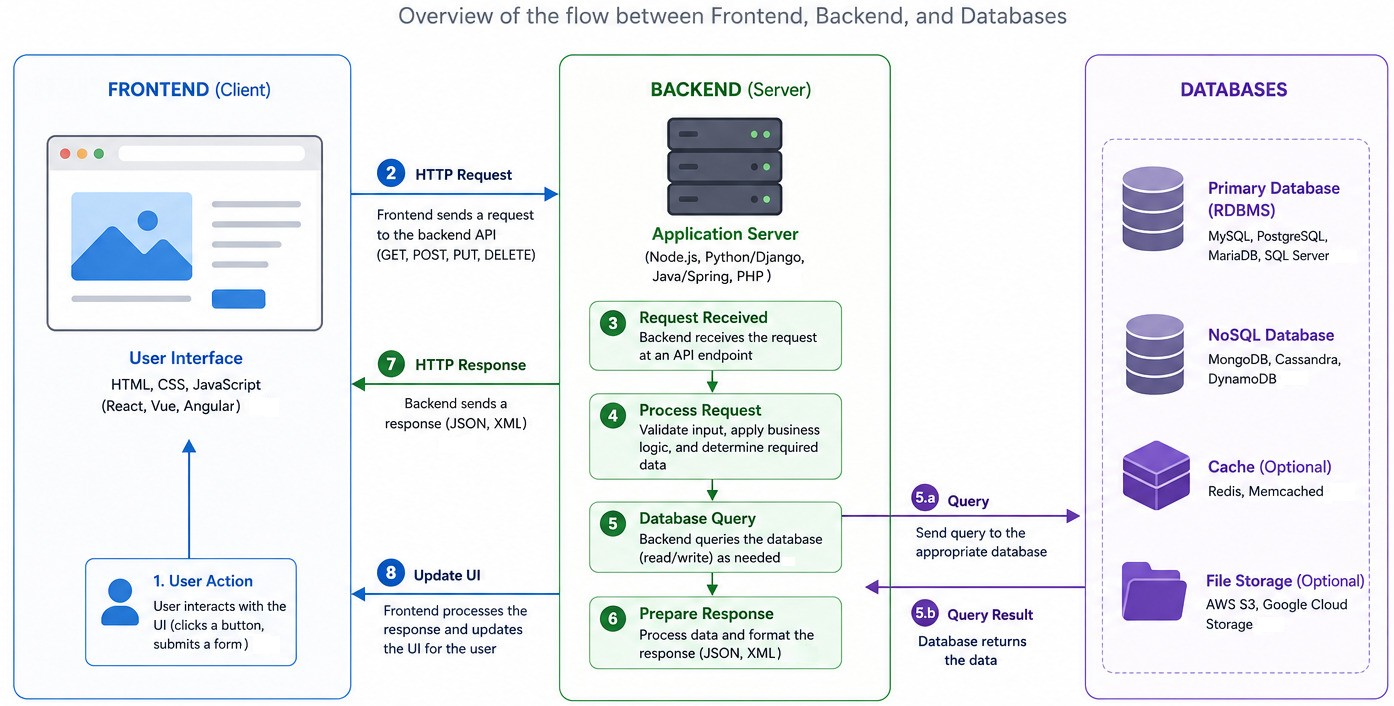
This article "aws.amazon.com/compare/the-difference-between-frontend-and-backend" gives good explanation about front-end and back-end technology.| Front-End (UI Layer) | Back-end (Logic Layer) | Full Stack |
| Topic dealing with user interface, what the end user see and interact with | Deals with methods required to create, maintain and provide data needed for Front End | Deals with both Front End and the Back End technologies |
| Mainly programmed in HTML, CSS, JavaScript, Angular, React, PHP | Deals with API, databases and server-side scripting: PHP, ASPX, SQL, JSON, Node.js, Java Spring Boot | In addition to Front / Back-end, developers have to deal with servers (ports, networks, web-hosting), data security and database management. |
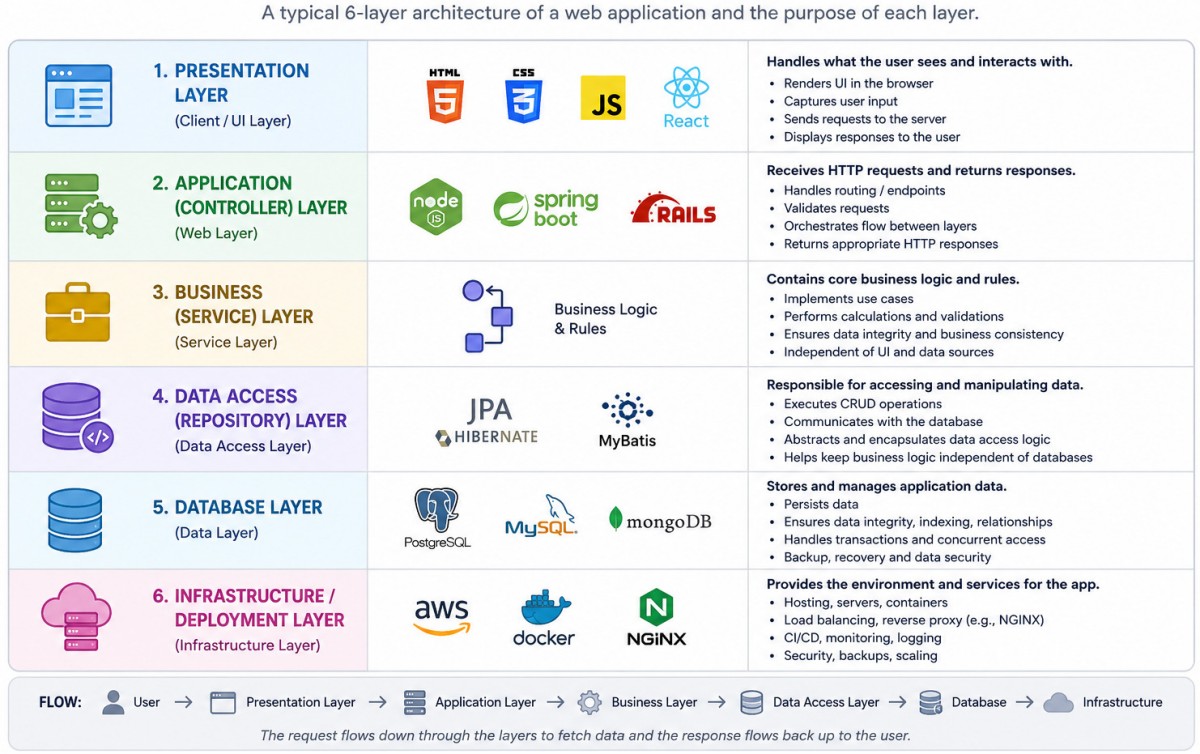
Selecting Tech Stack can be as easy as "AWS + React + Node + REST". However, it does not cover the entire spectrum and a detail tabulation is needed. Following is the summary of few of the options available.
| Activity | Available Artifacts | Selected Option | Responsible |
| Business Requirements | Stakeholder interviews, PM/PO creates the document | PM/PO creates it | SW Architect |
| UI Design Tool | Figma, Balsamiq, Sketch, Adobe XD, Canva | Figma | UI Designer |
| UI Design Frameworks | Material UI, Flutter, Ant Design | Material UI | UI Designer |
| UI Icon Library | Lucide Icons, Phosphor, FontAwesome | FontAwesome | UI Designer |
| Front-end Build Language | (HTML5, CSS) Javascript, PHP | JavaScript | Full-stack Dev |
| Front-end Frameworks | Bootstrap, Angular.js, React.js, Vue.js, jQuery, Next.js | Bootstrap, React.js | Full-stack Dev |
| Back-end Build Language | JavaScript, Python, Java, Go, C# | JavaScript, Python | Full-stack Dev |
| Back-end Frameworks | Node.js, Express.js, Django, Flask, Spring Boot, Gin, .NET core, Rust | Node.js, Express.js, Django | Full-stack Dev |
| Databases | NoSQL, MySQL, MongoDB, PostgreSQL, Redis, AWS RDS / Aurora / DynamoDB | MongoDB, PostgreSQL | SW Architect |
| IDE, Editors | GitHub, AWS CodeCommit, VS Code, Sublime Text, Cursor.ai, Nodepad++ | VS Code | SW Architect |
| Static Analysis of Code: Linter | ESLint, Bootlint, HTMLhint, Stylelint, Prettier, StandardJS, Pylint | ESLint | Full-stack Developer |
| Hosting | On-premises, Cloud: AWS, Azure, GCP, Oracle, IBM Cloud | AWS | SW Architect |
| Project management | Agile, Waterfall, Kanban, Lean, Hybrid, Critical Path Method | Agile | SW Architect |
| Codebase Version Control | Git, Apache Subversion (SVN), Mercurial | Git | SW Architect |
| CI/CD Pipeline | GitHub Actions, GitLab CI/CD, Jenkins, Azure Pipeline, Bitbucket Pipelines, Travis, CircleCI | GitHub Actions | DevOps Engineer |
| API Query Language | REST, GraphQL | REST | SW Architect |
| API creation | Node.js (Express/Fastify), Python (FastAPI or Django) | Django | Full-stack Dev |
| Unit Test | Jest, Mocha, Pytest, JUnit | Jest | Full-stack Dev |
| Integration Test | Selenium, Playwright, Cypress, Postman | Selenium | Full-stack Dev |
| Issue Tracking | Zoho BugTracker, Jira, GitHub Issues, Bugzilla | Bugzilla | Full-stack Dev |
| Charting and Plotting | Chart.js, Plotly, Matplotlib, Highcharts | Matplotlib | Full-stack Dev |
| Documentation | Confluence, GitBook, Notion, Hyperlinks to PDF Files | Notion | SW Architect |
Functional Requirements: For a web app, system should be mapped to 3 major categories: user, data, and business processes. The 'user' module can be further refined into Roles, Permissions Matrix and Data Access Levels. The 'data' section is usually grouped into "Inputs, Processing and Validation" which may include forms, files and drop-downs.
More granular permission needs to be worked out by the business based on confidentiality requirements. This may include Isolation: Restrict tool visibility based on employee department. Permitted Actions: Define read-only vs. create/modify and execute scripts. Environment Controls: Restricting access to staging or production tool environments to specific roles or admins.
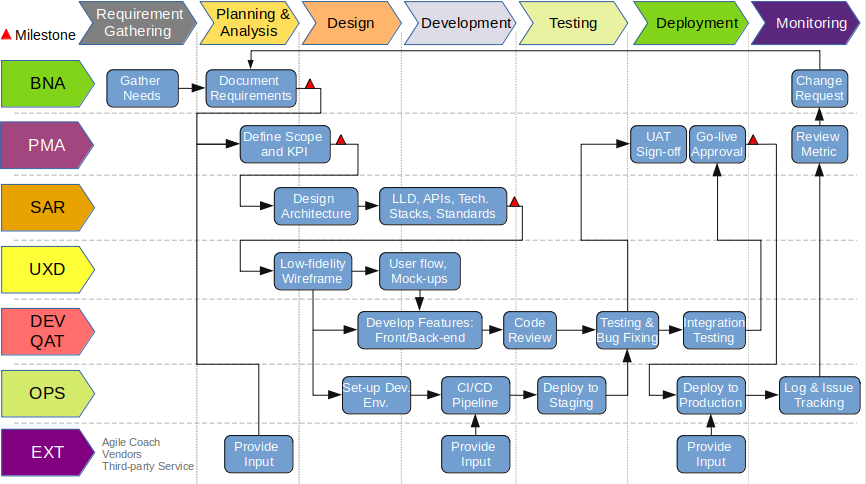
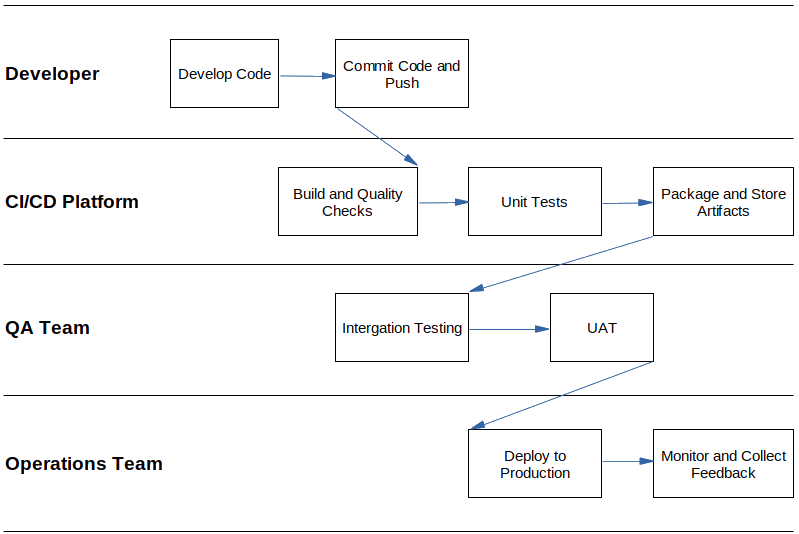
A swimlane diagram for activities and roles is described below.
UI/UX Design
Initiating UI/UX design with vague inputs is many times unavoidable and is standard industry practice. Product owners have to rely on phases called Discovery and Framing to transform ambiguity into a tangible digital interfaces. When it is not practical to design screens with available inputs, map the System Topology into Information Architecture such as User Management, Tool Hub, Central Dashboard.
The boundaries such as tech stack, component libraries and form factors (screen resolutions) can be assumed. Create a low-fidelity wireframes first with grey boxes and placeholders to map layouts and walk them through to few key (and may be non-expert) users. Ask them: what is the most frequent task(s) they will perform on this app every day? Based on the information received, create a simple tree diagram showing how a user moves from the central dashboard down into a specific section or tool.
Example Goals: Increase digital footprint, Enable digital self-service, Reduce manual processing time, Build once deploy anywhere, Access dashboard on the go, Quickly monitor progress of various projects or team performance, Simple navigation with lesser clicks, Real-time analysis (generate data-driven components such as tables and charts).
User Flow or User Journey: As per Figma resource library: "A user flow is a visual roadmap of users' journey. It lays out the steps they take to complete a specific task inside a product or service. They help designers and product managers understand how users move through your system and identify potential roadblocks before the build."
To create a low-fidelity user interface (layout without styling): decide content priority (what should user see first?) → generate basic User Journey showing how user accomplish a task → create information architecture (navigation structure) which comprises of list of pages, screens and their relationship → identify minimum (key) screens required → place core functional components such as buttons, menu bar, forms, tables, charts and upload controls. User Flow Diagram or the screen transitions can also be designed at this stage.
Creating User Matrix is helpful to define critical workflows. Power Users need keyboard shortcuts, and fewer confirmation pop-ups. Casual Users may need high visual clarity, wizard-style step-by-step forms, and strict error-checking designs. Admins: shall need different dashboards as compared to regular users, and may need bulk action buttons. Conditional Sidebars, Contextual Access, Unified Dashboard, Home Hub and Role-Based Access Control are some of the topics that help take decisions on creating a user matrix.
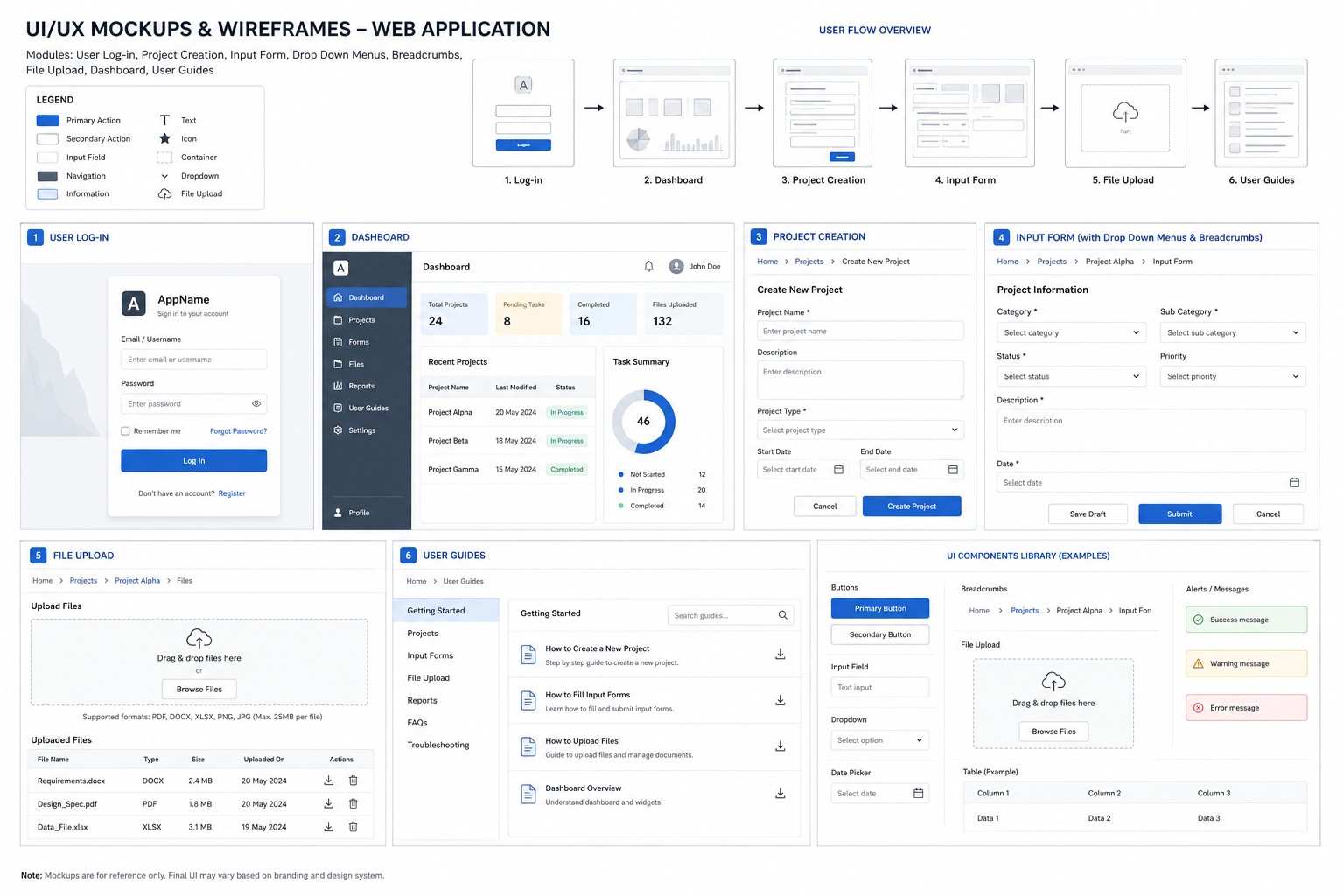
Reference figma.com/resource-library/what-is-wireframing: "Wireframe is the skeleton of your app, website, or other final product. Your wireframe shows the design team and stakeholders the bare-bones outlines of essential webpages, components, and features, including Screen layouts, Navigation bars, Components of UX and UI design and Interactive elements."
The wireframe can be just hand drawn or real-looking drawings created using Figma, Visily or many other drag and drop builders.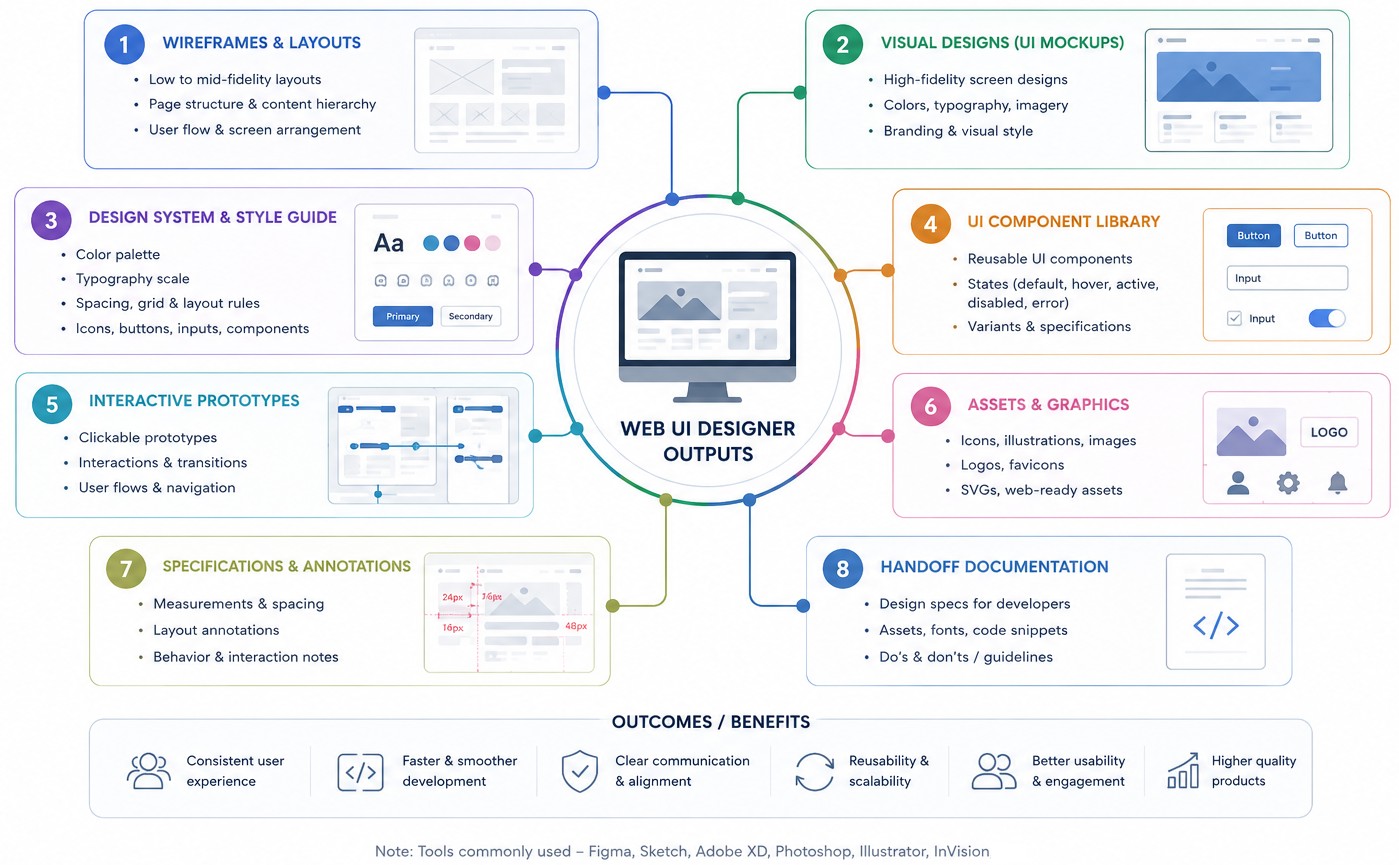
UI designers create static screens that represent the final look of the web application such as screen layouts, exact typography (font pairings, sizing, and line heights), colour palettes, iconography, and spacing. Iconography: Defines style for icons (e.g. flat or line art) and image guidelines. Layout / Grid System: Specifies the grid (typically a 12-column grid for web apps) and spacing/gutter rules. A sample UI Design Style Guide is attached here.
Visual hierarchy in UI design is the strategy about design of elements such that users easily recognize their order of importance. Whitespace is part of visual hierarchy used to prevents cognitive overload, and improves readability. Hover (mouse moved over an element) and Click operations should be appropriately colour coded to highlight the importance. Similarly, the toggle buttons should use 'x' and tick symbols to show OFF and ON status in addition to the colour (blue or green for ON and red for OFF status).
Design Systems: A comprehensive design system typically includes Design Tokens (stored as JSON/CSS variables), Component Library, Pattern Library and Documentation & Guidelines. Popular open-source design systems are Google Material Design, IBM Carbon Design System, and Shopify Polaris. "Dialect Design System" offers free component library on the Figma Community. "Simple Design System" template from the Figma Community provides a practical starting point for creating your own system.
Components are interactive building blocks (Reusable UI components) for creating a user interface. They can be organized into categories based on their purpose: action, containment, communication, navigation, selection, and text input. A Component Library is strictly the repository of assets — the visual items and the code blocks themselves. A Design System is the entire ecosystem (brand guidelines, product design principles...). Google Material Design is an example of component library.
┌────────────────────────────────────────────────────────┐
│                   COMPONENT LIBRARY                    │
├───────────────────────────┬────────────────────────────┤
│   DESIGN TOOL (Figma)     │     CODE BASE (React)      │
│  - Visual layouts         │    - Functional logic      │
│  - State variants         │    - Interactive behavior  │
│  - Micro-interactions     │    - Production CSS/JS     │
└───────────────────────────┴────────────────────────────┘
Interview questions for UI designers:
- How do you gather user requirements before starting a design?
- What factors do you consider when selecting a color palette?
- How do you design for different screen sizes?
- What deliverables do you typically produce?
- How do you document design decisions and hand off designs to developers?
- How would you design role-based interfaces for different user types?
- Which component libraries have you used?
- How do you design for keyboard navigation?
- How do you estimate design effort for a sprint?
- What elements make an effective navigation system?
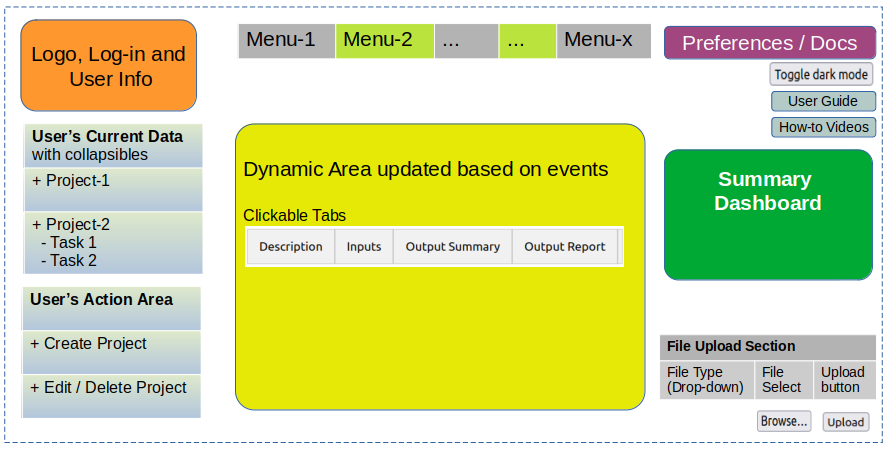
A simple approach could be to use PowerPoint with standard shapes which can be moved easily.
As per figma.com/resource-library/what-is-a-sequence-diagram: "A sequence diagram is a type of UML (Unified Modeling Language) diagram that maps out how users and systems interact over time. It is commonly used in interaction design and human-computer interaction studies to show what happens, when, and between which parts of a system."
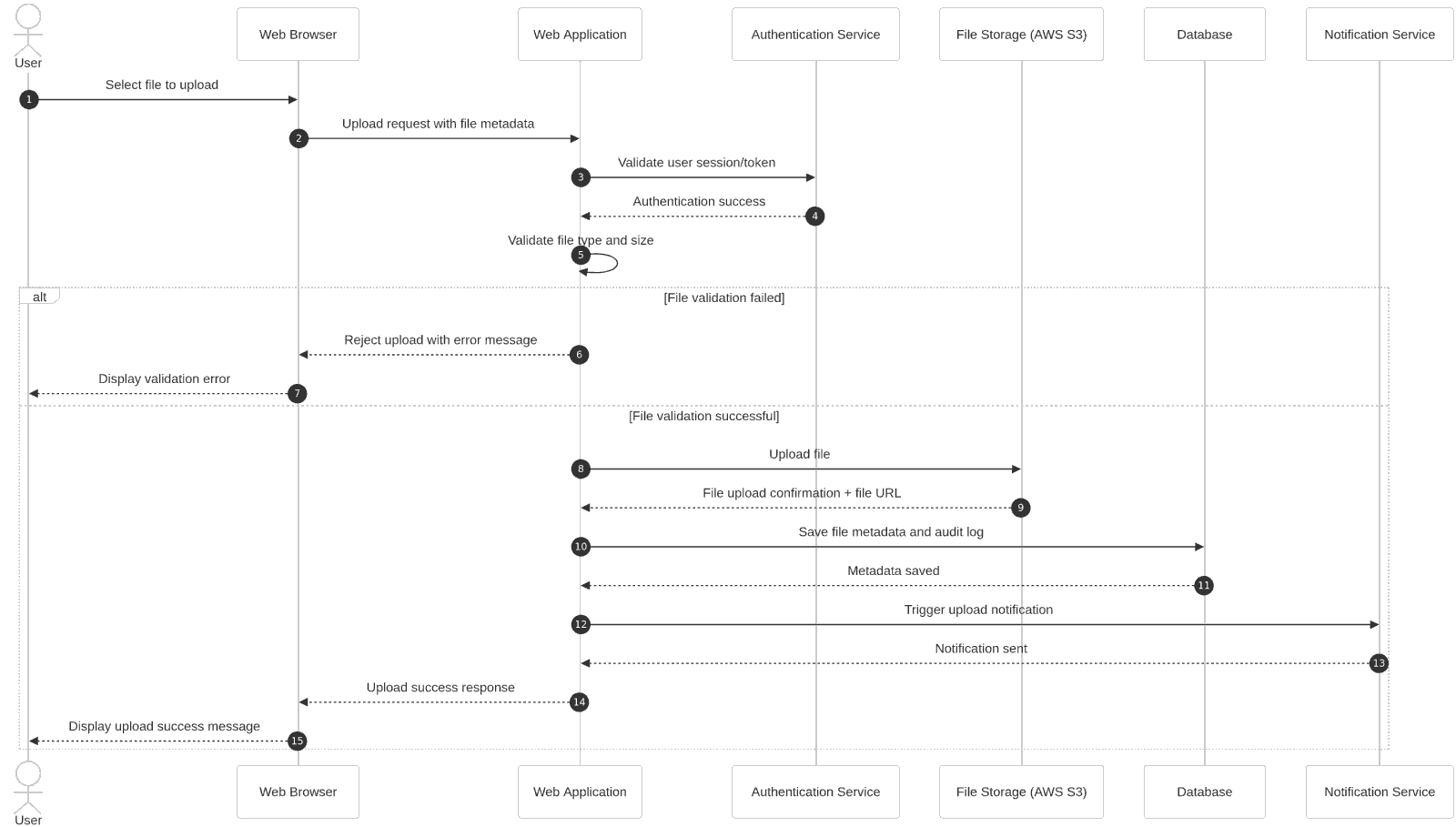
Inputs Required by UI Designer: Framing Stage
| Input Type | Description / What to Collect | Example Artefacts |
| Project Objectives | Define the purpose and expected outcomes | Increase visitors, automate workflows |
| Stakeholder List | Identify decision-makers, reviewers, and users | Product owner, IT admin, End-users |
| User Personas | Understand user demographics, and needs | Persona documents, empathy maps |
Inputs Required by UI Designer: Wireframing Stage
| Feature List | Define core and optional features | Login, dashboard, reports, charts, user guides |
| User Stories / Use Cases | Describe user interactions with the system | User can upload files, delete tasks |
| Breakpoint and Browser Targets | Define supported device, screen sizes and browsers | Chrome, Safari, mobile/tablet |
Inputs Required by UI Designer: Prototype/Mock-up Stage
| Brand Guidelines | Collect visual identity assets and standards | Logos, colors, typography |
| Content Inventory | Gather required text, media, and documents | Product descriptions, images |
| Accessibility Standards | Define accessibility expectations | Keyboard navigation, colour-blindness support |
| Language / Regional Needs | Determine multilingual or regional support | English + Hindi support |
| Scalability Considerations | Capture future enhancements that may affect design | Multi-tenant support, AI features |
An Empathy Map is a UX/UI design tool used to understand users better by capturing what they think (The navigation / process seems complicated), feel (Confused - how to get started, cannot be used by non-experts), say (I can't find the report I need, dashboard contains data I do not need), and do (Navigates back and forth between pages). Overwhelmed by too many options in drop-down or in one window, Confusing error messages, No guided navigation experience, Dashboard not customized for each role and crammed.
Typical Output or Artefacts: It is called UI-Developer hand-off document(s). Visual components, styles, and design tokens (variables to define colours, spacing scales, border radii, and type scales) are stored as master library files in Figma. The translated coded components are stored in source version control platforms.
| Output Type | Description / What is generated | Examples Artefacts |
| Low-fidelity wireframes: Sitemap / Navigation Structure | Define page hierarchy and navigation flow | Sitemap diagrams |
| High-fidelity mock-ups: Workflow Definitions | Map how users complete tasks | Login/onboarding flow, task creation |
| Design system / UI kit: Screen Inventory | List all screens/pages to be designed | Home, profile, settings, admin panel |
| Responsive layouts: UI Behaviour Details | Define animations, transitions, and interactions | Hover states, modal behaviour |
Phase-wise Outputs are Summarized Below
| Phase | Outputs | Status | Participants |
| Requirements Gathering | Business Requirements | Complete | Product Owner, S/w Architect, Full-stack |
| User Stories and Personas | In Progress | End-users, S/w Architect | |
| Functional Requirements | Not Started | Product Owner, Product Manager | |
| Information Architecture | Sitemap and Navigation Structure | Full-stack | |
| Content Hierarchy | Product Owner, S/w Architect, Full-stack | ||
| User Journey Maps | Product Owner, S/w Architect, Full-stack | ||
| Wireframing | Low-Fidelity Wireframes | S/w Architect, Full-stack | |
| Screen Layouts | Full-stack, Front-end | ||
| Page Flow Diagrams | Product Owner, S/w Architect, Full-stack | ||
| UI/UX Design | High-Fidelity Mock-ups | Full-stack, Front-end | |
| Design System and Style Guide | Full-stack, Front-end | ||
| Component Library | Full-stack, Front-end | ||
| Interactive Prototype and Usability Testing | Clickable Prototype | Full-stack, Front-end | |
| User Flow Validation | Product Owner, S/w Architect, Full-stack | ||
| Test Results and Improvement Backlog | Product Owner, S/w Architect, Full-stack | ||
| Developer Handoff | UI Specifications | Product Owner, S/w Architect, Full-stack | |
| Design Assets | Full-stack, Front-end | ||
| Responsive Guidelines | Full-stack, Front-end | ||
| Implementation and Validation | Developed UI | Full-stack, Front-end | |
| QA Test Cases | Product Owner, S/w Architect, Full-stack | ||
| UAT Sign-off | Product Owner, S/w Architect, Full-stack |
Summary of Technology Stacks
Node.js is a free, open-source, cross-platform asynchronous event-driven JavaScript runtime environment that lets developers create servers, web apps, command line tools and scripts. It is not a programming language or a framework. Node.js uses an event-driven architecture that can handle multiple tasks (like reading files or network requests) simultaneously without waiting for one to finish before starting the next. This makes it very efficient for data-intensive tasks. Angular uses TypeScript, a superset of JavaScript, as its primary language and contains a large suite of libraries to build full applications.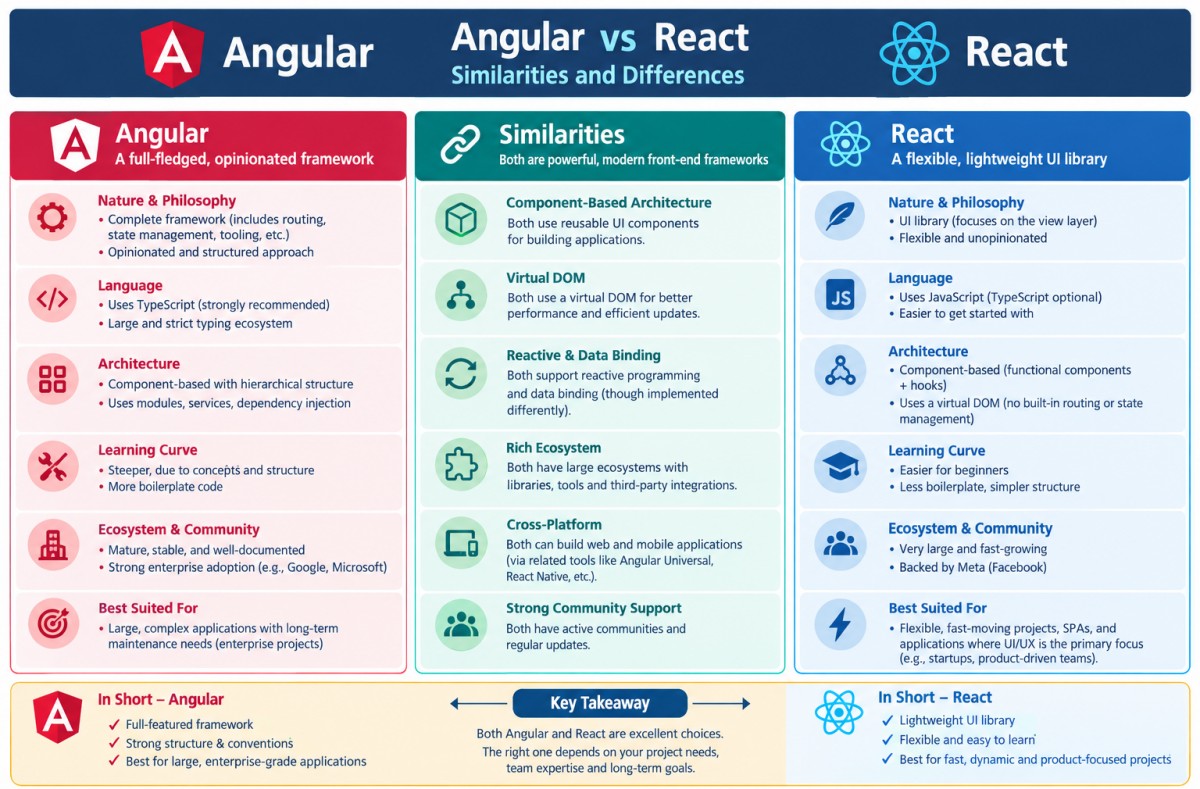
As per coursera.org/articles/angular-vs-react: "Angular is a comprehensive front-end framework for web applications, while React is a library that allows you to build interactive user interface (UI) components. Both use a component-based architecture, with self-contained, reusable pieces. React mainly deals with UI and client-side development. It is more lightweight and needs other frameworks for an application to complete functions like server-side rendering or data fetching. Angular comes with more pre-built functions, allowing a more structured framework to complete heavier and often more stable development projects."
The key to reusing React.js code across multiple web applications is to turn React.js code into components, hooks, utilities, or packages rather than copying files from one project into another. One should not think of the first React application as the place where reusable code is "stored." Extract generic functionality into an independent package, and let each application consume that package.
It is generally not recommended and even feasible to mechanically convert React files into Angular files. React and Angular have different component models, routing, state management, dependency injection, and template syntax. The practical approach is to migrate the application feature-by-feature, keeping the existing UI/behaviour while rewriting the implementation in Angular.
A React library such as a React-specific chart, editor, table, or UI component cannot necessarily be reused in Angular. It requires either an Angular equivalent or a framework-agnostic library. Thus, before rewriting code React concepts need to be mapped to their Angular equivalents.
Working in Angular
Before installing Angular, Node.js should be installed on the computer. 'ng' stands for "Angular" as the official prefix for the core tools of the framework, built-in features, and command-line functions. ng new: Creates a brand-new workspace and application, ng serve: Builds and runs a local development server, ng generate: Scaffolds components, services, or modules, ng build: Compiles the application into production-ready static assets. ng serve --open: The --open flag automatically launches the app in default browser at http://localhost:4200.
If a new project is being built from scratch, first step is to generate the configuration file: npm init -y → this will create package.json in current working directory. Port 4200 (http://127.0.0.1:4200) is most commonly used by Angular development servers. "npm start" in terminal throws error [npm error Missing script: "start"] → Add "start": "node server.js" under scripts section in package.json file. Install required packages: "npm install cors" and "npm install express". Install Angular CLI executable: npm install -g @angular/cli. Try "npm start" from CLI terminal. Following shall get printed in window:> angular@1.0.0 start > node server.jsThe content in server.js file reference in package.json under 'start' section should be something like described below.
# server.js
const express = require('express'); // 1. Import express
const app = express();              // 2. Initialize app

app.get('/', (req, res) => {
    res.send('Hello World!');
});

const cors = require('cors');
// Allow requests specifically from Angular app
app.use(cors({ origin: 'http://localhost:4200', credentials: true }));
Error: "Firefox can’t establish a connection to the server at 127.0.0.1:4200." Run "npm list -g --depth 0" which will print "~/.nvm/versions/node/v24.21.0/lib". Add export PATH="$(npm config get prefix)/bin:$PATH" at the end of .bashrc file.
ng serve → Error: This command is not available when running the Angular CLI outside a workspace. This is usually due to missing angular.json file. Create Angular app using "ng new app_name". Then change working directory to app_name/.
Angular relies on a modular, component-driven architecture. A clean structure keeps the codebase maintainable as project grows in features and complexity. For a standard application, components should be grouped by their architectural role inside the src/app/ directory:
src/app/
├── components/           # Reusable UI elements (shared across pages)
│   ├── header/
│   ├── footer/
│   └── custom-button/
├── features/             # Feature-specific modules or views (pages)
│   ├── dashboard/
│   ├── user-profile/
│   └── login/
├── core/                 # Singleton services, guards, and interceptors (app-wide)
│   ├── services/
│   └── guards/
├── shared/               # Shared pipes, directives, and models
│   ├── models/
│   └── pipes/
├── app.component.ts      # Root component
└── app.routes.ts         # Application routing definitions
JavaScript was originally designed to run only in browsers (the 'client-side'), Node.js allows it to run on servers, making it possible to build full-stack applications using a single programming language. It is built on V8 JavaScript engine of Google Chrome, which compiles code directly into fast machine code.
npm is the default package manager (like APT for Ubuntu and pip for Python) for JavaScript which gets automatically installed alongside the JavaScript runtime environment Node.js. Packages are collections of related modules or files bundled together for distribution and reuse.
REST stands for REpresentational State Transfer. It is a type of API (Application Programming Interface) that allows communication between different systems over the internet by sending requests and receiving responses typically in JSON format, between the client (user interface) and server (data and business logic). It is an architectural style for designing networked applications and uses standard HTTP methods (GET, POST, PUT, DELETE) to manipulate resources. REST APIs are stateless, meaning each request contains all the information needed to process it.
Django is a Full-stack web development framework that facilitates the creation and maintenance of high-quality dynamic pages and makes it easier to automate repeated operations. Middleware in the back-end is a software layer—often called "glue code" — that sits between the front-end (user interface) and back-end logic (database/server). Key examples include authentication, logging, data validation, and caching.
"FastAPI is a modern, fast (high-performance), web framework for building APIs with Python based on standard Python type hints." Fast: Very high performance, on par with NodeJS and Go.
Containerization is a form of operating system virtualization where an application and all its necessary files (libraries, configuration files, and dependencies) are bundled together into a single, isolated, and executable unit called a container. Docker is a popular open-source platform used to create, deploy, and manage these containerized applications. Thus, Docker acts as an operating system for containers.
As per learn.microsoft.com: "Load balancing and content delivery are critical components in optimizing the performance and reliability of web applications. Load balancing ensures that incoming network traffic is distributed evenly across multiple servers or services, preventing any single server from becoming overwhelmed with requests. And content delivery optimizes the delivery of content to users by caching and distributing it across multiple locations, reducing latency and improving performance." Note that an internal corporate application requiring secure access for distributed teams may not require a load-balancer.
Charting Engines
This is required for dashboard and libraries available are Chart.js for lightweight options, D3.js for heavy customizations, and Apache ECharts for large datasets. While line, bar (histogram) and pie charts remain the work-horse of data visualization, new options are getting added. One such example is Sunburst chart also known as multi-level or multi-layer pie chart, ring chart, or radial treemap. Funnel charts are good for visualizing gradually reducing pipelines such as hiring process. Box-and-whisker plot or Whisker plots are used to depict the distributions of one or more groups of numeric data.
Refer to this sample page for line and bar charts with zoom features. Key summary: Chart.js automatically overrides the legend box border thickness to inherit from the dataset's borderWidth. Custom callback allows to intercept the label creation process and assign a consistent, static thickness to the legend boxes. In Chart.js, minor ticks are off by default and are not configured natively in the same way major ticks are. Minor ticks are generally handled automatically by the chart's parsing and layout engine.
Some roles in Software Development
Back-End Developers create server-side logic, database management, and API integration, ensuring security and functionality using languages like PHP, Python, Java, or Node.js. Web Designers focus on the visual aspects, layout, and usability of the website, often handling graphic design and UI/UX elements.
As per aws.amazon.com/what-is/architecture-diagramming: "Architecture diagramming is the process of creating visual representations of software system components. In a software system, the term architecture refers to various functions, their implementations, and their interactions with each other. As software is inherently abstract, architecture diagrams visually illustrate the various data movements within the system. They also highlight how the software interacts with the environment around it."
In architecture diagramming, a building block is a reusable, modular component that represents a specific business, data, application, or technology capability. In AWS, there are 4 primitive building blocks upon which higher-level solutions are created: Compute, Storage, Networking and Databases.Software Architect
For this role deep, hands-on coding in React.js and Node.js is not strictly necessary yet understanding their architectural patterns, ecosystems, and limitations is highly beneficial. Knowing React helps communicate effectively with frontend engineers, understand their constraints, and make realistic technology decisions. Software architects are senior developers or programmers with degree in either of "computer science or information systems or software engineering" who formulate the high-level structure of a software, manages technical teams, and enforces coding standards for software development projects.Interview questions for Software Architects:
- When would you choose a monolithic architecture over micro-services, and vice versa?
- How do you decide database for a system say between SQL, NoSQL, MongoDB?
- How involved should a Software Architect be in code generation, debugging and change management?
- How would you architect a system for wind farm analytics that ingests real-time turbine data and provides predictive insights?
- How do you design systems to handle large-scale data processing?
- What trade-offs are required to design a system optimized for average load and that of peak load?
- How do you handle authentication and authorization in a web app?
- Tell me about a bug you faced recently and how you resolved it.
- What inputs are required to design the dashboard and layout of a scalable and cross-browser compliant website?
- How do you decide which method to chose: functional programming or object-oriented?
- Explain us the methodology of front-end, back-end, database, and deployment through a real project you were part of?
- How would you scale a system from just few users to 10,000 users?
- What are common security risks in web applications and how do you prevent them?
- How do you ensure long-term code quality in a fast-moving team due to both the rotations in different projects and attrition?
- What coding standards (guidelines) did you follow in past projects?
- How would you design a Continuous Integration / Continuous Delivery (Deployment) or CI/CD pipeline for a full-stack app?
- Which AI/ML based tools and platforms have you used for code generation and debugging?
An architecture diagram is a visual representation of a system that shows its major components, how they interact, and how data flows between them. It helps understand the system design at a high level. Typical elements of an Architecture Diagram are System Components, Actors (Users, Admins, External Systems), Infrastructure, Data Stores, Communication and Integration (such as REST APIs and WebsSockets), Data Flow and Network Boundaries. For a React + Node.js web application, a good architecture diagram typically includes users, frontend, back-end services, databases, authentication, external integrations, deployment infrastructure, and data flows. Sometimes architectural diagram = logical diagram + physical diagram.
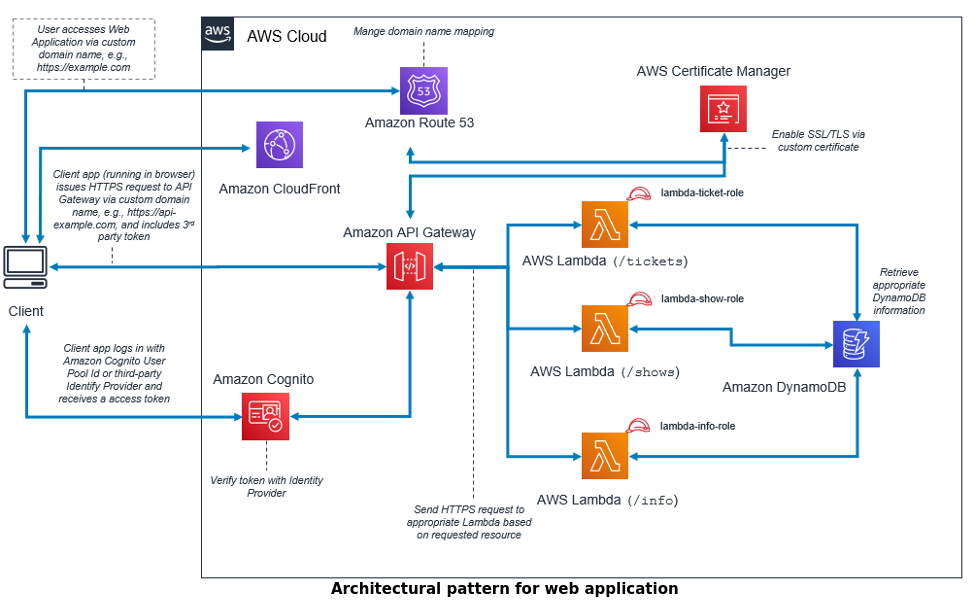
Many a time architecture diagram and High Level Design (HLD) are used interchangeably though they are not same. Architecture Diagram answers "What major systems exist and how they connect?" High-Level Design answers "How the application is organized and works internally?"
Architecture Diagram (Structural   |     High Level Design (Functional
````````````````````  Blueprint)   |     `````````````````  Blueprint)
Users                              |     User Management Module
  !                                |        !
Load Balancer                      |     Project Management Module
  !                                |        !
Web Server (React)                 |     Input Forms Module
  !                                |        !
API Gateway                        |     File Upload Module
  !                                |        !
Node.js (Backend)                  |     Dashboard Module
  !                                |        !
,---------------------,            |     Reporting Module
!                     !            |        !
Database         File Storage      |     Review Module
(PostgreSQL)      (AWS S3)         |        !
!                                  |     User Guide Module
External Services                  |        !
(Payment, Email)                   |     Tech Support Module
Low-Level Design (LLD) diagram describes implementation details of a single component whereas architecture diagram represents the macro-level representation of the entire web application. Architecture diagram represents the design of a multi-storied building, while the LLD diagram is the detailed blueprint for the electrical wiring and plumbings inside a single floor. Architecture diagram is used by Business Analysts and Product Managers whereas LLD is used by developers and QA engineers.
Choosing between centralized data storage and domain-specific databases, team structure, deployment pipelines, and ownership boundaries are activities under the HLD umbrella. Low-level design defines how a service validates input, interacts with its database, and what caching strategies to follow.
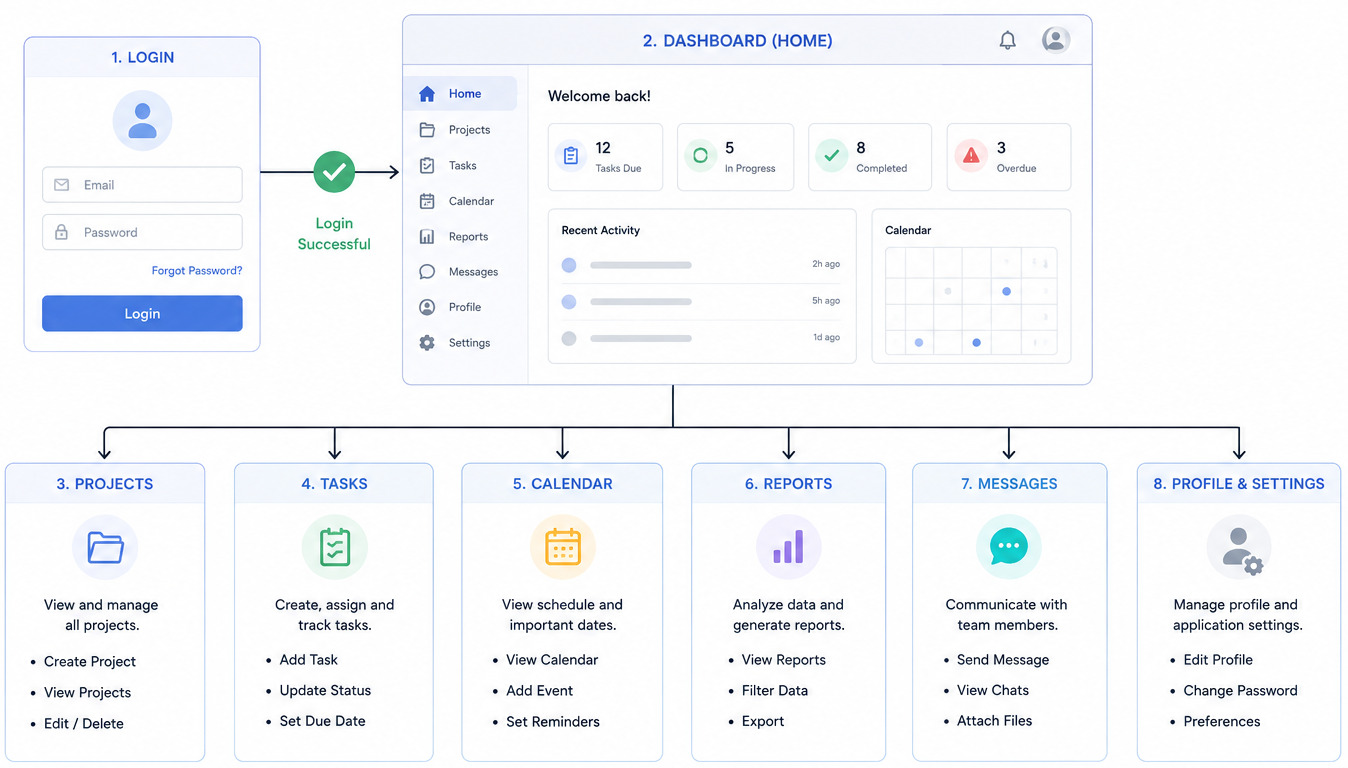
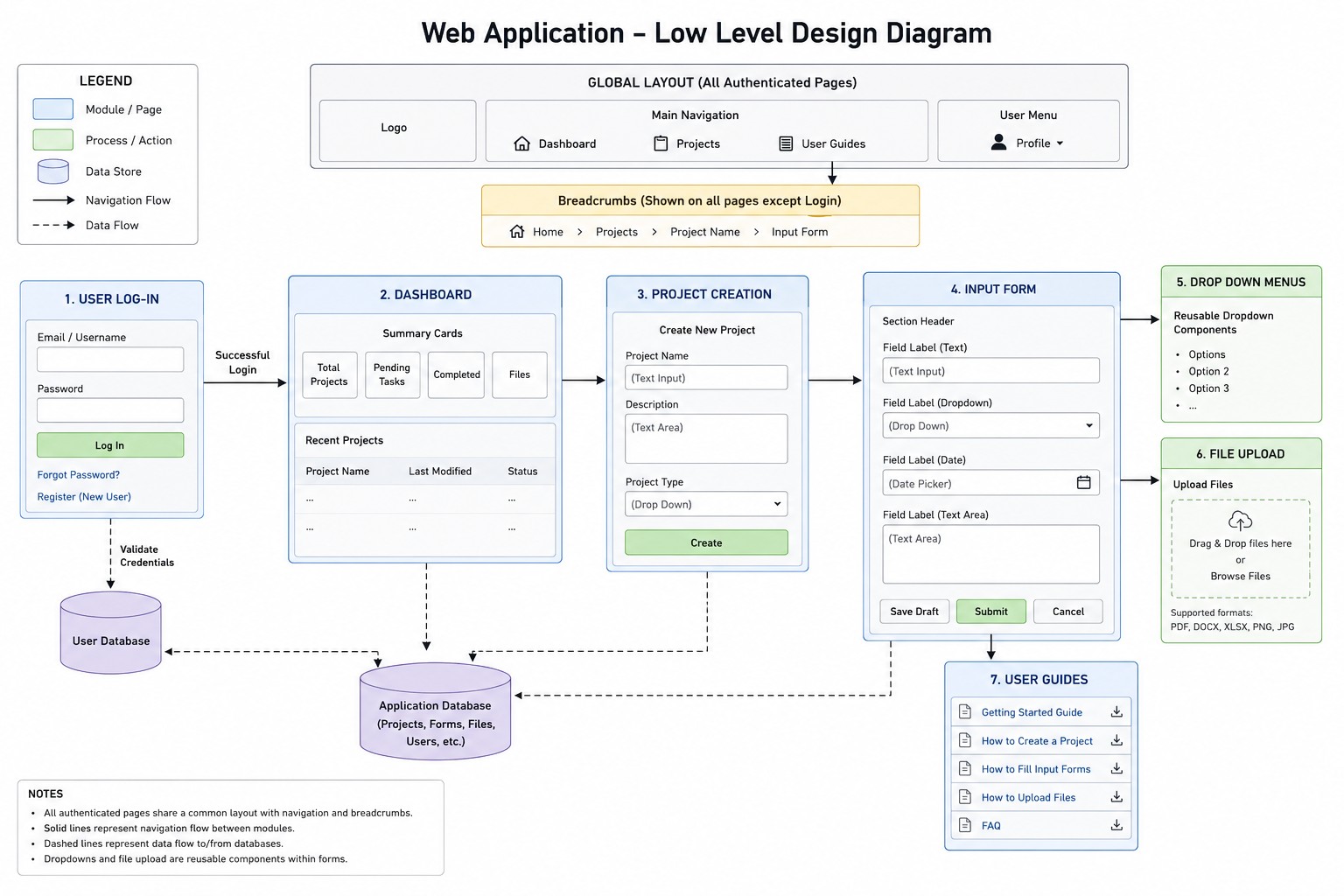
Web app interface diagrams — including wireframes, mock-ups, and user flows — map out the layout and navigation of digital products. Example of web interface diagram after successful log-in:
Swimlane Diagram: A type of flow chart which maps out the entire process of creating a website, illustrating the sequential tasks and responsibilities of different teams involved.
A Mermaid diagram is a visual chart or diagram generated entirely from plain text. It is a JavaScript based diagramming and charting tool that uses Markdown-inspired text definitions and a renderer to create and modify complex diagrams. Instead of manually dragging and dropping shapes in a visual editor, you simply type the code, and a text editor or platform automatically renders it into a polished graphic.
Some of the questions to evaluate Software Architects on judgment, trade-offs, leadership, and real-world decision-making are listed below. The questions are intended to probe how they think under ambiguity and influence systems and people.
- How do you approach designing of a system from vague or high-level programming?
- How do you prevent over-engineering in architecture?
- How do you design cloud-native systems?
- How do you document and communicate architectural decisions?
- How do you ensure architectural consistency across teams and projects?
- How do you validate that an architecture actually works in production?
- How do you evaluate build vs buy?
- What are common vulnerabilities you encounter very often?
- How do you ensure engineering teams follow architectural guidelines?
- How do you communicate trade-offs to non-technical stakeholders?
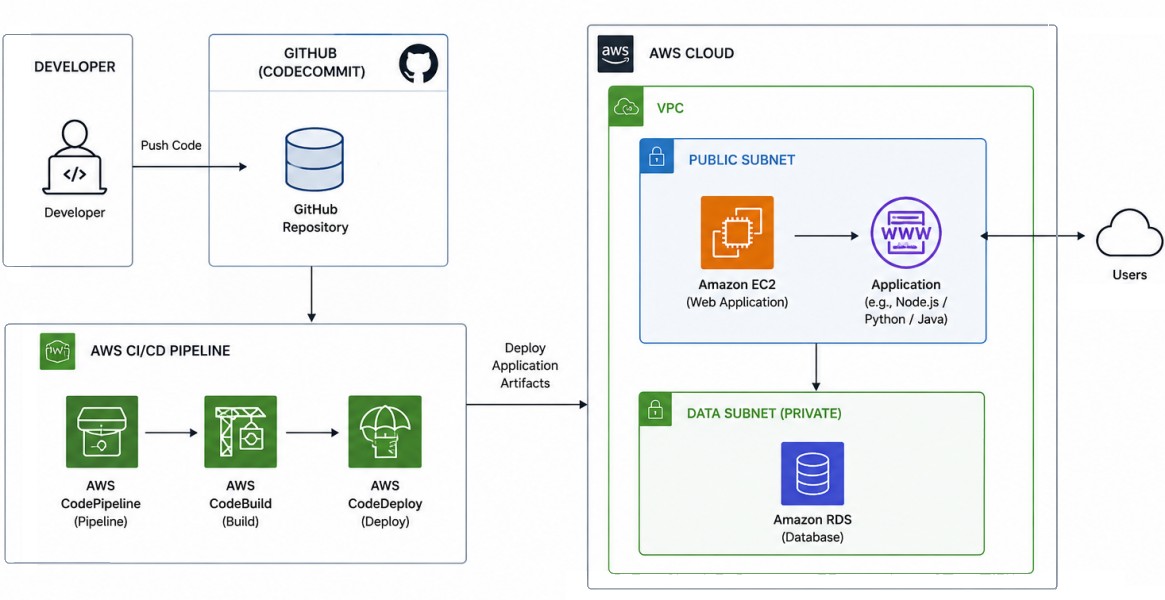
Sample Architecture Diagram for Deployment of a Web App on AWS ↴ is shown below. There are different types of architecture diagrams such as Application Architecture, Data Architecture, Deployment Architecture, and Security Architecture. Public subnet – The subnet has a direct route to an internet gateway. Resources in a public subnet can access the public internet. Private subnet – The subnet does not have a direct route to an internet gateway. Resources in a private subnet require a NAT device to access the public internet. NAT (Network Address Translation) devices (typically routers or firewalls) translate private IP addresses from local network into a single public IP address for internet access. Each subnet must reside entirely within one Availability Zone (AZ) and cannot span zones. Each subnet must be associated with a route table, which specifies the allowed routes for outbound traffic leaving the subnet.
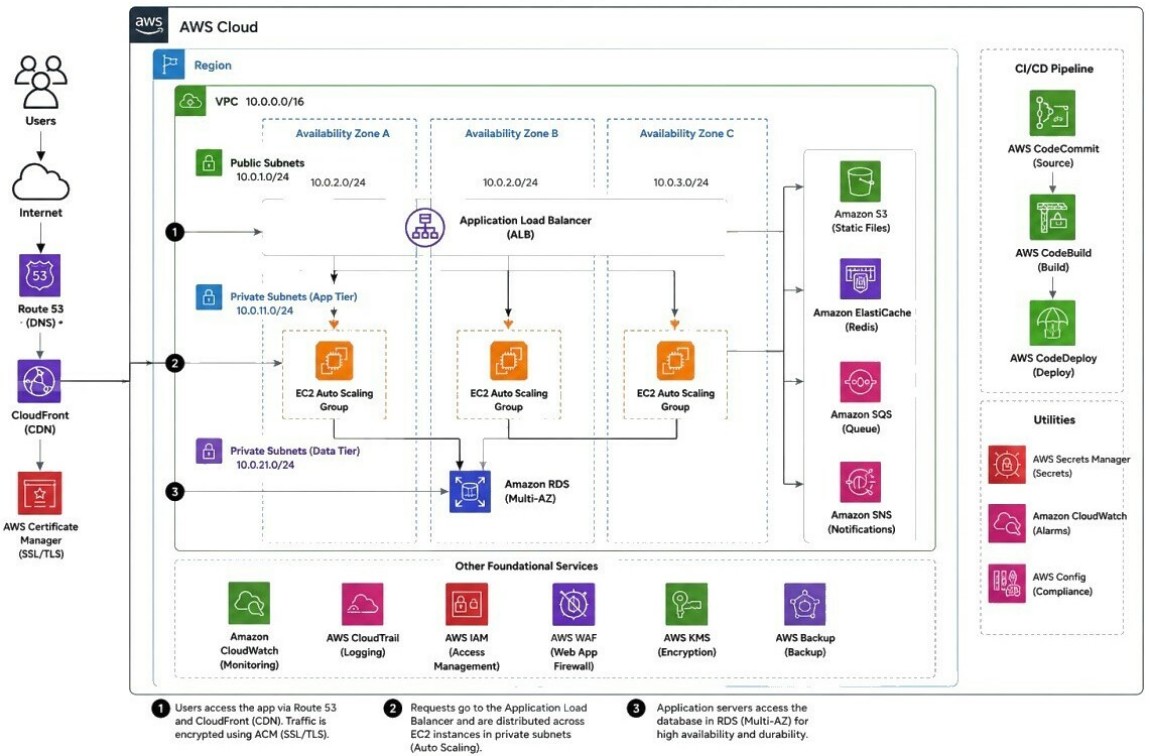
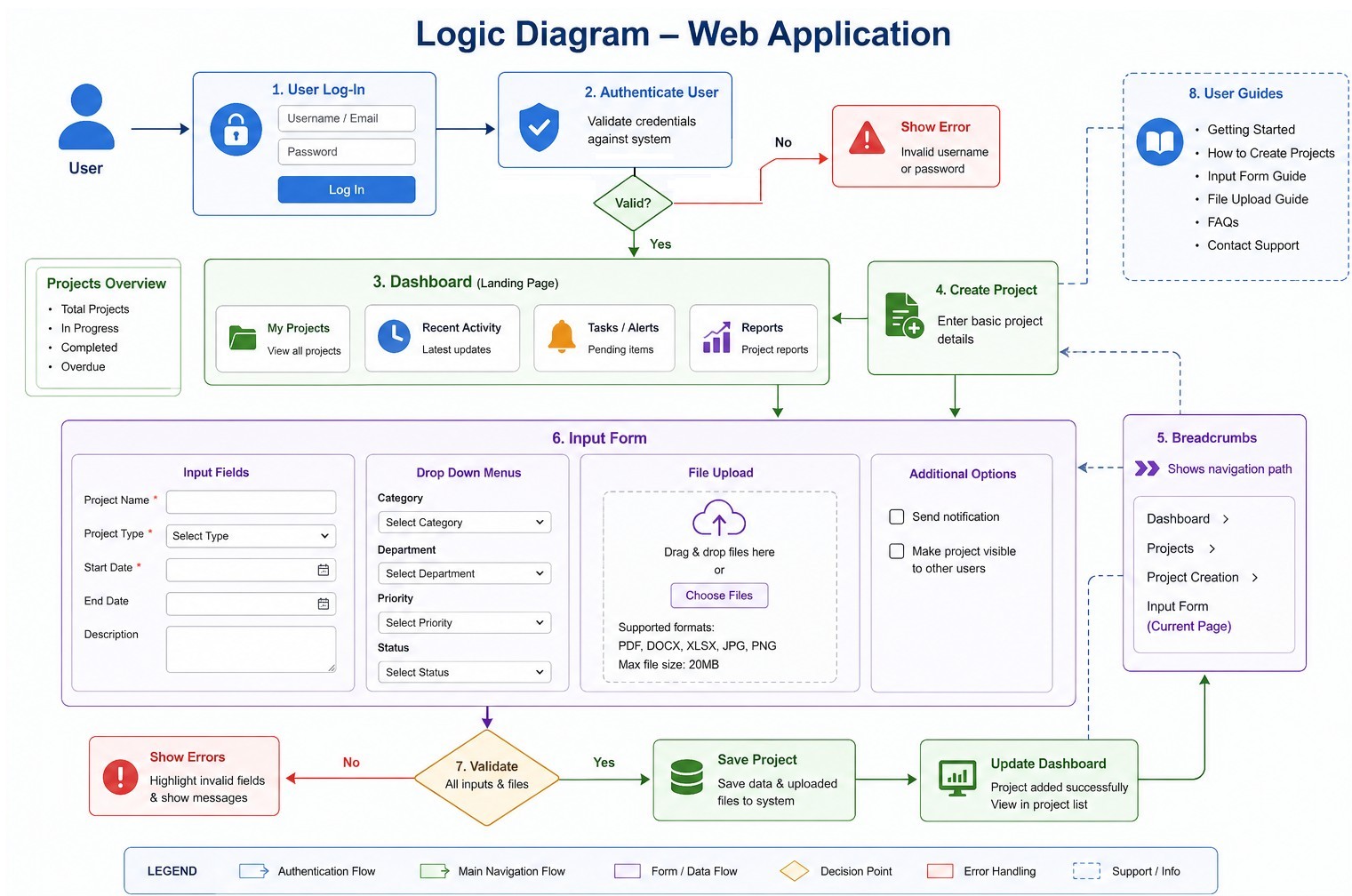
While a logical architecture focuses on what the application does, a physical diagram is essential for DevOps and IT teams to understand system capacity, scaling limitations, security vulnerabilities, and failover redundancies. Layer vs. Tier as per ibm.com/think/topics/three-tier-architecture: "A layer refers to a functional division of the software, but a tier refers to a functional division of the software that runs on infrastructure separate from the other divisions. The Contacts app on your phone, for example, is a three-layer application, but a single-tier application, because all three layers run on your phone."
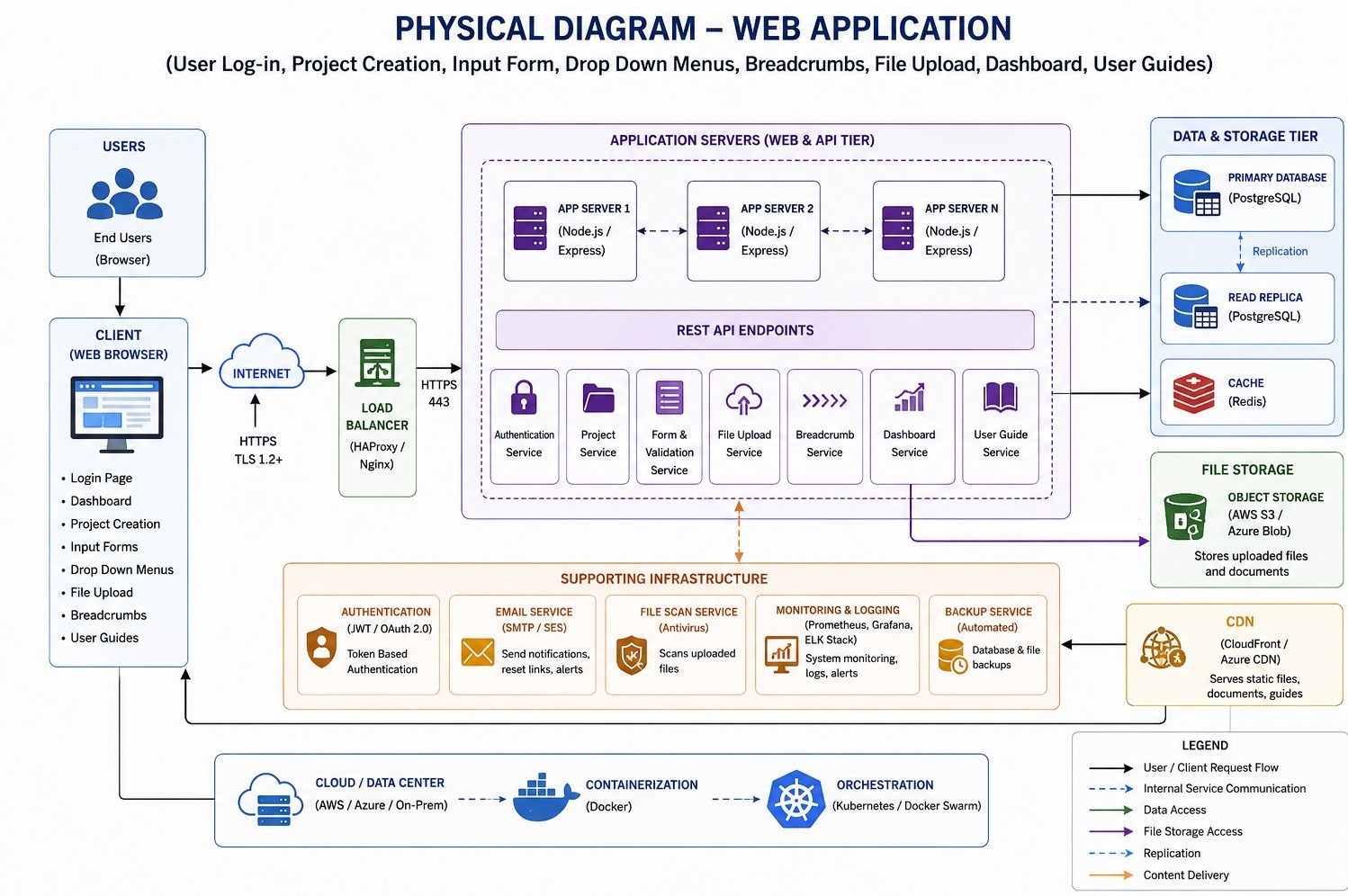
aws.amazon.com/what-is/cdn - CDN: "A content delivery network (CDN) is a network of interconnected servers that speeds up webpage loading for data-heavy applications. CDN can stand for content delivery network or content distribution network. When a user visits a website, data from that website's server has to travel across the internet to reach the user's computer." Edge servers cache static website content globally.
Platform-agnostic Physical Diagram for a Web App
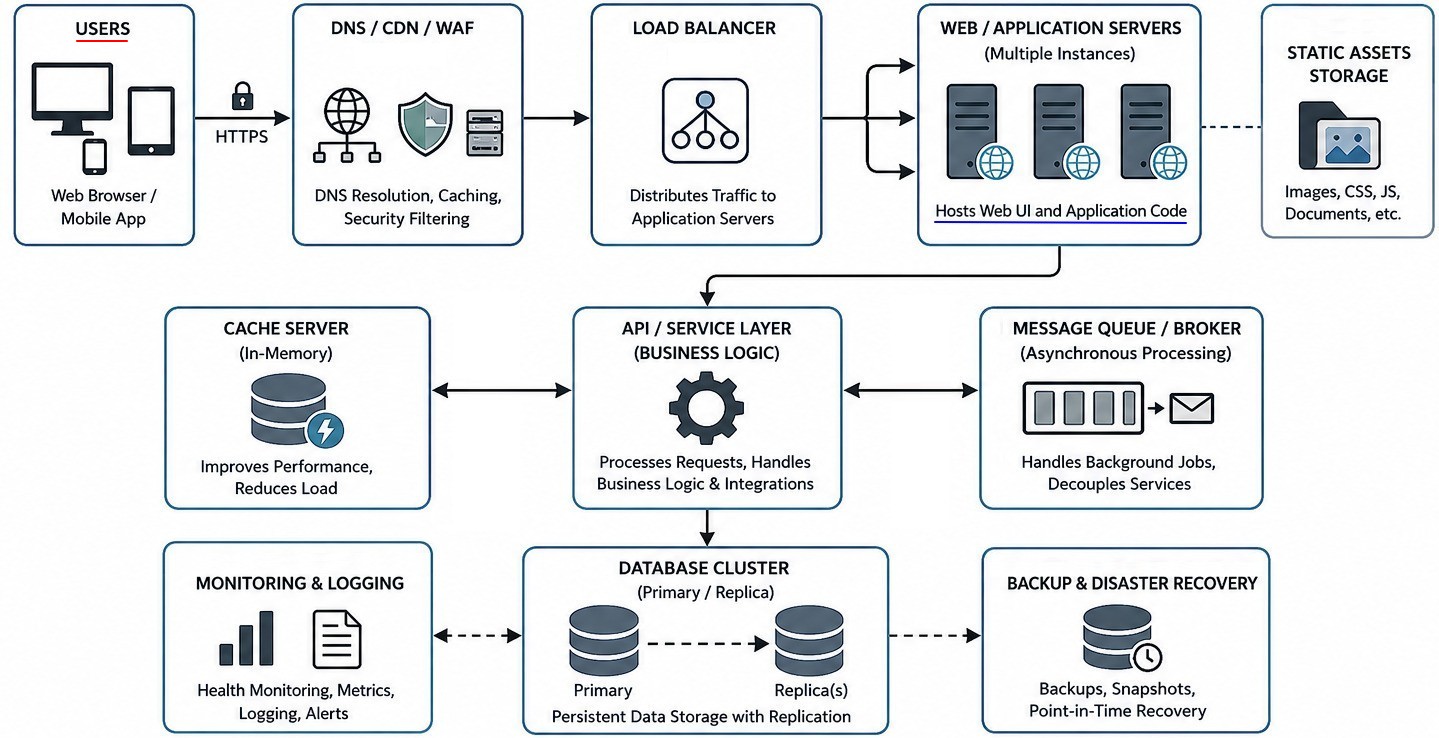
An interface is the point where a user or another system interacts with the application. There are mainly two types: User Interface (UI) - This is what users see and interact with, System Interface (API Interface) - This is how systems communicate with each other. Integration means connecting the web app with other systems, tools, or services so data and functionality can flow between them. Common Web App Integrations: Authentication Integration such as SSO, Cloud Storage Integration which connect with AWS S3, Reporting / Analytics Integration which may connect with Power BI / Tableau, External Tool Integration such as CAD software and Optimization engine.
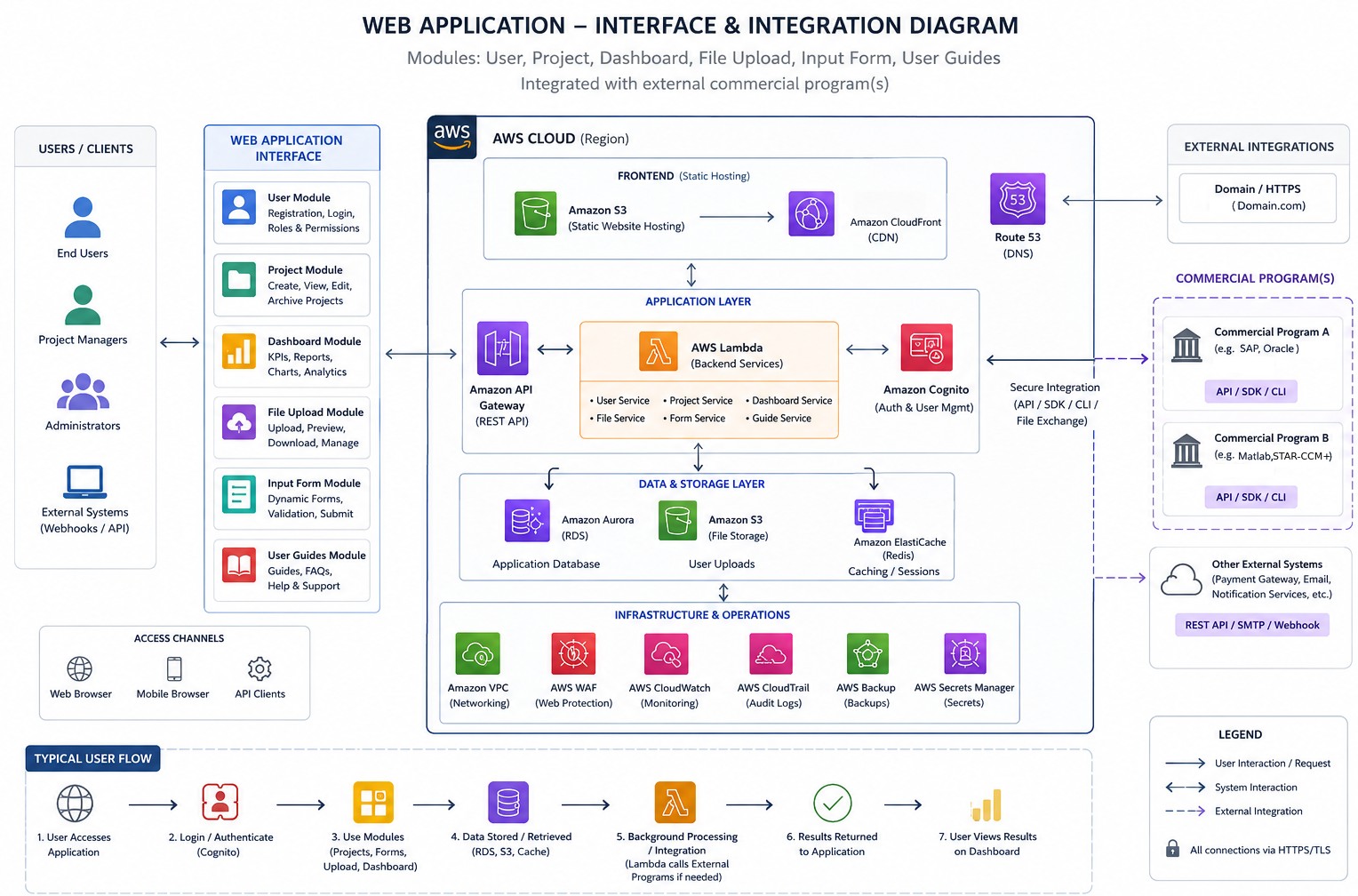
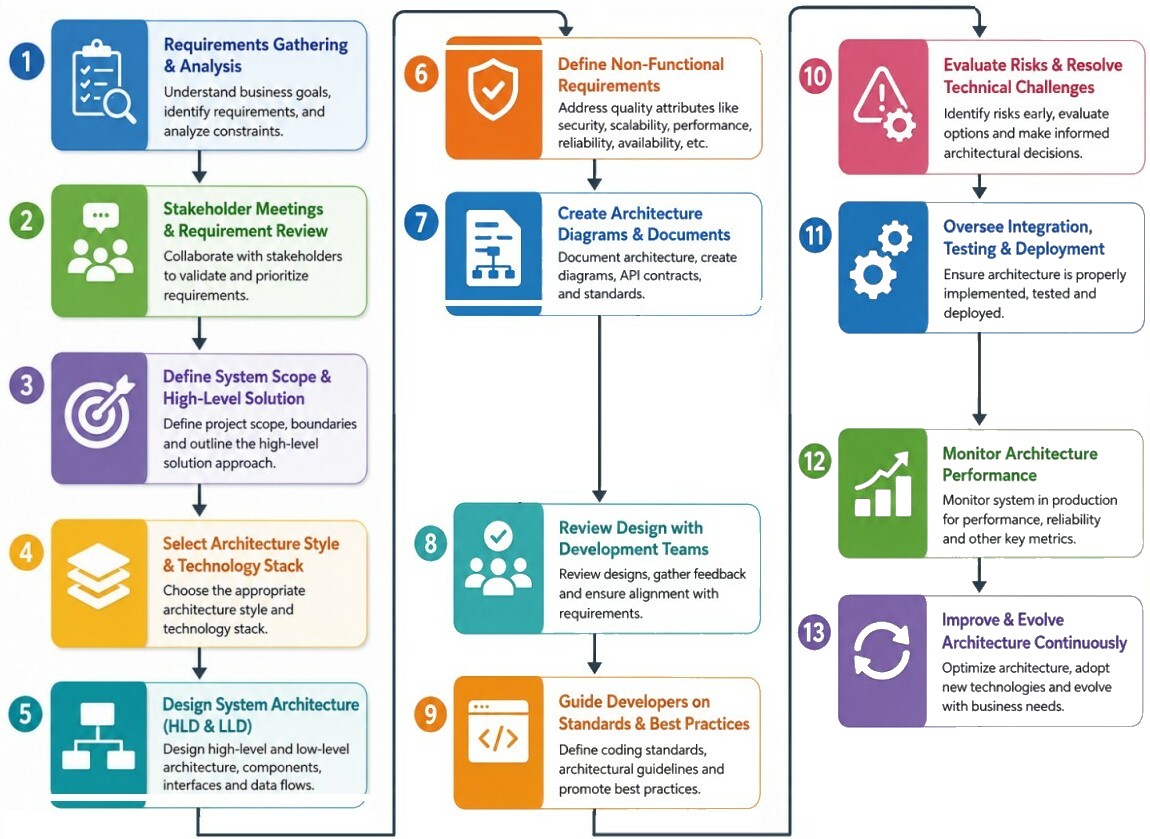
Key responsibilities of an architect include selecting "technology stacks, appropriate frameworks, tools, and databases" to meet technical needs. Guide developers, conduct code and architecture reviews in order to ensure the final product meets established standards. Remain engaged in every step of the software development life cycle (SDLC) and performs regular code inspections to ensure the product meets quality standards within planned cost and schedule. High-Level Design (HLD): Defines system architecture, technology stack, database design, and major modules. Low-Level Design (LLD): Specifies component logic, APIs, data structures, and workflows. Reference architecture diagrams published by AWS is attached here.
Other roles include Solution architects, Enterprise architects, Data architects and Cloud architects. An Information Architect optimizes the structure of the content of a site by creating sitemaps, user flows, wireframes and navigation schemes. Front-End Developers create the user-facing, interactive, and visual elements of websites and applications using HTML, CSS, and JavaScript. They collaborate with designers and back-end engineers to ensure responsive, accessible, and high-performance interfaces utilizing modern frameworks like Bootstrap, React, Angular, or Vue. Write clean, maintainable, and well-documented code, integrate APIs and maintain web standards. Require to have basic graphic design skills such as Photoshop, Figma, or Sketch.
Job titles are based on overall relevant experience as well as size of the company: Junior Developer is designation for entry-level (0 ~ 3 years experience), Mid-Level Developer is used for practitioner level developers (2 ~ 5 years), Senior Developer (5 ~ 10 years) designation is given to those with high-level of expertise, mentoring, and architectural decisions - multitasking programmers who master many programming and scripting languages and familiar with Content Management Systems (CMS). Lead Developer / Architect (> 10 years) are responsible for the entire team or technical direction - convert the customer’s requirements into technical requirements.
| Aspect | Software Architect | Full-Stack Developer | DevOps Engineer |
| Primary Focus | System design and technical strategy | Building application features end-to-end | Infrastructure, automation, deployment, reliability |
| Main Goal | Create scalable, maintainable architecture | Deliver functional software products | Ensure smooth CI/CD and operational stability |
| Scope | Enterprise/system-wide | Application/module-level | Infrastructure and deployment ecosystem |
| Works Closely With | Business leaders, engineering teams, product managers | UI/UX, backend teams, QA | Developers, QA, cloud/platform teams |
| Key Deliverables | Architecture diagrams, tech standards, solution design | Frontend + backend code | Pipelines, cloud infrastructure, monitoring |
Few questions related to Full-stack developers.
- What is the difference between GET and POST requests?
- What are the advantages of using a framework like React, Angular, or Vue instead of using vanilla JavaScript?
- What are the differences between client-side and server-side programming?
- What is event bubbling and capturing in JavaScript?
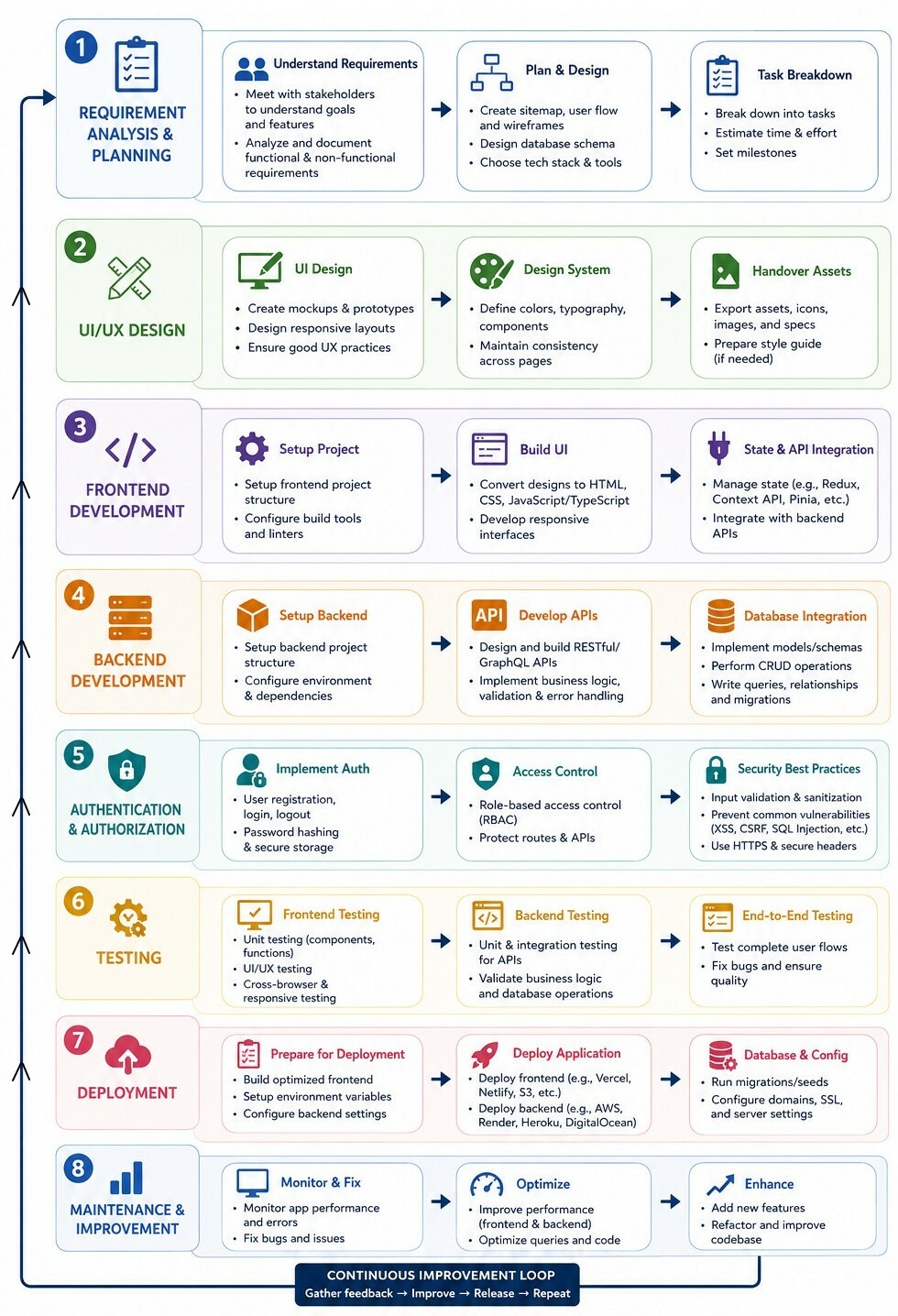
Tasks performed by Full-stack Developers ↴
| Input Required | Description / What Back-end Developers Need | Example Artefacts |
| Functional Requirements | Core application behaviour and rules | PRD, user stories |
| Access / Permission Matrix | Define user types and allowed actions | Admin vs customer permissions |
| Auth Mechanism | Login, session, token, SSO requirements | JWT, OAuth2, SAML |
| Third-Party Services | External APIs and service dependencies | Payment gateway, CRM APIs |
| Storage Requirements | Database types and file storage needs | PostgreSQL, MongoDB, S3 |
| Async Processing Needs | Scheduled jobs and queue processing | SLURM |
| Analytics & Reporting Needs | Dashboard and export requirements | CSV/PDF exports |
| Upload/Download Requirements | File handling constraints and limits | Image / PDF / CSV service |
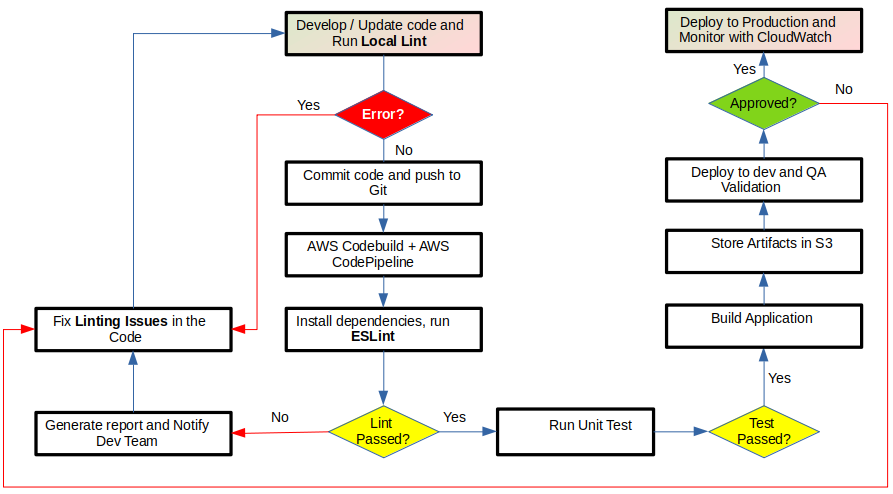
Process Flowchart for Linting
Linting is an automated process of analyzing source code without running it to find programming errors, formatting issues, and stylistic inconsistencies. A linter will scan source code looking for errors, defects, stylistic issues, and questionable constructs.Pylint is a tool to do linting on Python modules. The command line arguments include the followings: --rcfile RCFILE: Specify a configuration file to load, --output OUTPUT: Specify an output file, --errors-only, -E: In error mode, messages with a category besides ERROR or FATAL are suppressed, and no reports are done by default. --ignore <file>[,<file>...]: Files or directories to be skipped, should be base names, not paths.
Other handy options are: --good-names <names> - Good variable names which should always be accepted, separated by a comma. (default: ('i', 'j', 'k', 'ex', 'Run', '_')). Pylint can also looks for code which can be refactored. --max-nested-blocks <int>: Maximum number of nested blocks for function / method body (default: 5). --never-returning-functions <members names>: Complete name of functions that never returns.
Linting Angular Projects: Run "ng lint [project] [options]" via the Angular CLI or run "npm run lint" -- The command takes an optional project name, as specified in the projects section of the angular.json workspace configuration file. When a project name is not supplied, executes the lint builder for all projects. To use the "ng lint" command, use "ng add @angular-eslint/schematics" to add a package that implements linting capabilities.
Pylint is good at detecting local dead code (like unreachable logic, unused imports, or unused variables) within a specific file, but it cannot natively track unused functions, classes, or methods across an entire codebase.
To isolate built-in dead code and unused resource checks by disabling all other rules: pylint --disable=all --enable=unreachable, unused-import, unused-variable, unused-argument module_name.pyPylint is a static analyzer which evaluates files individually. It will miss a function that is fully defined but never actually called anywhere in the project. The industry standard for finding global dead code is the open-source tool Vulture. It scans entire directory structure to find unused classes, functions, and attributes. Refer this section for more about pylint.
Security Architecture for Web App Deployment on AWS
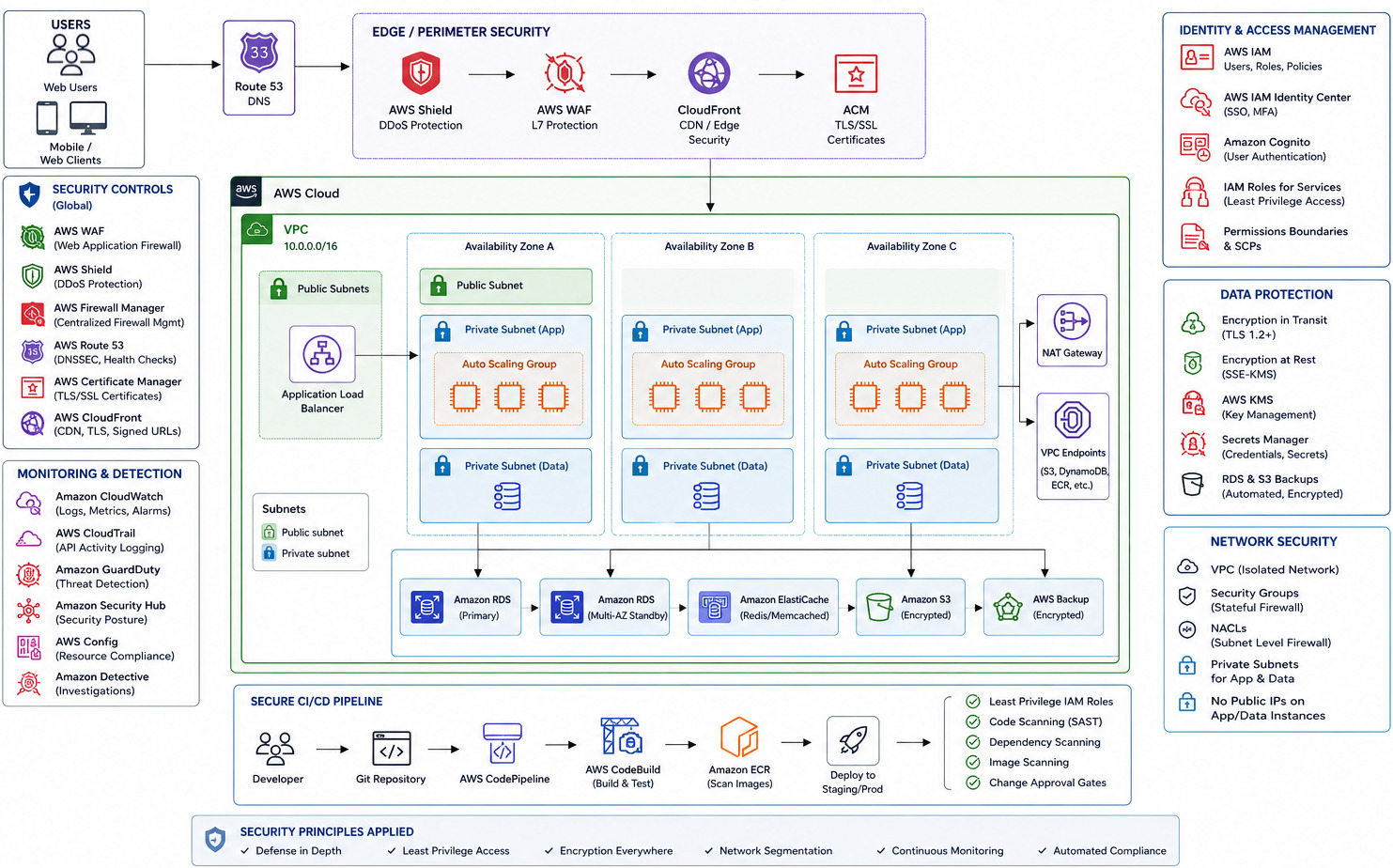
Back-end Design for a Web App
Core Components and Key Responsibilities of Back-end:- Server: A computer that hosts the application and processes incoming requests from users.
- Database: An organized system used to safely store, retrieve, and update user data.
- API (Application Programming Interface): A set of rules that lets the front-end (what users see) talk to the back-end (the server and database).
- Business Logic: Processing user data, running security checks, and making decisions based on user actions.
- Authentication: Verifying user identities and login credentials.
- Integration: Connecting external services like payment processors and cloud storage.
Method to remove hardcoded secrets from back-end code:
Create a text file named .env in the root folder of the project. This file stays on local machine and stores secret key-value pairs. → Create a .gitignore file to ensure secret keys are never tracked or uploaded online → Load variables safely in FastAPI using Pydantic Settings (companion management tool) to safely structure, parse, and inject your settings dynamically at runtime → To deploy the back-end to production servers (like AWS), do not upload the .env file. Instead, inject the environment variables directly through the native settings console of the chosen platform.
from pydantic_settings import BaseSettings, SettingsConfigDict
from sqlalchemy import create_engine

# Define configuration schema
class Settings(BaseSettings):
    # Automatically pulls from local system environments or a .env file
    database_url:   str
    jwt_secret_key: str
    algorithm:      str = "HS256"
    access_token_expire_minutes: int = 30

    # Instructs Pydantic to read from a local .env configuration file
    model_config = SettingsConfigDict(env_file=".env")

# Initialize and instantiate configurations
settings = Settings()

# Securely apply configurations to engines and endpoints
engine = create_engine(settings.database_url)
SECRET_KEY = settings.jwt_secret_key
Database Schema
The dictionary meaning of SCHEMA is a diagrammatic presentation (a drawing that represents an idea or theory and makes it easier to understand). A database schema is the structural framework or blueprint that defines how data is organized, how tables relate to one another, and what rules apply to the data.
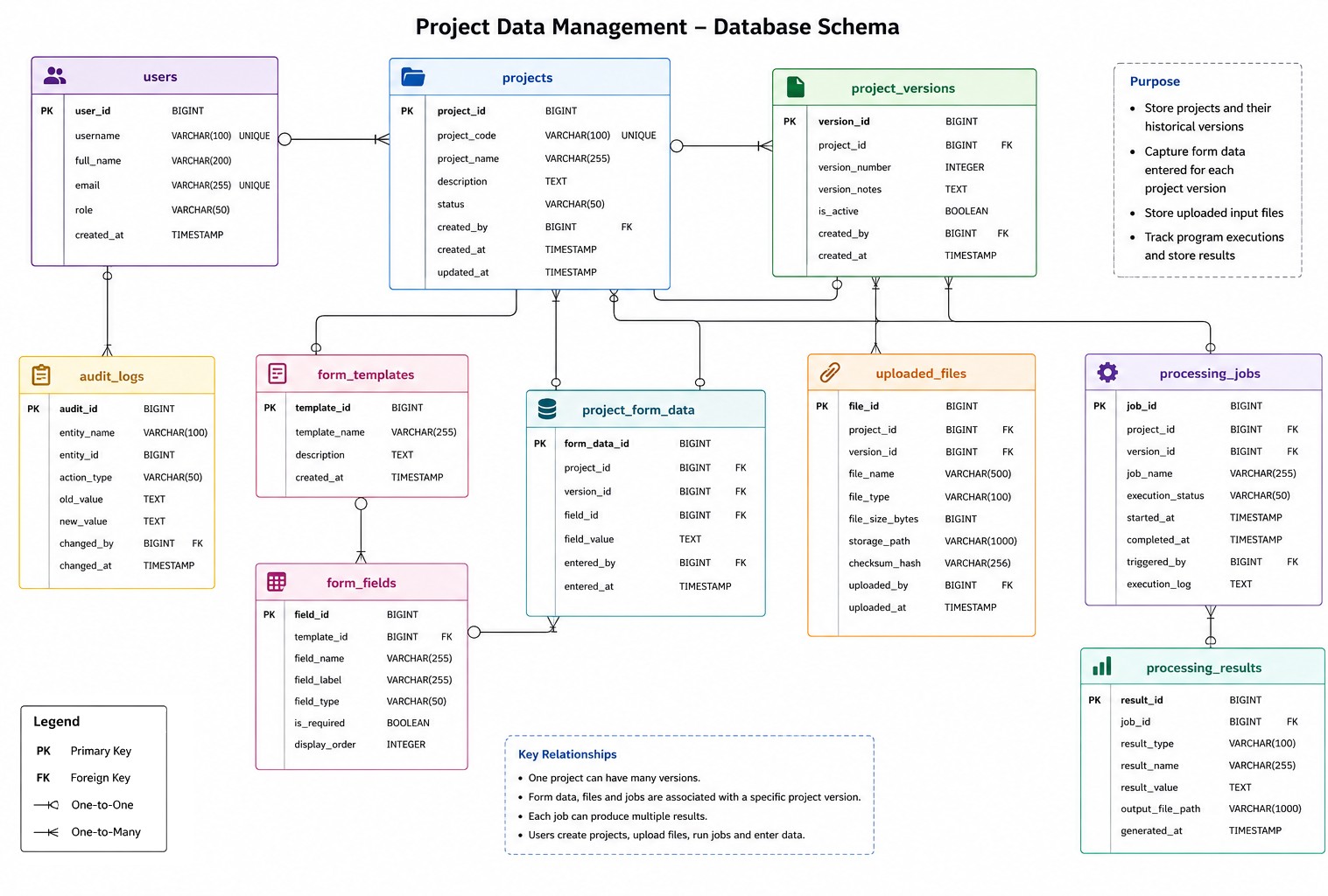
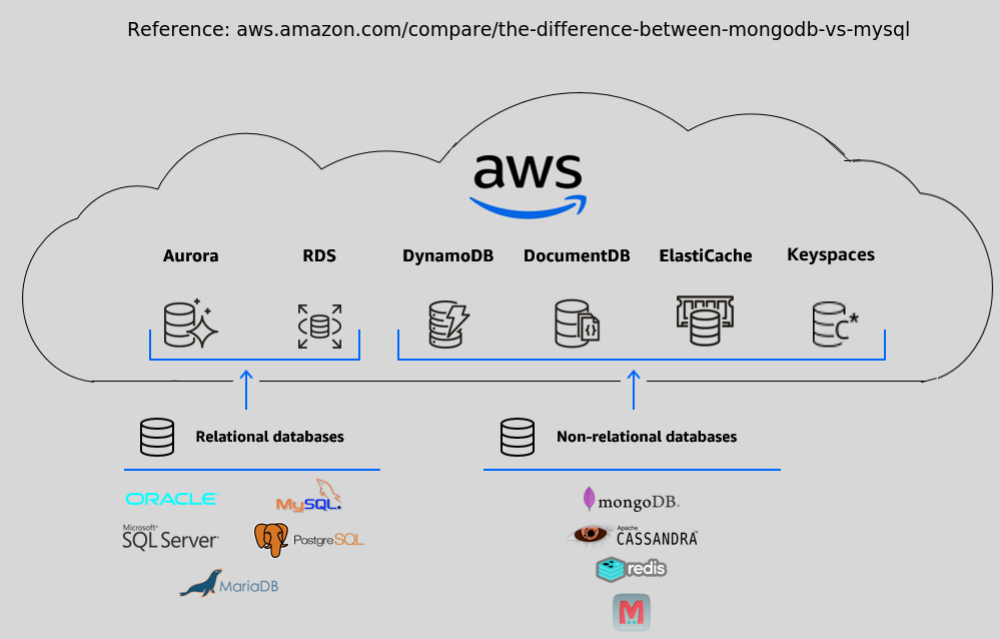
A database is the system to efficiently store, organize, and retrieve (raw) data typically limited to CRUD operations. A data framework is a broader software ecosystem (a blueprint) that processes, transforms, and manages data across its entire lifecycle involving ingestion, processing, and complex analytics. MongoDB or MySQL is a database and Apache Spark or Hadoop is a database framework. Database is the storage unit and database framework is the engine that processes the data stored there.
Databases do not store decimal separators (such as a period . or a comma) as characters on disk. Instead, they store numeric values in binary format, scaled integers (such as rupees in terms of paisa or dollars in terms of cents), or fixed-point/floating-point structures. Localization (taking input or displaying 1234.56 as 1234,56) is handled at the application, API, or reporting layer rather than inside the database storage engine.
There is no 100% foolproof method: 1,235 can be either 1.235 or one thousand two hundred thirty five. For input field, one option is to force users to follow specific convention: dot as decimal or comma as decimal. For data provided in CSV file, it requires some prior insight into order of magnitude value if the values are only integers. If is contains both floats and integers, running checks on a particular row or column can help guess the convention used. How do CSV files stored numbers with comma as decimal separators?When Excel is used with the German (Germany) locale, the default behaviour changes drastically because Germany uses a semicolon (;) as the list separator and a comma (,) as the decimal separator. Because of this, an "Excel CSV" in a German locale actually becomes a Semicolon-Separated Values file.
Ref - cloud.google.com/discover/what-are-data-products: "A data product is simply a way of packaging data so it solves a specific business problem. Instead of offering raw data that might be messy or confusing, we treat it like a product on a store shelf — complete with a description of what it is, how to use it, and a promise that it is accurate. This converts raw information into a high-quality, discoverable asset that the whole organization can rely on. Imagine the difference between buying loose ingredients and buying a meal kit. A data product is that kit: it packages the raw data with the instructions and context needed to solve a specific business problem. It transforms scattered data into something trusted, easy to find, and immediately useful for the organization."
Data as a Product is a strategy or philosophy to improve data quality and trust. It means treating internal datasets with the same care as a public software product normally gets treated.
ref - ibm.com/think/topics/data-modeling: "Data modeling is the process of creating a visual representation of either a whole information system or parts of it to communicate connections between data points and structures." Ref - aws.amazon.com/what-is/data-modeling: "Data modeling is the process of creating a visual representation or a blueprint that defines the information collection and management systems of any organization. This blueprint or data model helps different stakeholders, like data analysts, scientists, and engineers, to create a unified view of the organization’s data."
Ref - databricks.com/ blog/ data-lakes-vs-data-warehouses-what-your-organization-needs-know: A data warehouse is a data management system that stores data from multiple sources in a highly structured way. Data is cleansed, transformed and integrated into a schema that is optimized for querying and analysis. A data lake is a flexible repository that stores raw data in its native format. Data lakes are often used to consolidate all of an organization's data in a single, central location, where it can be saved "as is," without the need to impose a schema (a formal structure for how the data is organized) like a data warehouse does. AWS S3 is an example of object storage solutions for building enterprise data lakes.
ref - cloud.google.com/discover/what-is-database-sharding: "Database sharding is a strategy used to solve scalability issues in applications that have a massive amount of data. It involves splitting a single, large logical dataset into smaller, more manageable parts called shards. Each shard is stored on a separate database server instance, effectively spreading the data, and the workload, across multiple machines."
Data Engineering is the discipline of designing, building, and maintaining systems that collect, process, and move data. Users are called Data Engineers. Data Warehousing is about storing structured data in a way that enables fast querying, reporting, and analytics. Users are called (Data) Analysts and BI (Business Intelligence) teams.
Ref - ibm.com/think/topics/structured-vs-unstructured-data: "Structured data has a fixed schema and fits neatly into rows and columns, such as names and phone numbers. Unstructured data has no fixed schema and can have a more complex format, such as audio files and web pages. Structured data is easier to manipulate and analyse for general business users with traditional tools. Unstructured data can be more complex and requires specialized skills and tools to parse and analyse. Structured data is typically stored in tabular formats, such as Excel spreadsheets and relational databases (or SQL databases). Users can efficiently input, search and manipulate structured data within a relational database management system (RDBMS) by using structured query language (SQL). Developed by IBM in 1974, structured query language is the programming language used to manage structured data."
From previous reference: "Because unstructured data does not have a predefined data model, it is not easily processed and analysed through conventional data tools and methods. It is best managed in non-relational or NoSQL databases or in data lakes, which are designed to handle massive amounts of raw data in any format. Semi-structured data does not have a predefined data model. However, it uses metadata (for example, tags and semantic markers) to identify specific data characteristics and scale data into records and preset fields. Examples of semi-structured data include JavaScript Object Notation (JSON), comma-separated values (CSV) and eXtensible Markup Language (XML) files."
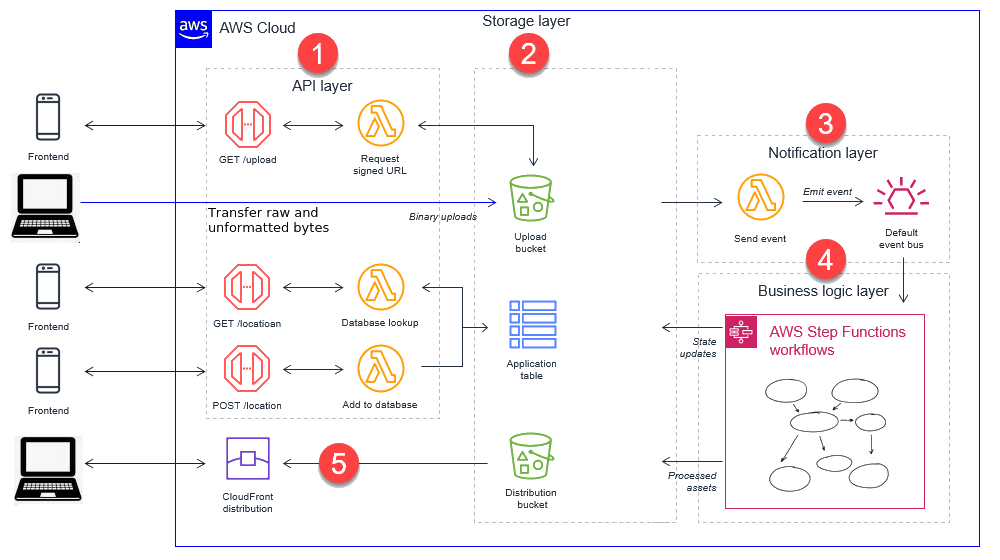
A binary upload in a web application refers to transferring files as raw, unformatted bytes of data directly from a client browser to a web server or cloud storage. A cache layer architecture is a high-speed, temporary data storage strategy designed to reduce latency, database load, and network congestion. By serving frequently requested data from memory or edge servers, it acts as a high-performance buffer between an application and its primary data sources.
MySQL is a relational database management system, while MongoDB is a NoSQL database system (more appropriate while working with unstructured data). MySQL stores data in columns, rows, and tables (suitable for data warehousing and online analytical processing). MongoDB is a document-oriented database that stores all of its data as Binary JSON (BSON) documents. Reference - mongodb.com/docs/manual/faq/fundamentals: "Instead of tables, a MongoDB database stores its data in collections. A collection holds one or more BSON documents. Documents are analogous to records or rows in a relational database table. Each document has one or more fields; fields are similar to the columns in a relational database table."
Concurrency: MongoDB allows multiple clients to read and write the same data. To ensure consistency, MongoDB uses locking and concurrency control to prevent clients from modifying the same data simultaneously. Writes to a single document occur either in full or not at all, and clients always see consistent data.
Reference: mongodb.com/docs/manual/faq/storage -- "A storage engine is the part of a database that is responsible for managing how data is stored, both in memory and on disk. Many databases support multiple storage engines, where different engines perform better for specific workloads. For example, one storage engine might offer better performance for read-heavy workloads, and another might support a higher throughput for write operations."
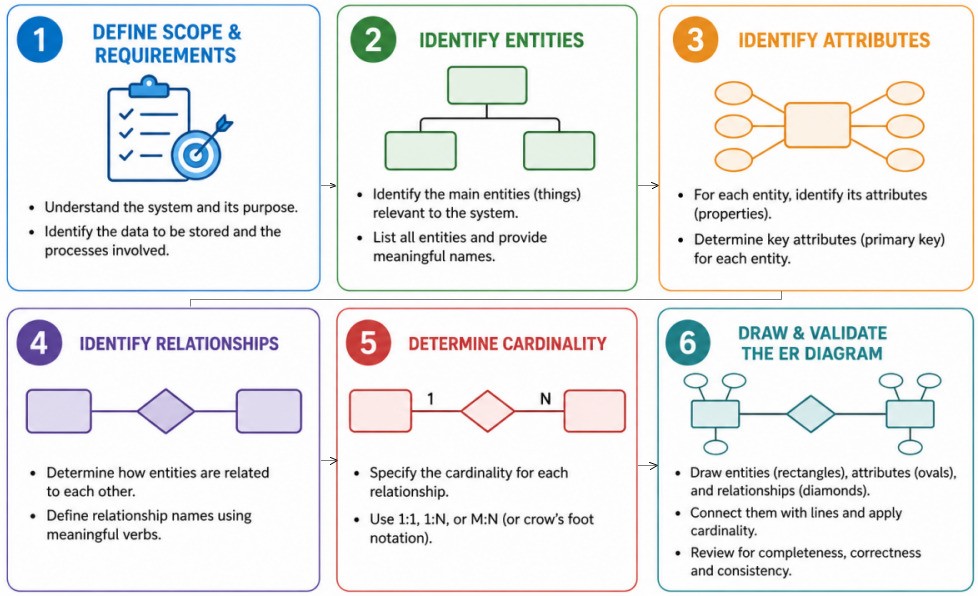
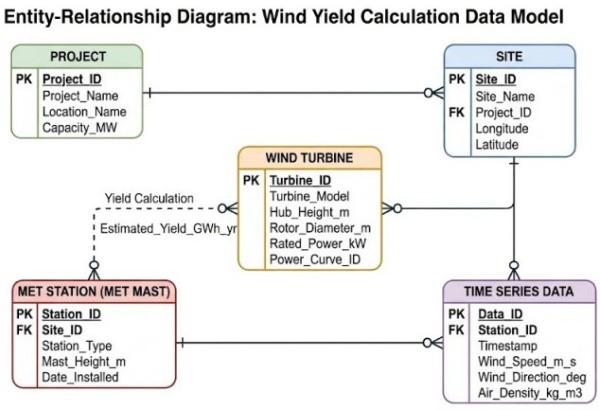
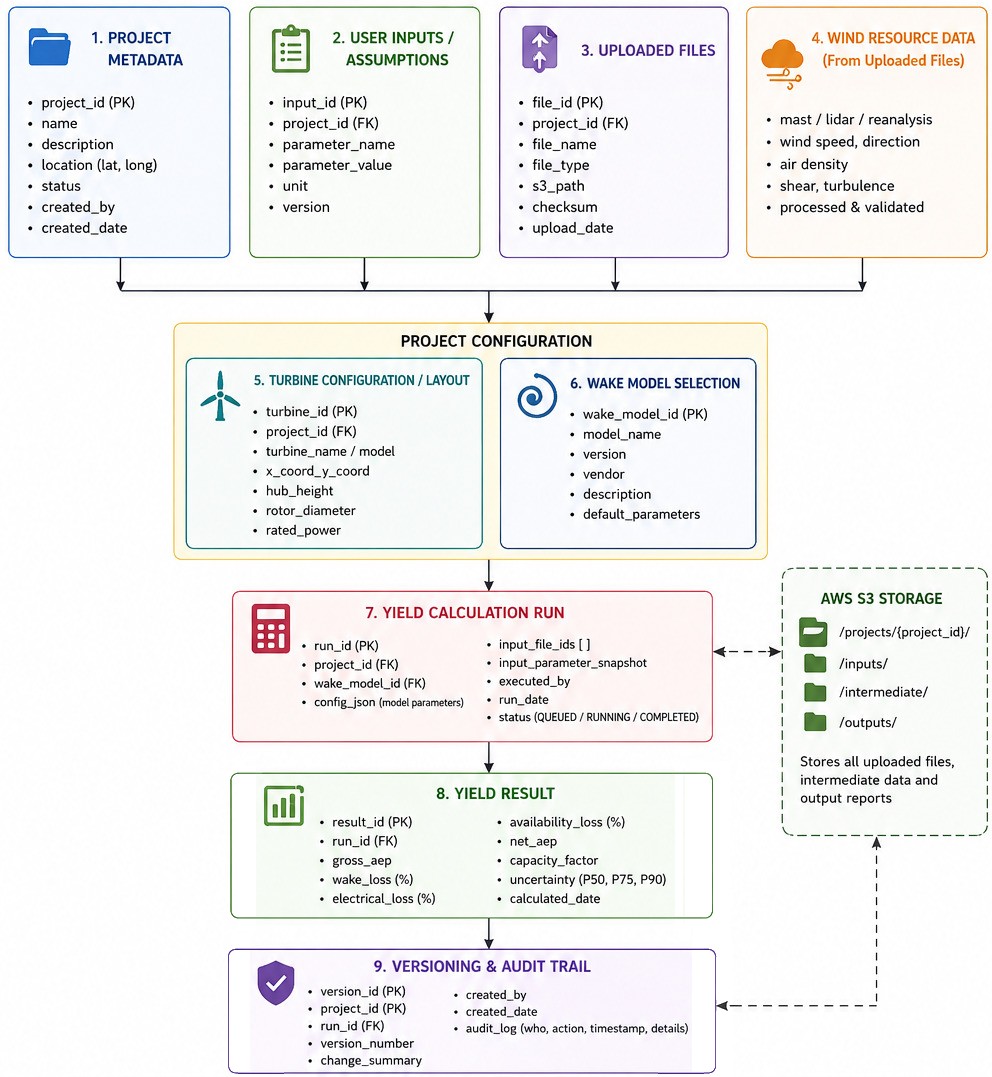
Steps to Create ER Diagrams ↴
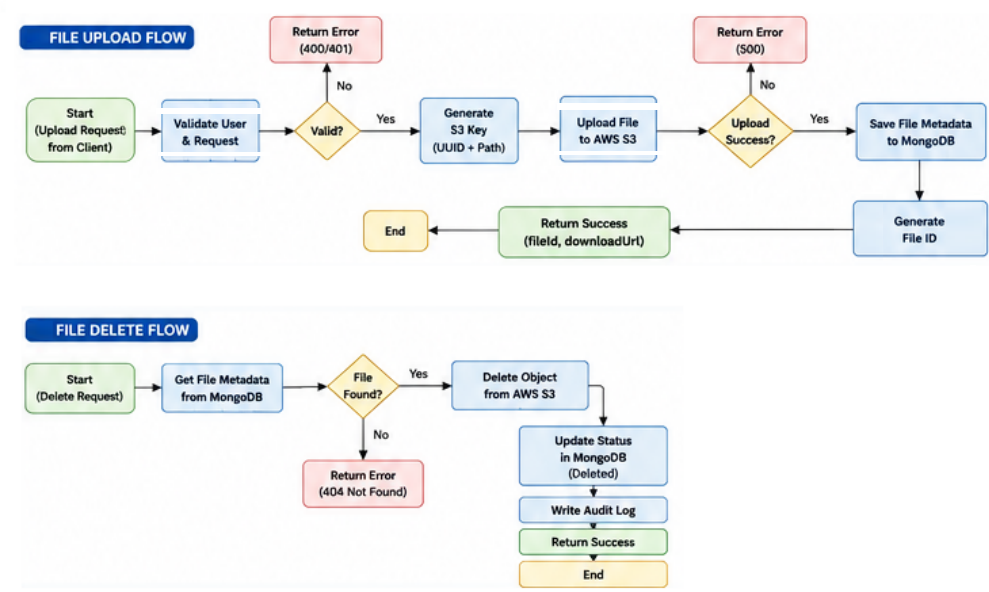
Sample Flowchart for File Upload and Delete Operations ↴
Folder Structure for Front-end and Back-end ↴
/frontend
 ├── /api                # API endpoint definitions
 ├── /assets             # Static files like images, fonts, and icons
 ├── /components         # Reusable UI elements (footers, headers)
 ├── /config             # Environment configurations
 ├── /features           # Self-contained domain modules
 │    ├── /auth
 │    └── /dashboard
 ├── /fonts              # Font files
 ├── /hooks              # Global reusable custom hooks
 ├── /layouts            # Store presentation-based UI components
 ├── /pages              # Route-level views (Home, Profile, Login)
 ├── /routes             # Router configuration and lazy-loading wrappers
 ├── /styles             # Global CSS and design tokens
 ├── /scripts            # JavaScript libraries, utility scripts
 ├── /types              # Global TypeScript interfaces, type declarations
 └── /utils              # Helper functions (formatters, date-parsers)
 index.html              # Entry point for the web application
 package.json            # Project metadata and dependencies for Node.js
/backend
 ├── /api                # All API Contract and Documentation Files
 ├── /config             # Global setup files
 ├── /controllers        # HTTP request handlers
 ├── /middlewares        # Custom middleware
 ├── /models             # Database schemas, interfaces models
 ├── /repositories       # File and data container
 ├── /routes             # API endpoint definitions
 ├── /services           # Core business logic
 ├── /utils              # Helper functions, reusable utilities
 ├── /users              # Related to all users
 └── /validators         # Request payload validation
Working with GitHub: Git is not the same as GitHub, it makes tools that use Git.
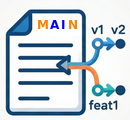
[[GitHub Repository]] → Update Local Environment: git fetch origin | git checkout main | git pull origin main → Create a Feature Branch: git checkout -b feature/user_form → [[New / Updated Local Working Directory]] → Develop → Test → Stage: git add index.html → Inspect changes to commit: git diff --cached → Commit - Save Snapshots: git commit -m "Updated user input field: frontend" → [[Updated Local Repository]] → Push to GitHub: git push -u origin feature/user_form → [[Updated Remote Repository]]
Once codes is pushed, a Pull Request should be opened which allows developers to review the proposed changes before integrating them into main. Note that pull requests are always required to merge code commits even if working directly on main branch. On GitHub:- Open the repository
- Select the feature/user_form branch
- Click the option to create a Pull Request
- Set the "base branch" to 'main' and the "compare branch" to 'feature/user_form'
- Review the changes and run any required checks
- Merge the Pull Request when it is ready.
- Approval from another developer
- Successful automated tests
- Resolution of merge conflicts
- Required status checks to pass
Once the pull succeeds and pull request has been merged, use <git checkout main> → <git pull origin main> to ensure local main branch now contains the merged feature. Thus, a complete collaborative development workflow is:
Fetch → Update → Branch → Develop → Test → Stage → Commit → Push [Run lightweight checks like syntax checking, linting and quick unit tests] → Pull Request [Run the full, rigorous suite of integration tests, security scans, and build checks] → Review → Merge → Update local → Final push pipeline triggers on 'main' to package the code and deploy it to staging or production.
Note that developers are expected to perform lightweight checks on the local version of the code (before commit), though a code push trigger should be implemented to make the CI workflow robust - just in case developer does not to local (manual) checks.
<git pull> downloads remote changes and automatically integrates them into current local branch in developer's computer. Behind the scene, it combines {git fetch} + {git merge} (or git rebase). <git push origin main> uploads local 'main' branch to the remote repository nicknamed 'origin'. Default alias or nickname Git gives to the remote repository URL developers clone from or manually connected to is origin. {git pull --rebase} places local commits on top of the latest remote changes.
A push trigger validates the isolated changes developer just made to a specific branch, while a pull request trigger simulates and validates the actual integration of those changes into a target branch (like main) before any code is permanently merged. Code push trigger provides fast feedback to the developers that their latest changes build and pass basic tests though the CI server evaluates the branch completely out of context from what other developers might be merging into the main branch at the same time.
From docs.github.com/en/pull-requests/reference/branches -- "Merging often: To avoid confusion, merge the base branch (for example, main) into your topic branch frequently. When you merge the base branch, the diffs shown by two-dot and three-dot comparisons are the same. We recommend merging a pull request as soon as possible. This encourages contributors to make pull requests smaller, which we recommend in general."
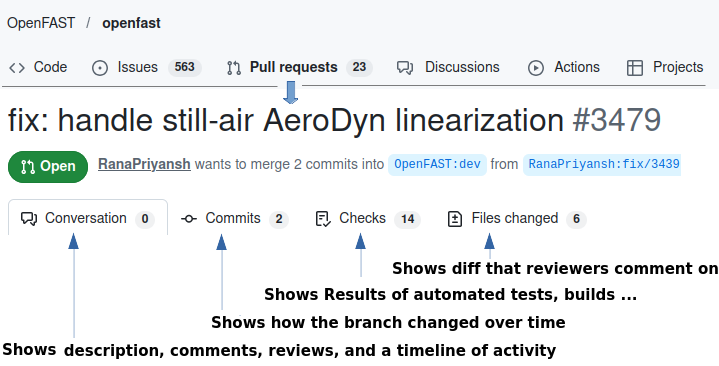
Automate Fetching: Configure Git or use an IDE (like VS Code or GitHub Desktop) to background-fetch updates so that the local branch is remains behind the remote branch.
Branches can be committed and switched offline. When a repository is created with content, GitHub creates the repository with a single branch which is the default branch. The default branch is the branch that GitHub displays when anyone visits that repository. By default, GitHub names the default branch main in any new repository.
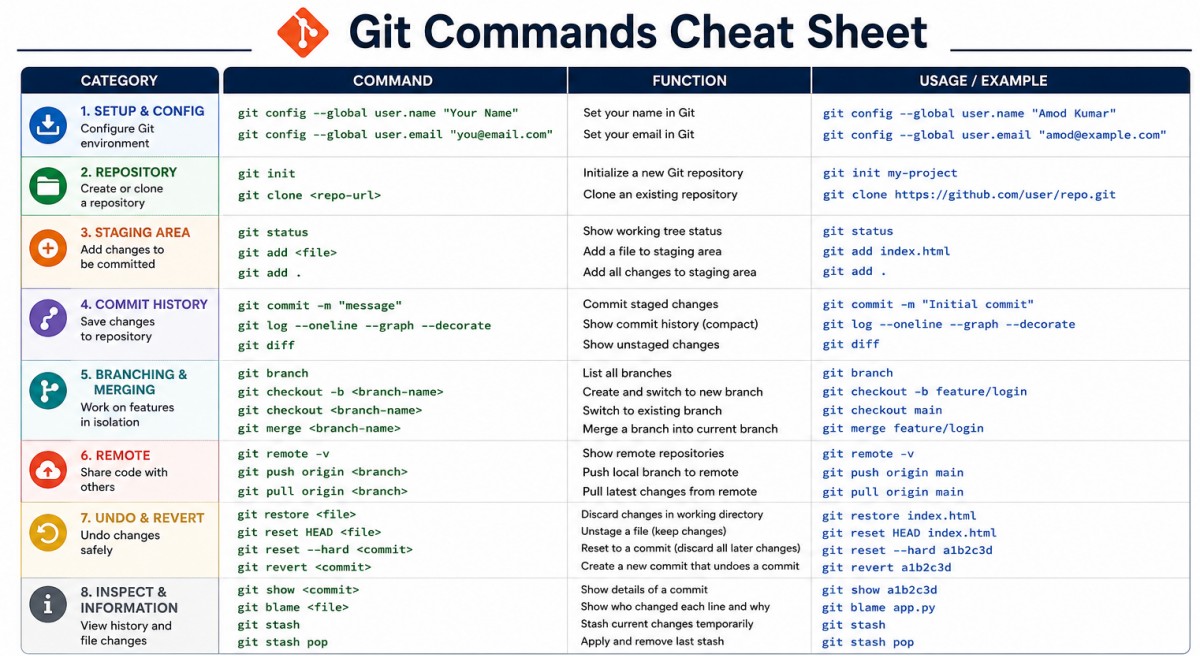
- Pull requests are proposals to merge code changes into a project.
- View local branches: Run {git branch} to see all the branches saved on local host (machine). The one with an asterisk (*) is active branch.
- Create a new local branch: Run {git branch br_name}.
- Switch to a branch: Run {git checkout br_name} or {git switch br_name>} to jump into that workspace.
- Publish to GitHub: A local branch stays local until it is explicitly pushed online using the command {git push origin br_name}.
- A protected branch can block force pushes or deletion, require status checks, require reviews, require code owner approval, or require signed commits before changes can merge.
Similar to saving a file after editing, a commit records changes to one or more files in a branch. Git assigns each commit a unique ID, called a SHA or hash, that identifies 1) The specific changes, 2) When the changes were made, and 3) Who created the changes. When a commit is made, the developer must include a commit message that briefly describes the changes.
Github repository structure and concurrent development collaboration workflow
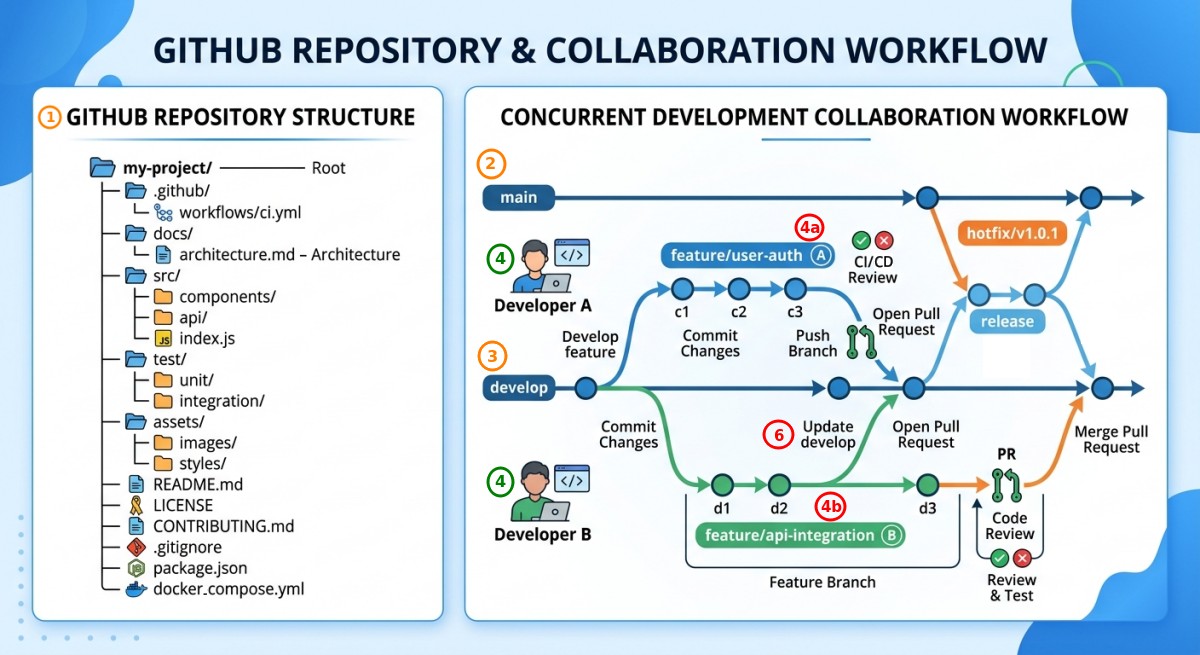
- Project Initialization and Repository Setup: Establish directory setup → Standardize folder organization → Setup root configuration files (including README.md, .gitignore, dependency configurations - package.json, and container orchestration files - docker_compose.yml)
- Establish main as the stable production branch
- Establish develop as the primary integration branch for ongoing feature work
- Two developers work simultaneously on separate feature branches branched off develop
- Creates a topic branch feature/user-auth from the latest 'develop' commit
- Concurrently creates a separate feature branch feature/api-integration from 'develop'
- Iterative Commits:
- Dev-A: Makes sequential commits (c1, c2, c3) representing local feature incremental changes
- Dev-B: Works locally and creates feature commits (d1, d2, d3)
- Branch Sync: Pulls updates from 'develop' into 'feature/api-integration' before completion to resolve potential code drift early
- Code Review and Pull Request (PR) Lifecycle: When a feature is complete, it transitions through quality assurance and review:
- Open Pull Request: The developer opens a PR targeting the 'develop' branch
- Automated CI Checks: Automated pipelines run unit and integration tests to verify code formatting, build success, and test coverage
- Peer Code Review: Team members review code quality, architecture adherence, and security standards
- Merge PR: Once approved and CI checks pass, the feature branch is merged into `develop`.
- Managing releases alongside active development
- A release branch is created from develop when features are stabilized
- Once verified, the release branch merges into both main (production deployment) and back into develop
- Managing production bug fixes
- If a production bug occurs on main, a `hotfix/v1.0.1` branch is branched directly off main
- The issue is fixed and quickly verified
- The hotfix is merged directly into main for deployment and back-merged into develop to prevent regression.
Another flowchart to demonstrate concurrent development is shown below. Note the Push-Pull loop to keep the local versions in sync.
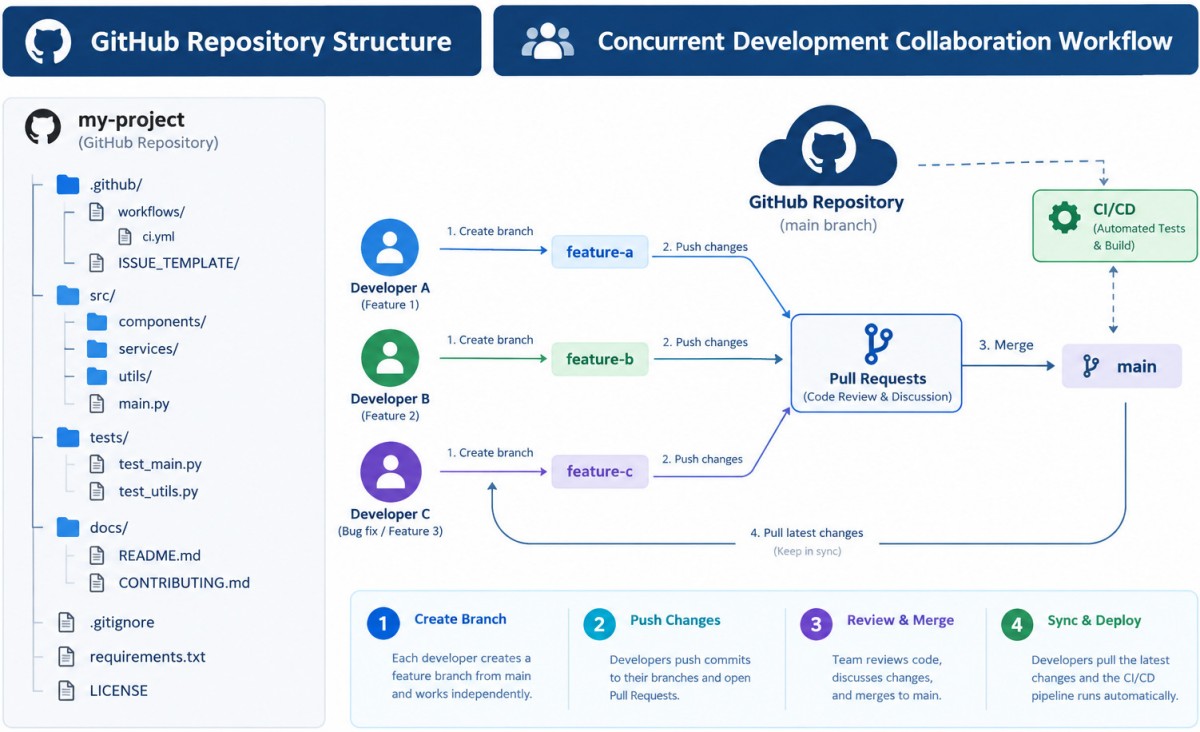
When multiple developers work on the same file, Git automatically manages the merge if they edited different lines. However, if they edited the exact same lines, it creates a merge conflict that must be resolved manually before the pull request (PR) can close.
For Multi-Developer Teams: Sync frequently by running {git pull origin main} or use {git pull --rebase} daily. Keep Pull Requests Small: The smaller a feature branch, the less likely someone else will collide with others code. Communicate: Drop a quick note to partner developer(s) when making critical structural changes to heavily shared files.
Merge Conflict Scenario: Developers Dev_A and Dev_B both branch off the main branch at the same time to edit a file named tools.js. The original tools.js file looks like this:
function greetUsers() {
  console.log("Welcome to our app!");
}
Scenario-1: Automatic Merge (Different Lines) - Dev_A and Dev_B change different parts of the same file. Dev_A changes branch Br_Dev_A by adding a user parameter and changes line 2.
function greetUsers(user) {
  console.log(`You will find new features exciting, ${user}!`);
}
Dev_B changes branch Br_Dev_B by adding a brand new function at the bottom of the file (line 5).
function logout() {
  console.log("I hope you liked the new ergonomic feature, see you soon!");
}
The Outcome: Dev_A submits PR first and merges it into main. When Dev_B submits his/her PR, GitHub sees that the changes are on entirely different lines. The system flashes a green "Able to merge automatically" notice. Git handles it behind the scenes, combining both changes into main flawlessly.
Scenario 2: Merge Conflict (Same Lines) - Dev_A and Dev_B modify the exact same lines of code. Dev_A changes branch Br_Dev_A by editing the console log text.
function greetUsers() {
  console.log("Hello and welcome back!");
}
Dev_B changes branch Br_Dev_B by editing the console log text, but differently.
function greetUsers() {
  console.log("Welcome back!");
}
The Conflict Sequence: Dev_A opens PR and merges it into main. main now says "Hello and welcome!". → Dev_B opens his/her PR to merge Br_Dev_B into main. → GitHub blocks the merge button and displays: "This branch has conflicts that must be resolved." How Dev_B resolves it via the terminal:
Dev_B needs to pull Dev_A's merged changes from main into his own local branch to resolve the conflict: Switch to main and get Dev_A's updates {git switch main} → {git pull origin main} → Switch back to Dev_B's feature branch and try to merge main: {git switch Br_Dev_B} → {git merge main} → At this point, Git pauses the merge and injects conflict markers directly into Dev_B's local tools.js file.
function greetUsers() {
<<<<<<< HEAD
  console.log("Welcome back!");           // Dev_B's local change
=======
  console.log("Hello and welcome back!"); // Dev_A's change already on main
>>>>>>> main
}
Conflict resolution: Dev_B talks to Dev_A (or reviews the code) and decides to combine both of their ideas. He edits the file in his code editor, deleting the conflict markers (<<<<<<<, =======, >>>>>>>):
function greetUsers() {
  // Resolved version:
  console.log("Hello and welcome back!");
}
Dev_B finalizes and pushes the resolution using {git add tools.js} → {git commit -m "chore: resolve merge conflict with main"} → {git push origin Br_Dev_B}. The Final Result: Dev_B's pull request on GitHub automatically updates, the conflict warning disappears, and the green "Merge pull request" button becomes active.
DevOps Engineer
- What checks do you enforce before production deploys?
- How do you design systems to be fault-tolerant?
- How do you secure a CI/CD pipeline?
- How do you manage multi-cluster deployments?
- How do you enforce standards without slowing teams down?
As per learn.microsoft.com/en-us/devops/what-is-devops: "DevOps combines development (Dev) and operations (Ops) to unite people, process, and technology in application planning, development, delivery, and operations. Continuous Integration (CI) is the practice used by development teams to automate, merge, and test code. Continuous Delivery (CD) is a process by which code is built, tested, and deployed to one or more test and production environments."
Dev refers to the software development side: Writing code (features, bug fixes), Designing applications and APIs, Running unit tests, Building new releases. Ops refers to the IT operations and infrastructure side: Deploying applications to servers/cloud, Managing infrastructure (servers, containers, networks), Monitoring system health and uptime, Handling incidents and outages. DevOps is about bridging the gap between Dev and Ops so both work as one team instead of silos. Dev ≡ designing and building the car. Ops ≡ driving, maintaining, and fixing issues on the road.

SonarQube is a DevOps tool that facilitates the static code analysis process. It is much more than just a linting tool: SonarQube for IDE goes beyond traditional linting by detecting security vulnerabilities and deep code issues that standard linters miss. From official web page: "Find and fix issues early in the development process with deep static analysis and real-time feedback that seamlessly integrates into your existing workflow. Automated scanning: SonarQube automatically scans all branches, pull requests, and merges as soon as code is committed or pushed. Automated detection: It automatically detects bugs, security issues, code duplications, and maintainability concerns before deployment."

To integrate SonarQube into a CI/CD pipeline such as GitHub Actions, secrets (SONAR_TOKEN and SONAR_HOST_URL) need to be configured (Settings > Secrets and variables > Actions) and dedicated workflow file has to be added to the codebase → Then create a file named sonar-project.properties in the root directory. This tells SonarQube what to scan and how to label the project → Then create a new workflow file at .github/workflows/build.yml (or append this job to the existing pipeline) → Verify Quality Gates: To prevent pull requests from merging if they fail SonarQube quality threshold, add a Quality Gate check right after the scan step.
Note the folder named 'workflows' which implies multiple workflow files can be stored and triggered in a CI pipeline. The sample configuration files are here: for linting on push, for testing using pytest during pull requests, and final check usingSonarQube for both push and pull. Refer the page titled Workflow syntax for GitHub Actions at "docs.github.com/ ... /workflows-and-actions/ workflow-syntax" to understand about YAML syntax for workflows.
To run these jobs sequentially while keeping them in separate workflow files, there are two main strategies: (1) Keep them in separate files and use workflow_run event to trigger the next workflow after the previous one finishes, (2) Combine them into a single file using jobs.job_id.needs (this option is recommended for sharing artefacts like test coverage easily). A fully optimized, sequential workflow that handles Linting → Pytest (with Coverage Upload) → SonarQube (with Coverage Download) is here.
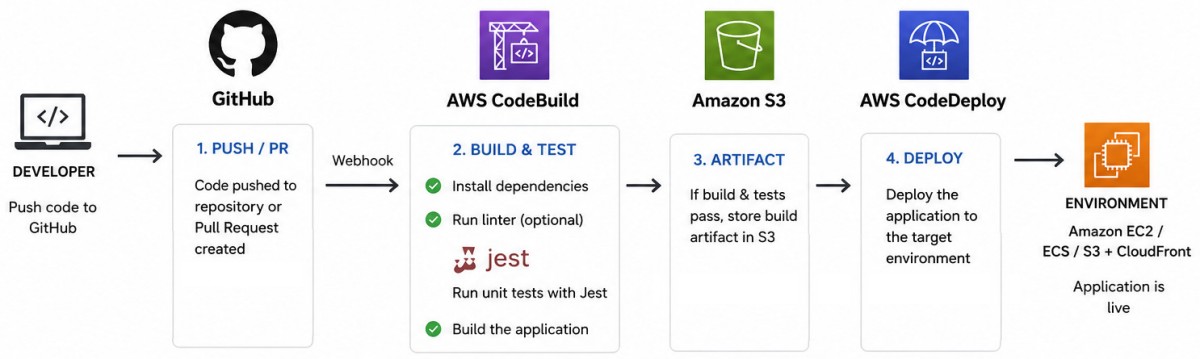
To set up SonarQube for IDE (formerly called SonarLint) in a local workspace, the extension needs to be installed in preferred editor and choose whether to run it standalone or connected to a server. For VS Code: Open the Extensions view (^Shift + X), search for "SonarQube for IDE", and click Install. Once installed, it will immediately start scanning open files in Standalone Mode using its default rule sets.
Note, SonarQube analyses source code statically but cannot run the Python tests or calculate coverage on its own. It relies on external reports where, a third-party tool (such as Coverage.py) must be set-up to produce the report as part of build process. Then, tell the SonarScanner where the report is located so that it can pick it up and send it to SonarQube Server.
Tox is commonly used to manage isolated testing environments, execute test suites via pytest, and generate the code coverage reports that SonarQube needs to display test coverage metrics. Tox creates a virtual environment, installs project dependencies, and manages the test runner.
To achieve in SonarQube a narrow scope like <select = ["F401"]> in Ruff for a single project, it can be approached in two ways: either use native SonarQube rules or directly import report generated by Ruff into SonarQube.
Method-1: Create a custom Python quality profile by updating a list of active rules after filtering rules by Type (Bug, Vulnerability, Code Smell) or Severity.
Method-2: use the sonar-project.properties file located in the root directory of the Python project. This method relies on excluding specific rules to be ignored across the project. The exact ruleKey (like python:S2190) can be found by by clicking on any issue or rule inside the SonarQube UI.
# pkg_name/sonar-project.properties

# Relative paths to source directories
sonar.sources=src

# Specific exclusions or inclusions of files and folders
sonar.exclusions=**/test*/**, **/dist/**

# Define unique keys for the rules to be ignored
sonar.issue.ignore.multicriteria=e1,e2

# Ignore all Python "Code Smells" across the whole project
sonar.issue.ignore.multicriteria.e1.ruleKey=python:S*
sonar.issue.ignore.multicriteria.e1.resourceKey=**/*

# Ignore a specific bug rule (e.g. python:S2711) in all python files
sonar.issue.ignore.multicriteria.e2.ruleKey=python:S2711
sonar.issue.ignore.multicriteria.e2.resourceKey=**/*.py
Pattern used to include / exclude files and folders:
- Excludes all files under the directory and its subdirectories: **/*
- Excludes all JavaScript files in the root folder: *.js
- Excludes all test files ending in .test.py anywhere in the project: **/*.test.py
- Using /** at the end ensures that every single file and nested subdirectory inside that submodule repo is completely ignored by the scanner: for example **/test/**
The recommended practice is to configure folder exclusions directly in the configuration file inside the project rather than hardcoding them into the GitHub Actions workflow file. This ensures that the same folders are skipped when running tests locally. This is explained in FAQ here.
If the repository is external to the current repository, it isn't technically a Git submodule (which by definition must live inside the folder structure tree). SonarQube scans whatever code is checked out into the local GitHub Actions workspace. If the external repository is never cloned into current pipeline workspace, SonarQube will not scan it, and hence any exclusions do not need to be configured.If that external repository is explicitly cloned into GitHub Actions workflow during the run, it can be excluded using one of two methods: Check it out outside the default source directory → or Use the Exclusions Flag as described earlier (if cloned inside the workspace).
redhat.com/en/topics/automation/what-is-yaml: YAML is a human-readable data serialization language that is often used for writing configuration files. YAML files use a .yml or .yaml extension, and follow specific syntax rules. There are no usual format symbols, such as braces, square brackets, closing tags, or quotation marks. YAML files use Python-style indentation to determine the structure and indicate nesting. Tab characters are not allowed by design, so whitespaces — literal space characters — are used instead.
Workflow using local host, GitHub, Jenkins and AWS:
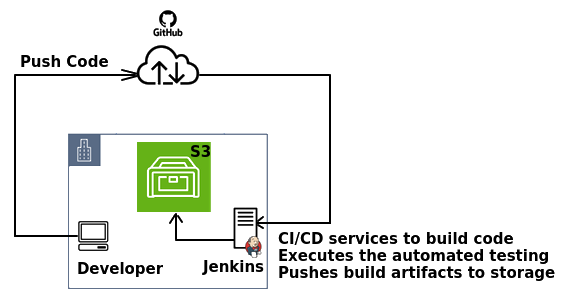
Tasks performed by DevOps Engineers ↴
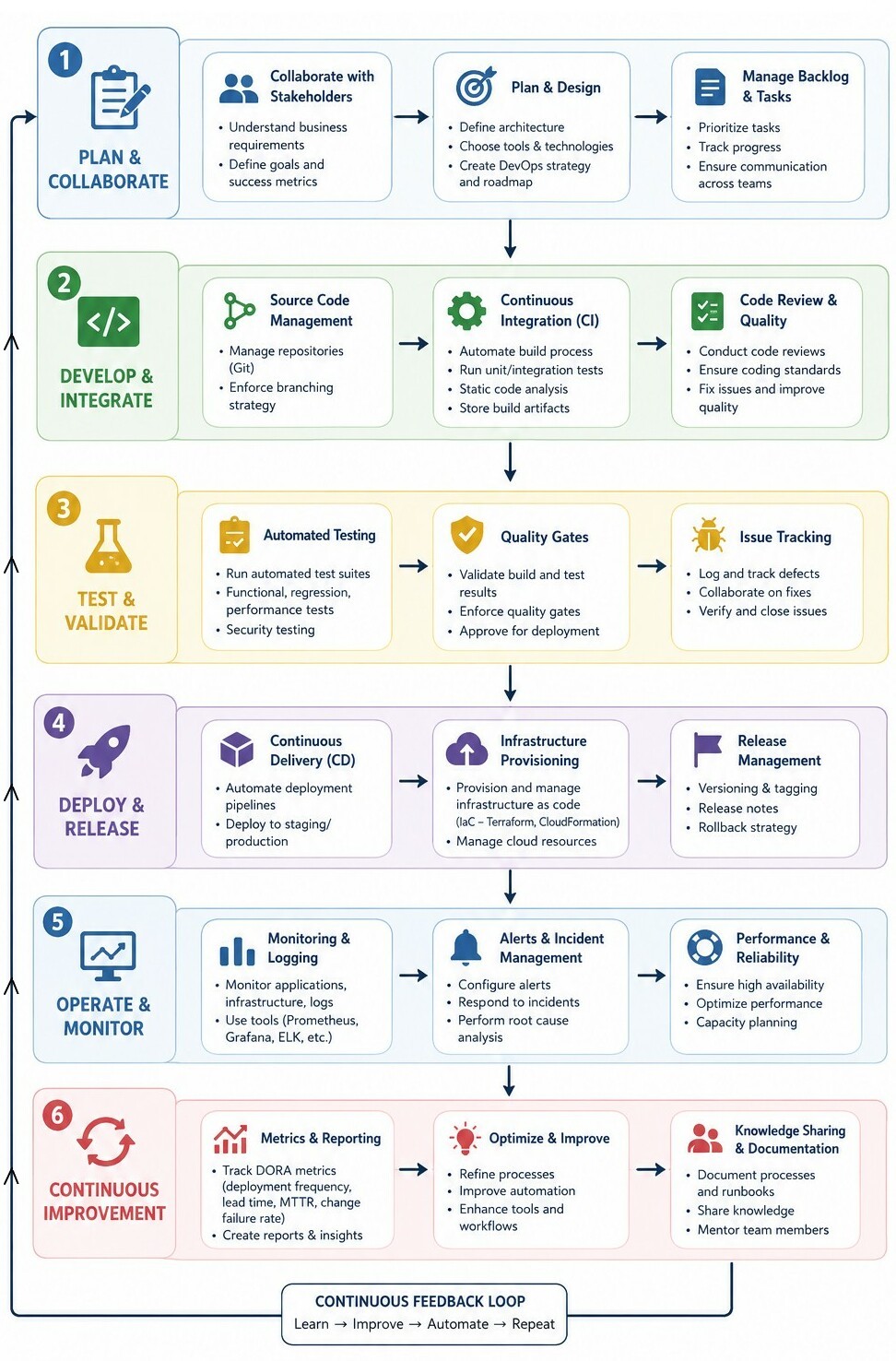
Environment: A configured instance of the application setup used for a specific purpose which focuses on application lifecycle stage and configuration. Common environments on AWS are: Development (Dev) - Used by developers, Testing / QA - Used for functional testing, UAT - User acceptance testing, Staging - Mirrors production before release, Production (Prod) - Live customer-facing system. Each environment may use different databases, scaling settings, secrets / configurations and application versions.
Terraform is an IaC (Infrastructure as Code) software tool that provides a consistent command line interface (CLI) workflow to manage hundreds of cloud services. Terraform codifies cloud APIs into declarative configuration files. Instead of manually clicking through the AWS Management Console, DevOps engineers write declarative code in HashiCorp Configuration Language (HCL) to define the desired infrastructure.
With Terraform, users can create, update and destroy infrastructure components by writing human-readable configuration files. For example, if a virtual machine (VM) depends on a virtual private cloud (VPC), Terraform ensures that the VPC is created before provisioning the VM. Terraform manages low-level components, such as compute and storage resources and S3 buckets, and high-level components, such as Domain Name System (DNS) entries and software as a service (SaaS) features.Activities of CI/CD Pipeline on AWS ↴
From docs.aws.amazon.com: "Continuous Integration (CI) is a software process in which developers regularly push their code into a central repository such as AWS CodeCommit or GitHub. Every code push triggers an automated build, followed by the running of tests. Continuous Delivery (CD) is a software process in which artefacts are deployed to the test environment, staging environment, and production environment. CI/CD can be pictured as a pipeline, where new code is submitted on one end, tested over a series of stages (source, build, test, staging, and production), and then published as production-ready code."
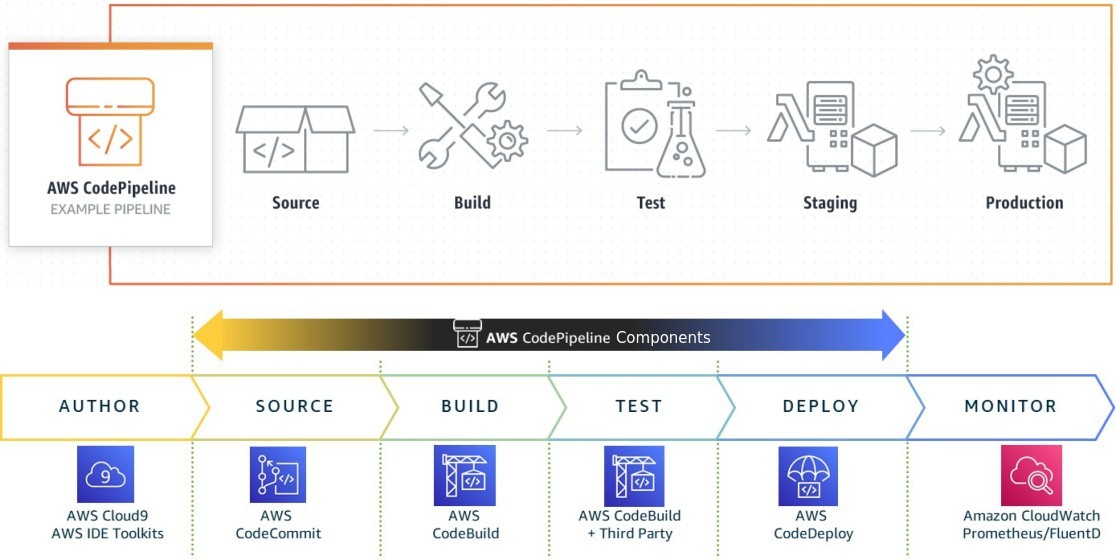
AWS can set up CI/CD pipelines using the tools AWS CodeCommit, AWS CodeBuild, AWS CodePipeline, AWS CodeDeploy, Amazon Elastic Container Registry, AWS CodeStar.
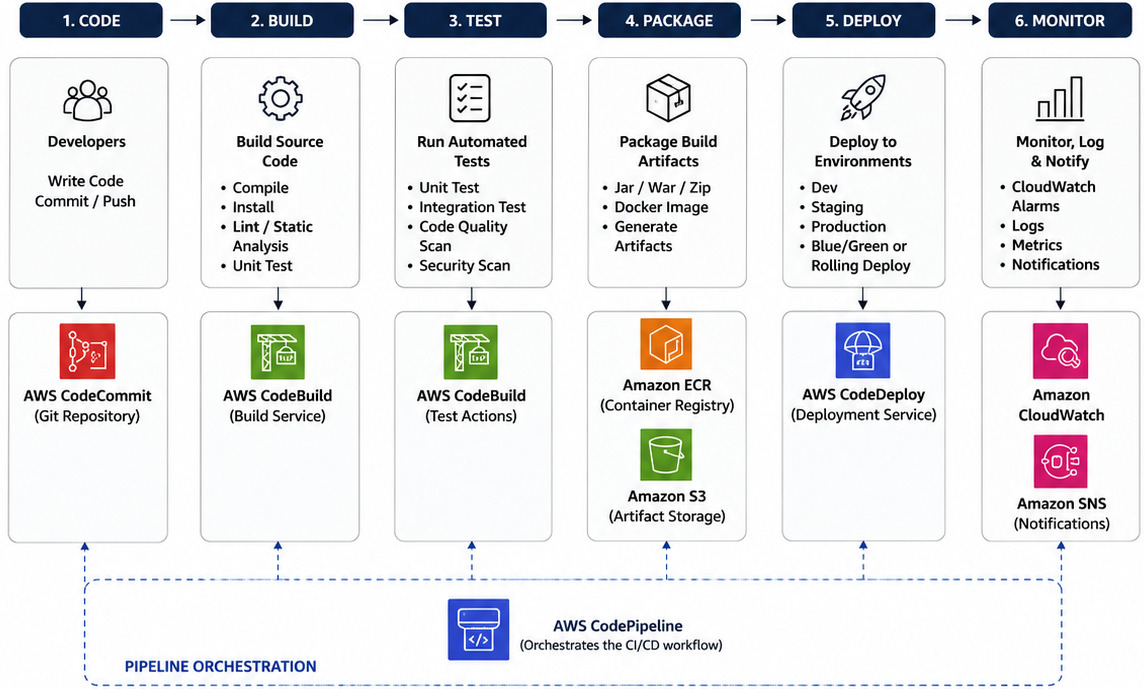
DevOps Artifacts: These are referenced in a pipeline stage for automated deployment to the target environment. They are used to specify software package versions for deployment. They can be a container image, a generic artifact, helm chart, or they can be defined inline. The artefact source varies depending on the type of artefact.
Environment of CI/CD Pipeline on AWS ↴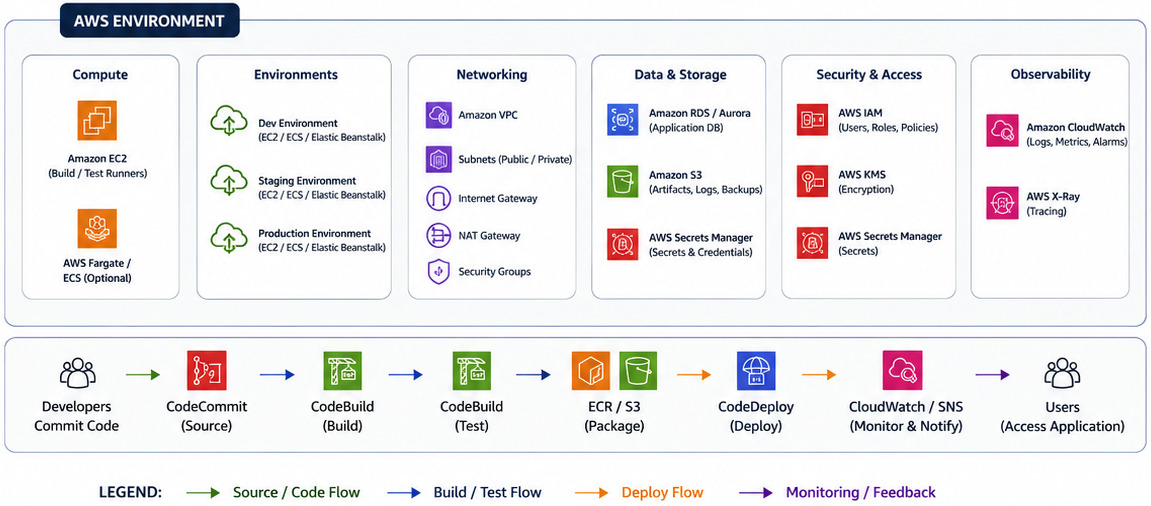
Typical AWS Architecture Components
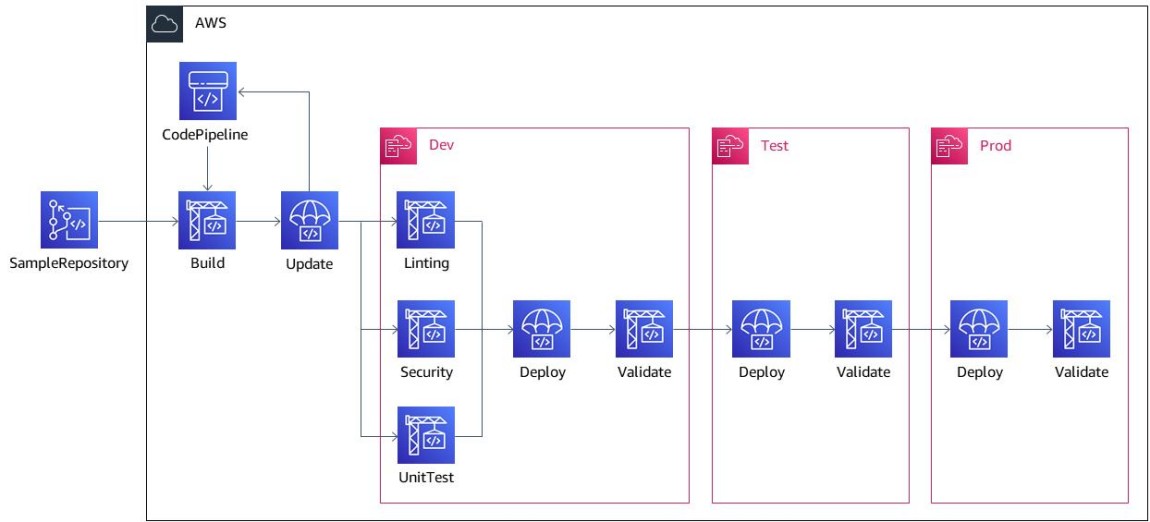
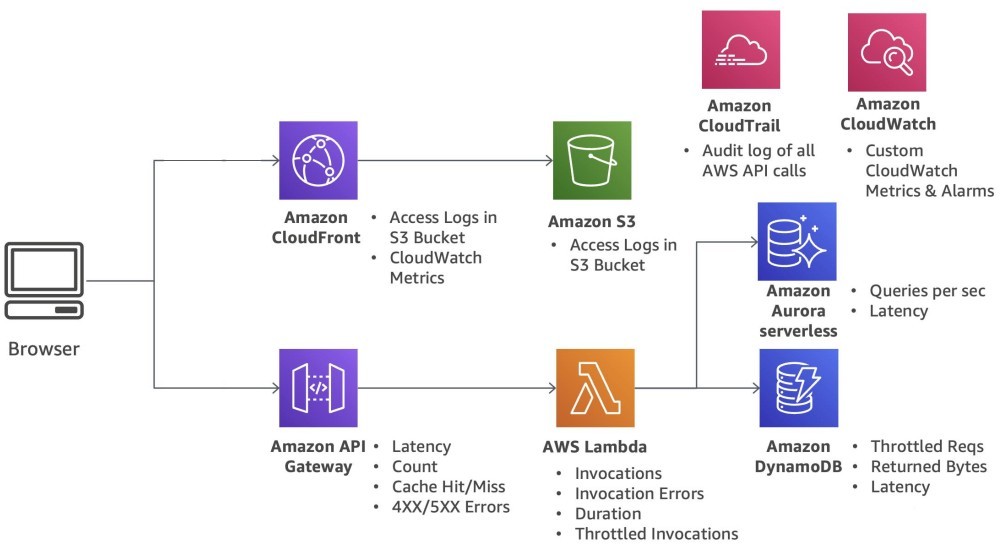
API Design
APIs allow two websites to securely share data and features behind the scenes. Alternatively, HTML iFrame (inline Frame) offers a way to embed another HTML document within a parent HTML page. AJAX allows for loading content dynamically without refreshing the entire page which can be used to replace iframe embedding for loading external content.Before designing the API, following need to be identified. API contract or Interface design is the most critical design artefact. Integration requirements define how API interacts with other systems: upstream dependencies, downstream systems, protocols. Postman is a API testing tool though AWS does not have similar single, standalone proprietary tool.
The first step is to identify business needs and users.
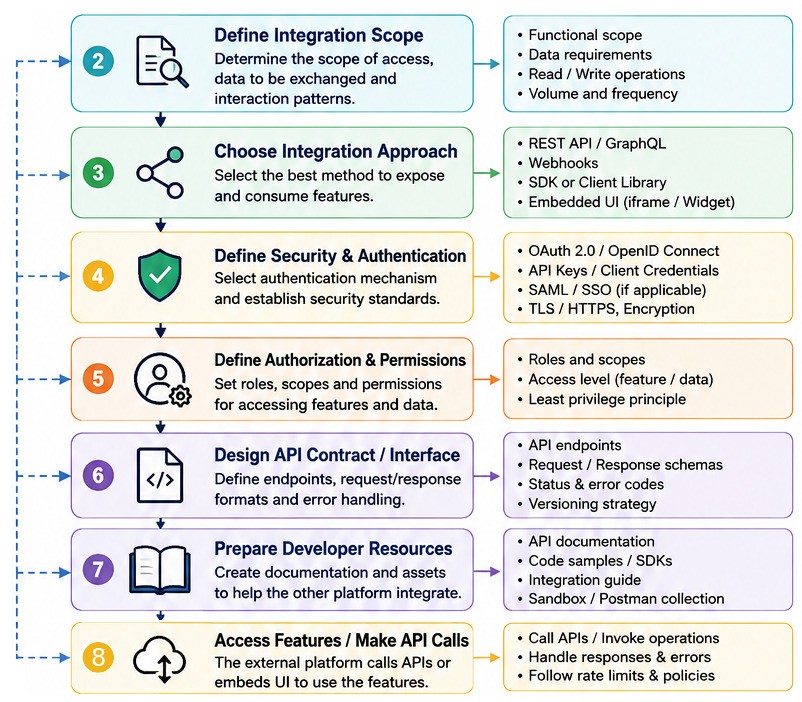
- What business actions the API calls are expected to perform (e.g. process transactions, pull logs, get project output)?
- Define Data Models: Entities, Attributes, Relationships
- What data (type, size, format, list, array, single object, nested JSON structures...) will be exchanged? Request Specifications: Path Parameters, Query Parameters, Headers, Request Body
- Who initiates communication and is it synchronous (REST/GraphQL) or asynchronous (Webhooks)?
- API Endpoints: URL Structure, HTTP Methods (GET, POST, PUT, DELETE). Validation rules: required fields, formats and constraints.
- Should the API request be real-time or batch processing?
- Is the API call one-way or bidirectional? Response Specifications: JSON Structure, Success Responses, Error Responses?
- What is expected transaction frequency and volume?
- What are security and compliance requirements? Authentication, Authorization, Encryption, API Keys?
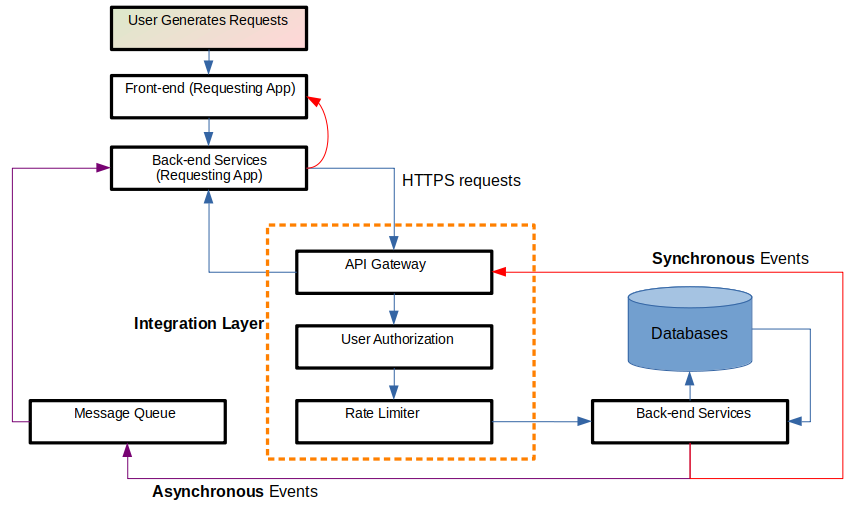
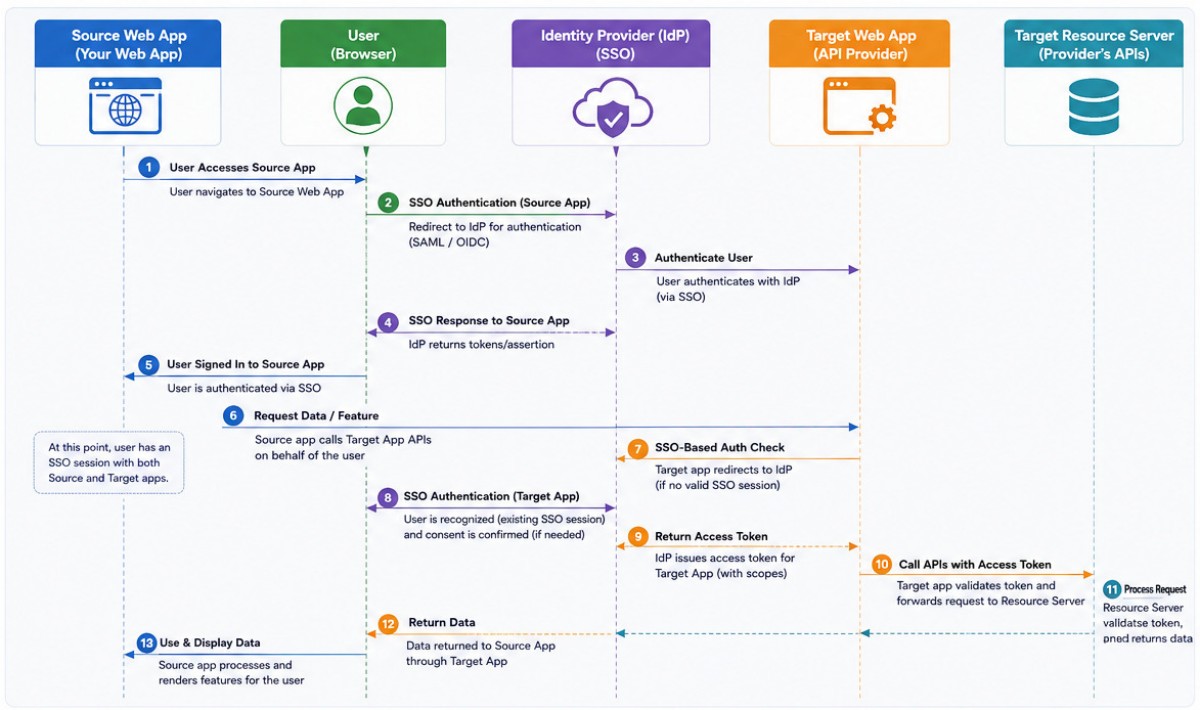
API Gateway Workflow
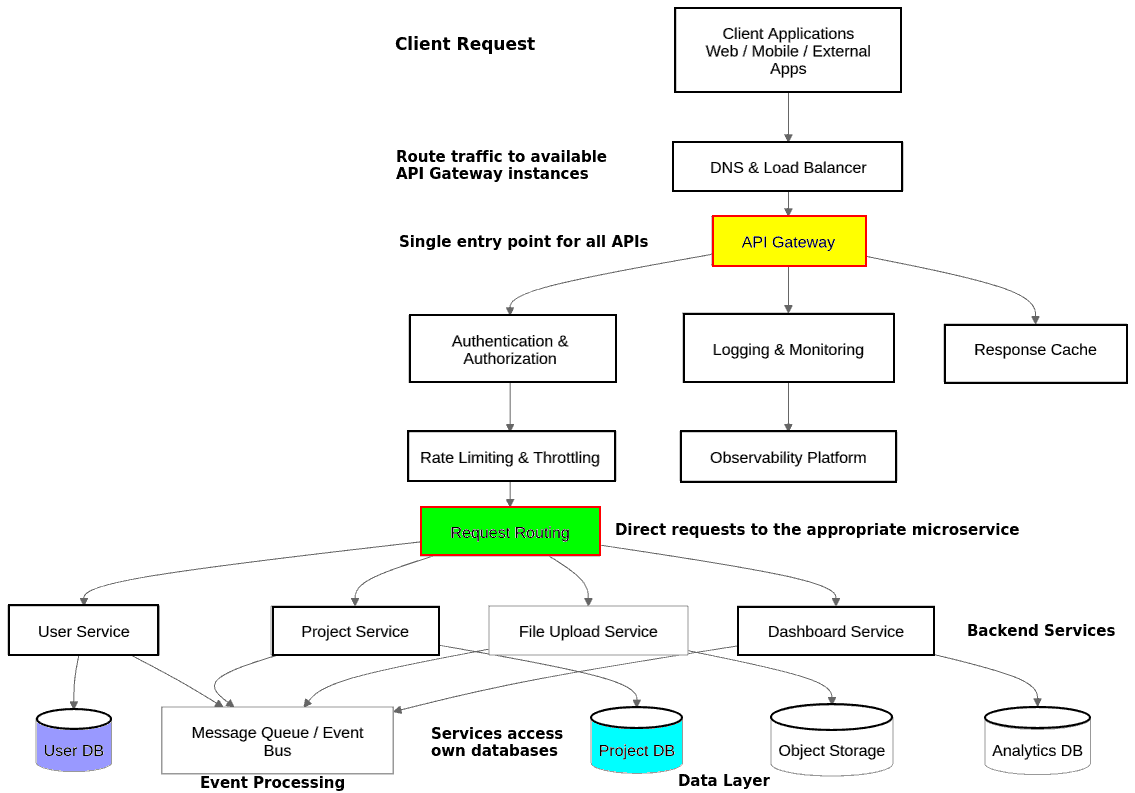
Testing Methods and Activities

Quality gate is a collection of conditions that determine whether a build passes or fails.
Unit testing is the process where the smallest functional unit of code is tested. In a web app, a unit is a specific function like a "file upload" and a data validation method like "checking password strength". These tests are written by Developers immediately after code commit (Build phase). It is not required to write explicit, fully customized unit tests for every single block of code. There are automated testing frameworks (such as Playwright, Cypress and Selenium) for every popular programming language.
Integration testing checks that different parts of the software system that are designed to interact do so correctly. These tests are written by Developers and QA engineers during early testing phase.
Security and Load Tests are written by DevOps Engineers at pre-production or staging deployment stage.
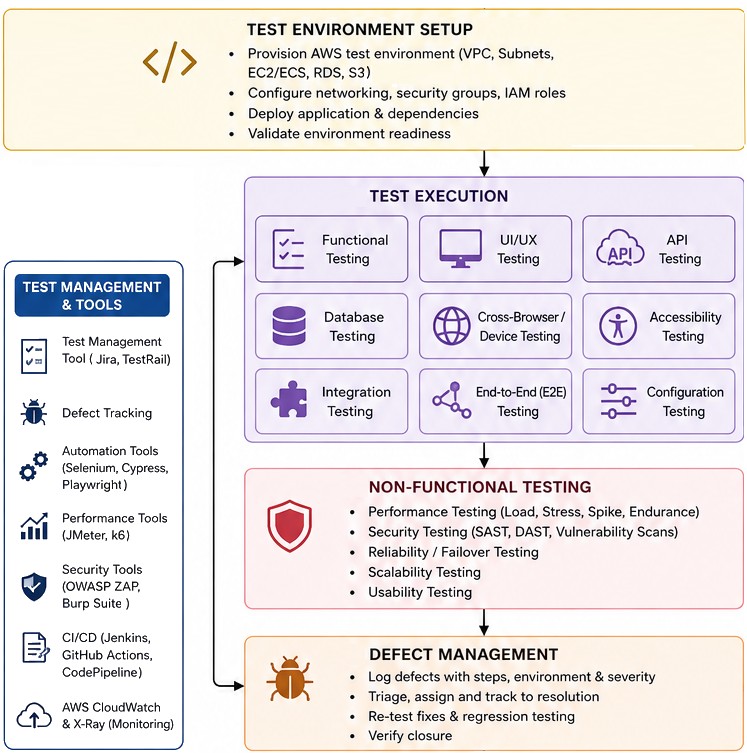
Code Testing Activities and Environment on AWS ↴
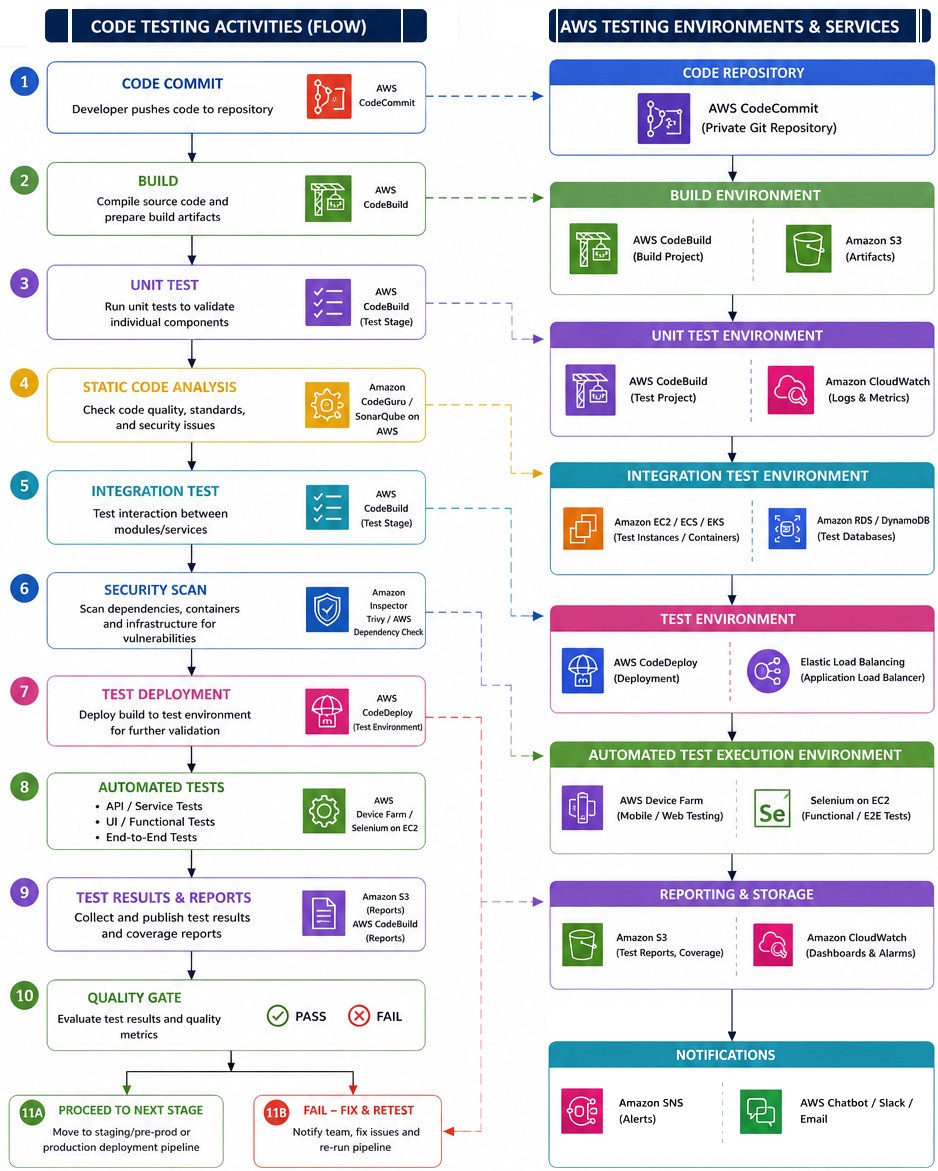
Boilerplate in testing refers to the repetitive, standard setup and teardown code that must be written before the actual test logic can be executed. While boilerplate code is necessary for the testing infrastructure to function, it does not directly verify any application features or business logic. The term "boilerplate" is used in two slightly different contexts within the realm of software testing:
| Context | What It Means | Purpose |
| Boilerplate Code Within a Test | The repetitive code blocks written inside individual test files to manage dependencies, execution flow, or object mocking. | Prepares the exact environment necessary for an assertion to run safely. |
| A Testing Boilerplate (Starter Kit) | A pre-configured repository template containing folder structures, configured test runners, CI/CD pipes, and sample code. | Minimizes the initial time required to set up a brand-new test automation framework from scratch. |
To integrate functional testing into GitHub Actions, use a workflow file (usually .github/workflows/test.yml) that triggers automatically when code is pushed or a pull request is opened. Here is a production-ready example of a workflow that sets up the environment, starts a local server in the background, and runs functional tests (using Playwright as an example, though one can swap this for Cypress or Selenium).
Smoke Testing is known as Build Verification Testing which acts as a gatekeeper in the development pipeline: if the build passes, it is moved to further functional or regression testing. If it fails, the build is sent back to the developers.Excerpts from AWS website: "Smoke testing is a subset of testing that validates the most critical functions of an application work correctly after deployment. These tests focus on key workflows like user login, core navigation, and key transactions rather than exhaustive feature coverage. Smoke tests typically complete in minutes rather than hours, making them ideal for CI/CD pipelines where fast feedback on code changes is essential."
aws.amazon.com/what-is/continuous-testing: "Continuous testing is the process of testing your application at every stage of the software development process and every time that changes are made to application code or configurations. Continuous testing integrates testing in every stage of the software delivery pipeline to catch bugs early and maintain software quality. Software tests are maintained as code alongside the application code and frequently run as part of the continuous testing paradigm."
Static testing is a proactive method of assessing the quality of code without needing to run it. It can be used to test application source code, as well as other design artefacts, documentation, and infrastructure as code (IaC) files. Static testing allows teams to spot misconfigurations, security vulnerabilities, or non-compliance with organizational standards in these components before they get applied in a real environment.
 Testing using pytest:
When pytest is typed in command terminal, the framework searches current directory and its subdirectories. It discovers what to run by looking for specific naming patterns: files named test_*.py or *_test.py, functions named with a test_ prefix and classes named with a Test prefix (without an __init__ constructor).
pytest --pyargs pkg.testing: This will import pkg.testing and use its filesystem location to find and run tests from. A set of commands can be read from a file using the @ prefix: pytest @tests_to_run.txt where the .txt file contains an entry per line without the keyword 'pytest' such as:test_file.py test_mod.py::TestClass --pyargs pkg.testing --failed-first test_file.py
Change command line options defaults: from user doc -- "to always see detailed info on skipped and xfailed tests, as well as have terser "dot" progress output, write it into a configuration file:"
# content of pytest.toml - this is ≡ pytest -ra -q test_script.py
[pytest]
addopts = ["-ra", "-q"]
To stop the testing process after the first (N) failures:
pytest -x           # stop after first failure = --exitfirst
pytest --maxfail=2  # stop after two failures
To re-run failed tests and maintain state between test runs, options to rerun failures from the last pytest invocation: --lf, --last-failed - to only re-run the failures. --ff, --failed-first - to run the failures first and then the rest of the tests. Runs with the --ff option, all tests will be run but the first previous failures will be executed first (as can be seen from the series of FF and dots).
--nf, --new-first option: run new tests first followed by the rest of the tests, in both cases tests are also sorted by the file modified time, with more recent files coming first.
Example:
The sample code and tests file here referenced from package github.com/CalebBell/fluids: "Fluids is open-source software for engineers and technicians working in the fields of chemical, mechanical, or civil engineering."
$:>python -B -m pytest --disable-warnings ./tests/
============================= test session starts ==============================
platform linux -- Python 3.8.10, pytest-8.3.5, pluggy-1.5.0
rootdir: /home/users/Projects/Fluids
configfile: pytest.ini
collected 52 items

tests/test_core.py ...............                                       [ 28%]
tests/test_friction.py ............ss.......................             [100%]

================== 50 passed, 2 skipped, 4 warnings in 1.93s ===================
Markers in pytest:
Pytest markers are metadata tags or labels attached to test functions, classes, or modules to configure their behaviour or categorize them for selective execution. They act like flags that let testers organize test suite, pass custom arguments to tests, or filter which tests run in different environments (like local development vs. CI/CD pipelines).For example, @pytest.mark.xfail indicates that a test is expected to fail. If it fails, pytest tracks it without breaking the build pipeline. @pytest.mark.parametrize feeds multiple data sets into a single test function, running it multiple times with different variables. Developers and testers can create custom markers to group tests logically. For example, tests can be labelled as smoke, regression, or slow.
Once tests are marked, you use the -m flag in the terminal to filter them. Run only smoke tests: pytest -m smoke, Run everything except slow tests: pytest -m "not slow", Combine markers with logical operators: pytest -m "smoke or regression"
Errors, Warnings and FAQ: pytest
1-- PytestUnknownMarkWarning occurs when a custom marker is used in tests that has not been registered in Pytest Documentation configuration file. Verify that a marker is registered correctly by running "pytest --markers" command in terminal.
# pytest.ini file in root directory
[pytest]
markers =
    slow: marks tests as slow (deselect with '-m "not slow"')
    pytz: marks tests that require or test pytz functionality

filterwarnings =
    ignore::_pytest.warning_types.PytestUnknownMarkWarning

# Set clean default behaviour for local terminal
addopts =
    --disable-warnings
    --tb=short
    --ignore=.venv              #expects a literal path
    --ignore-glob=*/*cache*/*   # standard shell-style wildcards

# pytest does not enter the directory at all: speeds up collection
norecursedirs = test* .venv bin doc* build*
Note that the addopts key should be defined only once. If addopts = ... are declared multiple times on separate lines, the last line will overwrite the previous ones.
2-- Pytest refers to or discovers test files outside of current package folder (or traverses up/down directories).
This may be due to specific design rules for test discovery, package layouts, and sys.path modifications. To restrict pytest to only look inside current folder, use: pytest ./tests/
3-- How to hide/suppress all warnings?Use pytest --disable-warnings or reduce verbosity by shrinking the output format to just show dots (.) for passes and F for failures: pytest -q. If tests do fail, prevent massive scrollback by showing only the immediate line that failed: pytest --tb=short
4-- How to override all local defaults to temporarily see absolutely everything reported by pytest?By turning on verbosity (-v) and PYTHONWARNINGS (-W): pytest -v -W default
5-- How how to prevent pytest writing __pycache__ folder?Note that __pycache__ is created by bytecode compilation mechanism in Python rather than pytest itself. To prevent this, pass the -B flag to the Python interpreter, which explicitly tells it not to write .pyc files or __pycache__ directories: python -B -m pytest ./tests/
 Testing using unittest
To run test modules without 'main' block: python -m unittest -v test_script.py or use Test Discovery (python -m unittest discover) which automatically finds and runs all tests matching a pattern in a directory.
<python -m unittest -f or --failfast test_*.py>: stop on first fail or error. -s START or --start-directory: 'START' is directory path to start discovery ('.' default). -t TOP or --top-level-directory: 'TOP' is the root level directory of project (defaults to start directory).
For unittest to successfully discover tests, the project must follow a strict naming convention. Directory structure: Test files should ideally be stored inside a dedicated directory (e.g. tests/) → File names: Test files must start with test_ (e.g. test_auth.py, test_models.py) → Class names: Test classes must inherit from unittest.TestCase → Method names: Individual test methods must start with the test_ prefix.
From docs.python.org/3/library/unittest.html: As a shortcut, "python -m unittest" is the equivalent of "python -m unittest discover". If you want to pass arguments to test discovery the discover sub-command must be used explicitly. The following two command lines are equivalent: python -m unittest discover -s project_directory -p "*_test.py" ≡ python -m unittest discover project_directory "*_test.py"
Open a terminal at the root directory of the project and run "python -m unittest" - the framework searches the current directory and its subdirectories for any files matching test*.py, loads them, and runs all test methods. To tell discovery to look in a specific directory instead of the current one: python -m unittest discover -s tests\
If tests are written in different folders such as the one shown below:
pkg_root
  ├── tests/
  |     ├── calibration/
  |     |      ├──  __init__.py
  |     |      └──  test_clb_a.py
  |     ├── unit/
  |     |      ├──  __init__.py
  |     |      └──  test_uni_b.py
  |     ├── integration/
  |     |      ├──  __init__.py
  |     |      └──  test_int_c.py
  |     └── end2end/
  |            ├──  __init__.py
  |            └──  test_e2e_d.py
  |
  └── src/
Since the folders contain __init__.py file, tests can be run either as "python -m unittest ./tests/unit/test_uni_b.py" or "python -m unittest tests.unit.test_uni_b".
- Test Fixture: The preparation needed to perform a test (and cleanup actions), handled via setUp() and tearDown() - such as tests which require a database connection, open files, or mock data
- Test Suite: A collection of test cases or other test suites grouped together
- Test Runner: The component that orchestrates the execution of tests and delivers the results.
Warnings:
reference: python.readthedocs.io/fr/latest/library/warnings.html --- "Warning messages are typically issued in situations where it is useful to alert the user of some condition in a program, where that condition (normally) doesn't warrant raising an exception and terminating the program. For example, one might want to issue a warning when a program uses an obsolete module."python -W always -m unittest: -W flag force warnings to be printed in detail in the terminal. python -W error -m unittest: Turn warnings into exceptions (fails the test and prints the full traceback). python -W default -m unittest: print the first occurrence of matching warnings for each location where the warning is issued.
'''
To collect and inspect or print detailed warning attributes (such as
message, category, filename, and line number) inside a specific test
method
'''
import unittest
import warnings


def warn_deprecation():
  warnings.warn("Obsolete feature: ", DeprecationWarning)


class WarningTest(unittest.TestCase):

  def test_warning_details(self):
    with warnings.catch_warnings(record=True) as captured:
      warnings.simplefilter("always")
      warn_deprecation()

      # Print detailed report of each captured warning
      for w in captured:
        print(f"\n--- Warning Report ---")
        print(f"Category : {w.category.__name__}")
        print(f"Message  : {w.message}")
        print(f"File     : {w.filename}")
        print(f"Line     : {w.lineno}")

      self.assertEqual(len(captured), 1)
      self.assertTrue(issubclass(captured[-1].category, DeprecationWarning))


if __name__ == "__main__":
  unittest.main()
unittest.main() is a built-in function in Python's unittest module that automatically discovers, loads, and runs unit tests defined in a script. It scans the current module for any class that inherits from unittest.TestCase → It searches those classes for methods whose names start with test_ and runs them one by one → It automatically calls setUp() before each test method and tearDown() after each test method.
To log warnings for debugging without failing the tests, the most effective approach is to route Python warnings into built-in logging module. This allows to print detailed warning reports (including times, filenames, and functions) directly into the test output or a separate log file.
MyPy:
MyPy and Ruff are Python development tools that solve different problems. MyPy is used for static type checking, catch type-related bugs before runtime. Ruff checks style, catches common errors, and can automatically fix many issues. An alternative to MyPy, with its own type-analysis behaviour is Pyright. MyPy helps catch following errors:- Passing a string where an integer is expected
- Returning a value with an incompatible type
- Accessing attributes that don't exist on a known type
- Calling functions with incorrect argument types
- Potential None-related errors
- Inconsistent types across function calls.
User Acceptance Testing (UAT)
Acceptance testing is when the software is tested manually by stakeholders or user groups to check whether it is working as they anticipate.
This is the final phase of testing in web application development where actual business users (Product Owners, Subject Matter Experts, Customer representatives) and end users verify that the application meets their requirements and is ready for production use. Unlike technical testing (unit testing, integration testing, system testing), UAT focuses on business functionality and user workflows. It serves as the formal approval before the application can go live.
Responsibilities of Software Test Engineers ↴
Functional Testing: Understand business and technical requirements. Create test scenarios, test cases, and test data. Execute manual and automated test cases. Functional testing checks whether the software system passes the software requirements outlined before building. A CI/CD pipeline can and absolutely should be used to perform functional testing. In fact, integrating automated functional tests into Continuous Integration (CI) or Continuous Deployment (CD) workflow is a standard industry best practice known as continuous testing.
Bug / Defect Management: Identify, log, track, and retest software defects. Work with development teams to resolve issues. Perform root cause analysis for recurring defects.
Automation Testing: Develop and maintain automation scripts. Execute regression and smoke test suites. Improve test coverage using automation tools
Test Planning and Documentation: Prepare test plans and testing strategies. Document test results and quality metrics. Maintain QA documentation and reports. Note that if tests never execute some conditions, branch coverage decreases.
Test coverage is a software quality metric that measures how much of your application's code or functionality is exercised by automated tests. Coverage (%) = Total Testable Items / Items Tested * 100. Line Coverage = Percentage of code lines executed during tests, Statement Coverage = Percentage of executable statements tested, Branch Coverage = Percentage of decision paths (if/else, switch cases) tested and Function Coverage = Percentage of functions/methods called by tests.
QA Testing Output Summary Table ↴ is summarize below. A sample list of tests to be conducted on a web app can be found in this Excel file.
| Test Category | Total Test Cases | Passed | Failed | Blocked* | Pass Rate |
| Functional Testing | 15 | 14 | 1 | 0 | 93.3% |
| UI/UX Testing | 12 | 11 | 1 | 0 | 91.7% |
| API Testing | 25 | 20 | 5 | 2 | 80.0% |
| Security Testing | 16 | 12 | 4 | 0 | 75.0% |
| Performance Testing | 20 | 16 | 4 | 1 | 80.0% |
| Compatibility Testing | 11 | 10 | 1 | 0 | 90.9% |
| Regression Testing | 22 | 20 | 2 | 0 | 90.9% |
| User Acceptance Testing | 14 | 12 | 2 | 0 | 85.7% |
Compatibility Testing Output Summary ↴
| Browsers Tested | OS Tested | Screen Resolution | Results / Observation |
| Chrome 144.0, FireFox 136.0, Edge, Safari | Window 11, Ubuntu 24.06, iOS | Laptops and Desktops screen size 13", 15" and 24" | Application compatible across all major browsers and platforms, no major UI rendering issue observed. |
Web Application QA Test Case Table ↴ should be aligned to RTM (Requirement Traceability Matrix), this is sometime also known as Technical Testing. BR = Business Requirement, FR = Functional Requirement. Ensure that each FR has a corresponding development (dev) task and at least one test case. Ensure each feature maps to a deployable AWS/Azure component.
| Test Case ID | Module / Feature | Test Scenario | Preconditions | Test Steps | Expected Result | Status | Tester Name | Test Date |
| TC-LOG-001 | Authentication | Verify login with valid credentials | User account exists | Enter valid username / pw > Click Login | User successfully logs in | Pass | ||
| TC-LOG-002 | Authentication | Verify login with invalid password | User account exists | Enter valid username & invalid pw > Login | Error message displayed | Pass | ||
| TC-LOG-003 | Authentication | Verify empty login fields validation | Login page accessible | Leave username or pw blank > Login | Field validation message displayed | Pass | ||
| TC-REG-001 | Registration | Verify new user registration | Registration page accessible | Enter valid user details > Submit | Account created successfully | Pass | ||
| TC-REG-002 | Registration | Verify duplicate email validation | Existing email available | Enter registered email > Submit | Duplicate email error displayed | Fail | ||
| TC-FGT-001 | Password Reset | Verify forgot pw functionality | Registered email exists | Click Forgot Password > Enter email > Submit | Reset link sent to registered email | Pass | ||
| TC-DSH-001 | Dashboard | Verify dashboard loads after login | Valid login completed | Login successfully | Dashboard page displayed correctly | Pass | ||
| TC-PRF-001 | User Profile | Verify profile update | User logged in | Open profile page > Update profile > Save | Profile updated successfully | Pass | ||
| TC-PRF-002 | User Profile | Verify profile picture upload | User logged in | Upload valid image file > Save | Picture uploaded successfully | Pass | ||
| TC-DAT-001 | Data Management | Verify create record operation | User has create permission | Open create form > Enter valid data > Save | New record created successfully | Pass | ||
| TC-DAT-002 | Data Management | Verify update record operation | Existing record available | Edit existing record > Save changes | Record updated successfully | Pass | ||
| TC-DAT-003 | Data Management | Verify delete record operation | Existing record available | Select record > Click Delete > Confirm | Record deleted successfully | Pass | ||
| TC-API-001 | API | Verify API response status code | API endpoint available | Send GET request to API | Status code 200 returned | Pass | ||
| TC-API-002 | API | Unauthorized access | No authentication token | Access secured API without token | Status code 401 returned | Pass | ||
| TC-SEC-001 | Security | Verify SQL Injection protection | Login form accessible | Enter SQL query in input field > Submit | Application rejects malicious input | Pass | ||
| TC-SEC-002 | Security | Verify XSS protection | Form input field available | Enter script tag in text field > Submit | Script execution blocked | Pass | ||
| TC-PRF-001 | Performance | Verify application under heavy traffic | Performance env. configured | Simulate concurrent users | Application remains stable | Pass | ||
| TC-CMP-001 | Compatibility | Verify application on Chrome | Chrome installed | Open application in Chrome | UI and functionality work correctly | Pass | ||
| TC-CMP-002 | Compatibility | Verify application on mobile device | Mobile device available | Open application on mobile browser | Responsive layout displayed correctly | Pass | ||
| TC-LOG-001 | Authentication | Verify logout functionality | User logged in | Click Logout | Session terminated successfully | Fail |
Unit tests in Angular are written using files ending with the .spec.ts extension, which are automatically generated alongside components and services when using the Angular CLI. Avoid creating test files manually. Use the Angular CLI generator (e.g. ng generate component comp_name) to ensure the proper .spec.ts boilerplate file is automatically set up subsequent testing.
By default, Angular projects rely on the Jasmine testing framework for writing test logic and assertions, combined with a test runner like Vitest or Karma to execute them. To test Angular application in a CI server, run the standard test command: "ng test". The "ng test" command also watches files for changes. If developers modify a file and save it, the tests will run again.
The test case table size can be shortened by removing "Module / Feature" column as it is already built into the test case ID. Test cases for a dashboard module can be as shown below.
| Test Case ID | Test Scenario | Preconditions | Expected Result |
| TC-DSH-001 | Dashboard page loads successfully | User logged in | Dashboard loads without errors within specified response time |
| TC-DSH-002 | Role-based dashboard access | Users with Admin, Manager, and User roles exist | Each role sees only authorized dashboard sections and widgets |
| TC-DSH-003 | Verify dashboard widgets display correctly | Dashboard configured with widgets | All configured widgets display correctly with proper labels |
| TC-DSH-004 | Verify dashboard data accuracy | Dashboard connected to backend database | Values match backend data |
| TC-DSH-005 | Verify charts and graphs render correctly | Dashboard contains charts | Charts render correctly with accurate labels, legends, and values |
| TC-DSH-006 | Verify dashboard refresh functionality | Dashboard contains dynamic data | Latest data displayed without page errors |
| TC-DSH-007 | Verify filtering options | Filters available | Data updates according to selected filter criteria |
| TC-DSH-008 | Verify breadcrumb navigation | Breadcrumbs available | Breadcrumb path displayed correctly and links work |
| TC-DSH-009 | Verify sorting of dashboard data | Sortable tables available | Data sorted ascending/descending correctly |
| TC-DSH-010 | Verify responsive design | Application deployed | Layout adjusts correctly without overlapping components |
| TC-DSH-011 | Verify dashboard loading performance | Production-like environment | Dashboard loads within SLA (e.g. < 5 seconds) |
| TC-DSH-012 | Verify export functionality | Export feature enabled | File generated successfully with accurate data |
| TC-DSH-013 | Verify error handling when data source unavailable | Ability to simulate back-end outage | User-friendly error message displayed; application remains stable |
Flowchart to identify Code Smells in a Web App Development project ↴
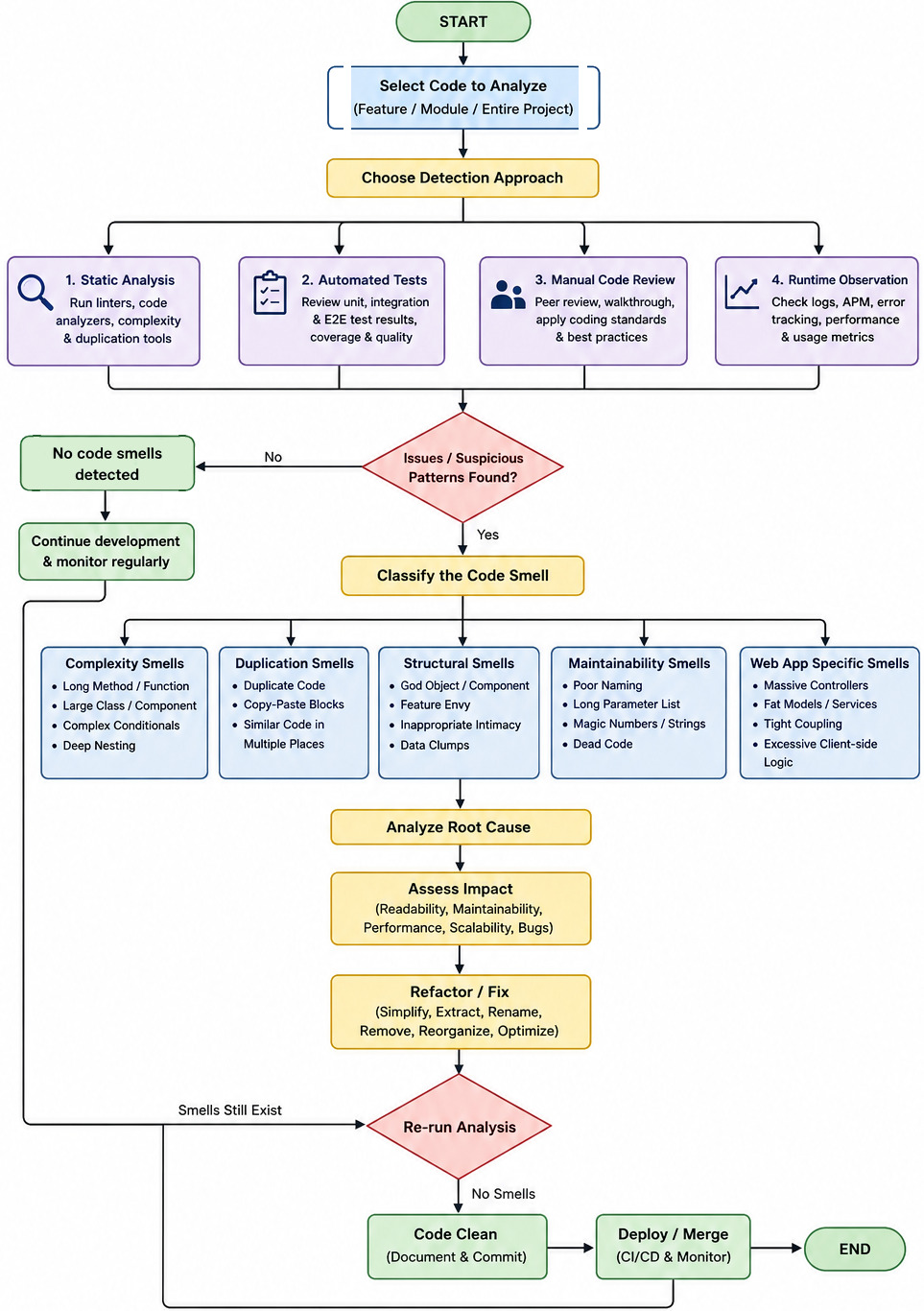
Example: how a File Upload feature (allowing users to upload a PDF, csv or document) moves through the three testing stages before it goes live.
- Unit Testing (Done by Developers): The developer writes tests for the smallest, isolated pieces of code to ensure the basic logic works. What they test:
- Does the system reject a file that is too large (e.g. over 25 MB)?
- Does the system block an unsafe file type (e.g. a *.exe malware file) and allow a safe one (e.g. pdf)?
- Is the file naming convention enforced during upload?
- Does the file name trimmer remove illegal characters?
- Integration Testing (Done by QA Testers and Developers): Once individual pieces work, the team tests how the file upload interacts with other interconnected systems, databases, and servers. What they test:
- When a user clicks "Upload," does the file successfully travel from the frontend browser and save into the cloud storage database (like Amazon S3)?
- Does the database successfully update the user's profile database row with the new file URL?
- If the network drops halfway through, does the system accurately throw an error instead of crashing the server?
- User Acceptance Testing (Done by End-Users and Business Stakeholders): Now that the feature is technically sound, real users or business analysts test it to ensure it makes sense, feels right, and solves the actual business goal. What they test:
- Is the "Upload File" button easy to find on the screen?
- When a document uploads, is the loading spinner clear enough so the user knows they need to wait?
- Does this feature actually help the business developers review project needs faster and intuitively, which was the original business requirement?
Final QA Sign-off ↴
| Item | Status | Reviewed By | Approved By |
| Functional Readiness | Approved | ABC | XYZ |
| Security Readiness | Approved with observations | ABC | XYZ |
| Performance Readiness | Approved with observations | ABC | XYZ |
| Production Deployment Recommendation | Yes, post-deployment smoke testing | PQR | LMN |
| User Training, Knowledge Transfer | Completed | PQR | LMN |
| User and Coding Documentation | Completed | PQR | LMN |
| Support Period | 3 months | UVW | EFG |
| Warranty Period | 6 months | UVW | RST |
| Agile/Scrum Project Closure | Yes | UVW | RST |
| Go-Live Sign-off | Yes | UVW | RST |
List of Phase-wise Handover Documents can be found in this file.
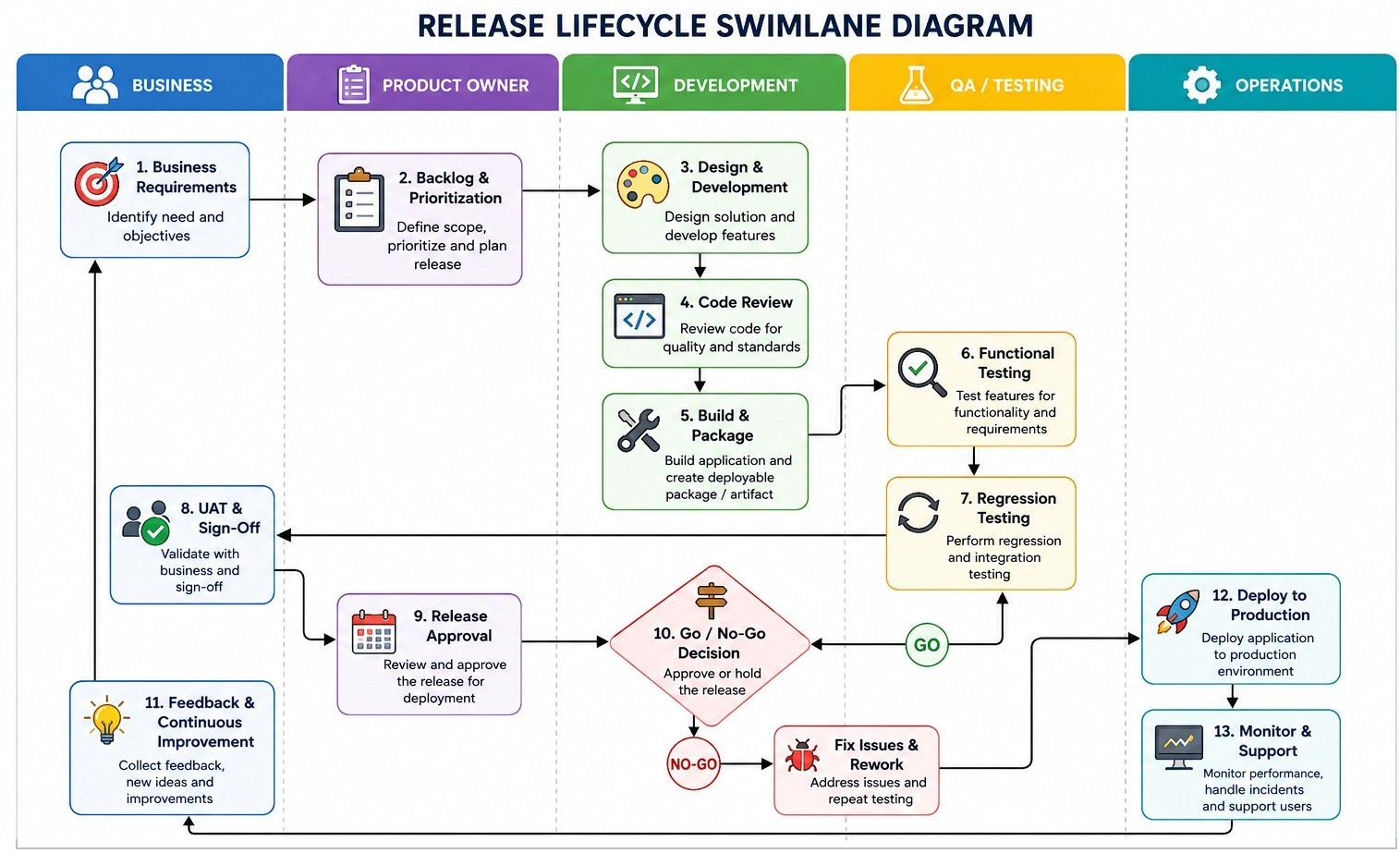
Simple web app development Gantt Chart
| Task                              |  W1 |  W2 |  W3 |  W4 |  W5 |  W6 |  W7 |  W8 |  W9 | W10 | W11 | W12 |
| ----------------------------------|-:-:-|-:-:-|-:-:-|-:-:-|-:-:-|-:-:-|-:-:-|-:-:-|-:-:-|-:-:-|-:-:-|-:-:-|
| Project Planning and Requirements | ■■■ | ■■■ |     |     |     |     |     |     |     |     |     |     |
| ----------------------------------|-----+-----+-----+-----+-----+-----+-----+-----+-----+-----+-----+-----+
| UI/UX Design                      |     | ■■■ | ■■■ | ■■■ |     |     | ■■■ |     |     |     |     |     |
| Solution Architecture             |     |     | ■■■ | ■■■ |     |     |     |     |     |     |     |     |
| Database and API Design           |     |     |     | ■■■ | ■■■ |     |     |     |     |     |     |     |
| Dev. Environment + CI/CD Setup    |     | ■■■ | ■■■ | ■■■ |     |     |     | ■■■ |     |     | ■■■ |     |
| ----------------------------------|-----+-----+-----+-----+-----+-----+-----+-----+-----+-----+-----+-----+
| Front-end Development             |     |     |     | ■■■ | ■■■ | ■■■ | ■■■ |     |     |     |     |     |
| Back-end Development              |     |     |     | ■■■ | ■■■ | ■■■ | ■■■ |     | ■■■ |     | ■■■ |     |
| Integration                       |     |     |     |     |     |     | ■■■ | ■■■ |     |     |     |     |
| System and Integration Testing    |     |     |     |     |     |     |     | ■■■ | ■■■ | ■■■ |     |     |
| ----------------------------------|-----+-----+-----+-----+-----+-----+-----+-----+-----+-----+-----+-----+
| Security and Performance Testing  |     |     |     |     |     |     |     |     | ■■■ | ■■■ |     |     |
| AWS Infrastructure and Deployment |     |     |     |     |     |     |     |     |     | ■■■ | ■■■ |     |
| User Acceptance Testing (UAT)     |     |     |     |     |     |     |     |     |     | ■■■ | ■■■ |     |
| Production Deployment             |     |     |     |     |     |     |     |     |     |     | ■■■ | ■■■ |
The plan above have schedule length of 12 calendar weeks and effort of 38 calender-weeks.
Agile Development Hierarchy
It is typically structured as Initiatives > Epics > User Stories > Tasks. Functional Team Structure: Product Owner (Defines the product vision, manages the backlog, and prioritizes work) > Scrum Master (Facilitates processes, removes impediments, and ensures Agile practices are followed) > Development Team (Cross-functional members namely designers, engineers, testers who build the product).
Product Managers: decide what products to build and why (strategy). Product Owners: ensure products get built correctly (execution). Analogy: Product Manager ≡ Architect (designs the building), Product Owner ≡ Site Manager (ensures it is built correctly).From atlassian.com/agile/scrum/agile-vs-scrum: "Agile is a project management philosophy emphasizing adaptability and customer value, while Scrum is a specific Agile framework with defined roles and ceremonies. In other words, Scrum is one way to practice Agile, but not the only way. Scrum is an agile framework that helps teams structure their work into short development cycles called sprints."
Agile process backlog hierarchy: An initiative in Jira is a high-level work item that sits above epics in the issue hierarchy to group related goals across multiple teams and projects. Jira traditionally organizes work from smallest to largest: subtasks > stories/tasks > epics > initiatives. An epic, a user story, and a sub-task form a hierarchy in Scrum ↴
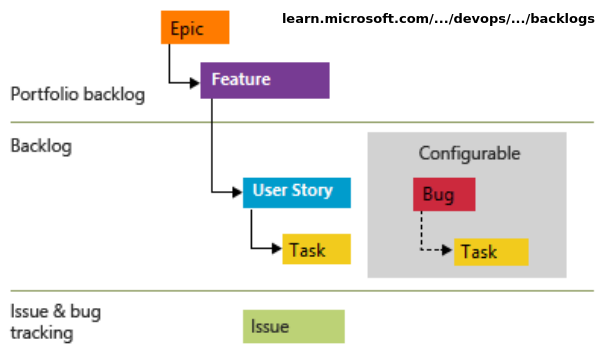
A user 'story' and a 'task' (as defined in Jira) are at same level of hierarchy. Following image referred from atlassian.com/software/jira/guides/issues/overview explains this. "Any work type can be both a parent and a child work item — the only exception being subtasks, which can only be a child since there are not any work types below it in the hierarchy."
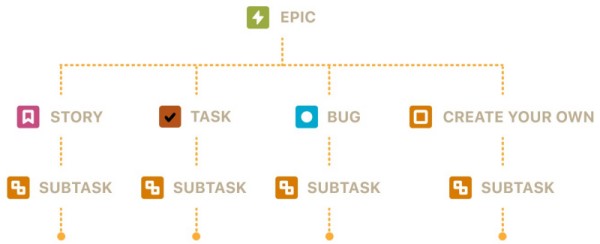
Linked work items: dependencies between work items are represented in Jira by linking work items together. Associations that come out-of-the-box are: blocks/is blocked by, clones/is cloned by, duplicates/is duplicated by, relates to.
The relationship between a sprint, a user story, and a task can be understood as a hierarchy of time, value, and execution. A sprint is the time container (can hold multiple user stories ), a user story is the package (broken down into tasks) of value delivered inside that container, and task are the building blocks needed to construct that package. Tasks belong to a parent user story and do not mean anything on their own. Project creation in Jira is simply referred as setting up a new project and the terminology is progressively transitioning towards "creating a space".
An epic, a user story, and a sub-task form a hierarchy in Scrum that breaks large business goals down into small, actionable steps. An epic is a large body of work that is too big to finish in a single sprint. It spans multiple sprints or months and represents a major strategic goal or product initiative.
As per atlassian.com/agile/project-management/user-stories: "For development teams new to Agile, user stories sometimes seem like an added step. Why not just break the big project (the epic) into a series of steps and get on with it? But stories give the team important context and associate tasks with the value those tasks bring. Generally a story is written by the product owner, product manager, or program manager and submitted for review."
A backlog in Scrum is an ordered, living list of everything needed to build, improve, or maintain a product. There are two main types of backlogs: the Product Backlog (maintained by product owner) and the Sprint Backlog (maintained by developers). Ref: atlassian.com/agile/scrum/backlogs: "A product backlog contains a prioritized list of work items, including user stories, features, bug fixes, technical tasks, and research activities needed to improve the product. Each item in the product backlog should be clearly described, estimated, and prioritized based on business value and urgency."
In Jira, work items (earlier known as Issues) are individual tasks or tickets which are tracked as pieces of work that must be completed. Components are sub-sections or functional categories used to group those items within a project.
Work Items: ↴- Definition: The fundamental building blocks of a Jira project that represent a specific piece of work, such as a user story, task, bug, or support request.
- Hierarchy: Organized into levels like Epics (large initiatives), standard work items (stories, tasks, bugs), and subtasks (smaller steps).
- Details: Each item holds core data like an assignee, description, status, priority, and attachments to monitor progress.
Components: Project-level sub-divisions or "buckets" used to categorize work items by specific product areas, modules, or teams (such as Frontend, Back-end, Database, Infrastructure, Deployment, Support Functions).
Comparative Flowchart for Waterfall vs Agile Approach for Web App Development ↴
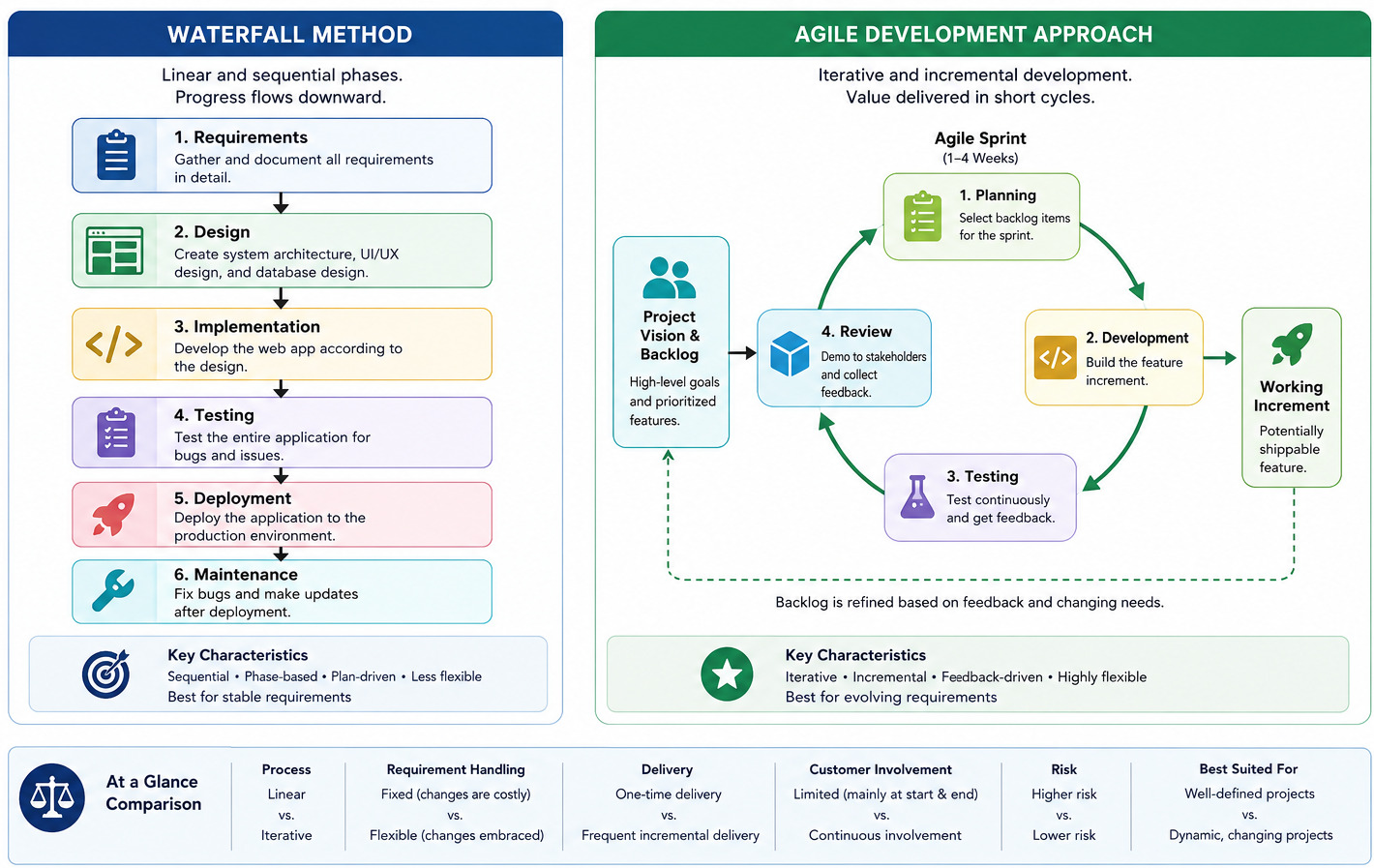
Team-managed vs. Company-managed Spaces
| Topic | Team-managed | Company-managed |
| Setup | Full autonomy to set up and change their own workflows and fields without a system admin | Uses centralized, shared schemes controlled by Jira administrators to ensure standardization across the whole organization |
| Control | Settings, workflows, and custom fields apply only to that single project and do not affect others | Workflows, issue types, screens, and permissions are reused across multiple projects for consistency |
| Best for | Autonomous, standalone teams, new users, or short-term experiments that need quick setup | Growing companies, large organizations, or cross-team collaboration that requires strict governance and reporting |
| Limitations | Cannot easily share configurations, pull issues from multiple projects onto one board | Requires administrator involvement to make changes to global settings and schemas |
A story point is a unit of measure used in Agile estimation to express the relative effort required to complete a user story or task. Story points consider complexity, risk, and the amount of work, rather than specific hours or days. Story points should not be mistaken for a measure of productivity. Instead, teams should use story points to understand the size of the work and the prioritization of the work. Reference: atlassian.com/agile/project-management/estimation
Note that an epic can contain both user stories and tasks simultaneously. Do not force technical work into user story phrasing: user stories should focus on the 'why' and 'who'. If project demands back-end work like infrastructure clean-up, setting up pipelines, or compliance tasks required to complete the Epic, log them explicitly as Tasks, not fake Stories.
Example: 1. Epic (The Big Goal) - Title: Cloud-Based Simulation Engine and Dashboard
Description: Build a web interface that allows researchers to upload data files, configure simulation parameters, run intensive calculations in the cloud, and view visual results.
Business Value: Eliminates the need for researchers to install heavy software locally, speeds up calculation times via cloud scaling, and standardizes data reporting.
Child Stories: Includes user authentication, data file upload, configuration dashboard, and CSV report export.
1.1 📄 The User Story (The Value to the User): One of the child stories rolling up into the epic above. ⤴
Story Statement: As a climate researcher, I want to upload my CSV data files and configure variables (like temperature and pressure range), so that I can customize my atmospheric simulation runs.
Acceptance Criteria:
- System must accept .csv and .txt files up to 100MB
- System must display an error message if the file format is invalid
- User must see numeric input fields for minimum and maximum temperature
- Clicking "Run" must lock inputs and show a loading spinner
Estimation: 15 Story Points
1.1.1 🛠️ The Sub-Tasks (The Technical To-Dos): The specific, bite-sized engineering steps required to complete the user story above. ⤴
- 1.1.1.a - Sub-Task 1 (Design): Create Figma wireframe / mock-ups for the file upload drag-and-drop area and the numeric parameter form
- 1.1.1.b - Sub-Task 2 (Frontend): Build the UI component for the parameters form and file upload using React, including file extension validation
- 1.1.1.c - Sub-Task 3 (Back-end): Create an API endpoint (/api/v1/simulations/upload) in Python/FastAPI to receive the file and securely store it in an AWS S3 bucket
- 1.1.1.d - Sub-Task 4 (DevOps): Configure the background worker queue (e.g. Redis) to accept the uploaded file path and user parameters
- 1.1.1.e - Sub-Task 5 (QA/Testing): Write integration tests ensuring that a 105MB file is rejected and a valid 10MB CSV successfully triggers the back-end queue.
Methods to Estimate Story Points
"Story points" are not tangible like hours and days, developers need to use mental or team-agreed benchmarks. If the team do not have historical data yet, they must collectively agree on a benchmark task that represents a known, manageable amount of effort. This can be found by looking through the product backlog to find a user story that is neither too simple nor too complex.
Look for a standard, well-understood feature that the whole team feels comfortable building (e.g. "As a user, I want to reset my password via an email link"). Before assigning a point value, the developers should talk through what it actually takes to get this specific story to the Definition of Done (DoD) which may encompass activities related to front-end, back-end, testing and deployment.Example of activities and corresponding story points need to be agreed can be as described below. Normally, the PO calculates the sprint "budget" based on the team's historical performance, if available.
- Standard, trivial bug fix, changing buttons (colour, shape, size) or text change: 1 SP
- Adding a feature with a bit of frontend and backend work: 3 SP
- Creating user registration, password reset feature: 5 SP
- User Password Reset via Email: 3 SP
- Creating a drop-down, user input fields: 2 SP
- Creating APIs to store input from front-end: 8 SP
- Visualizing results in front-end after retrieving from back-end: 8 SP
- Creating CI/CD pipeline using GitHub actions: 13 SP
- Making functional tests: 21 SP
A sample Planning Poker session after the team has established their baseline story. For this scenario, the team's agreed-upon baseline is: "User Password Reset via Email" = 3 Points. The team consists of three developers (Dev_A, Dev_B, and Dev_C), a Product Owner (PO), and a Scrum Master (SM). The setup comprise of every developer holding a deck of Planning Poker cards featuring the Fibonacci sequence (1, 2, 3, 5, 8, 13...). They are estimating a new ticket from the backlog: "As a user, I want to upload a profile picture."
Step 1: The Product Owner Presents the Story - "Next up is profile picture uploads. Users should be able to upload a JPEG or PNG up to 5 MB. It needs to crop automatically into a square and display on their dashboard. Any questions?"- Dev_A (Dev): "Where are we storing the images?"
- PO: "We have an existing AWS S3 bucket configured for other assets."
- Dev_B (Dev): "Do we need to scan for malware or just check the file extension?"
- PO: "Just validate the file extension and size for now. Keep it simple."
Step 3: The Reveal (First Round of Voting) - The Scrum Master counts down: "3, 2, 1, reveal!" All developers lay down their cards simultaneously so they don't bias each other and the scores were: Dev_A plays: 5, Dev_B plays: 3, Dev_C plays: 8
Step 4: Discussing the Outliers -- Because the votes do not match, the team does not average the numbers. Instead, the Scrum Master invites the lowest voter (Dev_B) and the highest voter (Dev_C) to explain their thinking.- Dev_B (3): "I voted a 3 because we already have the S3 bucket connected. I envisioned using a standard frontend library to handle the image cropping before upload. To me, it feels exactly like the same amount of effort as the password reset."
- Dev_C (8): "I see your point, Dev_B, but image manipulation always has hidden edge cases. What if a user uploads a weird resolution? Also, we have to handle API error states if the S3 upload times out or fails. That adds a lot of uncertainty and risk that our password reset baseline didn't have. That's why I think it's significantly larger."
- Dev_A (5): "Dev_C is right about the error handling. I originally voted a 5 because I forgot about the cropping aspect, but hearing Dev_C talk about the S3 timeout risks makes me lean closer to his side."
The Outcome: The team reaches a consensus. The "Profile Picture Upload" story is officially estimated at 5 Points. The Scrum Master records the points, and the team moves to the next ticket.
Poker planning is not a rule or principle in Scrum (mandatory elements of the Scrum framework), only a recommended method. Relative estimate (such as story points) is beneficial when team is new and it is not known who will be assigned which tasks. If team is matured and roles are well defined, absolute estimate (man hours or man days) works equally well.Sprint retrospective is a review conducted after completion of a sprint to determine what went well, where the team had challenges and identify areas where things can be improved. Sprint retrospectives are about improving the next sprint, so the feedback(s) that would not impact the rest of the project can take lower priority. It should be attended by the full Scrum Team which includes Developers, Product Owner, and Scrum Master.
Gherkin (Given-When-Then) Acceptance Criteria: Gherkin format turns user story requirements into clear, testable scenarios. During Sprint Planning, the team estimates User Stories using relative effort (Story Points) and breaks them into Tasks estimated in hours. Once the story is estimated at say 5 points, the team breaks it down into actionable tasks. Tasks should ideally take between 2 to 12 hours of work.
There is no direct way to convert number of story points into number of calendars days. Though an estimate can be made as story point to day ratio using following methods: Find total dev-days or dev-hours in a sprint = D → Get the total story points completed in the sprint = S → Get the ratio R = S/D which is in units "dev-days or dev-hours per story point".
Another method is to use velocity (which is number of story points completed per sprint) and sprint length (which is number of working days). If the velocity is 25 story points / sprint and backlog size is 75 sprints, it would required 75/25 = 3 sprints. If each sprint has length of 10 work days, total number of days required to finish the project is 3 x 10 = 30 days (6 calendar weeks).
The need of converting story points to man days is very much real and is absolute necessity for organizations to deal with Stakeholder Communication, Budgeting and Forecasting, and Risk Management. Using historical data and establishing a baseline velocity may help get a better time-based or effort-based metric.Tracking On-Time Delivery
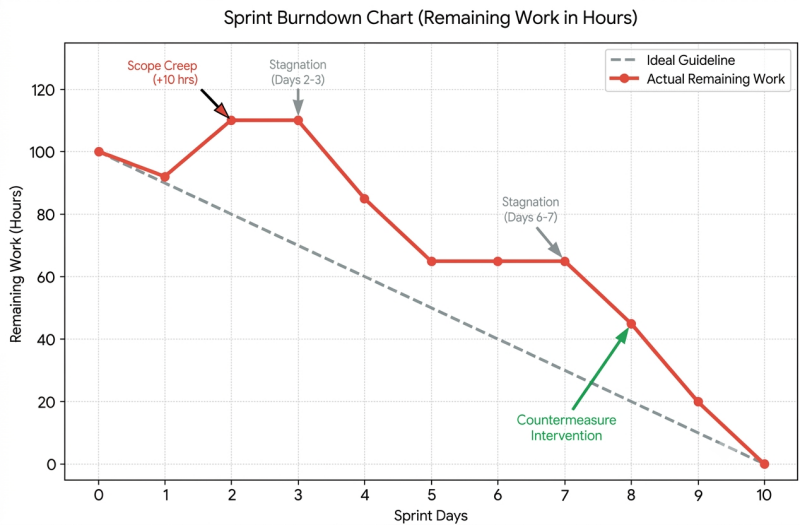
- Sprint Velocity: Measures the amount of work (in story points) a team completes per sprint to predict future delivery dates. Ref: atlassian.com/agile/project-management/velocity-scrum -- New Scrum teams usually average 5–10 story points per person per two-week sprint. Forecasting project timelines: If the project backlog has 200 story points and the team's average velocity is 50 story points per sprint, it can be confidently forecasted that the team will likely need around four more sprints to complete the project.
- Burndown Chart: Shows the remaining work in the current sprint day-by-day to see if the team will finish on time - the guideline or ideal effort line is a straight, planned trajectory from the total workload to completion. It serves as a benchmark for comparing actual progress. The position of the actual line relative to the ideal line shows whether team is ahead of schedule or falling behind.
- Release Burnup Chart: Tracks total scope versus completed work across multiple sprints toward a fixed deadline
- Cycle Time and Lead Time: Measures how long it takes from starting work on an item (Cycle Time) or creation (Lead Time) to its completion.
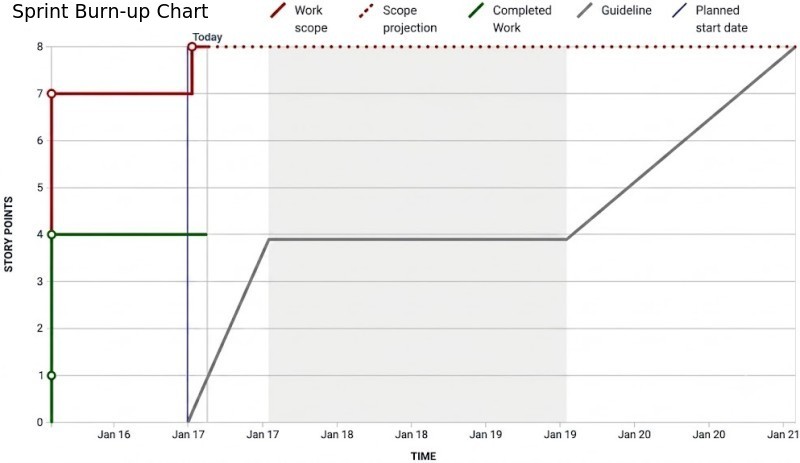
Summary of Progress in Sprints:
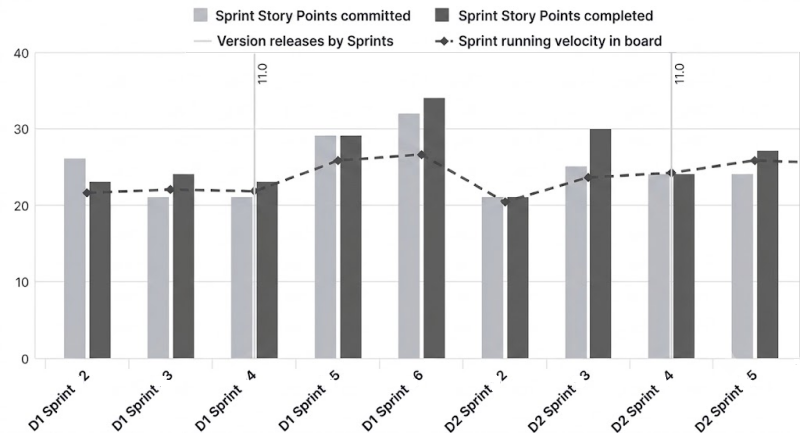
Sprint ID | User Story ID | Planned Story Points | Story Points Completed |   Velocity  |
----------+---------------+----------------------+------------------------+-------------|
          |               |                      |                        |             |
----------|---------------|----------------------|------------------------|-------------|
          |               |                      |                        |             |
----------|---------------|----------------------|------------------------|-------------|
          |               |                      |                        |             |
----------^---------------^----------------------^------------------------^-------------'
Jira allows to view data for one individual sprint at a time from a drop-down menu. There is no native report to get total story points across all historical, active, and future sprints. The Jira Query Language can be used to get custom summary. A reference document can be found here.
A search query (run in the issue navigator) that gathers all issues assigned to any sprint in a project: sprint_summary = "PROJECT_KEY" AND sprint IS NOT EMPTY AND "Story Points" IS NOT EMPTY → Click Save filter at the top, name it as PRJ_SPR_SP.Set Up the Dashboard Gadget
- Go to Dashboards in the top navigation bar and select Create dashboard (or open an existing one).
- Click Edit or Add gadget in the top right corner.
- Search for Two-Dimensional Filter Statistics and click Add.
- Configure the gadget settings exactly like this:
- Filter: Search for and select the saved filter created above (PRJ_SPR_SP).
- XAxis: Set this to Sprint.
- YAxis: Set this to Status (or Project, if you are tracking just one project).
- Number of Results: Enter a number higher than total number of sprints (e.g. 50 or 100) so none are cut off.
- Sort By: Set to Natural and Ascending (this will arrange sprints chronologically from oldest historical to active, then future).
Daily Scrum: Dos and Don'ts
For software teams, the stand-up also known as the daily scrum, and objective is to keep everyone aware of the team’s landscape and progress.- Don't use it as a planning session - Reference your scrum board
- Don't problem-solve during the stand-up - Do highlight blockers
- Don't make it a status report meeting - Keep stand-up efficient to finish in 15 minutes.
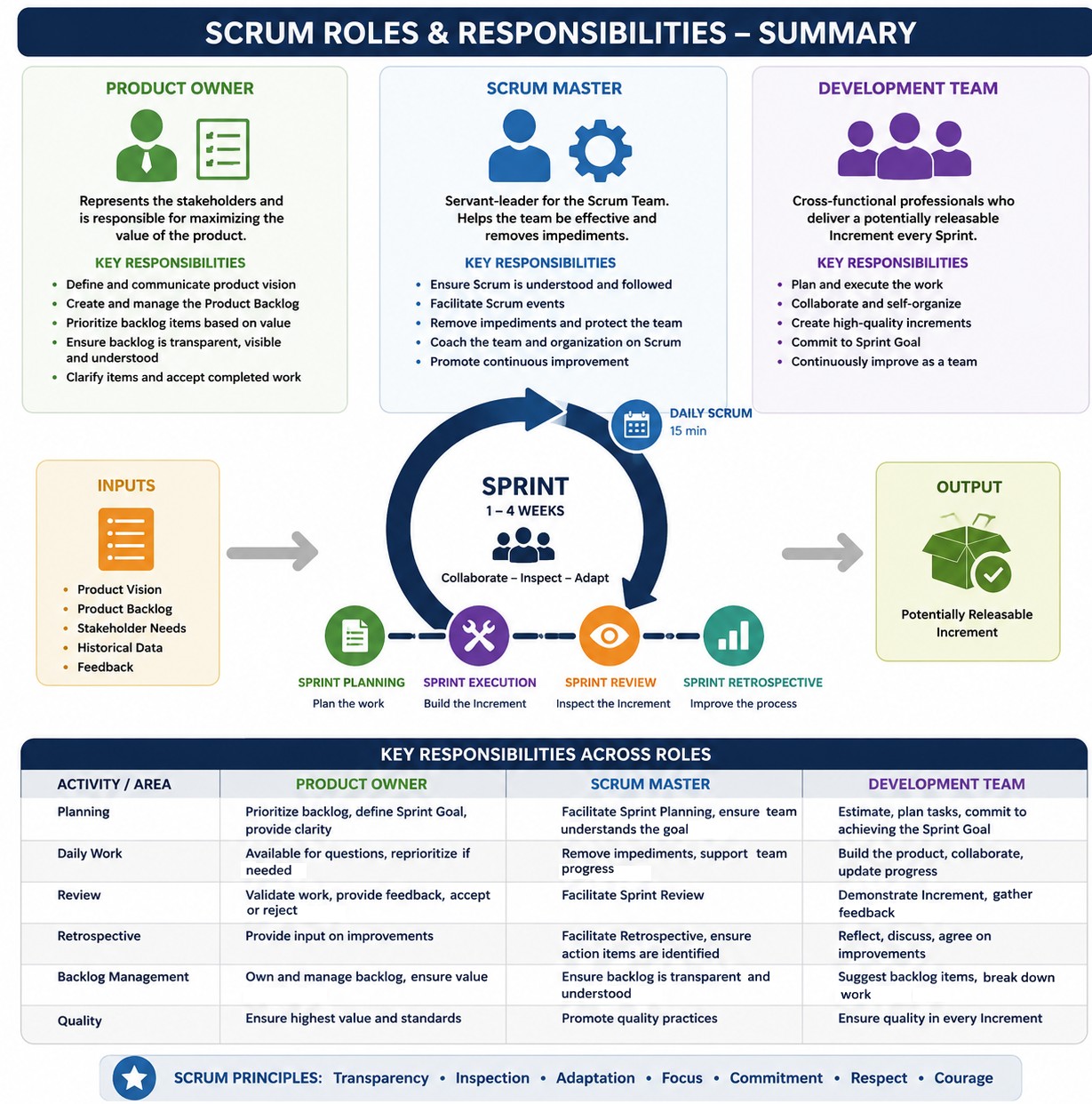
Reference - atlassian.com/agile/scrum/scrum-metrics: "The scrum way of working is characterized by the sprint, which is a measured amount of time a scrum team works to complete a set amount of work. Scrum metrics alone cannot measure customer value or show if the team even delivered the right thing. Stand-ups, or daily scrum, are short meetings held each day where team members check in about their work. A sprint burndown chart tracks the completion of work throughout a sprint. Velocity is how much work it can accomplish during a given time, and capacity refers to how much availability it has."
Jira Roles and Activities
Core admin creates users and groups including project administrators → Project admin creates a project, epic and adds users to the project → Create custom roles with specific permissions → Create tasks and assign to users.In Jira, roles are project specific - adding a user affects only the project s/he is added to. In other words, a user can have different permission levels in different projects.
In a dual-track Agile framework, UI/UX designers operate in the Discovery track, working exactly one or two sprints ahead of the developers' Delivery track. In this track, a Definition of Ready (DoR) ensures that when a Jira ticket moves from the Discovery Track to the Delivery Track, developers have absolutely everything they need to start writing code without hitting blockers.Example User Stories for a Web App Development Projects: This Agile structure, single user stories have been used to encompass the epic. Typically, each epic should have multiple or at least couple of user stories.
- 📂 Epic 1: UI/UX Discovery & Wireframing → Business Value: Ensures a user-centric design, minimizes development rework by validating layouts early, and aligns stakeholders on the visual direction.
Component: Design and Prototyping
User Story 1: As a User, I want to view a clean, intuitive dashboard so that I can easily navigate between file uploads and parameter inputs.
- Sub-Task 1: Create low-fidelity wireframes for the input dashboard and results screen, layouts for pages with zero data or initial onboarding states are included
- Sub-Task 2: Design high-fidelity UI mock-ups with interactive states (hover, loading, error) - the 'Happy' and 'Unhappy' paths
- Sub-Task 3: Apply colors, typography, color contrast, and branding to UI
- Sub-Task 4: Create interactive prototype by connecting screens to demonstrate expected user journeys
- Sub-Task 5: Conduct a design review with stakeholders for final sign-off or to gather feedbacks
- Design the multi-file drag-and-drop zone interface
- Design the input parameter forms and validation tooltips
- Design data visualization charts for the results screen
- Inspect implemented code against original mockups
- Sub-Task 6: Export SVG icons, images, and finalize the Figma handoff link in the Jira ticket
- Sub-Task 7: Audit the developer's staging environment to ensure alignment with padding, typography, and responsiveness.
- 📂 Epic 2: Frontend Input Interface and File Management → Business Value: Allows users to easily input custom parameters and upload multiple datasets seamlessly, providing immediate validation before processing.
Component: Frontend UI
User Story 2: As a User, I want to upload multiple files simultaneously and configure processing parameters so that the application has the correct data to generate results.
- Sub-Task 1: Implement a drag-and-drop file upload component
- Sub-Task 2: Build the dynamic form for input parameters with client-side validation
- Sub-task 3: Agree on an API Contract with back-end developer
- Sub-Task 4: Connect the frontend to the back-end file upload API
- Implement file type and size restriction alerts
- Add a progress bar UI for active file uploads.
- 📂 Epic 3: Back-end Processing Engine and API Layer → Business Value: Forms the core computational brain of the app, handling complex business logic, parsing files, and managing the processing flow.
Component: Back-end Core
User Story 3: As the System, I need to validate, parse, and process uploaded files alongside user parameters so that I can execute the core calculation logic accurately.
- Sub-Task 1: Develop API endpoints
- Sub-Task 2: Write the data parsing logic to extract information from multiple file formats
- Sub-Task 3: Implement the core business logic algorithm using the input parameters
- Create error-handling mechanisms for corrupted or malformed files
- Secure the API endpoints using token-based authentication.
- 📂 Epic 4: Database Architecture and Data Persistence → Business Value: Ensures secure, reliable storage of historical user inputs, operational logs, and generated results for future retrieval.
Component: Database (DB)
User Story 4: As a Developer, I need to store user inputs and generated results in a database so that users can retrieve their historical runs without reprocessing.- Sub-Task 1: Design the appropriate database schema
- Sub-Task 2: Set up database connection pools within the back-end application
- Sub-Task 3: Create Read/Write queries for user parameters and generated outputs
- Write database migration scripts
- Implement data encryption at rest for sensitive data fields.
- 📂 Epic 5: AWS Cloud Infrastructure and Deployment → Business Value: Provides a scalable, secure, and highly available hosting environment that automatically handles fluctuations in user traffic.
Component: DevOps / Infrastructure
User Story 5: As a DevOps Engineer, I need to deploy the application on AWS infrastructure so that the application is secure, scalable, and publicly accessible.- Sub-Task 1: Provision AWS compute resources (EC2 instances or ECS containers)
- Sub-Task 2: Configure an Amazon S3 bucket for secure file storage
- Sub-Task 3: Set up a CI/CD pipeline (e.g. GitHub Actions) for automated deployment
- Configure AWS IAM roles and security policies for least-privilege access
- Integrate linting and code validation tool such as SonarQube
- Write the build and test stages in Jenkinsfile or GitHub Actions YAML
- Set threshold rules to fail builds on high/critical vulnerabilities
- Configure webhook triggers for pull requests and main branch merges
- Test pipeline execution with a dummy commit
- Set up an Application Load Balancer (ALB) and SSL certificates.
- 📂 Epic 6: Results Display and Data Visualization → Business Value: Transforms raw database outputs into clean, readable, and actionable insights for the end-user.
Component: Frontend UI / Reporting
User Story 6: As a User, I want to see my generated results clearly displayed in tables and charts so that I can easily analyze the output.- Sub-Task 1: Build the results dashboard page based on approved wireframes
- Sub-Task 2: Integrate a data visualization library (such as Chart.js or D3.js) to render graphical data
- Sub-Task 3: Add an export feature (for example Download as PDF/CSV) for the displayed results
- Implement a polling or WebSocket mechanism to update the UI once the backend finishes processing
- Create responsive layout fixes for different monitor screen resolutions.
"When importing a file, the summary field is always required. It provides an overview of the work item. The CSV importer uses the file header row to determine how to map data from the file's second row and beyond to fields in Jira. Use email addresses when adding people as assignees, reporters, or creators to your CSV file. If you’d like to import work types and parent-child relationships between work items, along with the work type column, include the work item ID and parent columns in your CSV file."
From support.atlassian.com/ ... /import-data-from-a-csv-file: "Use double-quote marks (") in your CSV file to capture data that spans multiple lines." A Jira Admin privilege is required in order to use the option to specify the Space within the CSV data.
Work Type,  Summary,      Assignee, Description,        Priority, Status, Work item ID, Parent, Reporter, Story Points
Initiative,"UI Upgrade",  a@ex.com, "UI Enhancements",      High,  To Do,          101,       , r@ex.com,
Epic,      "Create UI",   a@ex.com, "Use Material UI",      High,  To Do,          105,    101, r@ex.com,
Story,     "First screen",a@ex.com, "Create user form",   Medium,  To Do,          110,    105, r@ex.com, 5
Sub-task,  "First task",  a@ex.com, "Create dropdown",       Low,  To Do,          115,    110, r@ex.com,
Bug,       "First bug",   d@ex.com, "Incorrect value",   Highest,  To Do,          120,       , b@ex.com, 5
A sample spreadsheet file (which can be easily saved into CSV format) for full backlog of a web project can be downloaded from here.
Note: Jira excludes the Story Points field for sub-task issue types. Agile methodology recommends estimating effort only at the parent work item level (such as Stories, Tasks, or Bugs), while sub-tasks are typically estimated in time (hours or days). White story-points can still be manually added to sub-tasks, adding story points to sub-tasks will not change the burndown chart.
An Epic Link in Jira is a special custom field used to connect child issues—such as stories, tasks, or bugs—to their parent Epic. Unlike general issue links (e.g. "relates to"), the Epic Link specifically structures work so Jira can group items together on boards, backlogs, and reports.When creating a new Epic, the Epic Name custom field is a short name field used to identify the Epic. By default it is available only to Epic work item. It is intended to be used to label any work item that belong to the Epic.
Immediate Configuration after Project Creation:
- Add Team Members: Go to Project settings > Access, click Add people, and assign them roles (Viewer, Member, or Administrator).
- Enable/Disable Features: Go to Project settings > Features to turn on or off modules like Sprints, Backlog, Deployments, or Releases depending on workflow adopted by the team.
- Customize Issue Types: Go to Project settings > Issue types to add custom fields (like drop-downs or text boxes) or modify the workflow statuses (e.g. adding a "In Review" step) just for this project.
- For a team-managed Scrum project, the main goal is to activate the backlog and sprint tracking features so that team can plan their fixed time blocks.
- Verify Agile Features: Go to Project settings > Features and ensure both Backlog and Sprints are toggled ON (these are required for Scrum but can sometimes be toggled off by default).
- Set Up the Scrum Board and Workspace
- Customize Workflow Statuses: Go to Project settings > Issue types > Task/Story. Click Edit workflow to add or rename columns on your board (e.g. To Do, In Progress, In Review, Done).
- Define Estimation: In Project settings > Features > Estimation, choose whether the team will estimate work using Story Points or Time (Hours).
- Initialize the First Sprint
- Access the Backlog: Click Backlog in the left sidebar.
- Create Issues: Click + Create issue to populate backlog with initial user stories, tasks, or bugs.
- Plan the first sprint: Click Create sprint at the top of the backlog page. Drag and drop the prioritized issues from the backlog into this new sprint section.
- Start Sprint: Click Start sprint, set fixed time block duration (e.g. 2 weeks), define the start/end dates, enter a Sprint goal, and click Start.
Active Sprint → Icon with axes and upward bent arrow → Sprint insight: it gives spring summary as All / Due / Stuck / Blocked / Flagged.
Reports → Work items by type → Click on … → View data table: get count of work items namely Story, Sub-task, Epic and Initiative.
Reports → Work item details → Click on … → Get tabular data containing headers Work Item Key, Work Type, Work Item Priority and Issue Summary. The Work Type includes Epic, Story, Sub-task and Initiative.
Backlog tab as the name suggests gives information about active and future sprints. Each sprint has 3 boxes [Not started], [In progress], [Completed] and mouse hover on any of the box displays X of Y (story points).
Summary → Status overview → Pie chart: shows count of work items In progress, Backlog and Done. Summary → Type of work: displays list of items under categories Epic, Story, Sub-task, Initiative, Task, Bug, Incident, and Security.
FAQ:
1) How to get story points completed within the sprint? Sprint Report: it shows the issues and the number of story points completed.2) How to account for partially allocated team member? By reducing their individual capacity (available hours or story points) during sprint planning, assign smaller self-contained tasks.
3) How is concurrent development handled? How to prevent frontend and back-end developers from waiting on each other, or DevOps from blocking deployment? Agree on API contract, and once the data structure is agreed upon, the frontend uses mock data while the back-end builds the actual logic. DevOps engineers embed automated CI/CD pipelines early.
4) How to manage the parallel tasks of a single feature without creating a complex Jira board? Use Single-Story Sub-task approach where the story represents the user-facing feature. Sub-tasks can be created for each discipline (e.g. [UI/UX] Design login wireframe, [BE] Create auth endpoints, [FE] Integrate auth UI, [DevOps] Configure SSL/CI pipeline).
Checklist to Develop a Simple Web App: Activity and Responsibility Matrix - for reference only (not validated with real-life roles)
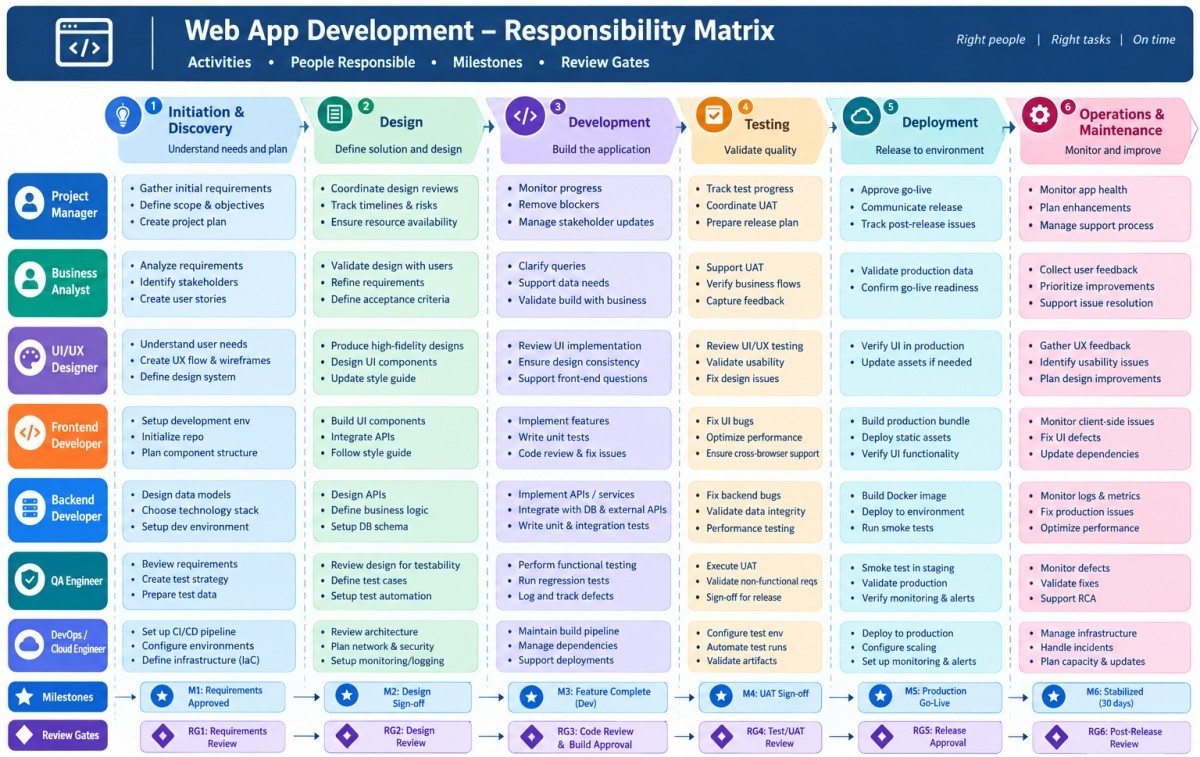
| Activity / Step / Stage | Artefacts | R | A | S | I | C |
| Define problem statement | Product Owner | S/w Architect | S/w Architect | Full-stack | DevOps | |
| Identify target users | Product Owner | S/w Architect | S/w Architect | Full-stack | DevOps | |
| Define core features | Product Owner | S/w Architect | S/w Architect | Full-stack | DevOps | |
| Write functional requirements | Product Owner | S/w Architect | S/w Architect | Full-stack | DevOps | |
| Define success metrics (KPIs) | Product Owner | S/w Architect | S/w Architect | Full-stack | DevOps |
| Activity / Step / Stage | Artefacts | R | A | S | I | C |
| Choose architecture | Monolith | S/w Architect | Product Owner | Full-stack | Product Owner | Full-stack |
| Select frontend framework | React | S/w Architect | Product Owner | Full-stack | Product Owner | Full-stack |
| Select back-end tech | Node.js | S/w Architect | Product Owner | Full-stack | Product Owner | Full-stack |
| Choose database | MongoDB | S/w Architect | Product Owner | Full-stack | Product Owner | Full-stack |
| Define API design | REST | S/w Architect | Product Owner | Full-stack | Product Owner | Full-stack |
| Create authentication scheme | AWS Amplify | S/w Architect | Product Owner | Full-stack | Product Owner | Full-stack |
| Define third-party integrations | Single Sign-On | S/w Architect | Product Owner | Full-stack | Product Owner | Full-stack |
| Create high-level design diagram | AWS Amplify | S/w Architect | Product Owner | Full-stack | Product Owner | Full-stack |
| Activity / Step / Stage | Artefacts | R | A | S | I | C |
| Create wireframes (low fidelity) | UI/UX Designer | Product Owner | S/w Architect | Back-end Dev | Full-stack | |
| Design UI mock-ups (high fidelity) | Figma | Full-stack | Product Owner | S/w Architect | ||
| Define design system | Full-stack | Product Owner | S/w Architect | |||
| Create responsive design | Desktops only | Full-stack | Product Owner | S/w Architect | ||
| Validate UX with stakeholders | Full-stack | Product Owner | S/w Architect |
| Activity / Step / Stage | Artefacts | R | A | S | I | C |
| Initialize repository | Git | DevOps | S/w Architect | Full-stack | Product Owner | Back-end Dev |
| Set up project structure | AWS | DevOps | S/w Architect | |||
| Configure package managers | npm | DevOps | S/w Architect | |||
| Set up linting tools | ESLint | DevOps | S/w Architect | |||
| Configure environment | AWS | DevOps | S/w Architect | |||
| Set up CI/CD pipeline | GitHub | DevOps | S/w Architect |
| Activity / Step / Stage | Artefacts | R | A | S | I | C |
| Set up routing/navigation | Full-stack | S/w Architect | Back-end Dev | Product Owner | UI/UX Designer | |
| Build reusable components | React | Full-stack | S/w Architect | |||
| Implement UI screens, responsiveness | React | Full-stack | S/w Architect | |||
| Integrate APIs | React | Full-stack | S/w Architect | |||
| Manage state | Redux | Full-stack | S/w Architect | |||
| Handle forms and validation | React | Full-stack | S/w Architect | |||
| Add loading/error states | Node | Full-stack | S/w Architect |
| Activity / Step / Stage | Artefacts | R | A | S | I | C |
| Set up server framework | Node.js | Full-stack | S/w Architect | Back-end Dev | Product Owner | DevSecOps |
| Define database schema | Full-stack | S/w Architect | ||||
| Implement APIs/endpoints | Full-stack | S/w Architect | ||||
| Add authentication | JWT | Full-stack | S/w Architect | |||
| Implement business logic | Full-stack | S/w Architect | ||||
| Add input validation, error handling | Full-stack | S/w Architect | ||||
| Integrate external services | Full-stack | S/w Architect | ||||
| Write unit tests | Full-stack | S/w Architect |
| Activity / Step / Stage | Artefacts | R | A | S | I | C |
| Design schema/models | Full-stack | S/w Architect | Product Manager | Product Owner | DevSecOps | |
| Set up migrations | Full-stack | S/w Architect | Product Owner | |||
| Seed initial data | Full-stack | S/w Architect | Product Owner | |||
| Optimize queries and indexing | Full-stack | S/w Architect | Product Owner |
| Activity / Step / Stage | Artefacts | R | A | S | I | C |
| Implement HTTPS | TSL 1.3 | Full-stack | DevOps | S/w Architect | Product Owner | Back-end Dev |
| Secure authentication and sessions | Full-stack | DevOps | Product Owner | |||
| Validate and sanitize inputs | Full-stack | DevOps | Product Owner | |||
| Manage secrets securely | Full-stack | DevOps | Product Owner | |||
| Set up rate limiting | Full-stack | DevOps | Product Owner |
| Activity / Step / Stage | Artefacts | R | A | S | I | C |
| Unit tests | Jest | Full-stack | S/w Architect | DevOps | Product Owner | S/w Architect |
| Integration tests | Jest | Full-stack | DevOps | S/w Architect | ||
| End-to-end tests | Full-stack | DevOps | S/w Architect | |||
| Manual QA testing | Full-stack | DevOps | S/w Architect | |||
| Cross-browser testing | Full-stack | DevOps | S/w Architect | |||
| Performance testing | Lighthouse | Full-stack | DevOps | S/w Architect |
| Activity / Step / Stage | Artefacts | R | A | S | I | C |
| Choose hosting | AWS | Full-stack | DevOps | S/w Architect | Prod. Manager | Product Owner |
| Set up production environment | Full-stack | DevOps | S/w Architect | |||
| Configure CI/CD pipelines | CodeBuild | Full-stack | DevOps | S/w Architect | ||
| Set up domain and DNS | Full-stack | DevOps | S/w Architect | |||
| Configure SSL certificates | Full-stack | DevOps | S/w Architect | |||
| Set up monitoring and logging | Full-stack | DevOps | S/w Architect |
| Activity / Step / Stage | Artefacts | R | A | S | I | C |
| Optimize frontend assets | Lazy loading | S/w Architect | Full-stack | Product Owner | ||
| Implement caching | Not required | S/w Architect | Full-stack | Product Owner | Full-stack | DevOps |
| Optimize database queries | S/w Architect | Full-stack | Product Owner | |||
| Use compression | gzip | S/w Architect | Full-stack | Product Owner | ||
| Analyze performance | S/w Architect | Full-stack | Product Owner |
| Activity / Step / Stage | Artefacts | R | A | S | I | C |
| Final QA pass | S/w Architect | Product Owner | DevOps | Prod. Manager | S/w Architect | |
| Fix critical bugs | S/w Architect | Product Owner | Full-stack | S/w Architect | ||
| Prepare rollback plan | S/w Architect | Product Owner | S/w Architect | |||
| Create user doc / help pages | S/w Architect | Product Owner | S/w Architect |
| Activity / Step / Stage | Artefacts | R | A | S | I | C |
| Monitor errors and logs | S/w Architect | Full-stack | DevOps | Product Owner | ||
| Track user behaviour and metrics | S/w Architect | Full-stack | DevOps | Product Owner | Prod. Manager | |
| Gather user feedback | S/w Architect | Full-stack | DevOps | Product Owner | ||
| Plan feature iterations | S/w Architect | Full-stack | DevOps | Product Owner | ||
| Regular security updates | S/w Architect | Full-stack | DevOps | Product Owner | ||
| Scale infrastructure as needed | S/w Architect | Full-stack | DevOps | Product Owner |
sample Flowchart: User Registration with Single Sign-On (SSO) Login
 ┌─────────────────────────────┐      ┌─────────────────────────────┐
 │       Start                 │ ---> │ User Opens Web App          │
 └─────────────────────────────┘      └─────────┬───────────────────┘
                                                │
                                                ▼
 ┌─────────────────────────────┐      ┌─────────────────────────────┐
 │ Registration Sent to Owner  │ <--- │ New User Registration Form  │
 │ for Approval                │ <--- │ - Name, Email, Team Detail  │
 └─────────┬───────────────────┘      └─────────────────────────────┘
           │
           ▼
 ┌─────────────────────────────┐
 │ Owner Reviews Request       │
 └─────────┬───────────────┬───┘
           │               │
     Approved              '-------Rejected
           │                            │
           ▼                            ▼
 ┌──────────────────────┐   ┌───────────────────┐
 │ User Account Created │   │ Rejection Email / │
 │ in System            │   │ Notification Sent │
 └─────────┬────────────┘   └─────────┬─────────┘
           │                          │
           ▼                          ▼
 ┌──────────────────────┐   ┌───────────────────┐
 │ Approval Notification│   │        End        │
 │ Sent to User         │   │                   │
 └─────────┬────────────┘   └───────────────────┘
           │
           ▼
 ┌─────────────────────────────┐
 │ User Accesses Login Screen  │
 └─────────┬───────────────────┘
           │
           ▼
 ┌─────────────────────────────┐
 │ SSO via Identity Provide    │
 │ (corporate ID/password)     │
 └─────────┬───────────────────┘
           │
           ▼
 ┌─────────────────────────────┐
 │ Authentication Successful?  │
 └─────────┬────────────────┬──┘
           │                │
          Yes              No
           │                │
           ▼                ▼
 ┌──────────────────┐  ┌───────────────┐
 │ Redirect to User │  │ Display Login │
 │ Dashboard        │  │ Error Message │
 └─────────┬────────┘  └───────┬───────┘
           │                   │
           ▼                   ▼
 ┌──────────────────┐  ┌───────────────┐
 │        End       │  │      End      │
 └──────────────────┘  └───────────────┘
Job Description Templates
Refer to this page for information to be put in a job description. The behavioural aspects of a candidate can be assessed though these questions. Use this page to create Job Description and save in CSV format. An spreadsheet template with appropriate drop-downs to create a summary of JD for hiring new members can be downloaded from here. It contains defined names for drop-downs in a separate sheet which can be updated / edited as per one's needs.
In the digital industry, professional roles are generally divided into two main categories: Domain (Business/Functional) and Tech (Technical/Engineering), though they are not mutually exclusive. Domain roles focus on what the business needs, why it matters, and how users interact with the product. Tech roles focus on how to build, scale, secure, and maintain the actual technology stack.
Data analyst is a domain role, data engineer is a technical (digital) role. Product owner is a domain matter, Tech lead applies to digital scope. Product manager is domain driven role, engineering manager is tech driven role. The designations varies a lot among IT services and consulting companies — vs — Digital product and technology companies — such as SaaS, and software product organizations.
Difference between Tech Lead and Software Architect can be found here, click the tabs below to get sample job descriptions.
| Job Title | Software Architect | Job Type | Full-time |
| Cost Center | CC01 | Section Name | SH01 |
| Job Code | CC01_SH01_SA | Reports To | Delivery Head |
| Work Location | Patna | Number of Openings | 2 |
| Minimum Experience (years) | 5.0 | Maximum Experience (years) | 8.0 |
| Education Qualification | B. Tech. | Engineering Discipline | Computer Science |
| Description of role | Make high-level design choices, set technical standards, present technical concepts, and define the overall structure of software systems. Act as a bridge between business requirements and technical solutions by deciding on tools, platforms, and architecture to ensure expected performance | ||
| Responsibilities | Create the outline for software defining components, interfaces, and their interactions. Selecting tech stacks, define coding standards, and address non-functional requirements like security and performance. Mentor developers and conduct code reviews to ensure the architectural decisions are implemented. Identify potential technical issues early and plan mitigations. | ||
| Technical Skills Required with % weight | (a) Experience in React front end programming - 25%, (b) Knowledge of concurrent execution, distributed computing and parallel processing - 25%, (c) Cloud-Native Architecture - 25% and (d) Security best practices - 25% | ||
| Domain Skills Required with % weight | (i) Software development lifecycle (SDLC) - 25%, (ii) Knowledge of UI/UX principles - 25%, (iii) Expertise in system design and cloud platforms with strong coding and problem-solving skills - 50% | ||
| Communication and Office suites or Productivity software | Extensive experience in preparing business proposal using MS-Word or LibreOffice Write with knowledge of advance formatting features, Hands-on experience in preparing high quality engaging presentations using MS PowerPoint or LibreOffice Impress, Know-how about advanced features in MS-Excel or LibreOffice Calc such as Filtering, Pivot Tables, Conditional Formatting, Data Validation and Scientific Charting | ||
| Keywords and Tool Names | Software Architecture, Python, React.js, Node.js, Automation Scripting, REST API, CI/CD - Jenkins, Flask, SQL, AWS hosting, Kubernetes/Docker, JIRA, SCRUM | ||
| Job Title | Full Stack Developer | Job Type | Full-time |
| Cost Center | CC01 | Section Name | SH02 |
| Job Code | CC01_SH02_FS | Reports To | Delivery Head |
| Work Location | Patna | Number of Openings | 3 |
| Minimum Experience (years) | 6.0 | Maximum Experience (years) | 9.0 |
| Education Qualification | B. Tech. | Engineering Discipline | Computer Science |
| Description of role | Software engineer proficient in both front-end (client-side) and back-end (server-side) development, managing the entire application lifecycle from user interface design to database management, APIs, and server configuration | ||
| Responsibilities | Create user-friendly and responsive interfaces using HTML, CSS, and JavaScript frameworks. Write server-side logic, maintain application performance, and build robust APIs using languages like Node.js. Database Management: Designing, developing, and managing databases (SQL or NoSQL) to store and retrieve data efficiently. API Integration: Develop and integrate third-party services and APIs to enhance functionality. Collaborate with product managers, business analysts, and other stakeholders to gather requirements and translate them into technical specifications. erform unit testing, debugging, and troubleshooting to identify and resolve software defects and performance bottlenecks. | ||
| Technical Skills Required with % weight | (a) Understanding of front-end frameworks, with a primary emphasis on React.js and knowledge of other libraries or frameworks such as Bootstrap, jQuery - 40%, (b) Familiarity with back-end frameworks and libraries, notably Node.js - 40%, (c) Experience deploying and managing applications using AWS Lambda and related server-less tools - 20% | ||
| Domain Skills Required with % weight | (i) Software development lifecycle (SDLC) - 25%, (ii) Knowledge of UI/UX principles - 25%, (iii) Expertise in system design and cloud platforms with strong coding and problem-solving skills - 50% | ||
| Communication and Office suites or Productivity software | Extensive experience in preparing business proposal using MS-Word or LibreOffice Write with knowledge of advance formatting features, Hand-on experience in preparing high quality engaging presentations using MS PowerPoint or LibreOffice Impress, Know-how about advanced features in MS-Excel or LibreOffice Calc such as Filtering, Pivot Tables, Conditional Formatting, Data Validation and Scientific Charting | ||
| Keywords and Tool Names | JavaScript (React.js, Node.js), Python, Java, Pytest, HTML/CSS, MySQL, MongoDB, PostgreSQL, JIRA, SCRUM | ||
| Job Title | DevOps Engineer | Job Type | Full-time |
| Cost Center | CC02 | Section Name | SH03 |
| Job Code | CC02_SH03_DO | Reports To | Delivery Head |
| Work Location | Noida | Number of Openings | 1 |
| Minimum Experience (years) | 5.0 | Maximum Experience (years) | 8.0 |
| Education Qualification | B. Tech. | Engineering Discipline | Computer Science |
| Description of role | DevOps Engineer acts as a bridge between software development and IT operations to automate, streamline, and optimize software delivery. | ||
| Responsibilities | Create the outline for software defining components, interfaces, and their interactions. Selecting tech stacks, define coding standards, and address non-functional requirements like security and performance. Mentor developers and conduct code reviews to ensure the architectural decisions are implemented. Identify potential technical issues early and plan mitigations. | ||
| Technical Skills Required with % weight | (a) Experience with cloud platforms (AWS) - 25%, (b) CI/CD tools (Jenkins, GitHub Actions) - 25%, (c) Containerization (Docker, Kubernetes) - 25% and (d) Security best practices - 25% | ||
| Domain Skills Required with % weight | (i) Software development lifecycle (SDLC) - 25%, (ii) Understanding of basic networking concepts - 25%, (iii) Familiarity with monitoring and logging tools - 25%, (iv) Web and Internet Technologies - 10%, (v) Experience with installing, configuring, and maintaining local services (daemons) - 15% | ||
| Communication and Office suites or Productivity software | Extensive experience in preparing business proposal using MS-Word or LibreOffice Write with knowledge of advance formatting features, Hand-on experience in preparing high quality engaging presentations using MS PowerPoint or LibreOffice Impress, Know-how about advanced features in MS-Excel or LibreOffice Calc such as Filtering, Pivot Tables, Conditional Formatting, Data Validation and Scientific Charting | ||
| Keywords and Tool Names | Python, Automation Scripting, CI/CD - Jenkins, Flask, SQL, AWS hosting, Kubernetes/Docker, Linux/Bash, PowerShell, JIRA, SCRUM | ||
| Job Title | Data Scientist | Job Type | Full-time |
| Cost Center | CC03 | Section Name | SH05 |
| Job Code | CC03_SH05_DS | Reports To | Delivery Head |
| Work Location | Gurgaon | Number of Openings | 2 |
| Minimum Experience (years) | 5.0 | Maximum Experience (years) | 8.0 |
| Education Qualification | M. Sc. | Engineering Discipline | Applied Maths |
| Description of role | Analyse complex, structured, and unstructured data to extract actionable insights, building predictive models and machine learning algorithms to solve business problems. | ||
| Responsibilities | Collecting, cleaning, and preprocessing large datasets to ensure data quality, uniformity, and reliability. Translating data insights into actionable strategies for stakeholders. Utilizing programming languages (Python, R, SQL) and data frameworks (Hadoop, Spark) to analyse, visualize, and report data. | ||
| Technical Skills Required with % weight | (a) Experience in R/Python programming - 25%, (b) Data science - 25%, (c) Data mining - 25% and (d) Machine Learning - 25% | ||
| Domain Skills Required with % weight | (i) Machine learning frameworks - 50%, (ii) Data mining, predictive modeling, and algorithm development - 25%, (iii) Hands on experience in data visualization tools such as Power BI - 25% | ||
| Communication and Office suites or Productivity software | Extensive experience in preparing business proposal using MS-Word or LibreOffice Write with knowledge of advance formatting features, Hand-on experience in preparing high quality engaging presentations using MS PowerPoint or LibreOffice Impress, Know-how about advanced features in MS-Excel or LibreOffice Calc such as Filtering, Pivot Tables, Conditional Formatting, Data Validation and Scientific Charting | ||
| Keywords and Tool Names | PowerBI, Python, Pytest, Pylint, Ruff, Scikit-Learn, Numpy/Pandas, SQL, AWS hosting, JIRA, SCRUM | ||
| Job Title | UI Designer | Job Type | Full-time |
| Cost Center | CC01 | Section Name | SH01 |
| Job Code | CC01_SH01_SA | Reports To | Delivery Head |
| Work Location | Noida | Number of Openings | 3 |
| Minimum Experience (years) | 3.0 | Maximum Experience (years) | 8.0 |
| Education Qualification | B. Tech. | Engineering Discipline | Graphic Design, IT Engg |
| Description of role | Creative and detail-oriented Web Application UI Designer to design intuitive, visually appealing, and user-centric web application interfaces. The role requires close collaboration with Product Owners, UX Designers, Developers, and Business Stakeholders to transform business requirements into engaging and functional user interfaces. | ||
| Responsibilities | Create low-fidelity wireframes, high-fidelity mock-ups, design systems, and high-fidelity prototypes that deliver exceptional user experiences while maintaining consistency across the application. Translate business requirements and user needs into effective design solutions. Ensure designs align with usability and accessibility standards. Create user flows, journey maps, and screen navigation diagrams. Review implemented interfaces to ensure design accuracy. Support front-end teams during implementation and testing. | ||
| Technical Skills Required with % weight | (a) Responsive web design, Visual hierarchy and layout design, Typography and colour theory - 25%, (b) Familiarity with front-end development constraints and best practices - 25%, (c) Data visualization and dashboard design - 25%, (d) Ability to handle multiple projects and deadlines - 15% and (d) Experience working in Agile/Scrum environments - 10% | ||
| Domain Skills Required with % weight | (i) Software development lifecycle (SDLC) - 25%, (ii) Understanding user personas and user journey mapping - 25% (iii) Ability to understand business workflows and map business requirements to screens and interactions - 50% | ||
| Communication and Office suites or Productivity software | Extensive experience in preparing business proposal using MS-Word or LibreOffice Write with knowledge of advance formatting features, Hand-on experience in preparing high quality engaging presentations using MS PowerPoint or LibreOffice Impress | ||
| Keywords and Tool Names | Figma, Sketch, Canva, SCRUM | ||
Example Swimlane Diagram for Ticketing: reference mockflow.com/blog/swimlane-diagram
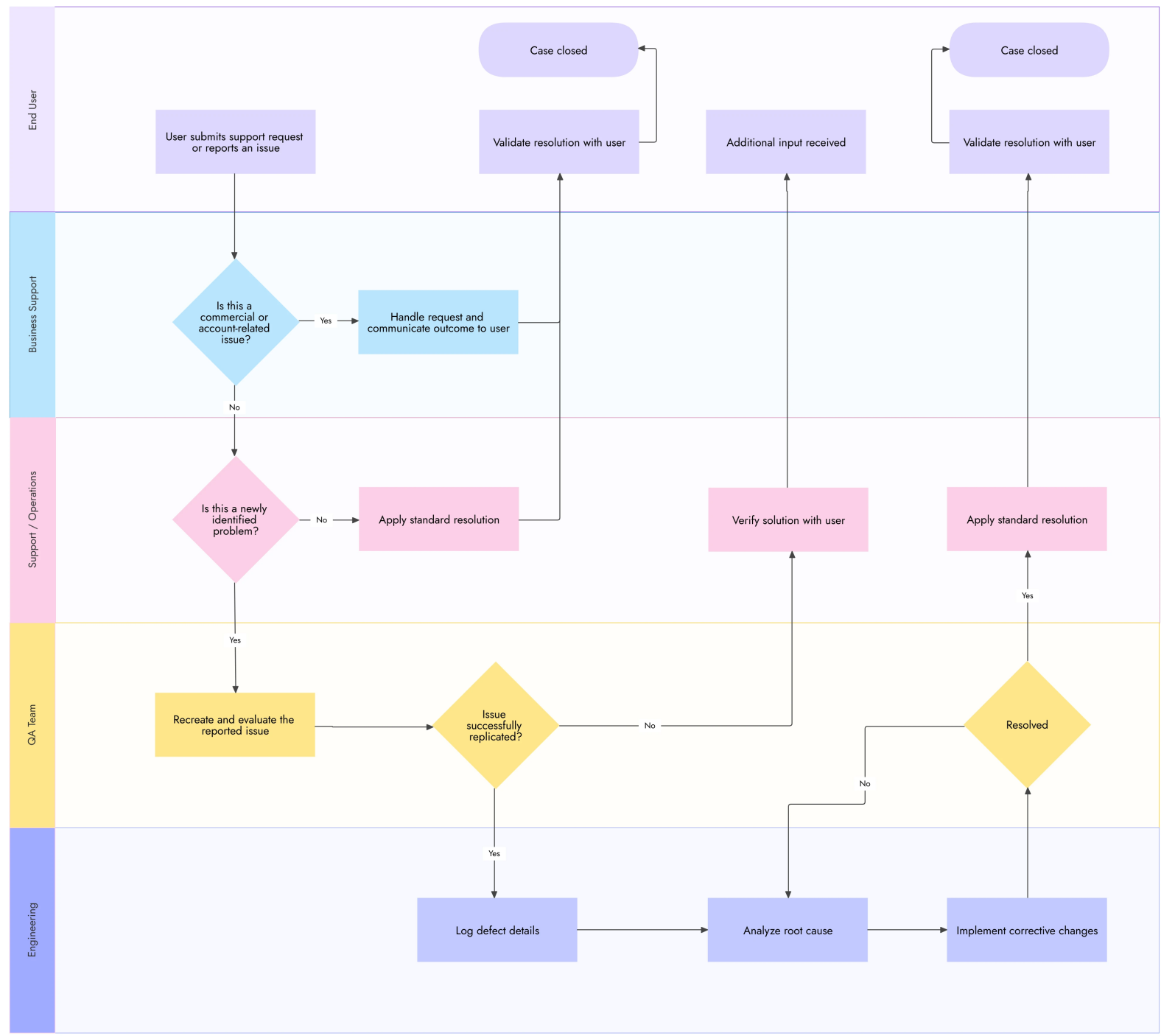
Document Management Process
A document management process is a set of methods designed for capturing, storing, and retrieving digital and physical records of an organization.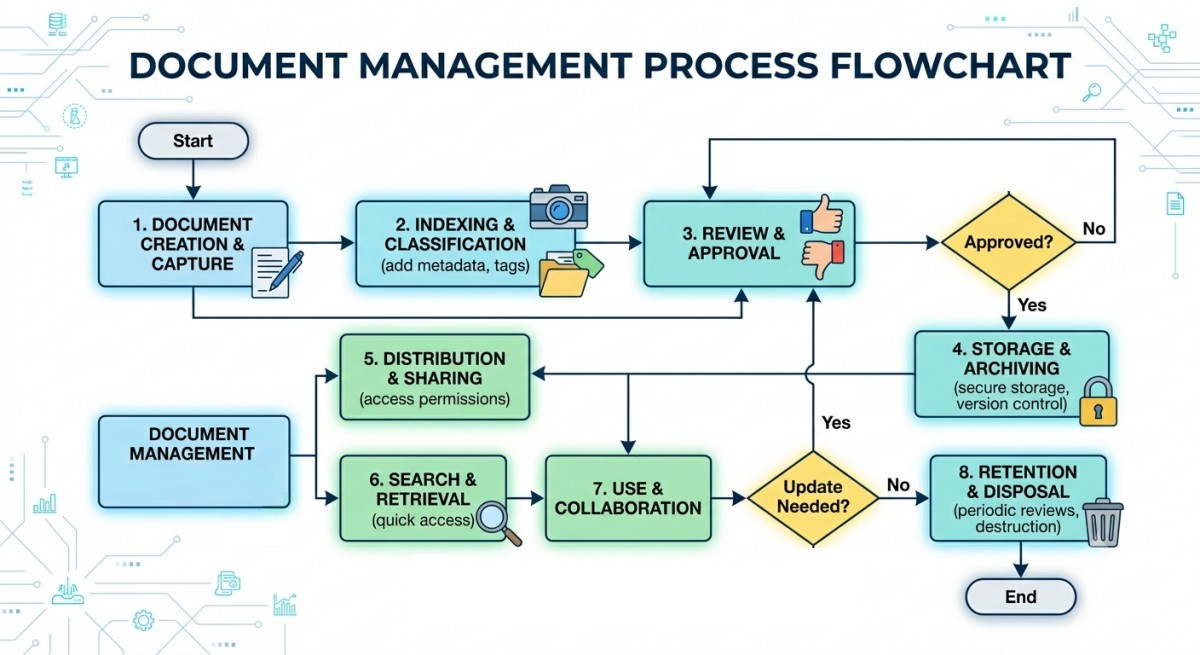
WAMP stands for Windows, Apache, MySQL, and anyone of PHP, Perl, or Python. LAMP is equivalent set for Linux. WAMP server is a local web server for running the scripting language (PHP, Perl) and this is open source. XAMPP stands for Cross-Platform (X), Apache (A), Maria DB (M), PHP (P), and Perl (P). It is developed by Apache Friends. It includes Apache and MySQL, FileZilla, Mercury, Tomcat, and Maria DB.
- Put files into the destination folder. Default folder is c:/xampp/htdocs, /var/www/html in Linux.
- Type address "http://localhost" in web browser: Opens XAMPP dashboard
- localhost/folderName/index.php: opens personalized page on localhost
- Excertps from Apache2 Ubuntu Default Page: "By default, Ubuntu does not allow access through the web browser to any file apart of those located in /var/www, public_html directories (when enabled) and /usr/share (for web applications). If your site is using a web document root located elsewhere (such as in /srv) you may need to whitelist your document root directory in /etc/apache2/apache2.conf."
Javascript is loosely typed. A variable can contain all data types and a variable can change its data type. Strings created with single or double quotes work the same. Use quotes inside a string, as long as they don't match the quotes surrounding the string. Hoisting is JavaScript's default behavior of moving declarations to the top. In JavaScript, a variable can be declared after it has been used. JavaScript modules allows to break up code into separate file which makes it easier to maintain a code-base. Like Python, with the 'import' statement. 'modules' are imported from external files with the 'import' statement.
document.addEventListener("click", func_name);
function func_name() {
  document.getElementById("demo") .innerHTML = "Demo";
}
≡
document. addEventListener("click", function(){
  document.getElementById("demo") .innerHTML = "Demo";
}
Select a column from a table on the webpage: No direct method exist though some add-on to web-browsers do exist. Select that table and paste in a text file or a spreadsheet. Use Python with CSV or Pandas modules. Paste the data in MS-Word which allows selecting particular column with mouse drag. For creating a table where columns can be selected, create a nested table. Outer table with only one 'tr' and 'td' tags. Each column as inner 'table' with single 'td' and desired number of 'tr' tags.
The Window object is the top level object in the JavaScript hierarchy and represents a browser window. It is created automatically with every instance of a 'body' or 'frameset' tag.
| DOM Object | Event Handlers Available |
| Checkbox, Radio / Reset / Submit button | onClick |
| Button element | onClick, onMouseOver |
| Hypertext link, Clickable ImageMap | onClick, onMouseOver, onMouseOut |
| Document | onLoad, onUnload, onError |
| Form | onSubmit, onReset |
| Framesets | onBlur, onFocus |
| Selection list | onBlur, onFocus, onChange |
| Image | onLoad, onError, onAbort |
| Text and TextArea element | onBlur, onChange, onFocus, onSelect |
| Window | onLoad, onUnload, onBlur, onFocus |
JavaScript Objects
| Property | Description |
| closed | Returns whether or not a window has been closed |
| defaultStatus | Sets or returns the default text in the statusbar of the window |
| document | Returns the entire HTML document |
| history | a JavaScript object, not an HTML DOM object, part of the Window object and is accessed through the window.history property |
| length | Sets or returns the number of frames in the window |
| location | See Location object |
| name | Sets or returns the name of the window |
| opener | Returns a reference to the window that created the window |
| outerHeight | Sets or returns the outer height of a window |
| outerWidth | Sets or returns the outer width of a window |
| pageXOffset | Sets or returns the X position of the current page in relation to upper left corner of a window's display area |
| pageYOffset | Sets or returns the Y position of the current page in relation to upper left corner of a window's display area |
| parent | Returns the parent window |
| personalb | Sets whether or not the browser's personal bar (or directories bar) should be visible |
| scrollbars | Sets whether or not the scrollbars should be visible |
| self | Returns a reference to the current window |
| status | Sets the text in the status bar of a window |
| statusbar | Sets whether or not the browser's status bar should be visible |
| toolbar | Sets whether or not the browser's tool bar is visible or not |
| top | Returns the topmost ancestor window |
function csv_to_arrays(csv_text) {
  // Split the text into individual rows and remove empty lines
  const lines = csv_text.split('\n').map(line =>
    line.trim()).filter(line => line);

  if (lines.length === 0) return {};

  // Extract the headers (assumes first row as header)
  const headers = lines[0].split(',');

  // Initialize an object containing an empty array for each column header
  const column_arrays = {};
  headers.forEach(header => {
    column_arrays[header.trim()] = [];
  });

  // Loop through the data rows (starting from index 1)
  for (let i = 1; i < lines.length; i++) {
    const cells = lines[i].split(',');

    // Push each cell value into its corresponding column array
    headers.forEach((header, column_index) => {
      column_arrays[header.trim()].push(cells[column_index]);
    });
  }
  return column_arrays;
}
// --- Example Usage ---
const data_CSV = `Name, Age, Degree
A, 19, ME
B, 18, CS
C, 20, EE`;

const column_arrays = csv_to_arrays(data_CSV);
console.log(column_arrays);
// Output:
{
  Name: ["A", "B", "C"],
  Age: ["19", "18", "20"],
  Degree: ["ME", "CS", "EE"]
}
const { Name, Age, Degree } = csv_to_arrays(data_CSV);
console.log(Name); // ["A", "B", "C"]
console.log(Age);  // ["19", "18", "20"]
JavaScript function to target matching input fields and download them as a structured text file.
function saveInputsByKeyword(keyword) {
  // Select all inputs where 'name' attribute starts with the keyword
  const selector = `input[name^="${keyword}"]`;
  const inputs = document.querySelectorAll(selector);

  // Format the matching inputs into "name=value" lines
  let file_content = "";
  inputs.forEach(input => {
    file_content += `${input.name}=${input.value}\n`;
  });
  // Prevent download if no matching elements are found
  if (!file_content) {
    console.warn(`No input fields found matching keyword: "${keyword}"`);
    return;
  }
  // Create a Blob containing the text data
  const blob = new Blob([file_content], { type: "text/plain;charset=utf-8" });

  // Generate a temporary download link and trigger it
  const link = document.createElement("a");
  link.href = URL.createObjectURL(blob);
  link.download = `${keyword}_fields.txt`;

  // Append to document, trigger click, and clean up
  document.body.appendChild(link);
  link.click();
  document.body.removeChild(link);
  URL.revokeObjectURL(link.href);
}
Unit Tests for JavaScript Codes
JavaScript codes can be pure mathematical operation or may use DOM components like document.getElementById(). The later makes it a browser-based JavaScript application, Jest with a mocked DOM is a practical choice. The tests below can run without a browser. Install testing framework: npm install --save-dev jest, run test: npx jest Psychrometry_test.jsThe input file is here and here is the test file.
JSON: Javascript Object Notation
A JSON array is equivalent to list in Python and a JSON object is similar to dictionary in Python. Python has standard JSON module where it is parsed using json.loads() method resulting in Python dictionary. A Python dictionary object can be converted into a JSON string using the json.dump() method.PHP is white space insensitive, case-sensitive, statements are terminated by semicolons, variables start with $, constants created by define() function e.g. define("pi", 3.1416), {...} create blocks - a sequence of multiple statements (concatenation of statements). Unlike with variables, constant does not need to start with a $. Logical operators uses both ('and' &&), ('or' '||'). Loop uses parentheses for logical argument: if () ... elseif () ... else ... Single-line comments: # or //. */ .... /* is used for multiline comments. PHP Magic constants: __LINE__, __FILE__, __FUNCTION__, __CLASS__, __METHOD__, $_POST (is a PHP super global variable which is used to collect form data after submitting an HTML form with method = "post").
The double arrow operator '=>' is used as an access mechanism for arrays. => is used in associative array key/value pairs for assignment that is => is used to assign values to the keys of an array. PHP is a server side language: nothing inside the "<?php ... ?>;" blocks will ever be visible in the browser. User names and passwords are required to connect to various databases. They are secure so long they remain inside PHP tags. include_once( "../../sub-folder-x/connect_mysqli.php"); can be used to avoid keeping connect_mysqli.php file into sub-folders along with index.php file.
PHP-enabled web pages are treated just like regular HTML pages and they can be created / edited the same way as normally done for regular HTML pages. Codes can jump in and out of PHP mode even in the middle of a PHP block while the logical flow of the script remains intact. This is similar to how image and equations can be put inline with text in a MS-Word file or how PERL scripts are used in CCL (CFX Command Language). PHP code can be embedded in the middle of an HTML opening tag. Instead of using PHP echo statement, one can jump out of PHP mode and just sent straight HTML. The PHP parser doesn't care that it is in the middle of an opening tag, and doesn't require that it (HTML tag) be closed. It also allows the cases where the closing ?> tag is at the end of the HTML opening tag, just before > of HTML tag.
<?php if ($expression == true): ?>
  Show if the expression is true.
<?php else: ?>
  Otherwise show this.
<?php endif; ?>
Similarly, following code shall print "Hello, there!" 4 times.
<?php for ($i = 0; $i < 5; ++$i): ?>
  Hello, there!
<?php endfor; ?>
Tag "<?=" is shorthand for "<? php echo". The super global variable $_SERVER["PHP_SELF"] returns the filename of the currently executing script. The htmlspecialchars() function converts special characters like < and > to '<' and '>' which prevents Cross-Site Scripting attacks. Use stripslashes() and preg_match('/^[a-zA-Z0-9]+$/', $username) functions for additional sanitization of user inputs. Regular expression '/^[a-zA-Z0-9_.]+$/' can be used to allow underscore and dot. $_SERVER["PHP_SELF"] exploits can be avoided by using the htmlspecialchars() function. if ($_SERVER["REQUEST_METHOD"] == "POST") { .. } checks the method used to submit a form. Prepared Statements and Bound Parameters are useful against SQL injections.
Error Reporting and Debugging: Quite often while running a PHP script, one gets a blank screen, no error message but just the empty screen. The reason might be syntax error, failed function call, or something else. One need to turn on the error display options. Use "sudo find /etc -name php.ini -type f" to find the location of php.ini file (something like /etc/php/7.4/apache2/php.ini) and set "display_errors = On" in the file. The location (path) of php.ini file can also be looked into the output generated through phpinfo(); function. php.ini: update line "mysqli.default_user =" to mysqli.default_user = "root". Some programs may access fields such as $username = ini_get("mysql.default_user"); $passwd = ini_get("mysql.default_password");
Depending on which files user developer has access to, it may be needed to configure display_errors in .htaccess or PHP.ini file. Many hosting providers do not allow modification to PHP.ini file. In production version of codes, error messages must not be shown to the end users, yet information must be recorded for tracing purposes. The common way to record error messages in production environment is to store it in log files.
When working with PHP and AJAX calls, errors is difficult to track as they do not get displayed in the browser rather they are returned to the AJAX request.The @ symbol, when placed before an expression, acts as an error control operator. When used with 'include' or 'require' statements, it suppresses error messages that would get generated if the included file cannot be found or if there is an issue during its inclusion.
"Notice: Undefined index" occurs when attempting to access an array key that does not exist within the array. This is a common warning, not a fatal error, but it indicates a potential issue in the code where an expected array key is missing. Use error_reporting(E_ALL & ~E_NOTICE); to suppress the warning (notice) messages.debug_backtrace() generates a PHP backtrace, Returns an array of associative arrays. When an error occurs, debug_backtrace() can identify the exact function or method call that triggered it. debug_print_backtrace() prints a PHP backtrace. It prints the function calls, included/required files and eval()ed stuff. No value is returned.
User Defined Functions in PHP:
A function is defined using the function keyword, a name, a list of parameters (which might be empty) separated by commas (,) enclosed in parentheses, followed by the body of the function enclosed in curly braces. Functions need not be defined before they are referenced, except when a function is conditionally defined. By default, function arguments are passed by value (so that if the value of the argument within the function is changed, it does not get changed outside of the function).<?php
$x = 5.0;
echo nl2br("$x \n"); // Output: 5
function sqr($x) {
$x = $x * $x;
return $x;
}
echo nl2br("$x \n"); // Output: 5
echo nl2br(sqr($x) \n"); // Output: 25
?>To have an argument to a function passed by reference, prepend an ampersand (&) to the parameter name in the function definition.
JavaScript
- Global Functions: eval(), isNaN(), parseInt(), parseFloat()
- String Methods: length, toUpperCase(), toLowerCase(), substring(), indexOf(), replace()
- Array Methods: length, push(), pop(), shift(), unshift(), splice(), slice(), forEach(), map(), filter(), reduce()
- Number Methods: toFixed(), toPrecision()
- Date and Time: Date() object and its methods
- Math Object: Math.abs(), Math.round(), Math.random(), Math.floor(), Math.ceil()
- Asynchronous Operations: setTimeout(), setInterval()
PHP vs. JavaScript
| Feature | PHP | JavaScript |
| String Manipulation | strlen(), str_replace(), explode(), implode() | length, replace(), split(), join() |
| Array Handling | array_push(), array_pop(), array_keys(), array_values() | push(), pop(), keys(), values() |
| Type Conversion | (int), (float), (string), intval(), floatval() | parseInt(), parseFloat(), String(), Number() |
| Input/Output | echo, print(), file_get_contents(), file_put_contents() | console.log(), alert(), fetch() (for network I/O) |
| Date & Time | date(), strtotime(), time() | Date object methods: getFullYear(), getMonth(), getTime() |
| Category | PHP | JavaScript | Example Code Snippet |
| Output | echo, print | console.log() | PHP: echo "Hello"; JS: console.log("Hello"); |
| String Length | strlen() | .length property | PHP: strlen("Hello") JS: "Hello".length |
| Substring | substr() | substring() / slice() | PHP: substr("Hello", 1, 3) JS: "Hello".slice(1, 4) |
| String Replace | str_replace() | replace() | PHP: str_replace("a", "b", "cat") JS: "cat".replace("a", "b") |
| Find in String | strpos() | indexOf() | PHP: strpos("Hello", "e") JS: "Hello".indexOf("e") |
| Array Length | count() | .length property | PHP: count([1, 2, 3]) JS: [1, 2, 3].length |
| Array Merge | array_merge() | concat() | PHP: array_merge([1], [2]) JS: [1].concat([2]) |
| Check if in Array | in_array() | includes() | PHP: in_array(2, [1, 2, 3]) JS: [1, 2, 3].includes(2) |
| Loop - For Each | foreach loop | forEach() method | PHP: foreach($arr as $val){} JS: [1,2,3].forEach(v => {}) |
| JSON Encode | json_encode() | JSON.stringify() | PHP: json_encode(["a" => 1]) JS: JSON.stringify({a: 1}) |
| JSON Decode | json_decode() | JSON.parse() | PHP: json_decode('{"a":1}') JS: JSON.parse('{"a":1}') |
| Date/Time Now | date("Y-m-d H:i:s") | new Date() | PHP: date("Y-m-d H:i:s") JS: new Date().toISOString() |
| Math Round | round() | Math.round() | PHP: round(2.5) JS: Math.round(2.5) |
| Random Number | rand(min, max) | Math.random() + scaling | PHP: rand(1, 10) JS: Math.floor(Math.random()*10+1) |
| Type Check | is_array(), is_string() | typeof, Array.isArray() | PHP: is_array($x) JS: Array.isArray(x) |
| File Read | file_get_contents() | fetch() / FileReader API (async) | PHP: file_get_contents("file.txt") JS: fetch('file.txt') |
| Variable Dump | var_dump(), print_r() | console.log() | PHP: var_dump($x) JS: console.log(x) |
| Set Timeout | sleep() | setTimeout() | PHP: sleep(2) JS: setTimeout(() => {}, 2000) |
| Define Constant | define() | const keyword | PHP: define("PI", 3.14) JS: const PI = 3.14 |
| Function Declare | function myFunc() {} | function myFunc() {} or arrow function | PHP: function greet() {} JS: const greet = () => {} |
Both MySQLi (the "i" stands for improved) and PDO (PHP Data objects) have their advantages: PDO will work on many (almost all) different database systems, whereas MySQLi will only work with MySQL databases. So, switching project to use another database is easier with PDO. One only have to change the connection string and a few queries. With MySQLi, the entire code will need to be rewritten - queries included. Both are object-oriented, but MySQLi also offers a procedural API. PDO has an exception class to handle any problems that may occur in database queries.
MySQLi Object-Oriented:               |  MySQLi Procedural
-------------------------------------------------------------------------------
<?php
$srv = "localhost";                   |  <- same
$usr = "username";                    |  <- same
$pwd = "password";                    |  <- same
// Create connection
$con = new mysqli($srv, $usr, $pwd);  |  $con=mysqli_connect($srv, $usr, $pwd);
// Check connection
if ($con->connect_error) {            |  if (!$con) {
  die("Fail: ".$con->connect_error);  |   die("Fail: ".mysqli_connect_error());
}                                     |  }
$con->close();                        |  mysqli_close($con);
?>
Strings (text can contain HTML markup) are surrounded by (single or double) quotes, but with double quotes variables can be inserted to the string directly and using single quotes variables have to be inserted using the '.' dot operator. For example:
$str1 = "AI ML";
$str2 = "cfdyna.com";
echo '<p>Sample codes in ' . $str1 . 'at' . $str2.'<p>';
or
echo "<p>Sample codes in $str1 at $str2.<p>";
Variables can be defined in a file say named as 'common_vars.ph'. Then, this file can be included in any other file and variables defined can be used in the calling file within <?php ... > tags. For example, creation of a form can be parametrized as <input type="text" name="<?php echo $tag_username;?>" value="<?php echo $value_username;?>">
strval(string): Get the string value of a variable - this is useful function to convert arguments of a function into string before adding the information into database. Thus, $sql = "SELECT * FROM tasks WHERE username = '".$username."'"; can be simplified to combination of following two statements: $username = strval($username); and $sql = "SELECT * FROM tasks WHERE username = '$username'";
Handling Passwords: password_verify — Verifies that a password matches a hash e.g. $does_pw_match = password_verify( $user_pass, $stored_pass ); $stored_pass = password_hash( $user_pass, PASSWORD_DEFAULT ); where password_hash( ) creates a new password hash using a strong one-way hashing algorithm PASSWORD_DEFAULT.
MySQL: COMMENTS are from a '-- ' to the end of the line. The double dash-comment style requires at least white space or control character (space, tab, newline...) after the second dash. From a '#' to the end of the line, C-style comment /* ... */ can span multiple lines. You use this comment style to document a block of SQL code. MySQL does not support nested comments. Log-in to MySQL: mysql -u root -p and then enter the password, type 'quit' on mysql prompt to close the session.
- Convention: in this list, any entry containing an underscore and lower case is user input.
- String and date values in MySQL used with either single or double quotes, but single quotes are more standard. INT signifies that the column holds integers (numeric values with no fractional part). UNSIGNED disallows negative values. NOT NULL requires that the column value must be filled in. This prevents members from being created without an ID number.
- AUTO_INCREMENT is a special attribute in MySQL. It indicates that the column holds sequence numbers. The PRIMARY KEY clause indicates that the the column is indexed to allow fast lookups. It also sets up the constraint that each value in that column must be unique.
- An ENUM (enumeration) column which means it can take only one of the values listed in the column specification. MySQL does not support a standalone CREATE TYPE statement like PostgreSQL. To use an ENUM, declare the allowed string values inside the column definition:
CREATE TABLE tbl_helpdesk ( ticket_id INT PRIMARY KEY AUTO_INCREMENT, ticket_title VARCHAR(128) NOT NULL, ticket_priority ENUM('Low', 'Medium', 'High') NOT NULL DEFAULT 'Medium' ); - A FOREIGN KEY is a column or a group of columns in one table that references the PRIMARY KEY (or a UNIQUE key) of another table, establishing a link between the two datasets.
- Storage engine clause, if present, names the storage engine that MySQL should use for creating the table.
- MySQL expects dates to be written in 'CCYY-MM-DD' format
- Check mysql version: SHOW VARIABLES LIKE "%version%";
- Get installation directory: WHICH mysql; on Linux prompt. To clear screen: system clear; \! is used to execute system shell commands and hence \!clear; works too. \! pwd; can be used to get working directory.
- Create a database named db_name: CREATE DATABASE IF NOT EXISTS db_name;
- Check what the default database is: SELECT DATABASE(); To add a database to current project: USE db_name; The keyword 'none' shall appear in the command prompt (MariaDB [(none)]>) if no database is selected.
- Create database named db_name with commands input from SourceFile.sql: MYSQL db_name < SourceFile.sql
- Login and activate database named 'db_name': mysql -h host_name -p -u user_name db_name
- List all the database names being managed by MySQL server to which the current user is logged in: show databases;
- Get list of users: SELECT user_column FROM mysql.tbl_users;
- Create a new user: CREATE USER user_name IDENTIFIED BY PASSWORD user_passwd; Note that the user_name should be enclosed in quotes. User name should be specified at user_name@host_name such as 'abc'@'localhost'.
- Show privileges granted to a user: SHOW GRANTS FOR 'user_name'@'host_name';
- flush privileges; Required to inform MySQL to reload the privilege after the change is made.
- Add specified privileges to a user: grant select, insert, update, delete on *.* to ‘user_name’@’host_name’;
- Add a user name on a host: INSERT INTO table_name (Host, User, Password) values('host_name', 'user_name', PASSWORD('user_passwd’));
- Change password for a user: SET PASSWORD FOR 'user_name'@'localhost' = PASSWORD('new_password'); FLUSH PRIVILEGES; For newer versions: ALTER USER 'user_name' IDENTIFIED BY 'new_password';
- Remove a user: DROP USER 'user_name'; Note that the user name must be in single quotes. DELETE FROM USER WHERE USER='user_name’ AND HOST='host_name';
- Create table named tab_name with column headers identified by column_designation: CREATE TABLE tab_name (column_designation);
- List all tables in currently active database: SHOW tables;
- Display information only for columns that match a given pattern %name where ‘%’ is a wildcard character: SHOW COLUMNS FROM tab_name LIKE ‘%name’;
- Show whole content of a table: SELECT * FROM tab_name;
- Add records into a table, for all the columns: INSERT INTO tab_name VALUES (value1, value2 ...);
- Start the auto_increment other than 1, 37001 in this example: ALTER TABLE tab_name AUTO_INCREMENT = 37001;
- Check structure of a table: DESCRIBE tab_name; or SHOW COLUMNS FROM tab_name; or show fields from tab_name
- Insert several rows into a table with a single INSERT statement by specifying multiple value lists: INSERT INTO tab_name VALUES (...), (...); Parentheses enclose the set of column values for each row. INSERT INTO tab_name (col_name1, col_name2, ...) VALUES (value1, value2, ...);
- Execute text file containing SQL queries: source queries_list.sql;
- Load data from a CSV file into a table: LOAD DATA INFILE input_data.csv REPLACE INTO TABLE tab_name FIELDS TERMINATED BY ',' LINES TERMINATED BY '\n' Field_1, Field_2, Field_3 IGNORE 1 LINES; --- Note that in the example, only 3 fields are being updated. Ignore option is used to ignore few lines such as header of the input file.
- LOAD DATA LOCAL INFILE 'input_data.txt' INTO TABLE tab_name; It assumes that input_data.txt is located in the current directory on the client host. By default, the LOAD DATA statement assumes that column values are separated by tabs and that lines end with newlines. It also assumes that the values are present in the order that columns are stored in the table.
- Change attributes of field 'id' in a table: ALTER TABLE tab_name CHANGE `id` `id` SMALLINT( 5 ) UNSIGNED NOT NULL AUTO_INCREMENT;
- Update a new record into the table emp_info: UPDATE INTO emp_info (first_name, last_name) value(‘ABC’, ‘LMN’);
- Update additional records to the entry updated in previous step: UPDATE emp_info SET PAN = ‘ABCAB3461N’ WHERE last_name=’LMN’ and first_name=’ABC’;
- Add column after (to the right of) an existing column: ALTER TABLE tab_name ADD COLUMN col_name VARCHAR(32) AFTER existing_column;
- Change a column name: ALTER TABLE tab_name CHANGE old_col_name new_col_name VARCHAR(32);
- Make a unique column to avoid duplicity: ALTER TABLE tab_name ADD UNIQUE col_name;
- Delete unique column from table: ALTER TABLE tab_name DROP INDEX col_name;
- Wipe out data completely from a table: DELETE FROM tab_name;
- Rename a table: RENAME old_tab_name TO new_tab_name;
- Delete a table completely: DROP TABLE tab_name;
- DELETE FROM tab_name WHERE "Query String"; Deletes specific records matching "Query String". For example, DELETE FROM tab_emp_info WHERE first_name='ABC' AND last_name = 'LMN';
- Delete a database: DROP db_name;
Option-1: read files which contains SQL queries
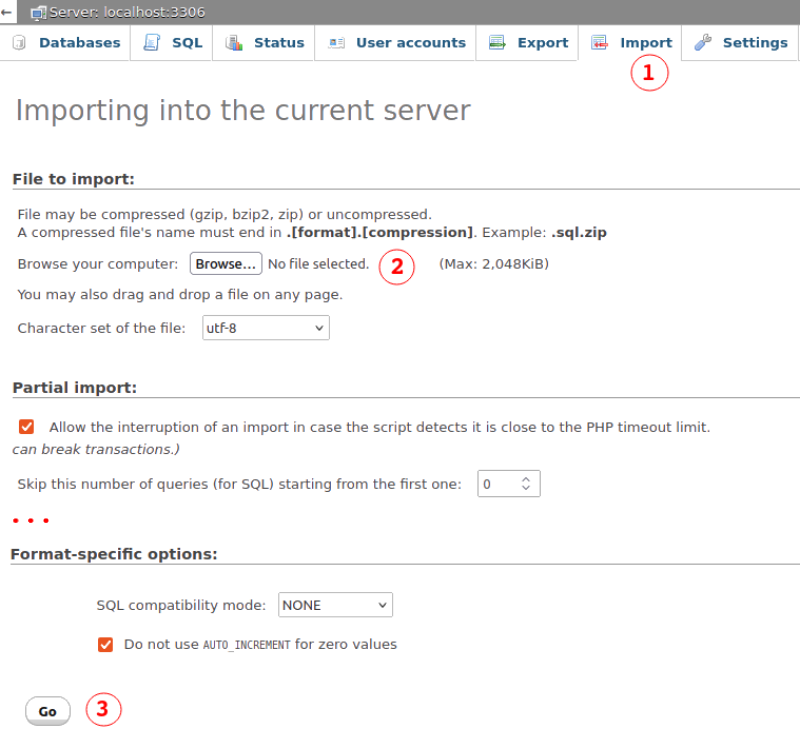
Option-2: Copy-paste SQL queries
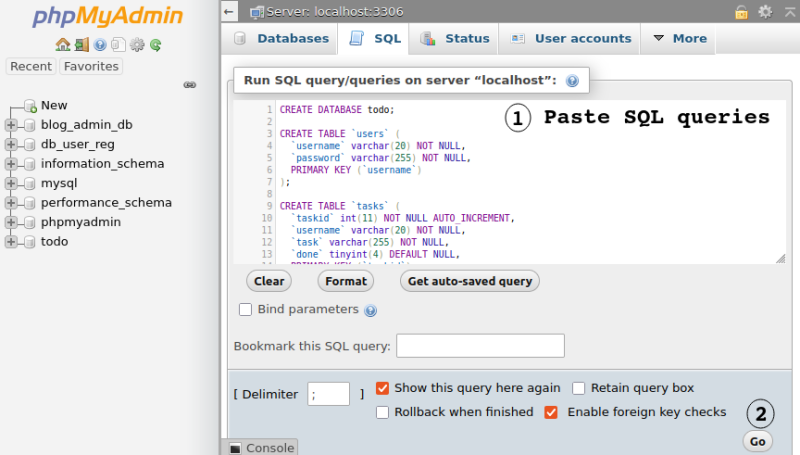
Commons Errors:
Failed to connect to MySQL: Access denied for user 'root'@'localhost' (using password: YES), Failed to connect to MySQL: Unknown database 'web_admin_db'
Catching error in SQL Queries:
$sql_cmd = "INSERT INTO tbl_members(`username`, `email`, `password`) VALUES(?,?,?)";
$stmt = $conn -> prepare($sql_cmd);
if ($stmt === False) {
  die('Error preparing SQL statement: ' . $conn->connect_error);
}
Steps to create a responsive page with LAMP: assuming LAMP is successfully configured. Default path for local server in Ubuntu: /var/www/htm. The URL to phpMyAdmin on local machine is "localhost/phpmyadmin". Check if /etc/phpmyadmin file is available. "sudo service apache2 restart" will result in error if server not installed. Use sudo apt-get install phpmyadmin to install from command line.
Installing phpMyAdmin may give error message "Connect failed: Access denied for user 'root'@'localhost' (using password: NO)" and shall ask to chose one of the 4 options. Chose 'ignore' to continue installation (use 'tab' key to select <ok>). Now loading "localhost/phpmyadmin" shall result in page looking like this:
Likely errors: mysqli_real_connect(): (HY000/1045): Access denied for user 'phpmyadmin'@'localhost' (using password: YES). Solution: get password from /etc/phpmyadmin/config-db.php >> run SQL Query: CREATE USER 'phpmyadmin'@'localhost' IDENTIFIED BY 'passwd'; >> Run another query: "flush privileges;" to apply the changes. Another error: 'The phpMyAdmin configuration storage is not completely configured, some extended features have been deactivated. Find out why. Or alternately go to 'Operations' tab of any database to set it up there." Get file "resources/sql/create_tables.sql" from github repository of phpmyadmin and run the SQL query from this file. Alternatively, under phpMyAdmin dashboard: go to "User Accounts", select 'phpmyadmin' under "User name" and then "Edit privileges".
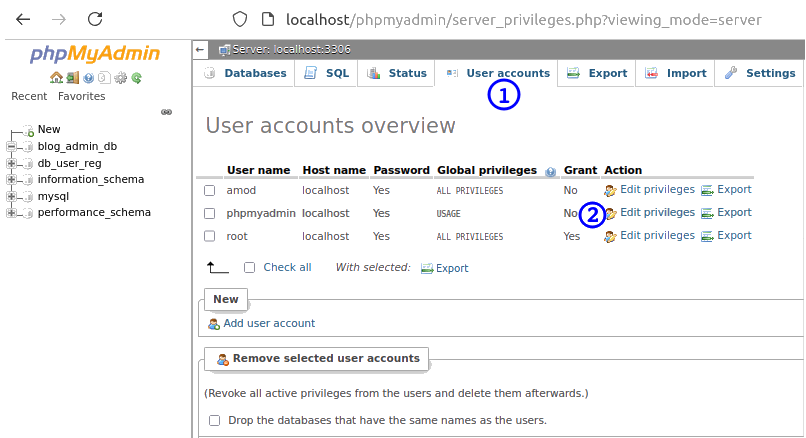
Files to configure MySQL
- /etc/mysql/mariadb.cnf: to set global defaults
- /etc/mysql/conf.d/*.cnf: to set global options
- /etc/mysql/mariadb.conf.d/*.cnf: to set MariaDB-only options
- ~/.my.cnf: to set user-specific options.
Now actual database and PHP stuff:
Step-1:
Define the folder structure named as inc (include files), jas (JavaScript), css, dab (database), adm (administrative stuff), img (images only), vid (videos only), ico (icons only), doc (PDF, DOC and other files), sql, api, lib, cnf (config), tpa (third party)... and create a Readme.txt file to describe what these folders contain and/or are expected to contain. Following is an example for user registration: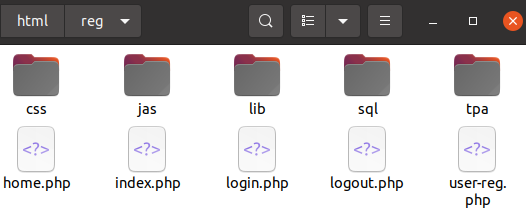
Step-2:
Log-in to mysql terminal and create database(s) and table(s) using command and method described above. A database db_user_reg was created from command prompt. A text file containing SQL commands can be used to create table(s). Alternatively, phpMyAdmin dashboard can also be used to create and view the table.
Step-3:
Create login and user registration form using standard HTML and CSS features. A good starting point is "github.com/keerti1924/PHP-MYSQL-User-Login-System" which seems to work without any modifications. A modified version can be downloaded from here. Minor updates such as trimming user inputs, ensuring alpha-numeric user names and e-mail addresses, password length between 8 to 16 characters with at least 1 special character, prepare() and bind_param() used for database updates. A simple forgot password page has been added. There is no check if user has entered a real e-mail address or not, click on 'eye' icon shows password only for one input field.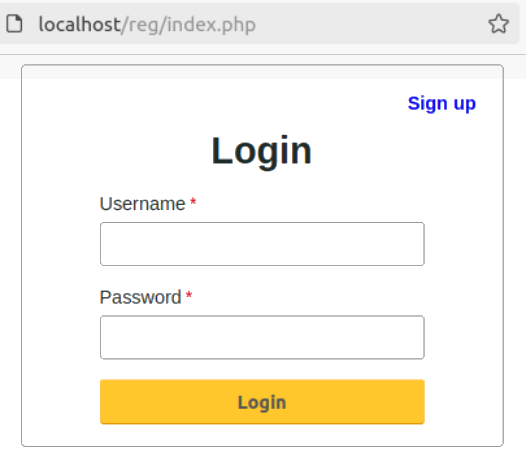
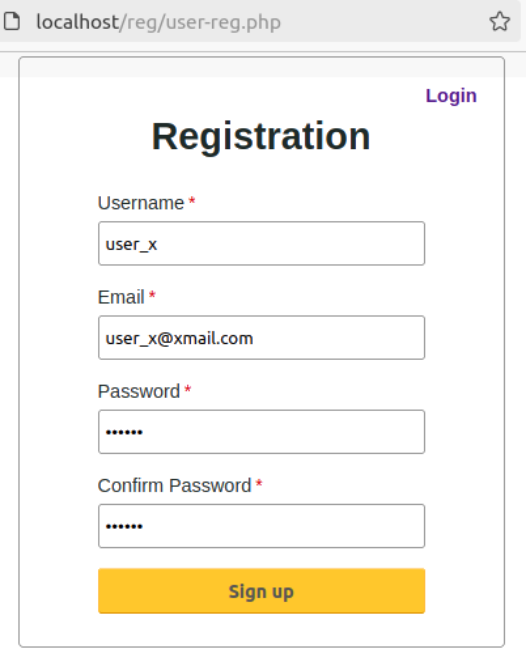
Step-4:
Create the landing page after successful login or new user registration.Define variables for parameters required to access database, this helps reuse the information multiple times.
define("DB_HOST", "localhost");
define("DB_USER", "power_user");
define("DB_PASS", "psr*1234#u");
define("DB_NAME", "db_home_pg");
Security issues: 'Form' resubmission using refresh (F5) or "Go back one page" logs-in user and/or repeats last operation such as adding same information into the database again.
<?php
  header("Cache-Control: no-cache, must-revalidate"); // HTTP/1.1
  header("Expires: Sat, 01 Jan 2020 05:00:00 GMT");   // Date in the past
?>
Some guidelines: create separate SQL command files for create and alter operations. Do not put JavaScript code inside the body - store these scripts in separate files. Follow a convention for naming: tab_ or tbl_ and db_ for table names and database names, for example db_user_reg. Add version and last update at the beginning of each file.
To-Do Application: Another example is taken from github.com/dhiraj-01/Todo-PHP to create a "ToDo List". Some modifications have been done to disable caching and prevent form resubmission on page refresh. This is a very simple set of codes for learning and demonstration. The updated version can be downloaded from here.
The folder structure of modified version is as shown below.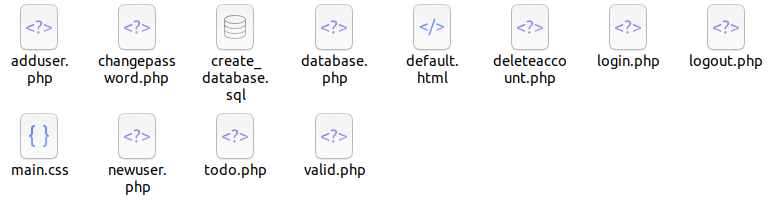
signup.php
|
*-- includes default.html and lib/database.php
*-- checks if user is logged-in and sets location to todo.php
*-- prints (echo) error message above the form section
*-- generates sign-up form and calls lib/adduser.php after Submit
|   |
|   *--- calls createCAPTCH() function to generate CAPTCHA
|   |
|   *--- adduser.php
|        |
|        *-- includes database.php (collection of all functions)
|        *-- collects inputs: username, password, secret key and CAPTCHA
|        *-- call createUser() function
|            |
|            *-- validates username, password and secret key
|                |
|                * alpha-numeric usernames
|                * password with special character, length between 6 to 10
|                * secret key: up to 6 numeric characters
|            *--- if criteria met, adds user
|            *--- if not, directs to signup.php which prints error message
login.php
|
*-- form submission directs to lib/valid_inputs.php
*-- function haveValidInputs() defined in database.php is used to check inputs
*-- checks if specified user name exist
`-- checks specified password with stored password using password_verify()
|
todo.php
|
*-- called after successful login
|   |
|   *-- option to change password with secret key used during sign-up
|   *-- generates single line form to get to-do text
|   *-- retrieves existing to-do string using getTodoItems() function
|   *-- adds new to-do string using addTodoItem() function
|
`*--lib/forgot_password.php
    |
    *-- form submission directs to lib/resetPassword.php
    `*- resetPassword() function from database.php is used to update password
        |
        *-- checks for valid username, secret key and new password
        *-- re-directs to signup.php if invalid inputs are provided.
Further improvements can be to add counter for 3 wrong attempts to log-in, send OTP to specified e-mail to reset password or secret pin, retain valid inputs when page is refreshed for invalid inputs, better background... As one can deduct, the code structure gets complicated even with simplest possible web page having server-side scripts.
Refer the example of Responsive Blog here from 'code-projects.org' which contains 140 different .php files (folder tree contains 41 directories, 266 files). A complete description of code structure with the inter-dependence of files and folders cannot be covered in few pages of a note book. The readme.txt file in this zip folder explains basic steps to make the repository working. The attached ZIP file is working on Ubuntu LTS 20.04, PHP version 7.4, Apache/2.4.41 (Ubuntu), phpMyAdmin 4.9.5deb2 and server version 10.3.39-MariaDB. Readme.txt file has been updated based on experience gained to make the code working.
CREATE DATABASE IF NOT EXISTS `db_project_x`;
USE `db_project_x`;

CREATE TABLE `tbl_users` (
  `user_idno` int(11) NOT NULL PRIMARY KEY,
  `user_name` varchar(50) NOT NULL,
  `user_pass` varchar(255) NOT NULL,
  `user_mail` varchar(64) NOT NULL,
  `user_role` varchar(16) NOT NULL,
  `user_stat` int(11) NOT NULL DEFAULT '0'
) ENGINE=InnoDB DEFAULT CHARSET=latin1;
-- Primary key can be set later (after creation of table as well)
ALTER TABLE `tbl_users`
  ADD PRIMARY KEY (`user_idno`);

CREATE TABLE `tbl_groups` (
  `group_idno` int(10) UNSIGNED NOT NULL,
  `group_name` varchar(20) DEFAULT NULL,
  `group_dscr` text
) ENGINE=InnoDB DEFAULT CHARSET=utf8;
CREATE TABLE `tbl_dept` (
  `dept_idno` int(11) NOT NULL,
  `dept_code` varchar(16) NOT NULL,
  `dept_name` varchar(64) NOT NULL
) ENGINE=MyISAM DEFAULT CHARSET=latin1;

CREATE TABLE `tbl_admin` (
  `admin_idno` int(11) NOT NULL,
  `user_idno` int FOREIGN KEY (user_idno) REFERENCES tbl_users(user_idno),
  `admin_mail` varchar(64) NOT NULL,
  `admin_user` varchar(50) NOT NULL,
  `admin_pass` varchar(255) NOT NULL
) ENGINE=InnoDB DEFAULT CHARSET=latin1;
ALTER TABLE `tbl_admin`
  ADD PRIMARY KEY (`admin_idno`);
-- Foreign key can be added after creation of the table as well
ALTER TABLE tbl_admin
ADD CONSTRAINT FK_user_idno
FOREIGN KEY (user_idno) REFERENCES tbl_users(user_idno);

CREATE TABLE `tab_authorization` (
  `auth_idx` int(10) UNSIGNED NOT NULL,
  `group_id` int(11) DEFAULT NULL,
  `tab_name` varchar(100) DEFAULT NULL,
  `allow_view` tinyint(4) NOT NULL DEFAULT '0',
  `allow_edit` tinyint(4) NOT NULL DEFAULT '0',
  `allow_delete` tinyint(4) NOT NULL DEFAULT '0'
) ENGINE=InnoDB DEFAULT CHARSET=utf8;

CREATE TABLE `tbl_inp_par` (
  `proj_idno` int(11) NOT NULL,
  `proj_title` varchar(128) NOT NULL,
  `proj_code` varchar(16) NOT NULL,
  `proj_dscr` text NOT NULL,
  `proj_phase` text NOT NULL
) ENGINE=InnoDB DEFAULT CHARSET=latin1;

CREATE TABLE `tbl_out_par` (
  `proj_idno` int FOREIGN KEY (proj_idno) REFERENCES tbl_inp_par(proj_idno),
  `proj_cht_img` text NOT NULL,  -- file name or full path
  `proj_tab_dat` text NOT NULL,  -- file name or full path
  `proj_summary` text NOT NULL   -- file name or full path
) ENGINE=InnoDB DEFAULT CHARSET=latin1;
Tables to Create a Hiring Tracker Dashboard
CREATE TABLE `candidate_details` (
  `requisition_id`   TEXT FOREIGN KEY,
  `cand_idno` INT(6) NOT NULL PRIMARY KEY,
  `cand_name_first`  VARCHAR(50) NOT NULL,
  `cand_name_last`   VARCHAR(50) NOT NULL,
  `cand_cv_date`     DATE NOT NULL
  `cand_grad_year`   VARCHAR(8)  NOT NULL,
  `cand_contact_no`  VARCHAR(16) NOT NULL,
  `cand_notice_days` INT(3) NOT NULL DEFAULT '30'
  `cand_recruiter`   VARCHAR(50) NOT NULL
) ENGINE=InnoDB DEFAULT CHARSET=latin1;
CREATE TABLE `panel_details_level_1` (
  `requisition_id`   TEXT FOREIGN KEY,
  `cand_name_first`  TEXT FOREIGN KEY,
  `cand_contact_no`  VARCHAR FOREIGN KEY,
  `panel_name_first` VARCHAR(50) NOT NULL,
  `panel_name_last`  VARCHAR(50) NOT NULL,
  `interview_date`   DATE  NOT NULL,
  `interview_result` ENUM('REJECTED', 'SELECTED', 'ON_HOLD')
) ENGINE=InnoDB DEFAULT CHARSET=latin1;

CREATE TABLE `panel_details_level_2` (
  `requisition_id`   TEXT FOREIGN KEY,
  `cand_name_first`  TEXT FOREIGN KEY,
  `cand_contact_no`  VARCHAR FOREIGN KEY,
  `panel_name_first` VARCHAR(50) NOT NULL,
  `panel_name_last`  VARCHAR(50) NOT NULL,
  `interview_date`   DATE  NOT NULL,
  `interview_result` ENUM('REJECTED', 'SELECTED', 'ON_HOLD')
) ENGINE=InnoDB DEFAULT CHARSET=latin1;
CREATE TABLE `offer_details` (
  `requisition_id`  TEXT FOREIGN KEY,
  `cand_name_first` TEXT FOREIGN KEY,
  `cand_contact_no` VARCHAR FOREIGN KEY,
  `recruiter_name_first` VARCHAR(50) NOT NULL,
  `recruiter_name_last`  VARCHAR(50) NOT NULL,
  `offer_date`   DATE  NOT NULL,
  `offer_status` ENUM('REJECTED', 'ACCEPTED', 'DECLINED'),
  `offer_decision_date` DATE,
  `reason_declined` TEXT,
  `reason_rejected` TEXT,
  `expected_join_date` DATE
) ENGINE=InnoDB DEFAULT CHARSET=latin1;
CREATE TABLE `onboarding_details` (
  `requisition_id`  TEXT FOREIGN KEY,
  `cand_name_first` TEXT FOREIGN KEY,
  `cand_contact_no` VARCHAR FOREIGN KEY,
  `date_of_joining` DATE NOT NULL,
  `joining_status`  ENUM('JOINED', 'NOT_TURNED_UP')
) ENGINE=InnoDB DEFAULT CHARSET=latin1;
Server Administration, Data Security and Hacking: Social Media Hunting, Data Theft, Tracking Personal Information
There are 52 characters (including lower and upper cases), 10 digits and 32 special characters on computer keyboard. If one does not allow to have password starting with special character and minimum size of password is set to be 8 characters, just for passwords having 8 characters, 62 x 947 = 4020 trillion combinations are possible. Note that passwords can be any size higher than 8 characters but usually it would be limited to 12 ~ 16 characters as users need to remember them.Most Basic Web Security Tips: [1] Prevent access of folder through browser such as https://www.abc.com/pqr/ - Use .htaccess file, [2] whois: This prints personal details of the website owner if privacy protection is not enabled or purchased from domain name provider, [3] wget or libwww: this Linux command can download entire content of a website: Change HTTP User Agent - RewriteCond %{HTTP_USER_AGENT} wget.* [NC], [4] Prevent access to crawlers: use Robot.txt file, [5] Prevent an htaccess file from being viewed: add following line:
<Files .htaccess>
  order allow,deny
  deny from all
</Files>
Browser Automation and Server Side Scripting:
Selenium, Pupeteer, Playwright, Headless browsers. Server side scripting: jQuery (JavaScript Framework), PHP, Ruby, Django (server side framework, free, open source and written in Python), Node.js (free, open source tool to run JavaScript outside the web browser), AngularJS (to extend HTML with new attributes). MongoDB is a document database which stores data in a type of JSON format called BSON.jQuery
'$' is alias for 'jQuery' and '$()' is shorthand for "$(document).ready()". Code included inside $(window).load(function() { ... }) will run once the entire page (images and iframes), not when just the DOM is ready.PowerBI and Pivot Tables
Excerpt from Microsoft website about PowerBI: Find insights in your data and share rich analytics reports. Explore your reports to find and generate the quick insights you need for better business decisions. Collaborate on reports with colleagues, then easily share reports and insights in workspaces, on the web, in apps, via Microsoft Teams.How to Create a Pivot Table
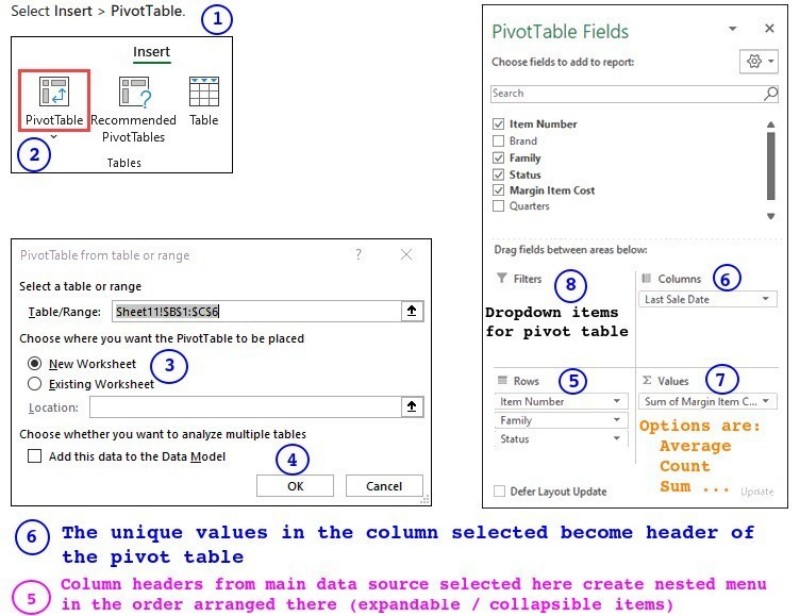
Cursor AI
Tag line on official website: "The AI Code Editor". More from website: "Cursor lets you write code using instructions. Update entire classes or functions with a simple prompt. Cursor's agent mode completes tasks end to end. It does this quickly, while keeping programmers in the loop. We support all frontier coding models, including Claude Sonnet 4, OpenAI o3-pro, OpenAI GPT-4.1, Gemini 2.5 Pro, Claude Opus 4, and more."Thus, Cursor AI is a code editor that uses artificial intelligence models to help code writers with coding tasks such as code generation, smart rewrites, codebase queries and end-to-end task completion.
Web Scraping in Python
The term web scraping refers to collecting information from web sites. However, the same concept can be used to check the consistency and correctness of tags and links in folder structure of a website before uploading the content on host server. If a website fetches data using JavaScript (called Dynamic pages such as nseindia.com), requests and urllib libraries cannot be used. These tools work only for static pages (where the contents are directly stored in HTML page being accessed).import re
def split_string_at_numbers(input_string):
# Check for +/- sign, digits, decimal point
pattern = r'(-?\d+\.?\d*|\d*\.?\d+)'
# Split the string by the number pattern, keeping delimiters
sub_str = re.split(pattern, input_string)
sub_str_txt = []
sub_str_num = []
for str_txt in sub_str :
if str_txt:
try:
num = float(str_txt)
if num == int(num):
sub_str_num.append(int(num))
else:
sub_str_num.append(num)
except ValueError: # If conversion fails, it implies a string
sub_str_txt.append(str_txt)
for item_txt, item_value in zip(sub_str_txt, sub_str_num):
#print(f"{item_txt} | {item_value}")
print('{} | {}'.format(item_txt, item_value))
return sub_str_txt, sub_str_num
This Python code is a simple and scalable example to check the image tags in all the HTML files stored in a folder and print summary of image tags such as relative path of image file, its file size, missing images...This code can be further improvised to include HREF tags, missing ALT tag for images, add styles to the images, remove styles of the images such as width and height... to name a few.
Python code linked here is a simple and scalable example to check the <a> tags and HREF values in all the HTML files stored in a folder and print summary of hyperlinks such as relative path of the file referred by HREF, missing files in the links... This code does not check the hyperlinks referred by HREF starting with http or https. This script can be further improvised to check for missing attribute values such as _blank.
Template to create work-flow for International Travels
This is a simple template which can be improvised to create an efficient workflow for international travels.Good Scripting and Programming Practices

First and foremost, learn the recommended guidelines for the chosen programming language and get a good text editor with syntax highlighting, auto-indentation and spell checker. Decide your own skill gap and chose whether procedural (functional) programming approach shall be easier to handle or the object oriented programming (OOP) method shall be needed. Coding standards and best practices vary depending on the industry a specific product is being developed for.
Get familiarity and start using any IDE (Integrated Development Environment) of your choice such as Visual Studio Code, Spyder, JuPyter, NetBeans, IDLE... Visual Studio Code needs Python executable path to be set manually, there is no built-in short-cut to change case (e.g. changing case for global variables from lowercase to upper case). To set Python interpreter: Open the Command Palette → Type and select Python: Select Interpreter → Open command terminal and type "where python" - this give path to python.ext → Copy-paste the path to Select Interpreter window in VS Code.Investigate into language specific libraries and frameworks - it helps in reusability and standardization. Instead of writing own CSS, use of Bootstrap enhances productivity. Adapt to utilise the screen space effectively: for example the integrated terminal in VS Code occupies too much screen space. It can be move to another monitor, detached or repositioned following two steps: Move the terminal into the editor area → Drag the tab out to its own window.
Write the version of each piece of code at the beginning of respective file. Create naming conventions for files and folders. Learn version management programs like Git. Split the main program into functions and subroutine. Develop naming standard for each variable type. Chose variable name easy to interpret (such as with minimum 4 characters except loop counters) or multiple words separated by underscore. Create a list of 'include' modules and variables in a separate file (for example, import modules in Python such as cv2, numpy, PyPDF2...).
One can follow standard convention in industry: Camel or Pascal case for naming functions, packages and classes. Snake case or Camel case for variables, objects and constants. Kebab case are supported by few programming languages such as SCHEME. One style can be to use built-in variables and function in UPPERCASE when the programming language is not case-sensitive.
Define sign conventions for variables: for example one may add prefix i_ for integers, f_ for floats, s_ for strings, a_ for arrays, d_ for dictionaries, t_ for tuples, o_ for objects...., mnth_ for monthly, qrtr_ for quarterly, half_ for half-yearly, year_ for yearly, infi_ for input field, sum_ for summation, bttn_ for buttons, cqbx_ for checkboxes...
User Ternary operator for single line loop and conditional blocks. For example, curly braces are optional in C in IF loops if there is only one statement. In Python, the single line statement can be written on the same line as the if condition. x = 1 if a > b else 2. In Java, it takes the form "variable = (condition) ? if condition True : if condition False; e.g. max_val = (n1 > n2) ? n1 : n2
Constants can be saved in a separate file and imported into Python. As per convention described in PEP 8 (the Python Style Guide), constant names must be written in ALL CAPS with underscores separating words. Using the standard built-in module typing in Python, Final type hint can be used to signal the code editors that these variables shouldn't be reassigned (typing module does not force or check types when code is run). For example, MAX_LOGIN_ATTEMPTS: Final = 5. Use "import constants" to read constants saved in file constants.py - access variables using dot notation.
Write descriptions of input variables and output(s) from each function and subroutine. Identify basic error logic and terminate the program with appropriate user message such as missing file or image. Use appropriate format statements for numbers and change the format style based on values. For example, do not print more than 3 decimals for any number > 100. For numbers > 105, switch to exponential notation. Similarly, for values < 0.0001, it is better to switch to exponential notation.
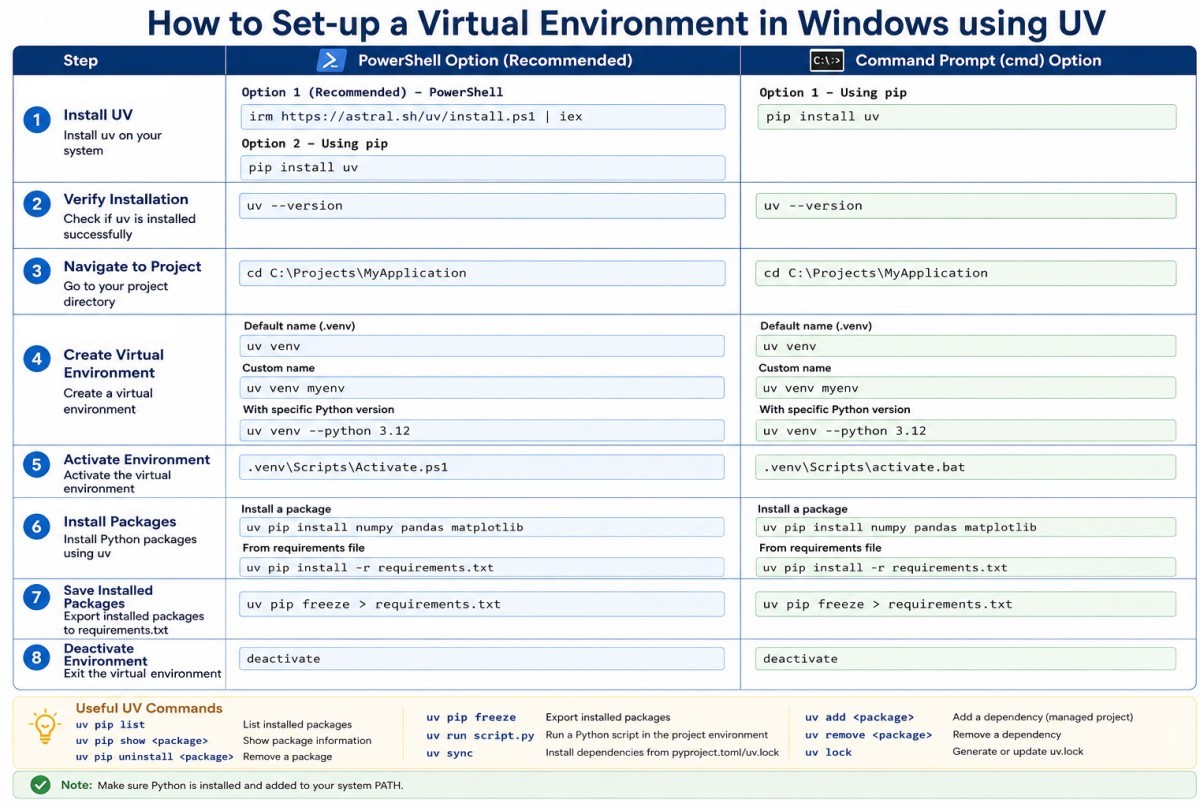
Understand the auto-generated help texts: First comment after function definition is used as Documentation String in MATLAB, Similarly, in Python first block of comments in the body of a method or function (those within triple quotes ''' ... ''') are used as Documentation String for that functions which can be printed by command help (funcName). In most of the cases, it is advised that the comments and user message should be restricted to 72 characters in the width (horizontal direction).
Sparsely documented codes create cognitive (over)load to new developers or same developer during maintenance few months down the line. Good documentation is as important as Clear Package Architecture with logical modules, separation of concerns, minimal circular dependencies. README, examples, architecture notes and configuration reference reduce dependency on the original developer. Separation of Concerns (SoC) is a core software design principle where a program is split into distinct sections, with each section addressing a single responsibility or "concern".Excerpts from browserstack.com/guide/coding-standards-best-practices: Use the DRY (Don’t Repeat Yourself) principle. Automate repetitive tasks whenever necessary. The same piece of code should not be repeated in the script. Avoid Deep Nesting. Too many nesting levels make code harder to read and follow.
This document summarizes coding standards and guidelines for web app development projects.
Some recommendations for Python codes: peps.python.org/pep-0008/ provides good insight into style guide. As per the document: "Consistency with this style guide is important. Consistency within a project is more important. Consistency within one module or function is the most important."
For module names, try to find one word names like divergence, gradient. If words need separation in a module name, use snake_case such as cross_product. Never use dashes (-) and capital letters in module names. Class names are usually short and a single or compound noun. For these short names, the convention is to use CamelCase. Function and variable names can be longer than class names. Especially function names sound like actual sentences: create_plot_from_csv().
Use try-catch to capture errors gracefully. raise ValueError(...) means "stop execution and signal that a value passed to this code is not valid." Do not suppress warnings for development versions. For variables whose values are specified through a drop-down or a list, raising value error is not important.
Excerpts from style guide:: Spaces are the preferred indentation method. Limit all lines to a maximum of 79 characters. The preferred way of wrapping long lines is by using Python's implied line continuation inside parentheses, brackets and braces. Place line break before a binary operator. Surround top-level function and class definitions with two blank lines. Imports should be grouped in the following order: Standard library imports → Related third party imports → Local application/library specific imports. Put a blank line between each group of imports.
Vectorize data by replacing loops with libraries like NumPy to handle complex numeric computations using parallel vector instructions. Replace all for loops with native NumPy array operations. Use functions from the native Python math module (like math.sqrt) rather than pure math operators (like ** 0.5). Prefer list, set, and dictionary comprehensions over manual "loop append" structures. Drop precision down from default 64-bit floats (float64) to 32-bit floats (float32) to halve memory consumption and dramatically speed up hardware throughput.
A well-designed class should follow the Single Responsibility Principle: it should have one clear purpose. In object-oriented design, cohesion (how closely related the data and behaviour are) is a much better indicator of class quality than the raw number of attributes or methods. Keep number of attributes of a class low, up to 10 may be a pragmatic upper limit. Keeping classes small and focused helps improve readability, defines clear purpose (tied to usually a single well-defined job), and reduces hidden redundancies (methods inside the class typically use a few attributes each).
Do not use argparse if the code requires only few (one or two) positional arguments or interactive programs where inputs are requested sequentially during execution or application requires dozens of inputs and settings or command line interface required only for testing / advanced users or there is a GUI / Web application to run the code. A good design principle is to use argparse only at the entry point (such as main.py or a CLI script).
For parallel processing: wrap main execution in if __name__ == '__main__': to prevent infinite child-process creation loops on Windows. os.cpu_count() can be used to get number of available CPU count. "os.cpu_count() - 2" can be used to automatically use all available power except two cores.
Folder Structure
Root_directory
  |-- pyproject.toml
  |-- config.py
  |-- README.md
  |-- setup.md
  |-- src\
  |-- docs\                  # Flowcharts, diagrams, tutorials, code documents*
  |-- inputs\
  |-- outputs\
  |-- third-party            # External standalone source code / tools
  |    ├── parser/
  |    └── utils/
  ├── bin/                   # Pre-compiled binaries / executables
  │    ├── win64/
  │    └── linux/
  |-- tests\                 # Unit and regression tests, numerical validation
  '-- data\
* ibm.com/think/topics/code-documentation
If users install this package using "pip install ." as a library, the third-party/ and bin/ directories outside of src/ will not be included in the installation by default. If the external folders must ship with the installed Python package, modify layout to pull them inside the package boundary (inside folder src\pkg_name\).
src/
 └── pkg_name/
      ├── __init__.py
      ├── main.py
      ├── read_inputs.py
      ├── analyse.py
      └── visualize.py
data/
  ├── raw/
  ├── validation/
  ├── references/
  └── tests/
tests/
  ├── unit/
  ├── regression/
  ├── validation/
  └── pytest/
To enforce absolute paths instead of relative paths in a scientific package, resolve them dynamically at runtime relative to installation directory of the module using built-in 'pathlib' library. This approach guarantees package can safely access scripts, data files, or third-party binaries, regardless of where or how a user invokes the program. An absolute anchor path needs to be created in top-level __init__.py file of the package (or a dedicated configuration module like config.py).
# src/pkg_name/__init__.py
from pathlib import Path
# This yields the absolute path to 'src/pkg_name/' at runtime
PACKAGE_ROOT = Path(__file__).resolve().parent
# Reference project-wide directories safely
PROJECT_ROOT = PACKAGE_ROOT.parents[1]  # Steps up to the root folder
The PACKAGE_ROOT or PROJECT_ROOT constants can be combined with the '/' operator to construct bulletproof absolute paths for the assets. For example
from pkg_name import PROJECT_ROOT
BIN_DIR = PROJECT_ROOT / "bin"
DATA_DIR = PROJECT_ROOT / "data"
However, the above code does not apply to a flat layout, where source package directory sits directly in the root of the project repository without a wrapping src/ folder.
To handle cross-platform path differences seamlessly across Windows, Linux, and macOS, built-in 'sys' module can be used alongside pathlib.
IS_WINDOWS = sys.platform.startswith("win")
IS_MACOS   = sys.platform.startswith("darwin")
IS_LINUX   = sys.platform.startswith("linux")
Configuration Module in Python
A dedicated configuration module in Python is a separate .py file (commonly named config.py or settings.py) used exclusively to define, centralize, and manage global application constants, variables, or environment setups. Instead of embedding configuration logic inside main application files, isolate it in this single module so any other file can cleanly import the settings.While a dedicated .py file is highly effective for basic-to-intermediate applications, larger production systems often shift to or combine it with the alternatives like Static Config Files which are written in TOML, JSON, or YAML formats. They are ideal when non-programmers need to adjust settings safely without breaking code.
Refactoring:
This book has a catalogue of refactoring techniques. "Remove Dead Code" as a basic refactoring technique mentioned in the list. Some argue that refactoring strictly means restructuring active design and deleting abandoned files or long-forgotten lines of code is simply a 'clean-up' activity. As per innovate.uc.edu/coding/refactorings/remove-dead-code: "Remove dead code is another simple refactoring. Dead code is simply code that will never be executed — it might be commented out, it might be in a conditional block that will never be reached."From previous reference - Unreachable Code: There are a few ways code can be unreachable — it could be in an if statement that is always false, it could be in an else branch that will never be executed, it could be a loop that will never execute.
What is Refactoring?- Extract Method: Break long methods into shorter methods
- Inline Method: Inline a simple method when the body is as clear as the name
- Inline Variable: Use a simple expression directly when a variable does not add any clarity or value
- Introduce Explaining Variable: Store the result of an expression in a variable with a name that explains its purpose
- Introduce Parameter Object: Create a class for commonly used groups of parameters
- Remove Dead Code: Remove code that is no longer used
- Rename Variable: Rename a variable so that its name clearly indicates its purpose
- Split Temporary Variable: Make separate temporary variables for each assignment.
From this reference: "Examples of code refactoring include fixing incorrect formatting, renaming non-descriptive variables, removing duplicate or unused functions and breaking up large, long methods into smaller, more manageable blocks."
Validation of Refactoring: Any change to code including refactoring needs to go through pipeline of static checkers (such as SonarQube) and a test runner such as pytest. Note that SonarQube cannot replace pytest and in fact relies on it. To make the two work together, follow these steps. Since pytest doesn't support coverage out of the box, the pytest-cov package needs to be installed.
Generate a coverage report: pytest --cov=. --cov-report=xml → Run the SonarQube scanner which reads source code and the coverage.xml file generated by pytest → SonarQube reports its static analysis findings with the coverage data into a single dashboard.Alternatively: Install the standalone coverage tool (pip install coverage) → Run pytest inside the coverage runner (coverage run -m pytest) → Explicitly export the XML report for SonarQube (coverage xml).
Yet another approach could to validate Python code refactoring continuously, a standard pytest architecture integrated with GitHub Actions can be implemented. This structure guarantees that every code change triggers automated test execution before it merges into the production branch. This require source code to be isolated from test suites.
py_project/
├── .github/
│   └── workflows/
│       └── test_pipeline.yml  # GitHub Actions workflow config
├── src/
│   ├── __init__.py
│   └── legacy_code.py         # Application code to refactor
├── tests/
│   ├── __init__.py
│   └── test_runs.py           # Automated unit tests
├── requirements.txt           # Project dependencies
└── README.md
Above workflow instructs GitHub to provision an isolated Ubuntu runner, build the Python workspace, install pytest, and run test suite with coverage reporting on every push or pull request. A sample YAML file will look like described below. Read the syntax definitions at docs.github.com/ ... /workflows-and-actions/workflow-syntax
# Define name of the workflow
name: Python Automated Testing

# Define which events can cause the workflow to run
on:
  push:
    branches: [ "main", "develop" ]
  pull_request:
    branches: [ "main", "develop" ]

# A workflow run is made up of one or more jobs
jobs:
  linux-test:
    # Pipeline tasks to a GitHub-hosted virtual machine
    runs-on: ubuntu-latest  # To use a fixed version: change to ubuntu-24.04

    # A job contains a sequence of tasks called steps
    steps:
    # Check out code using v7: github.com/actions/checkout
    - name: Check out repository code
      uses: actions/checkout@v7
    - run: echo "Running on Linux OS"

    # Setup: download, install, and configure specified version of Python
    - name: Set up Python
      uses: actions/setup-python@v6
      with:
        python-version: '3.10'
        cache: 'pip'  # Automatically cache and restore package dependencies

    # Verify installation and manage dependencies
    - name: Install dependencies
      run: |     # A multi-line command, each line runs in the same shell
        python -m pip install --upgrade pip
        if [ -f requirements.txt ]; then pip install -r requirements.txt; fi
        pip install pytest pytest-cov

    - name: Run automated tests with pytest
      run: |
        pytest --cov=src/ --cov-report=term-missing
pytest-cov is a popular plugin that wraps Coverage.py engine acting as a bridge between pytest and Coverage.py. The pytest should be pointed to the src/ directory with --cov option and not to the tests/ directory. The option 'term-missing' outputs a terminal table showing overall execution percentages per file and lists the exact line numbers that the tests missed.
For Continuous Integration (CI) workflows (like GitHub Actions), a parameter like "--cov-fail-under=80" can be specified. If the test execution coverage drops below 80%, the test suite fails automatically.
Note that high coverage value does not imply accuracy and correctness. It is also not a proof of high-quality code. Coverage reports can be used to systematically locate untested exception handling paths, and blind spots which can be overlooked by developers while testing the code or developing the tests.
Concurrent Development of Python Package
Developing a Python optimization code that relies on packages concurrently built by other teams requires a strategy focused on decoupling, strict contract enforcement, and automated integration. Because optimization models are highly sensitive to data structures and performance, any uncoordinated change in a dependency can break the target engine.Recommended option is to keep the optimization engine and its dependent packages in a single repository. This ensures that a breaking change in a dependency immediately breaks the tests in optimization engine in the same Pull Request.
If single repository is not feasible, enforce Semantic Versioning. Pin dependencies in pyproject.toml or requirements.txt of base project using conservative bounds (e.g. dependent-package >=1.2.0, <1.3.0). This has unique advantage that the performance benchmark can be reset after each version upgrade of the dependent package else pinpointing performance degradation would be difficult.
Semantic versioning use X.Y.Z where
- X = Major change such as updates that break backward compatibility
- Y = Minor change such as adding new functionality in a backward-compatible manner
- Z = Patch where code is updated with backward-compatible bug fixes or security patches.
From previous reference: "NumPy uses a standard, PEP 440 compliant, versioning scheme: major.minor.bugfix. A major release is highly unusual and if it happens it will most likely indicate an ABI break. NumPy 1.xx releases happened from 2006 to 2023; NumPy 2.0 in early 2024 is the first release which changed the ABI." ABI = Application Binary Interface.
SDLC: Software Development Life Cycle
As per ibm.com/think/topics/sdlc: "The software development lifecycle (SDLC) is a structured and iterative methodology used by development teams to build, deliver and maintain high-quality and cost-effective software systems. The SDLC helps stakeholders estimate project costs and time frames, identify potential challenges and address risk factors early in the development lifecycle." From same source: ↴| S. No. | Phase | Key activities | Deliverables |
| 1 | Planning / Feasibility | Identify project scope, goals and requirements | Initial project plan |
| 2 | Analysis | Gather and review data on project requirements | Fully detailed requirement documentation |
| 3 | Design | Define project architecture | Software design document (SDD) |
| 4 | Coding / Development | Write initial code | Functional software prototype |
| 5 | Testing | Review code and eliminate bugs | Refined, optimized software |
| 6 | Deployment | Deploy code to production environment | Software available to end users |
| 7 | Maintenance | Continual fixes and improvements | Updated and optimized code |
Some organizations use the terms "Framing → Discovery → Delivery" as product development framework though it serves a different purpose than the traditional Software Development Life Cycle (SDLC). While a traditional SDLC focuses heavily on the technical steps of building, testing, and deploying software, the Framing-Discovery-Delivery model is a modern, product-centric framework designed to ensure building the right thing before spending time to build it correctly.
To link Framing, Discovery, and Delivery with the SDLC, Framing and Discovery phases can be treated as the upstream strategic brain and the SDLC as the downstream execution engine.
SDLC: All 6 Phases ↴
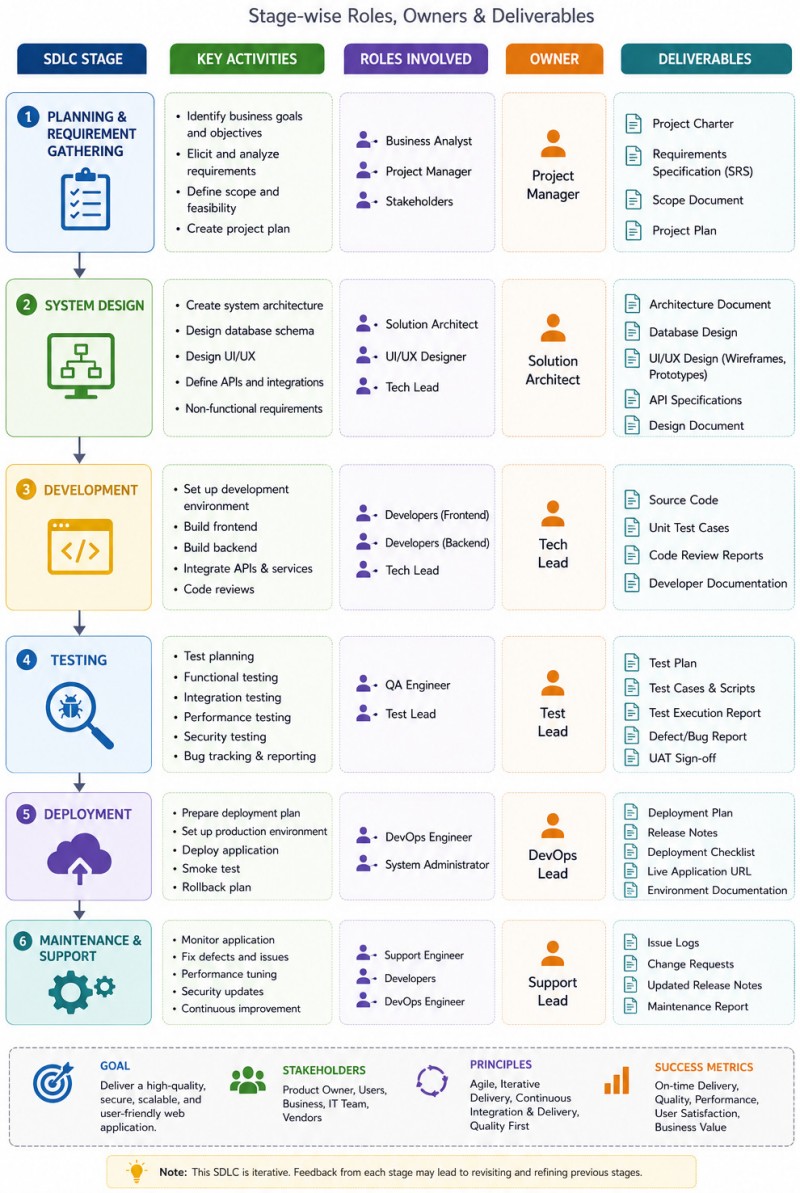
                       ┌───────────────────────────────┐
                       │  1. BACKLOG / REFINEMENT      │
                       │  (Product Owner + Architect)  │
                       └───────────────┬───────────────┘
  Inputs:                              │ Handover:
  • User feedback / features           │ • Refined Product Backlog
  • Technical constraints              │ • Sprint Goal / Target Backlog
  • Business value metrics             │ • Defined Definition of Done (DoD)
                                       ▼
                       ┌───────────────────────────────┐
                       │  2. SPRINT PLANNING / DESIGN  │
                       │  (UX Designer + Team)         │
                       └───────────────┬───────────────┘
  Inputs:                              │ Handover:
  • Refined Sprint Backlog             │ • High-fidelity UX/UI Figma links
  • Existing design system             │ • Technical tasks with story points
  • Team velocity / capacity           │ • Lightweight architecture sketches
                                       ▼
                       ┌───────────────────────────────┐
                       │  3. SPRINT EXECUTION (CODE)   │
                       │  (Developers + Architect)     │
                       └───────────────┬───────────────┘
  Inputs:                              │ Handover:
  • Approved UI mockups / user stories │ • Feature branch Pull Request (PR)
  • Architecture/API design            │ • Documented code / API contracts
  • Acceptance criteria                │ • Passing unit test suite
                                       ▼
                       ┌───────────────────────────────┐
                       │  4. TESTING / PEER REVIEW     │
                       │  (Developers + UX Reviewer)   │
                       └───────────────┬───────────────┘
  Inputs:                              │ Handover:
  • Open PR / functional code branch   │ • Approved / merged main branch code
  • Dev/Staging deployment             │ • Automated CI pipeline green-light
  • UX design checklist                │ • Completed UX design sign-off
                                       ▼
                       ┌───────────────────────────────┐
                       │  5. DEPLOYMENT / RELEASE      │
                       │  (DevOps Engineer + Team)     │
                       └───────────────────────────────┘
  Inputs:                              │ Handover:
  • Merged main branch code            │ • Live feature on production
  • Infrastructure-as-Code (IaC) files │ • Slack/Email release notes
  • Automated CD pipeline triggers     │ • Datadog/CloudWatch monitor alerts
SDLC vs. Framing-Discovery-Delivery Phases ↴
| Product Framework | SDLC Framework | How linked? |
| Framing* | Planning and Feasibility | Product team defines the business goal and user problem (Framing), it ensures the engineering team is given a clear problem statement rather than a rigid list of features. |
| Discovery** | Analysis and Design | Team builds quick wireframes to see if users actually want the feature. The output of the Discovery phase is a validated, de-risked Product Backlog. |
| Delivery | Develop → Test → Deploy → Maintain | Sprint backlogs are fed with fully formed, discovered tickets, and the engineering team runs CI/CD pipelines, automated testing, and code deployments. |
Activities of Discovery Phase ↴
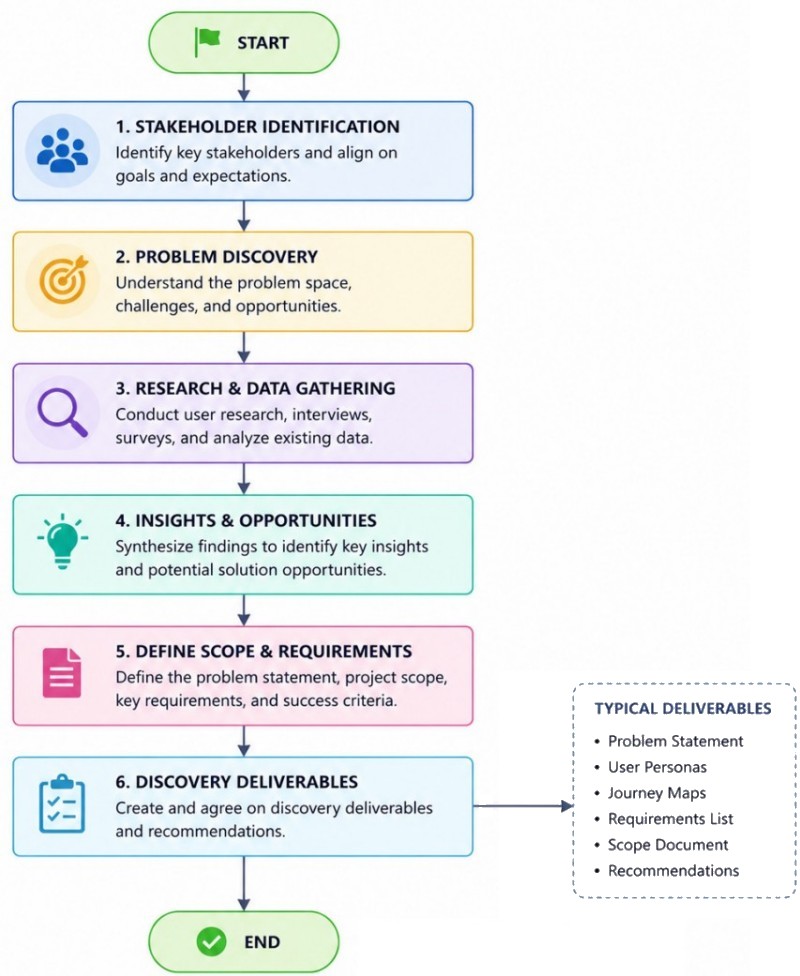
Example: "Add a Cost Optimization Method to a SaaS Dashboard" ↴
| Product Framework | Trigger or Kick-off Step | Workshop / Activities / Goal | Artefacts |
| Framing | 40% users find cloud infra. cost too high, and don't know which servers to shutdown | The Product Manager (PM), Lead UX Designer, and Tech Lead meet. | Goal in brief: "Help users reduce cloud spend by automating suggestions, targeting a 15% reduction in average customer bills." |
| Discovery | Focus is on reducing risk (Value, Usability, Feasibility) through fast iterations | A refined, de-risked design and a clear technical strategy | UX designer creates clickable Figma mockups, Tech Lead investigates architecture and propose countermeasure(s) |
| Delivery | Product manager breaks UI prototype into small, concrete user stories* in the backlog | Start of formal SDLC: Develop and test the optimization method against acceptance criteria | Code is shipped to production using a feature flag |
How to link it with Agile?
Backlog Refinement (The Bridge between Discovery and SDLC): Product Owner (PO) presents the validated prototypes and customer feedback to the developers. This meeting can be used to hand over validated concepts from the Discovery track into the Delivery track. Because the Tech Lead already vetted the technical feasibility during Discovery, the team can estimate story points quickly and split tickets accurately.
Sprint Planning: Tickets can be pulled into the upcoming Sprint that have passed the "Definition of Ready" (DoR). DoR Constraint: A ticket cannot enter a production sprint unless it has been validated in Discovery (e.g. UI designs are finalized, technical dependencies are mapped, and user value is proven).Visualizing it in Jira / Scrum Board
Option-1: Add custom columns to existing Scrum board: Framing ➔ Discovery ➔ Ready for Dev ➔ In Progress ➔ Testing ➔ Done.Option-2: A Kanban board for the PO and Designer to track discovery phase. A standard Scrum board for developers tracking the active sprint.
Code Documentation and User Training Flowchart
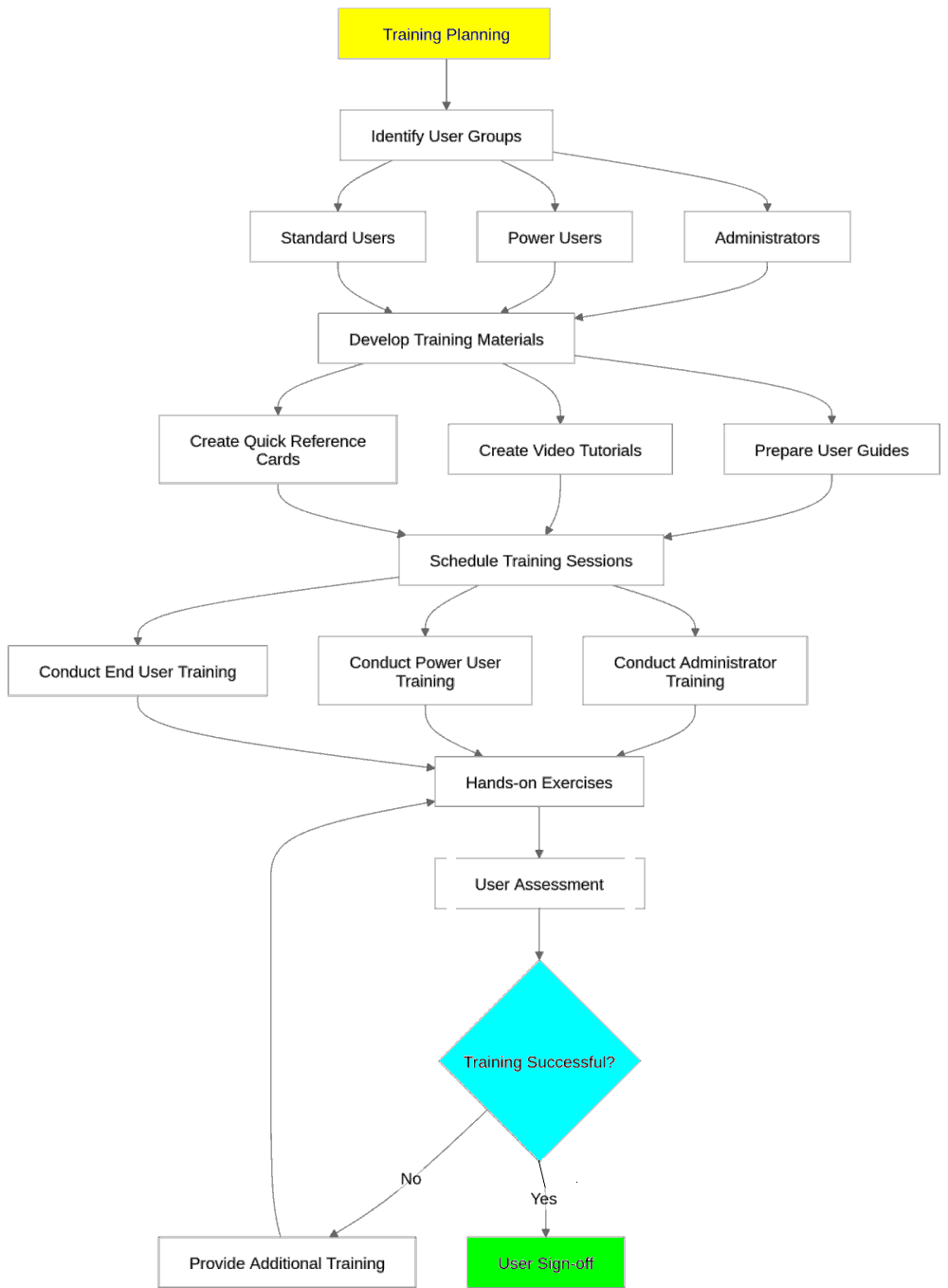
Inline comments, docstrings, API documentation, ReadMe file, Architecture and system doc and configuration files are some of the elements of a code documentation.
Modern coding orient towards self-documenting code (using clear variable and function names) and use inline comments sparingly, inline comments and docstrings are the best way to handle audiences with differing knowledge levels. A comment should explain why the code exists, and should not restate what it does. It should clarify complex logic or unexpected decisions.Code documentation generation tools capture software architecture, function specs, and logic to keep documentation in sync with codebase changes.
- Doxygen: The standard for C++, C, Java, and C#, but also supports Python and PHP. It outputs HTML, PDFs, and dependency graphs
- Sphinx: The definitive industry choice for Python environments. It compiles reStructuredText or MyST Markdown into highly searchable HTML and LaTeX sites
Doxygen
Some of the tags which need to be updated in Doxyfile are PROJECT_NAME, OUTPUT_DIRECTORY, OPTIMIZE_OUTPUT_JAVA, INPUT, RECURSIVE, FILE_PATTERNS, and EXCLUDE. Note that folders and files specified in EXCLUDE tag use relative path which references current working directory as base folder. Thus, if EXCLUDE = tests and "doxygen Doxyfile" is run from /home/user/projects/, it looks for /home/user/projects/tests.Exclusion path must be a sub-path of INPUT. If current working directory is /home/user/projects/appY and run <doxygen ../Doxyfile> it looks for /home/user/projects/appY/tests folder. The path fails to match, and codes stored inside tests/ folder will not be excluded.
To prevent path breaks and make the Doxyfile portable, use the built-in $(DOXYFILE_DIR) environment variable. Doxygen automatically replaces this variable with the absolute path of the directory where Doxyfile lives.
Alternatively, since the EXCLUDE tag cannot be specified directly "relative to the INPUT tag", make root folder of the package as current working directory. Store Doxyfile here, update INPUT = . or INPUT = $(DOXYFILE_DIR) and run "doxygen Doxyfile" from the root folder.
Sphinx
Running bootstrapping step / command <sphinx-quickstart docs> in terminal creates following folder structure:
docs
├── build           - Empty directory initially to hold rendered documentation
├── make.bat
├── Makefile        - Convenience scripts to simplify common Sphinx operations
└── source
    ├── conf.py     - Script holding the configuration of the Sphinx project
    ├── index.rst   - The root document of the project
    ├── _static
    └── _templates
Refer the page sphinx-doc.org/en/master/tutorial/automatic-doc-generation.html for Automatic documentation generation from code. Sphinx does not strictly require one specific docstring format, but it does require a format it knows how to parse. By default, Sphinx expects docstrings to be written in reStructuredText (reST), but it can easily read other popular formats like Google or NumPy styles if you enable a built-in extension.
Google Format: Google style uses human-readable section headers with colons and indentation.
    Args:
        price (float): The base price of the item.
        tax (float): The tax rate as a decimal.

    Raises:
        ValueError: If price or tax is negative.

    Returns:
        float: The total cost.
NumPy Format: this format uses underlines below section headers along with type of the variables.
    Parameters
    ----------
    price : float
        The base price of the item.
    tax : float
        The tax rate as a decimal.

    Returns
    -------
    float
        The total cost.
Key Parameters to Create Executive Dashboards for Hiring: Time-to-Hire, Top Recruitment Sources, Offer Acceptance Rate, Candidate Pipeline Efficiency or Hiring Funnel (an inverted pyramid showing ratio of Applications, Screening, Interview, Offer and Hired), Average Cost per Hire, Gender Ratio.
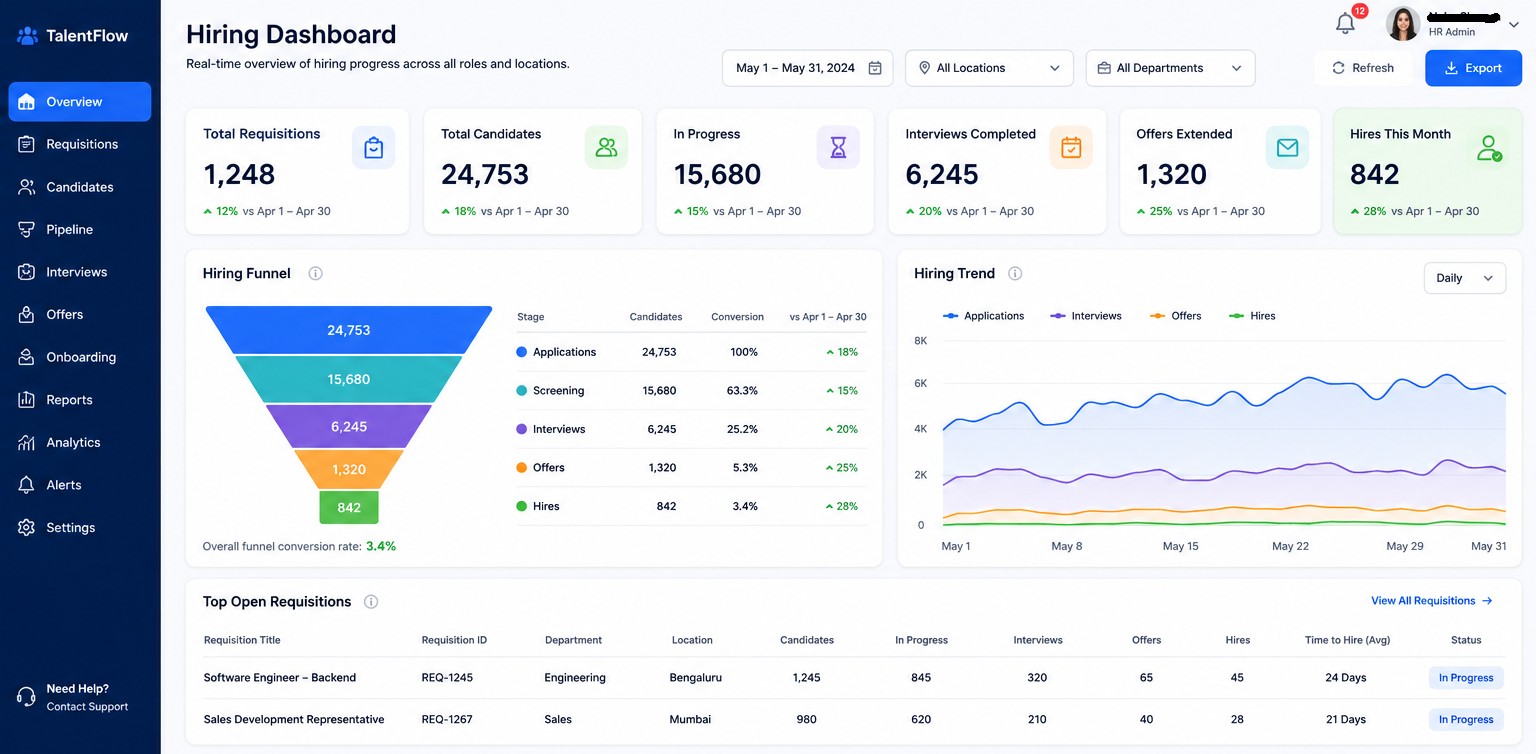
This Excel file can be used to track JD and hiring progress.
GUI Creation using Tkinter
Python code to generate a generic GUI for engineering calculations. To create a general-purpose Graphical User Interface (GUI) program, the first step is to choose a programming language and a UI framework. The one need to design the layout, write event-handling logic, and run the main event loop. An easy and reliable way to build a general-purpose GUI application is using Python with its built-in Tkinter library. Core concepts to understand:
- Widgets: The building blocks of your UI (buttons, labels, checkboxes, entry fields)
- Layout Managers: Rules that position widgets inside the window (e.g. pack(), grid(), or place() from Tkinter). Do not hardcode exact pixel coordinates unless necessary - layout managers handle resizing much better
- Event Loop or mainloop(): An endless loop running in the background that listens for mouse clicks, key presses, and window movements.
References:
- "Refactoring: Improving the Design of Existing Code" by Fowler M, Beck K, Brant J, Opdyke W, Roberts D. Addison-Wesley 1999.
- "Thinking in Java", Fourth Edition by Bruce Eckel.
- "https://www.ibm.com/think/topics/code-refactoring"
The content on CFDyna.com is being constantly refined and improvised with on-the-job experience, testing, and training. Examples might be simplified to improve insight into the physics and basic understanding. Linked pages, articles, references, and examples are constantly reviewed to reduce errors, but we cannot warrant full correctness of all content.
Template by OS Templates