- CFD, Fluid Flow, FEA, Heat/Mass Transfer: Feedbacks/Queries - fb@cfdyna.com
Turbomachines
Knowledge Management for Turbomachines
Turbines, blowers, wind energy, MRF, SMM, DMM, Wake Modeling
Table of Contents: MRF Approach - Limitations | Roll, Pitch and Yaw | Flow inside a centrifugal blower for HVAC applications | Dynamic Mesh Motion | Cavitation in Pumps | Mixing Tanks or Stirred Tanks | Propellers |:| Flow and Losses in Transmission Gearboxes |*| NPSH: Net Positive Suction Head |-| Testing of Fans |=| Gas Turbines and Airfoils (*) Wind Turbines |:| WAsP - Wind Atlas Analysis and Application Program |:| Lifecycle of a Wind Farm
Geographic Information System (GIS) in Wind Energy |:| Wind Rose Diagram |:| OpenFAST |:| Reference OpenSource COntroller (ROSCO) |:| TurbSim: Stochastic Turbulence |:| Output from OpenFAST |:| List of Input Files required by OpenFAST |:| Sensor Locations: OpenFAST |:| Fatigue Life Estimation
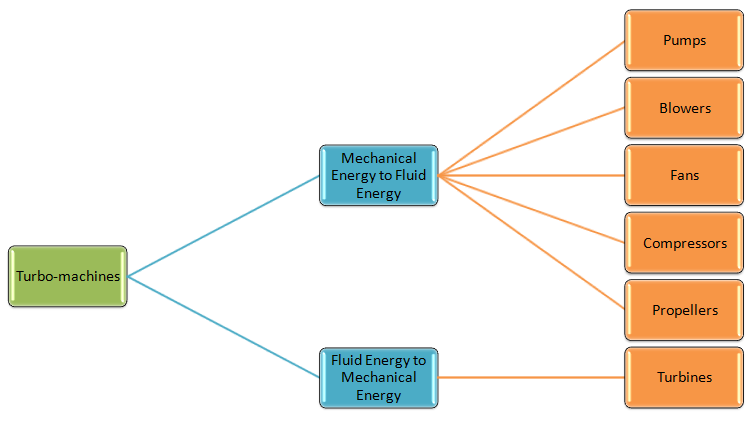
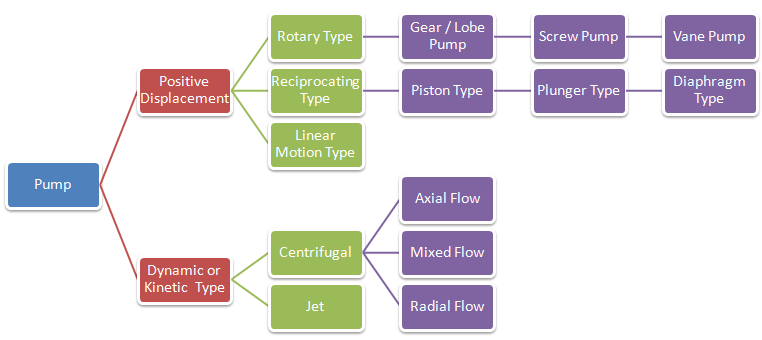
CFD simulation approach for turbomachines such as centrifugal pump and blowers, appropriateness of various modelling approaches namely Single Reference Frame (SRF), Multiple Reference Frame (MRF) or Frozen Rotor Method, Sliding Mesh Motion (SMM) along with applications to industrial problems are described in this page. Before moving to the CFD simulation aspects, following two graphics summarize the types of turbomachines available in industries. The simulation can be just one phase (liquid or gas) or multi-phase applications such as investigation into mixing effects in Gas-Liquid-Solid Stirred Reactor. The explanation on multi-phase flow simulations can be found here.
Forward-curved Blade vs. Backward-curved Blades: Two articles titled "The Difference Between Forward Curved and Backward Curved Fans" (longwellfans.com/difference-between-forward-curved-and-backward-curved-fans) and "Comparison between Forward Curved and Backward Curved Fans" (sofasco.com/blogs/article/comparison-between-forward-curved-and-backward-curved-fans) give good comparison.
Pumps need to transfer energy to the liquids and their suction (inlet) lines are at lower pressures than the discharge lines. In general, it is assumed that the inlet line is always filled with water without any traces of air or gas. However, this is not always the case. If the centreline of the pump is above the water supply reservoir and there is no check valve or the pump is started first time, there will be air present in the suction line. Centrifugal pumps with basic design features cannot remove the air from the suction line and can only start to pump the fluid after it has initially been primed with the fluid.
The term 'priming' refers to the phenomena of removing the air from the system. Types of self-priming pumps are centrifugal pumps with "separation chamber", "side channel" or "water ring pumps" and "two casing chambers and an open impeller pumps". Some self-priming pumps come with an integrated vacuum pump that ensure the pump primes at unfavourable suction pipe layouts. The self-priming feature can be imparted to a centrifugal pump by ensuring impeller is submerged in water or retains enough water when it stops. It can be achieve simply by designing a suction and discharge cavity above the centerline of the impeller or installing a check valve near the suction eye. Note that even self-priming pumps will need initial priming after commissioning.
CFD simulations of a pump is carried with known mass flow rate and known pressure at one of the boundaries. However, any simulation of a self-priming process needs to be carried out with atmospheric boundary conditions at both inlet and outlet as well as keeping the gravity on - to separate gas from liquid. Alternatively, pressure inlet and the opening at the outlet can be used as inlet and outlet boundaries in order to approximate the actual self-priming operation This makes the simulation process special and a transient simulation is necessary.
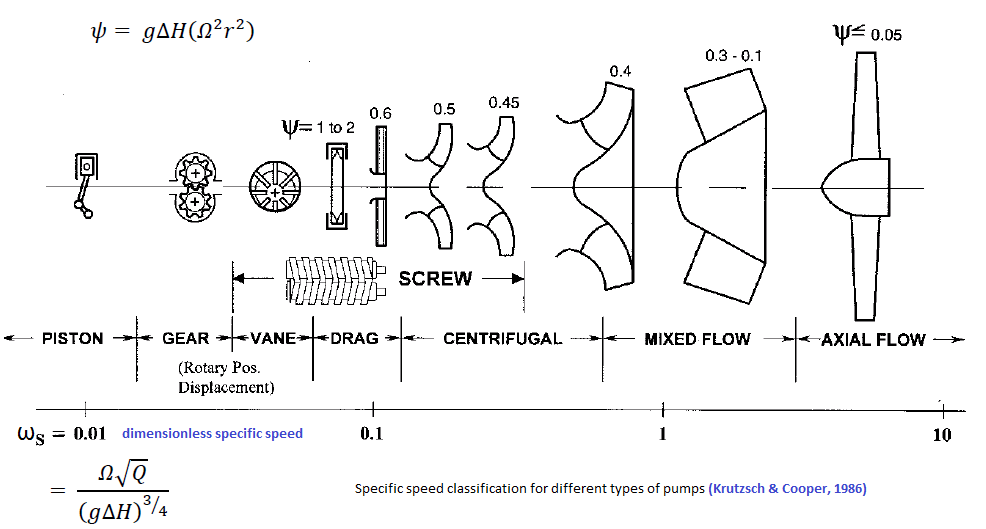
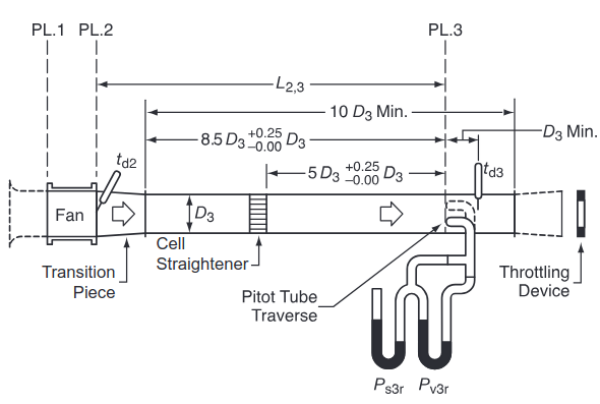
Pumps are characterized by a single value known as specific speed. There are some dimensional variants of specific speeds and some non-dimensional. Hence, utmost care should be taken to check and use appropriate units used to derive the specific speeds. ISO 5801:2017 specifies procedures for the determination of the performance of fans of all types except those designed solely for air circulation, e.g. ceiling fans and table fans. Testing of jet fans is described in ISO 13350. The aeroacoustic measurements are performed using a test rig (the so-called In-Duct method) according to the industry norm ISO 5136 where far-field noise levels are recorded inside a circular duct using three slit-tube microphones.
CFD Simulation Methods for Turbomachines
SRF: This method is used when the computational domain is axi-symmetric. This is called 'single' reference frame because only one reference frame (which is rotating) needs to be defined. This method can be used when whole geometry (the computational domain) can be assumed rotating.
Lumped Fan (FP) or Body Force Model: This method does not model the blades and hub, instead uses an interface at the location where the fan blades would be located. An experimentally obtained fan curve (pressure drop vs. flow rate) is applies as pressure rise (pressure jump or porous jump) over the interface according to the mass flow rate. The drawbacks of this model are that the velocity vectors exiting the interface of the standard LF model only have an axial component, no swirl (tangential component) and no reduced velocity where the hub would be located. These drawbacks can be reduced by adding a swirl to the outlet flow or geometrically leaving out the hub region from the interface.
MRF:This method uses more that one reference frames - at least one stationary (outer) and 1 rotating (inner). This is also known as Frozen Rotor Method (FRM) as the rotating parts are kept frozen in position and rotation is accounted for by the additional source terms through inclusion of centrifugal and Coriolis forces. Instead of the blades moving physically through the air, the air moves around the rotor blades with a corresponding angular velocity. Even for the cases where transient simulation is required, MRF method is useful for attaining initial values for time-dependent simulations because the pseudo-steady state can be reached within a few revolutions starting from zero initial velocity. MFR approach is appropriate if the flow seen from the rotating/moving frame of reference is steady along the interface. In other words, when flow is relatively uniform at the interface between the moving and stationary zones. E.g. in mixing tanks the impeller-baffle interactions are relatively weak, large-scale transient effects are not present and the MRF model can be used.
- The equations for the inner rotating region are solved in a rotating reference frame (when a rotating reference frame is used the centrifugal and Coriolis forces are included in the momentum equation). The equations for the outer stationary region are solved using a stationary reference frame. The solutions from both regions are matched at the interface between the rotating and stationary regions via velocity transformation from one frame to the other. This velocity-matching step involves the implicit assumption of a steady flow condition at the interface. The local velocity value may depend on the position of the impeller blade.
- Domain and Mesh: The accuracy of simulation result is sensitive to the selection of MRF region. It is defined so that it includes rotating parts and extends to upstream and downstream sections where a mixed-out (relatively uniform) flow field exists. MRF region can also include stationary parts if they are rotationally symmetric. The mesh (elements and nodes) inside the rotating domain including external or internal boundaries rotate as a solid body with the rotation angular speed specified about the axis of rotation.
- Walls: In order to account for wall shear, solver needs to know the speed of the wall. Any external or internal wall inside the rotating domain is assumed to rotate at the speed of the domain. If a wall defining the boundary of rotating domain is required to be defined stationary, it either needs to be specified as "counter-rotating wall" or its angular velocity needs to be defined as "0 [rad/s]". In FLUENT, this can be achieved using the feature motion "Relative to Adjacent Cell Zone" or 'Absolute'.
- Governing Equations: In both SRF and MRF methods, the momentum conservation is governed by the Navier-Stokes equations and the mass conservation is governed by the continuity equation. Both SRF and MRF methods are called steady-state approach (or pseudo-transient due to usage of pseudo time stepping) where the solution is time independent and rotation is achieved through mesh fixed in space and time. As a result, it does not model unsteady (transient) effects at the frame change interface.
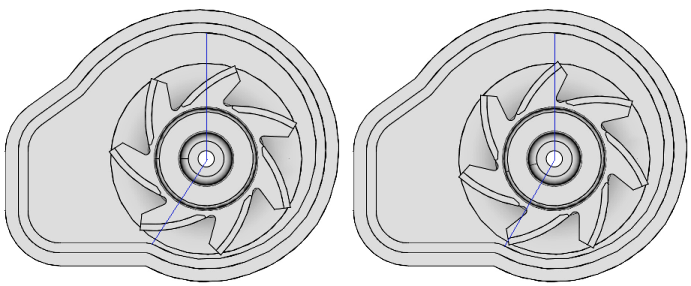
- Result is influenced by 'frozen' position of rotating components (blade) with respect to the stationary parts (baffles, involute). Hence, the validity of result should be thoroughly checked when either the number of blade count is low or the speed of rotation is relatively low.
- MRF result will be inaccurate when flow crosses the interface from both directions - that is when flow enters and leaves the outer boundary of rotating domain.
- As per ANSYS user manual, the use of the realizable k-ε turbulence model with multiple reference frames is not recommended. The PRESTO! scheme for the discretization of pressure equation is recommended for solving rotary machines.
MRF Approach - Limitations:
Excerpts from "Evaluation of the Multiple Reference Frame Approach for the Modelling of an Axial Cooling Fan" by Randi Franzke, Simone Sebben, Tore Bark, EmilWilleson and Alexander Broniewicz.The fan performance curve, describing the pressure rise over volume flow rate through the fan, is commonly under-predicted when using the MRF model. This under-prediction mainly occurs at low to medium volume flow rates (radial and transitional regime), therefore it is concluded that the MRF method works best when the fan is operating in axial conditions. Liu et al. (2016) found that the thrust of a tidal current turbine was equally under-predicted with the MRF approach as the pressure rise. Furthermore, they found that the frozen rotor position has a significant influence on the flow field in the near wake. Kobayashi and Kohri (2011) showed that uniform inflow conditions are necessary in order to facilitate the transition to the moving reference frame. Apart from the operating conditions, it is also important that flow structures originating from the blades (e.g. tip vortices) are completely encompassed by the MRF domain, in order not to be split or in other ways being hindered from developing. As was pointed out by Gullberg and Löfdahl (2011) and Kobayashi et al. (2014) the performance of the MRF approach is highly dependent on the users choice of the size of the MRF. A large MRF domain has therefore been shown to give better agreement with experimentally obtained fan curves. For open fans (i.e. no ring connecting the blade tips), the radial extent is more important, due to the occurring tip vortices, while for both the open and closed fan type a sufficiently large axial extent can lead to more uniform inflow conditions and hence a better performance prediction. Therefore it can be concluded that the users choice of the MRF domain has a substantial impact on the accuracy of the results.
SMM: In Sliding Mesh Motion (rigid body motion - RBM) the rotation is achieved through moving mesh functionality which is a time dependent process and hence known as transient simulation approach. No additional source terms area added into the momentum equations. This is specially required when (a)vortices of next blade (or wake behind the blade) that have just passed upwind affect the following blades or (b)flow unsteadiness due to pressure waves which propagate both upstream and downstream.
- Note that the mesh motion can be constant speed or accelerating – the solver accommodate both situations.
- In the SMM formulation, the motion(s) of moving zone(s) is tracked relative to the stationary reference frame where the motion of any point or node in the domain is given by a time rate of change of the position vector - known as grid speed.
- SMM and DMM uses same equations where in case of DMM, has additional feature for nodes to move relative to each other. Hence, SMM can be assumed to be a subset of more general DMM method.
- Since this approach involves mesh motion it is necessary that the interface between the zones be two overlapping faces, one of which is attached to the rotating region while the other is attached to the stationary region. The interaction between the two regions is modelled by interpolating the information across these faces. No additional source terms needs to be added into the momentum equations. For each time step, nodes are rotated and the fluxes at the sliding interfaces (interface at the stationary and rotating) are recomputed.
- Time steps for transient simulation is a function of element size (Δs) at the sliding interface. The time steps should always be less that it requires a moving / rotating cells to cross past a stationary point at the interface that is Δt ≤ Δs/ω/r where ω is the rotational speed of moving domain and r is the radius of sliding interface.
- The mesh interface between rotating and stationary domains must be situated such that there is no motion normal to it.
- The common boundary or mesh interface can be any shape (including non-planar surfaces) provided the two interface boundaries are derived from a set of common geometrical entities (lines in 2D and surfaces in 3D).
- By default, the velocity of wall is zero relative to the motion of the mesh or cell zone it is attached to. For walls bounding a moving mesh this imposes the "no-slip" condition in the reference frame of the mesh. Hence, one need to modify the wall velocity boundary conditions only if it is stationary in the absolute frame and therefore moving in the relative frame. For example, shroud of a fan is a stationary wall bounding the rotating reference frame defined for the blades. Hence, its velocity should be explicitly set to ZERO.
- An interface is a MUST between rotating and stationary regions (domains or zones). Sometimes, such surface zones can be set as 'interior' instead of an interface.
- However, such 'interfaces' must be a surface of revolution having axis of revolution coinciding with the axis of revolution of the rotating zones and walls.
- The recommended practice is to chose the location of such interface(s) at the mid-way between the tip of rotating walls (or the blade tip) and the nearest stationary housing walls. Sometimes, the location of interfaces are also governed by meshing considerations (such as number of boundary layers on the walls of the blades) and free mesh size beyond this region.
- For rotating domains embedded in relative large domains (such as a fan relative very small as compared to room), the recommendation is to have the interface at a location where flow is likely to be uniform.
- Note that there is a significant difference between "Rotating Frame" and "Rotating Mesh".
DMM:
In all the cases described above, the rotating and stationary parts do not change the shape or geometry. When the parts change shape and/or size, a Dynamic Mesh Model (DMM) method is required which allow changes to be made to the mesh (as solution progresses) such as remeshing, adding and removing grid cells where necessary. 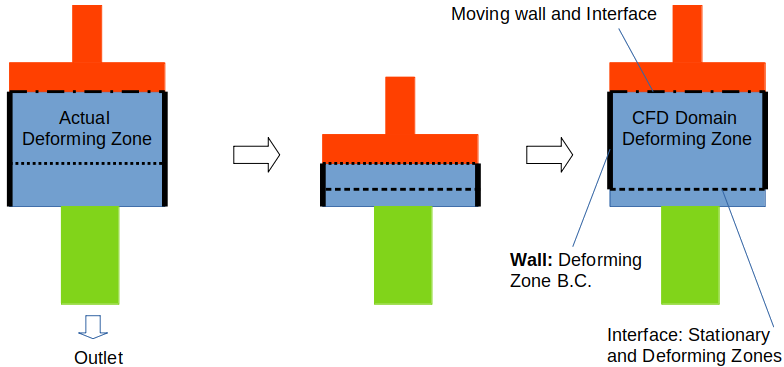
- Prescribed translation (such as motion of piston and valves in engines), rotation (motion of teeth in gear pumps) or combination of translation and rotation (motion of teeth in helical pumps). In ANSYS FLUENT, "DEFINE_CG_MOTION” is used to describe the motion of a face or cell zone. It provides solver with a velocity at every time step. ANSYS Fluent then translates this to the position of the zone given the current simulation time. DEFINE_CG_MOTION(udf_name, dt, vel, omega, time, dtime), where name defines the name of the UDF. 'dt' is a pointer to a storage that contains the dynamic mesh attributes specified by the user or calculated by FLUENT. 'vel' and 'omega' are the linear and angular velocity arrays respectively. 'time' defines the current time and 'dtime' defines the time step. These 6 variables are passed to the UDF by FLUENT, the UDF then calculates the linear and angular velocities and returns the values to ANSYS FLUENT.
- Since movement is known a priori, a sequence of meshes can be generated to accommodate the motion of the boundaries. In between those generated meshes, the mesh can be deformed (for example stretching and compression) according to the prescribed boundary movement.
- In situation where sliding interfaces need to be created in very tight clearances such as screw pumps, continuous mesh adaptation - even at every time step - might be required.
- It is when the deformation of the mesh is excessive that the deformed mesh can be replaced with a new generated one (e.g. layer addition and deletion in case of translation of boundary or linear deformation of the fluid zone).
- Note that the motion is prescribed at the solid boundaries and not at the mesh representing fluid volume which shape and size changes.
- The motion of each point and cell in the mesh needs to be calculated so that the mesh remains topologically consistent to the changes in shape and size of the fluid domain.
- During the mesh deformation process, a finite element method is used based to the Laplacian equation (∇.κ∇u = 0) for estimating the velocity and location of the mesh points, either with a constant or variable diffusivity κ. The added diffusivity controls the mesh deformation and quality.
- If the zone is a rigid body, a 'profile' or 'user-defined function (UDF)' can be used to define the motion of the rigid body or use the 6-DOF solver. The motion of a solid-body can be specified either as a profile or as a user-defined function (UDF). A profile may be defined by the following profile fields: time (time), crank angle (angle) (in-cylinder flows only), position (x, y, z), linear velocity (v_x, v_y, v_z), angular velocity (omega_x, omega_y, omega_z), orientation (theta_x, theta_y, theta_z).
- Unprescribed motion where the subsequent motion is determined based on the solution at each time step(for example, the linear and angular velocities are calculated from the force balance on a swing valve), as is done by the six degree of freedom (6DOF) solver. Motion induced by flow field which is dependent of the solution of flow field itself and found application in phenomena such as aero-elasticity and fluid-structure interactions (FSI). A noticeable difference with prescribed mesh motion case is that the deformation in this category of applications are low and as well as not known a-priori. If there is excessive deformation in solid, a high quality hexahedral mesh would be required.
- Overset mesh: this is a dynamic mesh motion option available in ANSYS FLUENT and STAR-CCM+. The Overset mesh consists always of at least two regions partially or fully overlapping each other and is useful when working with moving bodies such as swing valves. It does not require mesh modification after initialization or during the simulation. The solutions in the overlapping mesh zones are interpolated and hence cell sizes in the two meshes should be nearly same. Key concepts in overset mesh technology are: Overset Interface, Background Grid, Component Grid and Overset Boundary.
- The boundaries and interfaces are defined such that the solver divides the cells into active, inactive and acceptor groups. The inactive cells are deactivated and the flow is not solved for them while the acceptor cells are used to couple the solution between overset and background region.
- The overset region moves into the background region, and the solver automatically selects appropriate cells (active or acceptor) for the solution.
- This meshing technique can simulate a moving body with up to six degrees of freedom as well as it also permits the creation of a zero-gap interface required to simulate the full closure of valves.
- For cases such as swing valves, the closing valve disc is part of the overset region, which shall rotate according to the momentum exerted by all the forces / torques as per Newton’s second law for momentum.
- Cells in the background overlapping with valve disk becomes inactive because it is occupying that space. Later on the those cells shall get active again when disc changes its position.
Example profile for motion of the solid-body
((movement_linear 3 point)
(time  0   1   2 )
(x     2   3   4 )
(v_y   0  -5   0 ) )
((movement_angular 3 point)
(time     0   1   2 )
(omega_x  2   3   4 ) )
Typically, a DMM simulation can consist of up to 4 different zones. This is demonstrated by application of DMM for simulation of flow in an internal combustion engines. Excerpts from Theory Guide: "ANSYS Fluent expects the description of the motion to be specified on either face or cell zones. If the model contains moving and non-moving regions, you need to identify these regions by grouping them into their respective face or cell zones in the starting volume mesh that you generate. Furthermore, regions that are deforming due to motion on their adjacent regions must also be grouped into separate zones in the starting volume mesh. The boundary between the various regions need not be conformal. You can use the non-conformal or sliding interface capability in ANSYS Fluent to connect the various zones in the final model."
Standard Transient Profiles
((profile-name transient N periodic?)
(field_name-1 a1 a2 a3 .... aN)
(field_name-2 b1 b2 b3 .... bN)
.
.
(field_name-r r1 r2 r3 .... rN) )
Profile names must have all lowercase letters, time field section must be in ascending order. N is the number of entries per field. The 'periodic?' entry indicates whether profile is time-periodic or not: 1 for a time-periodic profile, or 0 if the profile is not time-periodic. An example is shown below:
((time_vel_curve transient 3 0)
(time 1  2  3)
(u   10 20 30) )
The 6DOF solver in ANSYS Fluent uses the forces and moments acting on the object in order to compute the translational and angular motion of the center of gravity of an object. The governing equation for the translational motion of the center of gravity is solved in the inertial coordinate system. Once the angular and the translational accelerations are computed from angular momentum balance and linear momentum balance respectively, the rates (angular velocity / angular displacement and translation velocity / displacement) are derived by numerical integration. The angular and translational velocities are used in the dynamic mesh calculations to update the rigid body position." For the rigid body motion of a body such as valves and diaphragms, the 6DOF solver is which computes external forces and moments on the valve by computing a numerical integration of the pressure and shear stress over the valve’s surface. It can also add additional forces or moments such as e.g. spring and mass inertia forces. When the forces and moments acting on a rigid body is estimated, it calculates the translational and rotational motion of the center of gravity of the body using equation a = 1/m . ΣF, dω/dt = 1/Inertia . Στ
Roll, Pitch and Yaw
Simulation involving dynamic mesh motion and 6-DOF requires understanding of Euler angles, roll, pitch and yawing motion. The yaw, pitch, and roll rotations can be used to place a 3D body in any orientation. A single rotation matrix can be formed by multiplying the yaw, pitch and roll rotation matrices to obtain final transformation matrix. It is important to note the order that performs the roll first, then the pitch and finally the yaw. If order is changed, transformation matrix will also change. In FLUENT, the angle of rotation or orientation about x-, y- and z-axis is denoted by φ, θ and ψ. The transformation matrix from inertial to body coordinate systems are given as: 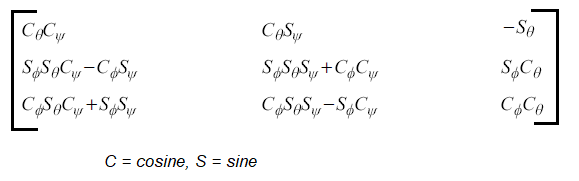
Zones and Mesh Updates in DMM
- Deforming zone: This refers to the mesh which will deform with the simulation. For example, zone or volume in 3D consisting of volume bounded by piston, liner, head and valves. The zone deforms by the valve and piston motion.
- Layering Zone: This zone represents the valve motion and it located above the valve, between valve curtain and valve stem. As the name suggest, mesh layers are added / deleted during the simulation. Whenever the mesh quality in the deforming zone or layering zone deteriorates beyond a pre-defined value, mesh is regenerated by adding or removing layers in the layering zone and remeshing the deforming zone by adding (refining) or removing (coarsening) cells (depending on if the cells are compressed or stretched during piston motion).
- Rigid Motion Zone: This is located between the layering zone and the valve. This zone keeps its geometrical shape throughout the whole engine cycle, but follows the valve motion. The function of the rigid motion zone is to capture the concave valve shape without affecting the layering zone. In this way it is easier to make new meshes at different valve lifts by simply adding or removing layers of cells in the layering zone. It also helps to preserve the mesh quality in the area of the valve exit.
- Static Zone: This zone consists of all volumes that are unaffected by boundary motion and as the name suggests they keep their geometry and shape during the whole engine cycle. This zone includes all remaining volumes in the intake and exhaust ports.
- The mesh deformation is handled in 3 ways:
- Smoothing: This is method to apply a boundary movement which retains original cells of the mesh and move the nodes to ensure certain mesh quality. This method is appropriate only when the boundaries undergo small deformation. In case of larger deformation, the layer adjacent to boundary may get so skewed that any mesh smoothing operation will not improve the quality to permissible level. The smoothing method includes three different options:
- Spring-Based Smoothing: use the edges between two mesh nodes as interconnected springs. Equilibrium state is before any boundary motion have occurred. When a displacement happen at a node, it generates a force equal to the displacement between the two nodes. Hooke’s law is used to calculate the force between the nodes. This method is used if the movement of the boundary is primarily only in one direction, resulting in no excessive stretching or compression of the cell zone
- Laplacian Smoothing: This method adjusts the mesh vertex to the center of the adjacent vertices, does not guarantee improvements on mesh quality and often lead to poor mesh quality.
- Boundary Layer Smoothing: this is often combined with another mesh motion UDF where the smoothing method is used to deform the boundary layer during the mesh motion.
- Layering: In this method, the boundary selected as a layering face has certain prescribed motion profile. All the cells adjacent to that face (in the domain marked layering) are allowed to compress and expand. All other cells of the domain perform rigid body motion - compressing or expansion as the same rate as the first layer of cells attached the layering face. This method required the layering zone to consists of either hexahedrons or prism elements. Note that this method is viable only if the moving object (boundary) is not surrounded by cells.
- Remeshing:The Remeshing method create new cells due to skewness, that is a new mesh is regenerated in the specified zone when the mesh quality deteriorates beyond a pre-defined level. An informative video on YouTube covering 6-DOF (6 Degrees-of-Freedom) solver in ANSYS FLUENT is here.
- Smoothing: This is method to apply a boundary movement which retains original cells of the mesh and move the nodes to ensure certain mesh quality. This method is appropriate only when the boundaries undergo small deformation. In case of larger deformation, the layer adjacent to boundary may get so skewed that any mesh smoothing operation will not improve the quality to permissible level. The smoothing method includes three different options:
Dynamic Mesh TUI
define/dynamic-mesh dynamic-mesh?
 Enable Dynamic Mesh? [yes] yes
 Enable In-Cylinder Option [no] no
 Enable Six DOF Solver? [no] no
 Enable Implicit Update? [no] yes
 Enable Contact Detection? [no] yes
/define/dynamic-mesh/zones create zone_x
 motion type: (stationary rigid-body deforming user-defined system-coupling)
 enter motion type: [stationary] deforming
 allow smoothing? [yes] yes
 allow local remeshing? [yes] yes
 use remeshing global values? [yes] yes
/define/dynamic-mesh/controls smoothing? [yes] yes
/define/dynamic-mesh/controls layering? [no] yes
/define/dynamic-mesh/controls remeshing? [no] yes
When using Local Remeshing method, FLUENT marks cells based on criteria set for skewness and minimum / maximum length scales. It evaluates each cell and marks the cell if it does not meet one of the following criteria:
- Skewness > the value specified by user
- Cell size < specified minimum length scale
- Cell size > specified maximum length scale
- Cell height does not meet length scale specified for adjacent boundary, e.g. a moving wall (valve or piston)
Sample UDF for 6DOF case. DEFINE_SDOF_PROPERTIES (name, properties, dt, time, dtime) specifies custom properties of moving objects for the six degrees of freedom (SDOF) solver which includes mass, moment and products of inertia, external forces and external moments. real *properties - pointer to the array that stores the SDOF properties. The properties of an object which can consist of multiple zones can change in time, if desired. External load forces and moments can either be specified as global coordinates or body coordinates. In addition, you can specify custom transformation matrices using DEFINE_SDOF_PROPERTIES. The boolean properties[SDOF_LOAD_LOCAL] can be used to determine whether the forces and moments are expressed in terms of global coordinates (FALSE) or body coordinates (TRUE). The default value for properties[SDOF_LOAD_LOCAL] is FALSE.
| #include "udf.h" | |||
| #include "math.h" | |||
| DEFINE_SDOF_PROPERTIES(valve_6dof, prop, dt, time, dtime) { | |||
| prop[SDOF_MASS] = 0.10; | /*Mass of the rigid body in [kg] */ | ||
| prop[SDOF_IZZ] = 1.5e-3; | /*Mass moment of inertia about Z axis [kg/m^2]*/ | ||
| /* Translational motion setting, use TRUE and FALSE as applicable */ | |||
| prop[SDOF_ZERO_TRANS_X] = TRUE; | /*Translation allowed in global X-Direction? */ | ||
| prop[SDOF_ZERO_TRANS_Y] = TRUE; | /*Translation allowed in global Y-Direction? */ | ||
| prop[SDOF_ZERO_TRANS_Z] = TRUE; | /*Translation allowed in global Z-Direction? */ | ||
| /* Rotational motion setting, use TRUE and FALSE as applicable*/ | |||
| prop[SDOF_ZERO_ROT_X] = TRUE; | /*Rotation allowed about global X-Axis? */ | ||
| prop[SDOF_ZERO_ROT_Y] = TRUE; | /*Rotation allowed about global Y-Axis? */ | ||
| prop[SDOF_ZERO_ROT_Z] = FALSE; | /*Rotation allowed about global Z-Axis? */ | ||
| /* Gravitational, External Forces/Moments: SDOF_LOAD_F_X, SDOF_LOAD_F_Y ... SDOF_LOAD_M_Z*/ | |||
| M = prop[SDOF_MASS]; Larm = 0.10 */ | |||
| /* DT_THETA(dt): orientation of body-fixed axis vector, DT_CG(dt): center of gravity vector, DT_VEL_CG(dt): cg velocity vector, DT_OMEGA_CG(t): angular velocity vector */ | |||
| prop[SDOF_LOAD_M_Z] = -9.81 * M * Larm * sin(DT_THETA(dt)[2] ; | |||
| Message("\n 2D: updated 6DOF properties DT_THETA_Z: %e, Mz: %e, Mass: %e \n", | |||
| DT_THETA(dt)[2], prop[SDOF_LOAD_M_Z], prop[SDOF_MASS]); | |||
| } | |||
#include "udf.h"
#define PI 3.141592654
DEFINE_TRANSIENT_PROFILE(speed, time) {
  real A = PI/12;   /*Amplitude in [rad]   */
  real f = 10.0;    /*Frequency in [rad/s] */
  real w;           /*Angular displacement */
  w = 2.0*PI*A*cos(f * time);
  return w;
}
Sign convention of rotor power in FLUENT: 'positive' value implies fluid is supplying energy to the rotor (e.g. turbine), 'negative' value implies rotor is supplying energy to the fluid (e.g. compressor or pump).
DFBI - DMM is known as DFBI in STAR-CCM+ where the DFBI (Dynamic Fluid Body Interaction) module is used to simulate the motion of a rigid body in response to pressure and shear forces the fluid exerts, and to additional user-defined forces such as weight and inertia. STAR-CCM+ calculates the resultant force and moment acting on the body due to all influences, and solves the governing equations of rigid body motion to find the new position of the rigid body. There are multiple type of DFBI features. One such feature is DFBI Superposed Rotation which superimposes an additional fixed body rotation in addition to the DFBI motion. For example, this option can be used to model rotating propellers attached to rotating and/or translating marine boats.
The 6-DOF Solver in STAR-CCM+ computes fluid forces, moments, and gravitational forces on a 6-DOF object where pressure and shear forces are integrated over the surfaces of the 6-DOF bodies. These forces and moments are used to compute the translational motion of the center of mass of the body and the angular motion of the orientation of the body. The 6-DOF body object defines the surface of the floating body for the calculations of the 6-DOF solver.
Mesh Motion in OpenFOAM: The solid body motion is defined by classes derived from common base solidBodyMotionFunction. The motion function returns a septernian which describes the motion of the body. Septernion class used to perform translations and rotations in 3D space. It is composed of a translation vector and rotation quaternion and as such has seven components hence the name 'septernion' from the Latin to be consistent with quaternion rather than 'hepternion' derived from the Greek. Quaternion are the extension of complex number system in 2D geometry to that in 3D geometry (4-dimensional division algebra discovered by Irish mathematician and physicist William Rowan Hamilton).
Immersed Solid Approach: ANSYS CFX uses an immersed solid approach to model to model steady-state or transient simulations involving rigid solid objects that can move through fluid domains such as lobe pump, gear pumps and axial flow fans. The immersed solid is represented as a moving walls (or two counter-rotating moving walls in case of gear pumps) and a source term in the fluid equations that drives the fluid velocity to match the solid velocity. Some of the limitations of this approach are: the immersed solid domain cannot undergo mesh deformation and the surfaces of the immersed solid body are not explicitly resolved by the mesh. In addition, a wall function cannot be applied to the boundary of an immersed solid and hence the accuracy of simulation results may be lower than can be obtained using mesh deformation methods or other techniques that support the use of wall boundaries to directly resolve solid surfaces.
Mixing Plane Method: MPM is available in ANSYS FLUENT. When a axial flow compressor or turbine stage needs to simulated with different values of periodic angles of rotor and stator, this approach becomes necessary. A "mixing plane" is defined at the interface of rotor and stator.- Like MRF, MPM is a steady-state approach, that is the mixing plane model is useful for predicting steady-state flow in a turbomachine stage when local interaction effects (such as wake and shock wave interaction) are weak.
- After a prescribed number of iterations, the flow data at the mixing plane interface are (by default area-)averaged in the tangential (circumferential) direction at the interface: on both the rotor outlet and the stator inlet faces.
- If rotor-stator interaction effects are important, then a transient sliding mesh calculation is required.
- Note that the mass flux for the rotor portion and stator volume would be different as periodic angles are also different. However, for a complete 360° domain, the mass fluxes for rotor and stator should be equal.
Flow inside Automotive Transmission Gearboxes
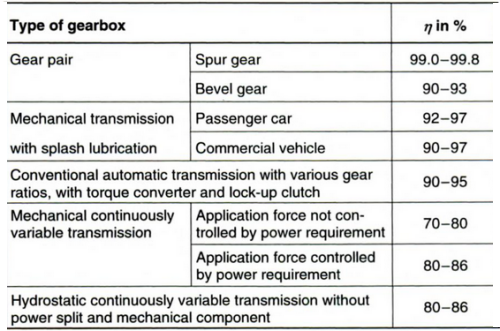
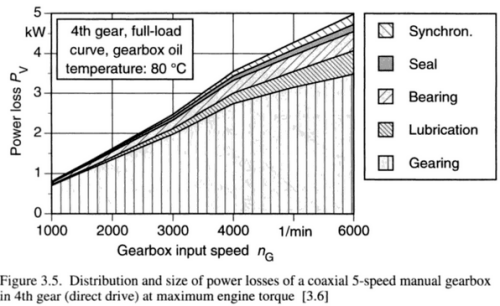
The lubrication system used in an automotive gearboxes are of dip-lubricated type or splash-lubricated gearboxes where the gears are partly immersed in oil and oil is transported to the tooth-meshing region while the teeth come out of the oil well. The rotation of gear teeth in highly viscous oil lead to drag known as churning power loss (category of load-independent power losses). Note that in real life, the two faces of gear teeth are in solid-to-solid contact which changes with time.
Thus, in order to apply the CFD method, some arbitrary gaps need to be assumed so that the two interacting teeth never touch each other (sometimes achieved by scaling down the driver and driven gears to 99.5% of their original sizes). It is recommended to start with 2D geometry where VOF multiphase model with dynamic meshing (smoothing, local- or global-remeshing and/or layering) to simulate the fluid flow for a pair of mating gears. Continuous variation of the geometry of the fluid volume during the operation, determined by the mating cycles of the gears, leads to high complexity in the simulation of fluid dynamics inside gearboxes, because it necessarily requires an update of the (distorted) mesh after a few time steps or fraction of degree rotation.
Another source of load-independent losses in gears is squeezing or pocketing generated due to variation of the volume between mating teeth thereby producing axial flows (squeeze effect) of the trapped lubricant. This loss is a lower order of magnitude when compared to churning losses.
Reference: "Automotive Transmissions: Fundamentals, Selection, Design and Application" by Giesbert Lechner, Harald Naunheimer
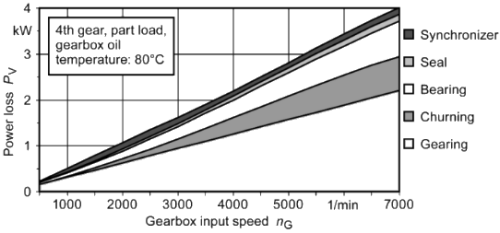
From STAR-CCM+ V2302 Release Notes: "In applications like gear box splashing droplets may break-up in smaller and smaller size until you can no longer model the very small droplets as Lagrangian particles. At the same time you still need to model the free surface of the bulk liquid. For such applications Mixture Multiphase with Large Scale Interface modelling (MMP-LSI) has become the method of choice. In general, MMP-LSI is relevant anywhere you have Volume Of Fluid (VOF) but that would be too expensive, and a mixture is present. But just like VOF, MMP-LSI comes at a comparably high cost if you can’t decouple the choice of flow time step from that needed to fulfil the small time step required for the volume fraction due to Courant (CFL) number constraints. To overcome this challenge we previously rolled out Implicit Multi-Step for VOF where simulations were typically sped up by 3-4x and in some cases by up to an order of magnitude."
Flow inside a centrifugal blower for HVAC applications
Centrifugal blowers have far too many applications. Automotive HVAC is one of them. Following picture demonstrates typical layout of blower inside the heating module for automobiles. 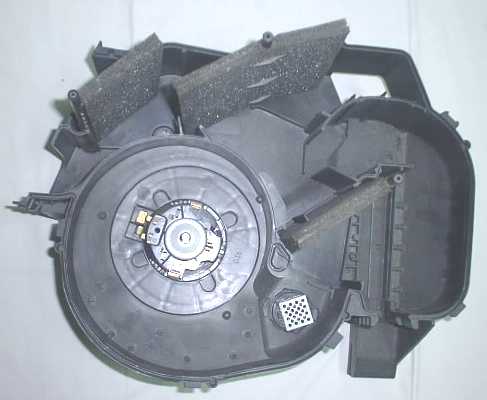
The purpose of this demonstration is:
- to gain insight into the operation of a centrifugal blower, effect of casing on pressure recovery
- develop an optimized throat shape, size and location
- execute basic optimization using 2D simulation
- use the 2D mesh to generate the 3D mesh, a novel use of mesh extrusion
- assess the improvement in results using Sliding Mesh Model (SMM) over Multiple Reference Frame (MRF) model
- study the effect of clearances between blade and casing on overall performance - 3D simulation
- check for the issues observed when solution for SMM is initialized with a converged MRF solution vs. full transient start where flow field is uniform.
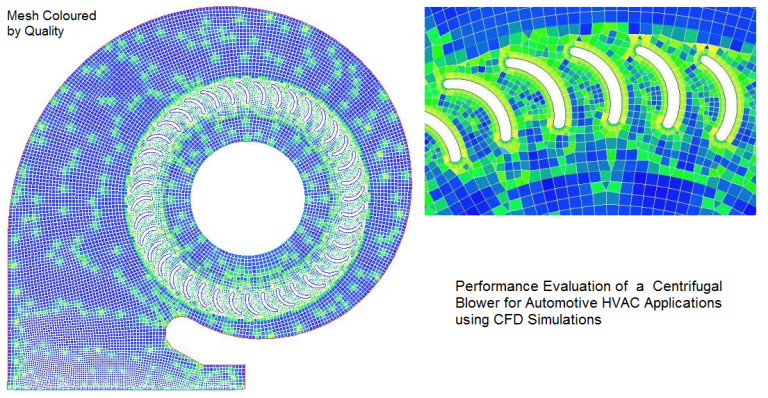
- Incompressible air at 25 [°C] and 1 [atm] resulting in density of 1.185 [kg/m3.
- Realizable k-ε model with enhanced wall treatment
- Coupled solver with 2nd order discretization schemes for mass, momentum and turbulence
The results with Shear Stress Transport (SST) turbulence model is presented in following plots.
The plots Y+, velocity contour and wall shear on top wall are shown here.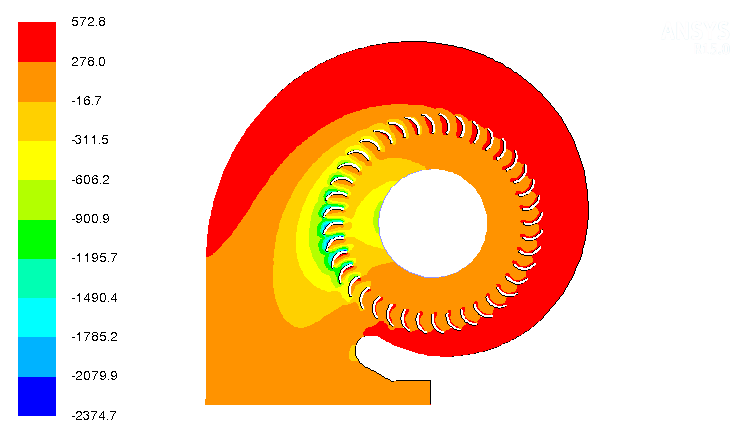
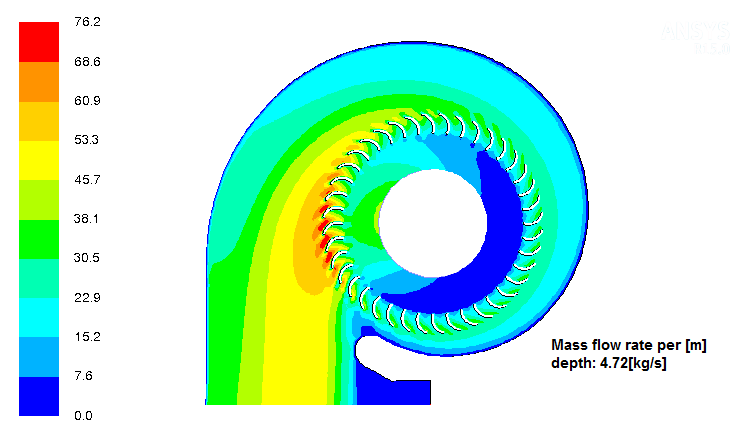
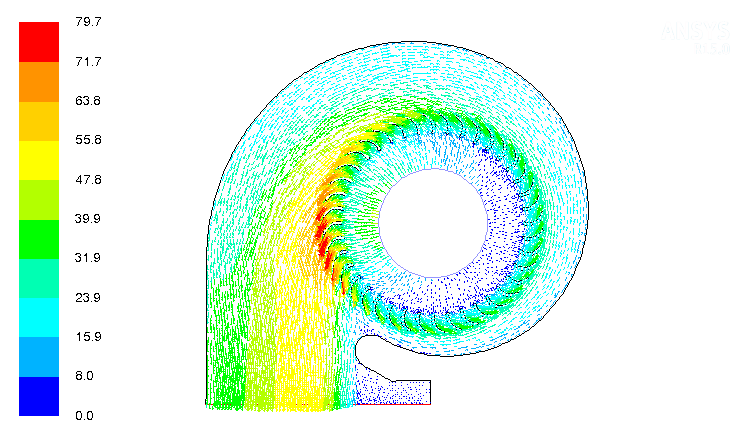
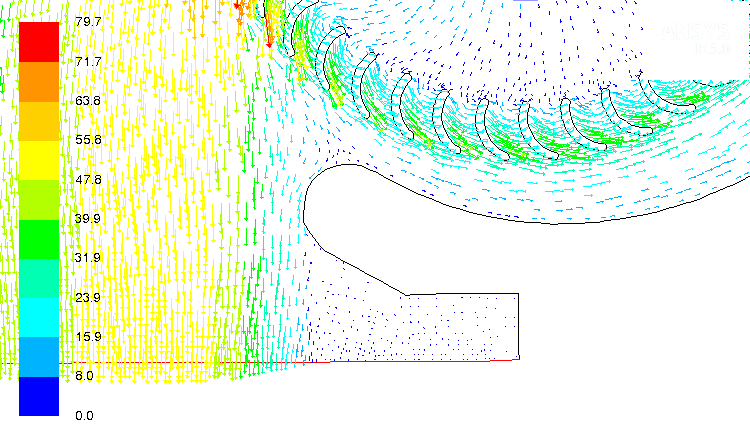
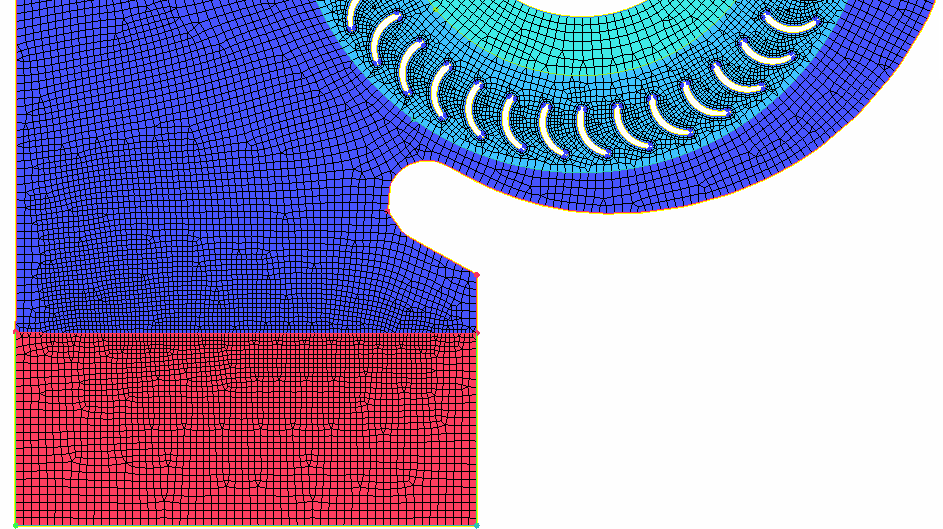
- The calculated mass flow rate per unit [that is 1 m] depth of the blade is 4.72 [kg/s].
- Small level of reverse flow observed near the throat area which has been handles by redesign of this section and extending the outlet. Free-slip wall boundaries can be applied to eliminate the effect of extended domain.
- The location of throat is very close to the optimal design and there is no back flow into the blade cascade from the discharge region.
Testing of Fans
Cyclone Separators
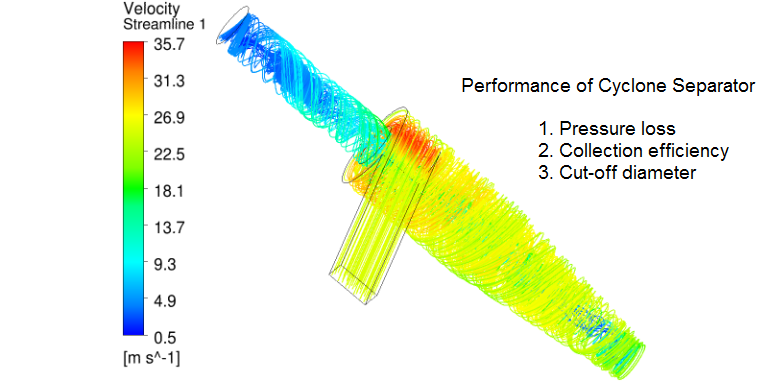
- Cyclone separators are being used in industries for more than a century. This device falls under the category of what is called "Industrial Duct Collectors".
- Dust separation process utilize different methods ranging from fabrics (such as Air Cleaners in Automotive Intake Systems) to Electrostatic Precipitators in Coal-fired power plants
- Cyclone separators fall under the category of inertial separators which uses combination of the 3 most prevalent mechanical forces namely gravitational, centrifugal and inertial.
- In a cyclone, a high speed flow of fluid is established by tangential entry into a cylindrical geometry followed by a conical section.
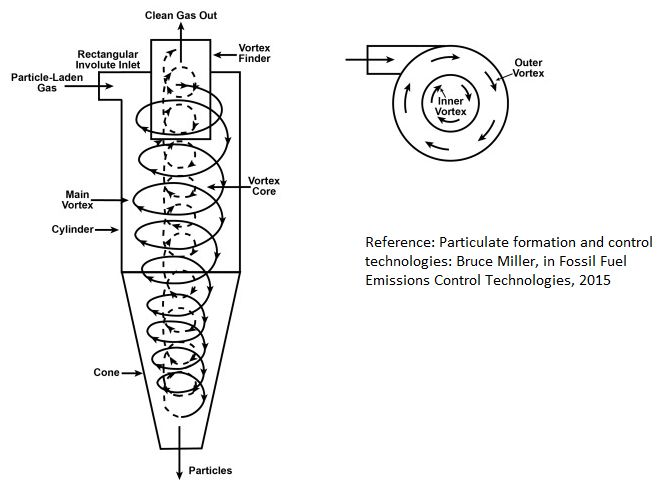
- The tangential entry of fluid stream result in a rotating and translating (swirling) pattern, beginning at the top and ending at the bottom conical end. Heavier particles in the rotating stream gets thrown out due to centrifugal forces and strike the outside wall, falling along the wall then to the bottom exit of the cyclone where they are collected.
- In the conical section, due to conservation of angular momentum, as the rotational radius of the stream is reduced, the tangential component of velocity is increased throwing out lighter and smaller particles, leading to separation of smaller particles, even up to size of 5 microns.
- [Reference: Particulate formation and control technology -- Bruce Miller, in Fossil Fuel Emissions Control Technologies, 2015] - The pressure loss and collection efficiency are two key performance parameters of this device. Cyclone separators are used for removing particles having diameters ≥ 10 [μm]. However, conventional cyclones seldom remove particles with an efficiency greater than 90% unless the particle size is ≥ 25 [μm]. High-efficiency cyclones can remove particles up to as los as to 5 [μm].
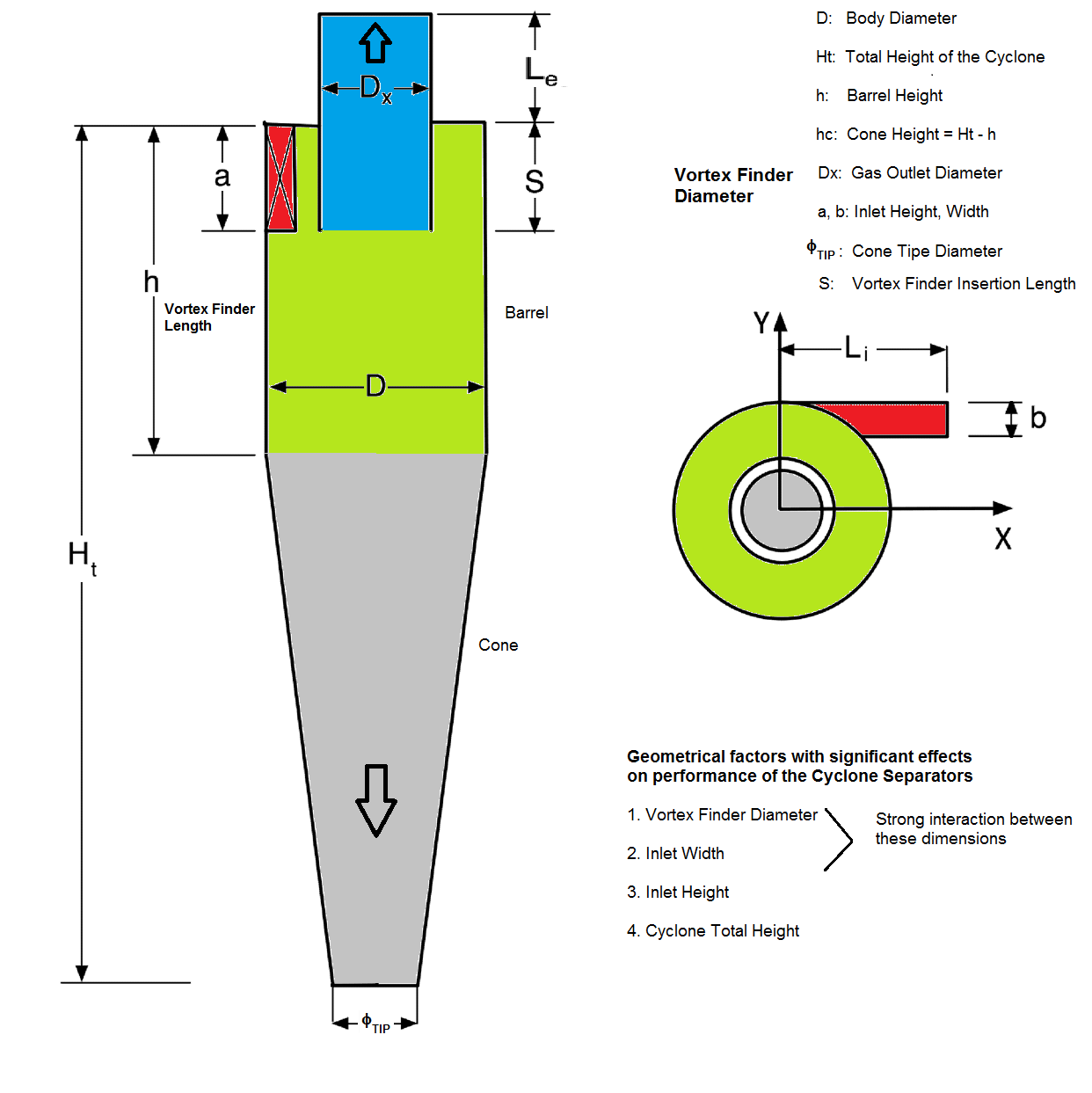
- A geometry of cyclone separator in STEP and IGES format can be are as available with the respective links. Dimensions in [mm] are Ht = 1250, D = 400, h = 500, S = 200, a = 200, Dx = 100.
- [Reference: Multiphase Flows in Cyclone Separators - Modeling the classification and drying of solid particles using CFD: Master of Science Thesis by Erik A. R. Stendal] Excerpts - When the swirling gas reaches the cone it will be accelerated due to the decreasing cross-sectional area and a vortex going upwards will form. This vortex will move inside the vortex finder and out through the gas outlet. The purpose of the vortex finder is to prevent contact between the inner vortex and the swirling gas in the barrel to prevent large pressure drops. The diameter of the vortex finder is an important parameter which affects the velocities in the barrel and, as a consequence, the total pressure drop of the cyclone. The particles injected into the cyclone separator will experience a centrifugal force towards the outer wall of the cyclone due to the swirling motion of the gas. The centrifugal force will be opposed by the drag force acting towards the core of the cyclone.
- The cut diameter of the cyclone is defined as the size of the particles collected with 50% collection efficiency. Collection efficiency is defined as the ratio of particles of a given size collected in the cyclone to the number of particles of that size entering into the cyclone at inlet.
- Despite such a long history of application in industry, the design principles so far as mostly based on empirical data. Recently, CFD techniques is being used to optimize the designs.
- 4 geometrical parameter which is tightly linked with the performance of cyclone separators are
- Vortex finder diameter
- Inlet width
- Inlet Height
- Total Height of the Cyclone
- The cone-tip diameter of the separator does not have noticeable effect on its performance.
Design Ratio: Cyclone Separator: The table below summarizes important dimensions of a cyclone separator. The range given are based on information found in reasearch and thesis documents. However, these dimensions are indicative only and are not intended to provide any engineering solutions.
| S. No. | Description | Design ratio | Typical range | |
| 1 | Cyclone diameter | 1.000 | - | |
| 2 | Diameter of vortex finder | 0.600 | 0.450 - 0.700 | |
| 3 | Dust outlet diameter | 0.300 | 0.250 - 0.350 | |
| 4 | Barrel height | 0.500 | 0.400 - 0.600 | |
| 5 | Height of the cone | 1.500 | 1.250 - 1.750 | |
| 6 | Vortex breaker cross height | 0.400 | 0.300 - 0.500 | |
| 7 | Height of the nozzle | 0.250 | 0.200 - 0.300 | |
| 8 | Nozzle width | 0.002 | 0.001 - 0.003 | |
| 9 | Vortex breaker cone height | 0.125 | 0.100 - 0.150 | |
| 10 | Diameter of vortex breaker cone | 0.250 | 0.200 - 0.300 |
Gear Pumps
Gear pumps with involute profile of Gerotor type and lobe pumps are two category of devices which require a dynamic mesh motion to solve the flow field.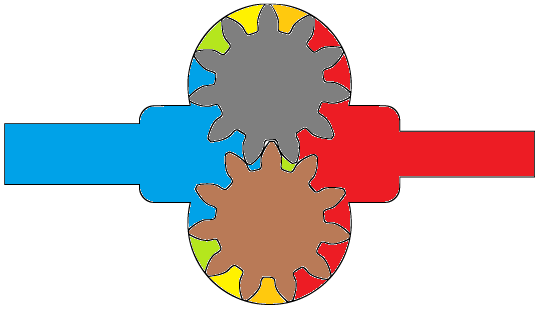
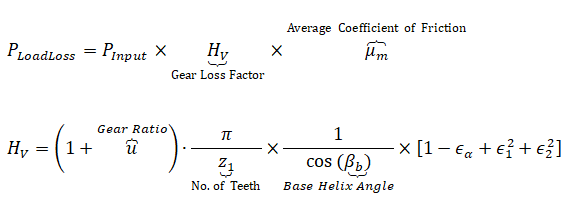
- PInput = input power to drive gear
- εα = transverse contact ratio
- ε1 = addendum contact ratio
- ε2 = dedendum contact ratio
- grease lubrication - applied in low speed / low load applications with tangential speed < 5 [m/s]
- splash lubrication (oil bath method) - used with an enclosed system. The rotating gears splash lubricant onto the gear system and bearings. It needs at least 3 [m/s] tangential speed to be effective.
- forced oil circulation lubrication: there are many methods, one of them is the oil drop method where an oil pump is used to suck-up the lubricant and then directly drop it on the contact portion of the gears via a delivery pipe.
Centrifugal Pumps
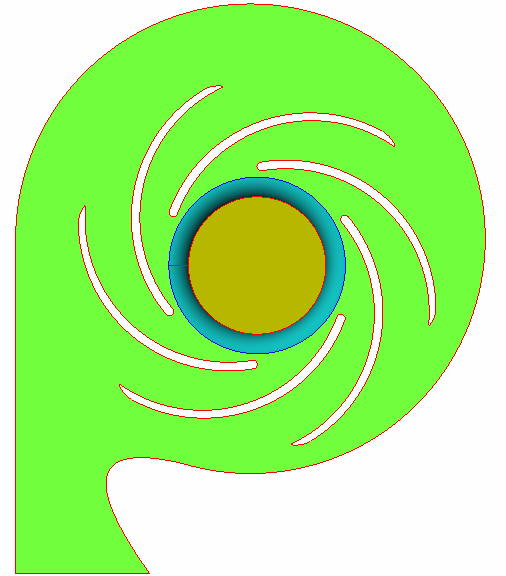

- z [m] = height of the measurement plane with respect to arbitrarily chosen datum plane
- U [m/s] = mean (area-average) velocity at pressure measurement planes
- ρ [kg/m3] = density of fluid
- p [Pa] = static pressure (the value should be consistent at outlet and inlet: either both in gauge pressure or both in absolute pressure
- g [m/s2 = 9.806 - acceleration due to gravity
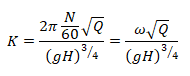
- N [RPM] = rotation speed of impeller in revolutions per minute
- ω [rad/s] = rotation speed of impeller
- Q [m3/s] = volumetric flow rate through the pump (each eye)
Fan Laws: applicable when the efficiency of scaled model and actual model are assumed nearly equal.

Measurement uncertainty for the individual operating parameters: reference - www.ksb.com/centrifugal-pump-lexicon/total-tolerance/191302
| Variable | Symbol | Class 1 [%] | Class 2 [%] |
| Volume flow rate | tQ | ± 4.5 | ± 8.0 |
| Pump discharge head | tH | ± 3.0 | ± 5.0 |
| Pump efficiency | tη | -3.0 | -5.0 |
Sample Pump Performance Curve
Note the constant efficiency lines - can you explain what will be the impact of increase in impeller diameter on efficiency for a given flow rate?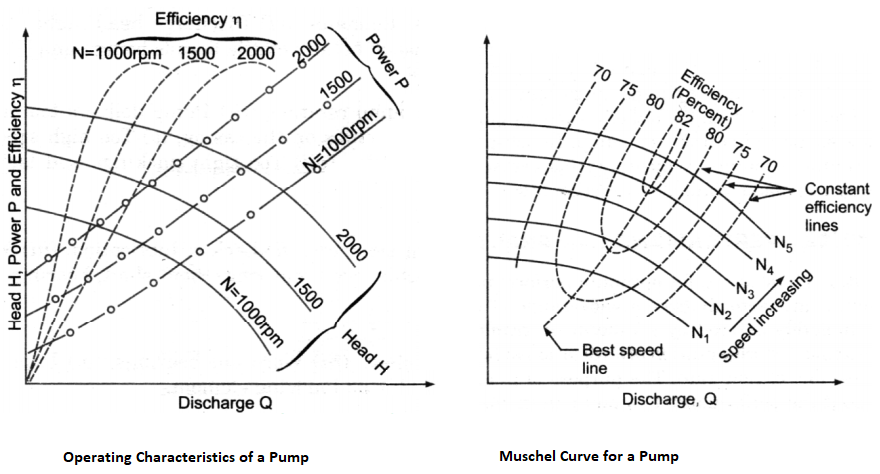
Sample design data of a centrifugal pump [Reference: 1Numerical 3D RANS simulation of gas-liquid flow in a centrifugal pump with an Euler-Euler two-phase model and a dispersed phase distribution: T. Mueller, P. Limbach, R. Skoda, 2Investigation of the handling ability of centrifugal pumps under air-water two-phase inflow: model and experimental validation: Qiaorui Si et al.]
| Performane / Design Parameters | Symbol | Unit | Value1 | Value2 |
| Impeller inlet diameter | d1 | [mm] | 260 | 79 |
| Impeller inlet duct diameter | di | [mm] | - | 65 |
| Blade inlet width | b1 | [mm] | 46 | - |
| Impeller blade inlet angle | β1 | [°] | 19 | - |
| Impeller outlet diameter | d2 | [mm] | 556 | 140 |
| Blade outlet width | b2 | [mm] | 46 | 15.5 |
| Impeller blade outlet angle | β2 | [°] | 23 | - |
| Blade thickness | s | [mm] | 12 | - |
| Shape of blades | - | [-] | 2 circular arcs | Archimedes' spiral |
| Number of blades | z | [no.] | 5 | 6 |
| Nominal flow rate | Q | [m3/s] | 0.114 | 0.014 |
| Nominal pump head | H | [m] | 10.16 | 20.2 |
| Nominal rotational speed | ω | [rad/s-1] | - | 305 |
| N | [RPM] | 540 | 2910 | |
| Specific speed | Ns | [s-1] | 32 | - |
Losses in Pumps
Slip Losses: The losses due to "imperfect guidance of the flow by the blades" or slip due to fluid not following the solid rotating wall and fluid. As the fluid traverses through the impeller blades the pressure between each adjacent blade (pressure side of one blade and suction side of other blade) will be different due to the adverse tangential or peripheral pressure gradient. This results in a secondary circulation which forces the fluid exiting the blade to flow backward (from tip towards the hub) with respect to the rotational direction of the impeller. To reduce slip losses, it is suggested to increase the inlet blade angle and reduce the outlet angle (Sixsmith). The slip at shut-off head is a measure of the drag (or 'hold') which the blades have on the fluid (Crewdson). The increase in number of blades reduces slip loss but increases frictional loss At the same time, number and spacing of the blades are strongly related to the diameter of the impeller and and the size of the side channel (height of the blades along axial direction).
Shock Losses: Also known as incidence losses, these losses occur at the entry to the blades and predominantly at off-design operating conditions. It is believed that the difference in angle between the blade and the velocity of fluid entering the blade results in difference of angular momenta between the slower moving fluid in the channel and the faster moving fluid in the impeller. The shock effect is quantified as the ratio of the mean peripheral (tangential) fluid velocity at the blade inlets to the velocity of the blade (at the inner diameter of the blades). As the losses from shock and slip are mainly due to misalignment of the blade and fluid angles, these could be minimised by increasing the impeller diameter and decreasing the hub diameter (Raheel and Engeda).
Cavitation in Pumps
Cavitation refers to localized boiling of evaporation of any liquid due to reduction in static pressure below its vapour pressure at its operating temperature. However, the phenomena is almost always associated with formation and collapse of bubbles as they move along the mean flow path. A liquid increases its volume significantly when it vapourizes. 1 m3 of water at room temperature becomes 1400 m3 of vapour at the same temperature and pressure. The calculation is as follows (assuming water vapour to behave like an ideal gas):- Mass of 1 m3 of water at 20 [°C] = 998.2 [kg]
- Gas constant for water vapour = 8134/18 =451.9 [J/kg-K]
- Volume occupied by water vapour at 20 [°C] and 1 [bar], V = mRT/p = 1360 [m3].
- However, the density ratio of water liquid and vapour is 998.2 [kg/m3] / 0.0173 [kg/m3] = 57655.
Another term associated with cavitation phenomena is NPSH (Net Positive Suction Head). NPSH is the difference "total pressure at pump inlet" - "vapour pressure of liquid at operating temperature" expressed as head of that fluid. That is:
ρ × g × NPSH = P0 - Pv. Note that total (or stagnation) pressure and not the static pressure is used in calculation.
NPSH is further differentiated in two types: NPSHREQUIRED or NPSHr and NPSHAVAILABLE or NPSHa. The former is supplied by pump manufacturers and this refers to the NPSH that must be available at impeller eye. Hence this value must be independent of the the system in which pump is installed and should solely depend on the design (shape and size) of the pump.
- NPSHr indicates the lowest inlet pressure required by the pump at a given flow to avoid cavitation and is independent of the kind of liquid pumped.
- As the liquid flows from the pump inlet port (suction port) to the eye of the impeller, the velocity increases and hence pressure decreases.
- Additional pressure losses occur due to shock and turbulence as the liquid strikes the impeller. The centrifugal force of the impeller vanes further increases the velocity and decreases the pressure of the liquid.
- Cavitation zone predominantly occurs near the suction side of the leading edge of the impeller blades.
- In CFD simulations, the volume fraction plots on the impeller blades can be used to estimate the extent of cavitation.
- CFD simulation for cavitation is primarily a multiphase flow simulation where the volume fraction on non-condensible air can be specified in the range 1 ~ 5 [ppm]. Note that the amount of O2 dissolved in water at atmospheric pressure at 15 [°C] is approximately 10.0E−6 [g/g]. For N2, this value is about 15.0E−6 [g/g]. However, the solubility of air in water is not the sum 25.0E−6 [g/g].
- The solubility of O2 in water is higher than the solubility of N2. Air dissolved in water contains approximately 36% O2 compared to 21% in air.
- Lower the NPSHr, higher the suction capacity.
- On the other hand, NPSHa is dependent on the overall system (supply tank or sump) to inlet to the impeller eye.
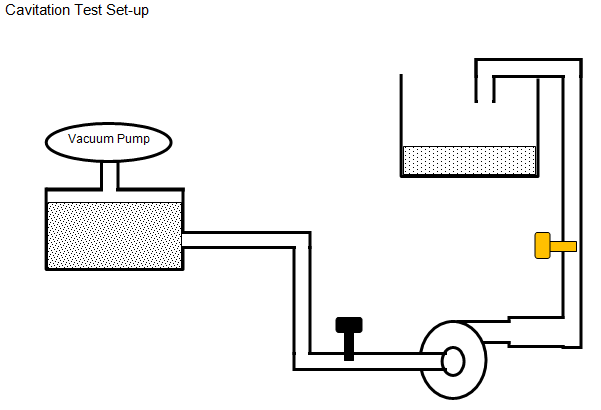
In manufacturer's catalogues, characteristic curves (Δp-Q curve) of a pump also contain a curve for NPSHr vs. Q. The NPSHr values indicated are based on measurements carried out with cold water as pumping liquid. NPSHr is also referred to as NPSH3 per API 610 and determines the operating point at which a pump will operate at 3% loss of head due to cavitation. In test set-up, the pump is installed with a starving device (flow and pressure regulator) on its suction line so that the test loop can deliver variable NPSHa. Cavitation begins as small bubbles before any indication of loss of head or capacity can be observed. This is called the point of incipient cavitation and corresponding head is denoted by NPSHi. NPSHr ≈ [2 ~ 20] × NPSHi, is sole responsibility of the pump manufacturer.
Excerpts from "Understanding Centrifugal Pump Curves" by MGNewell: Generally speaking NPSHr does not vary dramatically between variations in impeller trim which is why we do not see separate curves for the minimum and maximum impeller trims. Those curves are actually present, but they are overlaid by the design trim NPSHr curve.Reference - www.iso.org/standard/41202.html: ISO 9906:2012 specifies hydraulic performance tests for customers' acceptance of rotodynamic pumps (centrifugal, mixed flow and axial pumps). It is intended to be used for pump acceptance testing at pump test facilities, such as manufacturers' pump test facilities or laboratories. It can be applied to pumps of any size and to any pumped liquids which behave as clean, cold water. It specifies three levels of acceptance:
- grades 1B, 1E and 1U with tighter tolerance
- grades 2B and 2U with broader tolerance
- grade 3B with even broader tolerance
NPSH: Net Positive Suction Head
CFD simulations can be used to determine NPSHr by running a series of simulations for a given system and determining when the performance exhibits 3% head loss. For accurate predictions, the effect of vapor formation and collapse (cavitation) and Non-Condensable Gases (NCG) such as dissolved oxygen should also be considered.
The dimensionless parameter that governs the cavitation characteristics of a centrifugal pump is cavitation number described below.
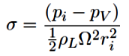
- ρL = density of liquid
- pi = inlet pressure at pump suction port (Pa)
- ri = impeller tip radius (m)
- Ω = pump rotation speed (rad/s)
- pV = vapour pressure or saturation pressure at working temperature of the liquid
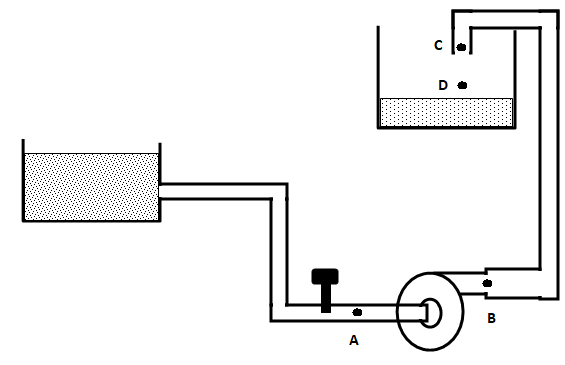
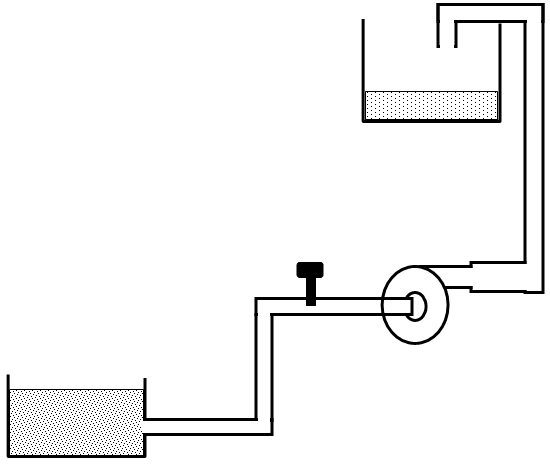
Refer to the two operating conditions of a pump at same flow rates, pipe diameters, elevation of discharge tanks and water levels in supply tanks. Should the NPSHREQUIRED be different in the two situations? Would the NPSHAVAILABLE be same in both of the scenarios?
Cavitation Test
Refer to the graph below how NPSHr and NPSHa varies with respect to flow rate in the pump. 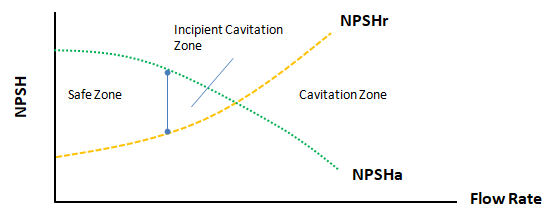
Effect of Non-condensible Gases
Air (hence O2 and N2) are soluble in water, though at very low level. Still, they are good enough to keep species under water alive. Similarly, the operating liquids in most of the industrial applications have small amount of non-condensible gases present. These can be in dissolved state or mixed with liquid due to leakage / aeration.- The primary effect of non-condensible gas is due to the expansion of gas at low pressures. This can lead to significant values of local gas volume fraction causing considerable change in density, velocity, viscosity and pressure distributions.
- The secondary effect of a non-condensible gas is on the early inception of cavitation by increasing the number of nucleation sites for bubble formation.
Mixing Tanks or Stirred Tanks
Also known as mechanically agitated tanks, these are widely used in the process (pharmaceutical, beverage...) industries for mixing of single or multiphase fluids. "Mixing time" is one the most critical performance parameter which is defined as the time to achieve complete homogenization of injected tracer (fluid) or time to mix reactants fed into a tank. The mixing process simulation does not account for Agglomeration which the phenomena of combining of finely dispersed particles into larger parcels, usually caused by a re-arrangement of surface forces resulting from a change of environment. 
The time of homogenization (mixing time) is defined as the time from the introduction of the tracer to the time when the tracer concentration at the probe position reaches and remains within a certain range of the final value. If the range is set to ± 5% it is designated as t95.
Flash Mixer: An agitator used to mix a small amount of additive into a continuous stream where the Residence Time is extremely short. Residence Time it average time a process component remains in the mixing environment in a continuous process.
Mixing process needs to handle both the immiscible (e.g. water - silicone oil, water - benzene) and miscible liquids (e.g. water - alcohol, water - caustic solution), liquid with large difference in viscosities (e.g. water-0.001 Pa.s and molasses-2 Pa.s) and fluids with large difference in densities. In case of miscible liquids, only transient simulation can be performed and mass or volume fraction of one the phases needs to be monitored at different locations of the tank. If left for a long enough period of time, miscible liquids will any way dissolve in one another and form a homogeneous solution. A sliding mesh model is recommended to transport the velocity of the impeller to the bulk liquid in the stationary domain.
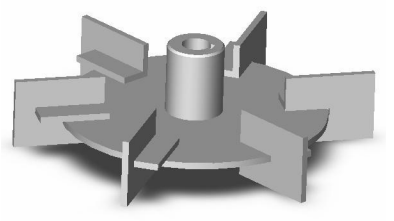
Rushton Turbine
Reference: Hayward Gordon - MASTERING MIXING FUNDAMENTALS: A technical guide from the experts in the industry - Blending:blending of miscible fluids. If left for a long enough period of time, miscible liquids will dissolve in one another and form a homogeneous solution. The majority of liquid/liquid blending applications fall into this category. Applications involving immiscible (insoluble) fluids are classified as dispersion applications which involves very different mixer sizing methods.
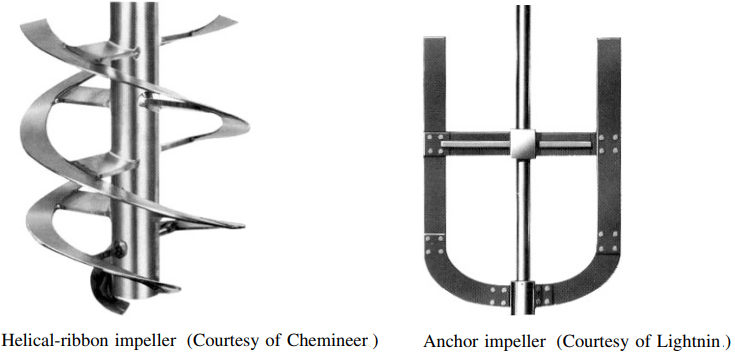
There are other types of mixtures known as static mixtures where the mixing elements are inserted in the pipelines and the liquids mix as they flow through them. Kenics static mixer from Chemineer is one such device.
Reference: Mechanical Design of Mixing Equipment, D. S. DICKEY, MixTech, Inc. J. B. FASANO Chemineer, Inc - Dry-solids mixers are normally applied to flowable powdered materials. The action of the mixers can be categorized as summarized below.
- Tumble mixers
- Convective mixers which use a ribbon, paddles, or blades to move material
- High-shear mixers which create a crushing action like a mortar and pestle
- Fluidized mixers as in fluidized beds and
- Hopper mixers which use discharge and recirculating flow to cause mixing
The Reynolds number for agitators or mixers are calculated based on blade tip speed. However, the adopted formula has been simplified a bit by dropping π and the formula is Re = ρ[kg/m3]×N[rev/s] ×D[m2]/μ [Pa.s]. Flow is assumed turbulent when Re > 10,000 ((McCabe, Unit Operations of Chemical Engineering, 1993). Torque per Equivalent Volume [Torque on impeller / Working Volume of Tank] is an extremely useful ratio which is used as the basis for mixer sizing and describes the level of mixing for any application.
Vapour Pressure of Water
| T [°C] | PSAT [Pa] | 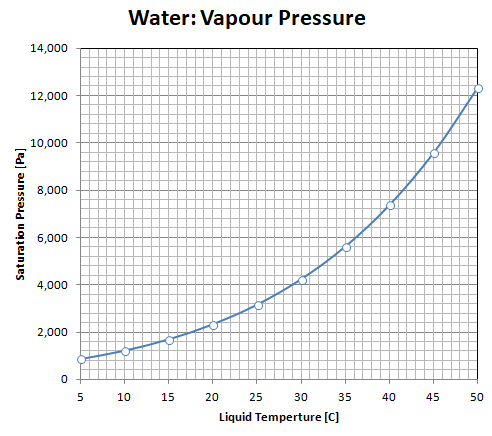 |
| 5 | 872.60 | |
| 10 | 1228.1 | |
| 15 | 1705.6 | |
| 20 | 2338.8 | |
| 25 | 3169.0 | |
| 30 | 4245.5 | |
| 35 | 5626.7 | |
| 40 | 7381.4 | |
| 45 | 9589.8 | |
| 50 | 12344 | |
| 55 | 15752 | |
| 60 | 19932 | |
| 65 | 25022 | |
| 70 | 31176 | |
| 75 | 38563 | |
| 80 | 47373 | |
| 85 | 57815 | |
| 90 | 70117 | |
| 95 | 84529 | |
| 100 | 101320 |
Surface Water: water on the earth’s surface, including rivers, ponds, water reservoirs (dams), springs, creeks and wetlands/swamps. Most surface water comes from rainfall (precipitation) run-off from the surrounding land area (catchment). Surface water also includes the solid forms of water - snow and ice.
Non-Surface Water: water under the earth’s surface, underground water, aquifer system. It also includes soil water.
Propellers
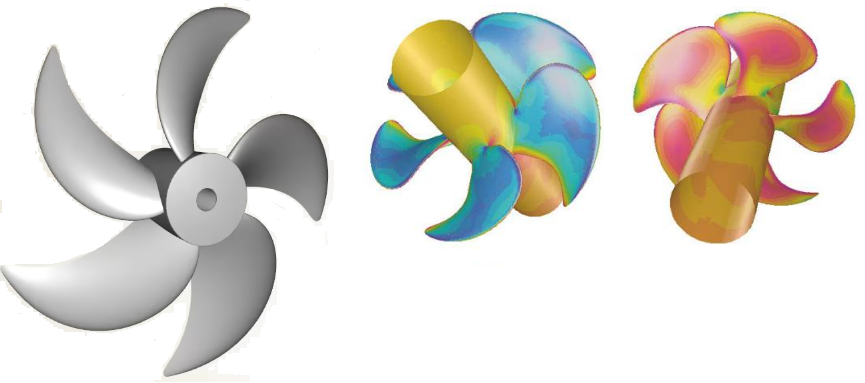
In other words: The 'face' of a blade is the high-pressure side or pressure face of the blade. This is the side that faces aft (downstream) and pushes the water when the vessel is in forward motion. The 'back' of the blade is the low pressure side or the suction face of the blade. This is the side that faces upstream (incoming water) or towards the front of the vessel.
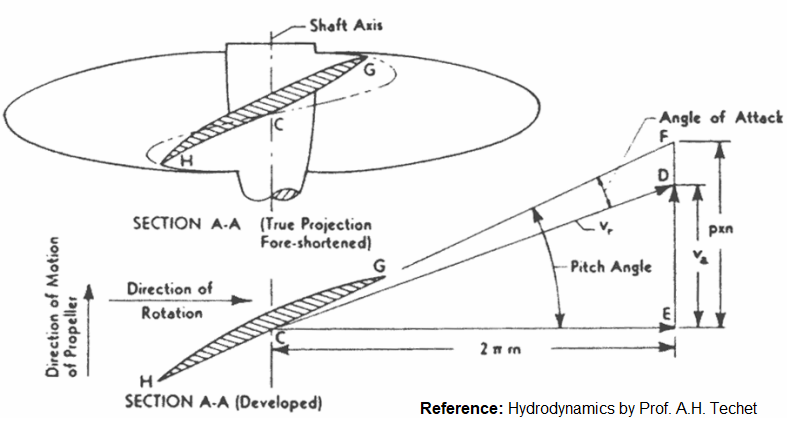
Propellers are axial flow type. In most of the rotating devices and especially in axial flow machines, blades have two edges: leading edge and trailing (lagging) edge. The blades rotates in the direction formed by rotating trailing edge towards the leading edge. The shape of the blades have speacial twist and the parameters defining the twists are known as rake, skew and pitch.
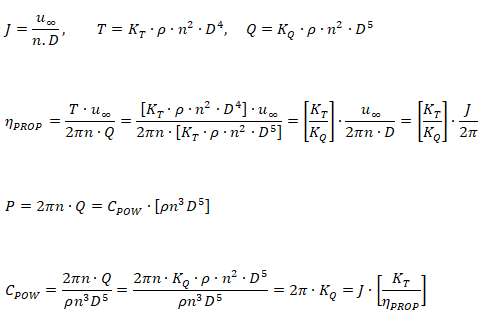
Propellers operate in non-uniform flow field (wake regions) created by the boat or ship body. However, the theoretical studies of the performance of an impeller is carried out in calm water known as open-water characteristics. Advance ratio, thrust coefficient, torque coefficient and power coefficient are the key parameters required to define a propeller.
- u∞ = ship or flight (free-stream) velocity
- us = ship velocity
- ρ = density of the liquid
- n = revolution per second (RPS)
- D = propeller tip diamter
- T = Thrust
- Q = Torque
- P = Power
- J = Advance ratio or advance number
- KT = thrust coefficient
- KQ = torque coefficient
- ηPROP = propeller efficiency
- ηt = propulsive efficiency
- CPOW = power coefficient
- Rt = total ship resistance
- w = wake fraction
- t = thrust deduction factor

Input
- Thrust, T = 2,000 [N]
- Boat speed, u∞ = 5[m/s] = 18 [km/hour]
- Fluid Density, ρ = 1000 [kg/m3]
- Propelle blade tip diameter, D = 0.75 [m]
- RPS, n = 20 [rev/s]
- Number of blades, nB = 4 [ - ]
Step-1
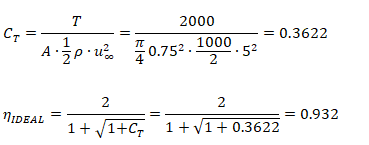
Calculate ideal (actuator disc) efficiency, CT
Step-2
Calculate advance ratio, J

Step-3
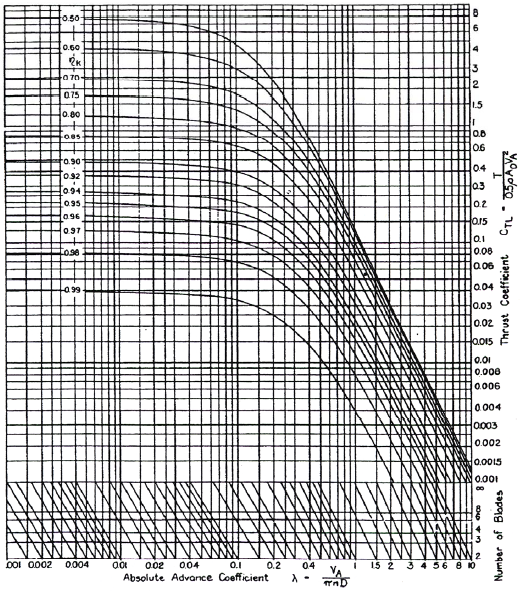
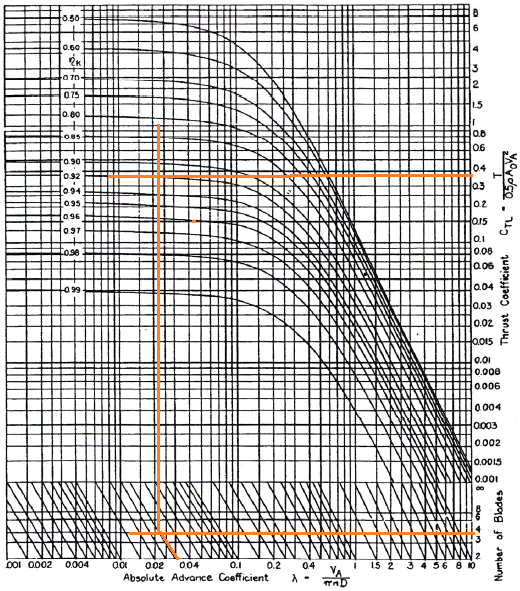
From Kramer diagram, calculate the propeller efficiency.
Cross-flow Fans
Reciprocating Compressors
Types of Hydraulic pumps
- Hydrodynamic: a rotating element within a casing imparts radial velocity to the fluid which exits in a discharge nozzle
- Hydrostatic: also known as positive displacement pumps, displace a fixed volume of fluid per cycle (rotation of shaft)
- Rotary: a rotating vane, screw or gear collects fluid in its void on the suction side of the pump and forces it to the discharge side
- Reciprocating: fluid is pulled into a void on the suction side of the pump and then pushed during the compression stroke, through the discharge port of the pump.
Swash-plate axial piston pump
Reference: Axial Piston Pump - Leakage Modelling and Measurement, PhD Thesis by Jonathan Mark Haynes
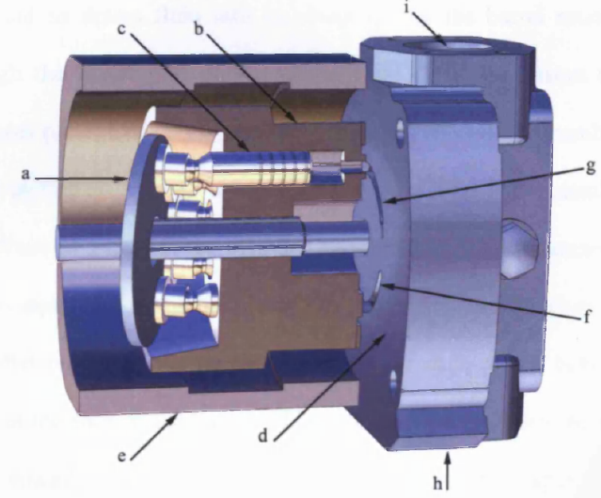
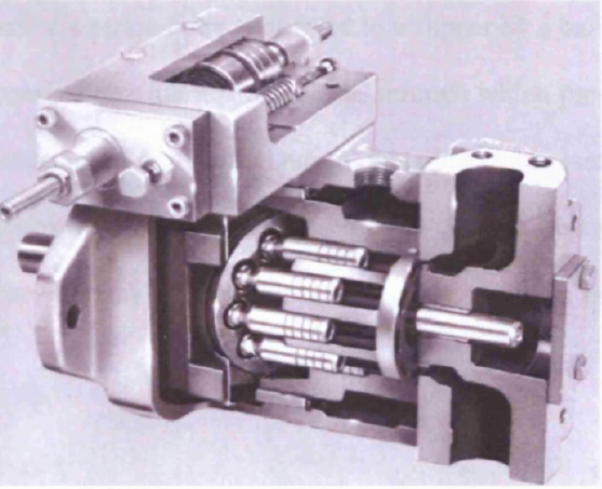
Reference: Use of CFD Technology in Hydraulics System Design for off-Highway Equipment and Applications by Shivayogi S. Salutagi, Milind S. Kulkarni and Aniruddha Kulkarni - International Journal of Materials, Mechanics and Manufacturing, Vol. 4, No. 1, February 2016
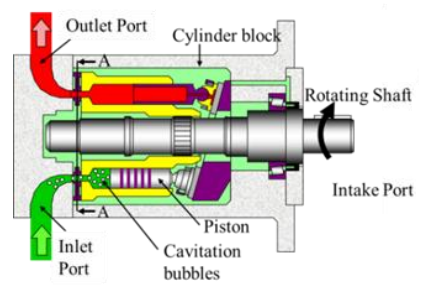
Leakage Paths:
- The gap between the rotating barrel and fixed port plate introduces a cross-port leakage and a leakage across the barrel edges to the internal casing, and ultimately back to tank.
- The slipper face consists of a lubrication orifice, through which pressurised fluid can flow, ultimately returning back to tank.
Wind Turbines
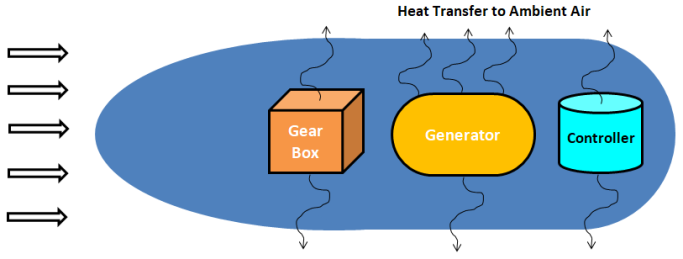
Wind Turbines (sometime also referred as WTG: Wind Turbine Generator) are a set of device where one rotating system (Nacelle) contains many other rotating systems inside it (generator, gear-box...). A simplified evaluation of heat transfer capacity of a nacelle housing can be performed as described below.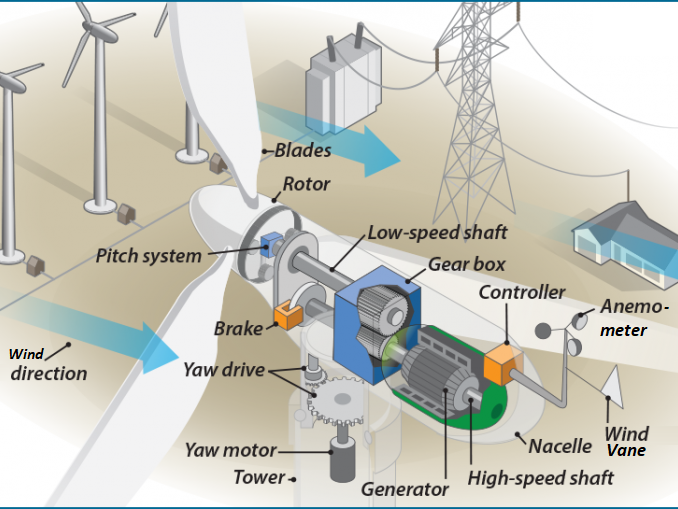
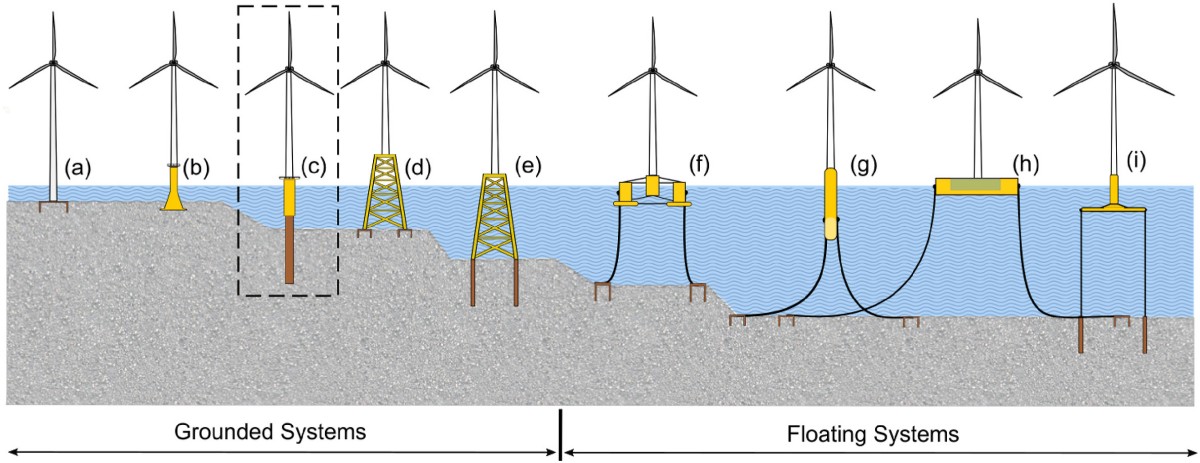
Wind Turbine Installations: Offshore / Onshore: the following image is reference from this article.
Breakdown of the Model Name- IEA: International Energy Agency (developed under IEA Wind Task 37)
- 15: Rated power capacity of 15 [MW]
- 240: Rotor diameter of 240 meters (the total width covered by the spinning blades)
- RWT: Reference Wind Turbine, hub height = 150 [m]
The onshore RWT are: IEA 3.35 MW Turbine, NREL 5 MW (Land-based configuration), and NREL WindPact Turbine.
Wake Modeling
Excerpts from "Wind turbine wakes modeling and applications: Past, present, and future" by Li Wang et al, Ocean Engineering Volume 309, Part 1:- The wake effect refers to the phenomenon where natural wind, after passing through a Wind Turbine, converts part of its energy into mechanical energy, resulting in reduced wind speed, increased turbulence, and wind shear.
- Studies indicate that the wake effect can lead to power losses of 10 ∼ 40% in wind farms and significantly increase the fatigue load on downstream WTs (Fei et al. 2020 and Cai et al. 2021).
- Wind tunnel experiments and field measurements constitute the primary methods for wake investigations. Wind tunnel experiments, based on similarity theory, reveal the flow field dynamics of wind turbines and wind farms, providing critical insights into the flow field structure of Wind Turbine in boundary layer flows (Bottasso et al. 2020).
WAsP: some excerpts from official website - Wind Atlas Analysis and Application Program - used to simulate wind flow over terrain and estimate the long-term power production of wind turbines and wind farms. Can be used for sites located in all kinds of terrain. WAsP contains the PARK2 and PARK1 wake models for calculation of wind farm wake effects. WAsP includes two high-resolution micro-scale wind flow models for vertical and horizontal extrapolation of the wind climate. PyWAsP is a python-based API for running WAsP and WAsP Engineering models. Turbulence intensity data from wind measurements at a nearby meteorological mast can be used for correction of modelled turbulence intensity.
As per "Wind Farm Site Selection Using WAsP Tool for Application in the Tropical Region" by Kamdar et al. -- WAsP uses a linear model composed of a comprehensive collection of individual modules according to the physical characteristics of flows in the planetary boundary layer to predict the vertical and horizontal extrapolation of wind. The WAsP flow model requires the following inputs: (1) Terrain height, (2) surface roughness, and (3) obstacle effects also known as the wind atlas methodology.The user guide or tutorial examples for latest releases are not available to public. As per WAsP version 11 on-line documentations published in 2014, the WAsP methodology consists of five main calculation blocks:
- Analysis of raw wind data
- Generation of wind atlas data
- Wind climate estimation
- Estimation of wind power potential
- Calculation of wind farm production
Known limitations: as per version 11
- WAsP uses a default air density of 1.225 [kg/m3] (which corresponds to standard pressure and 15 °C temperature) when calculating power density unless you specify the air density in the project's parameters. Similarly, power production is calculated for this standard air density if one of the sample power curves is used. You can change the air density in the project parameters; this will affect power density, but not AEP calculations.
- Only if the power curve is specified for the actual site air density, or an existing power curve has been scaled to the site air density (this is only recommended for some turbines though), will the wind turbine power production calculated by WAsP correspond to this air density. In 'real' projects it is strongly recommended to obtain a site-specific power curve from the manufacturer of the wind turbine.
Typical workflow for calculations in WAsP is as shown below:
Data from nearby meteorological station ----┐
               or                           |---┐
Recorded wind data at actual site-----------┘   |
                                                |
                                                ▼
                              Load Terrain and Roughness Data
                                                |
                                                ▼
                              Create topography map
                                                |
                                                ▼
                              Site effects at the mast location
                                                |
                                                ▼
                              Wind atlas data set or Generalised wind climate*
                                                |
                                                ▼
                              Estimate the wind power
                                                |
                                                ▼
                              Estimate wind farm production
* Termed site-independent characterization of the local wind climate
This site-independent characterization of the local wind climate is called a wind atlas data set or generalised wind climate.
                  .------------------------------------------------------------.
                  |                     Wind Climate                           |
------------------(------------------------------------------------------------)
Aspect            |  Observed         | Generalized     | Predicted            |
------------------|------------------------------------------------------------|
Location specific?|  Yes              | No / regional   | Yes                  |
------------------|------------------------------------------------------------|
Based directly on |                   |                 |                      |
measurements?     |  Usually yes      | No - derived    | No - modelled        |
------------------|------------------------------------------------------------|
Contains local    |                   |                 | Modelled for         |
terrain effects?  |  Yes              | Removed         | target site          |
------------------|------------------------------------------------------------|
Requires flow     |                   |                 |                      |
modelling?        |  No               | Yes             | Yes                  |
------------------|------------------------------------------------------------|
Typical WAsP      |  Histogram or     | Sector-wise     | Weibull or           |
representation    |  Weibull          | Weibull         | histogram            |
------------------|------------------------------------------------------------|
Primary purpose   | Describe measured | Create regional | Estimate wind climate|
                  |  wind climate     | wind climate    | at another location  |
------------------^-------------------^-----------------^----------------------'
Files used and generated by WAsP:
- *.wws (WAsP Workspace File): The central anchor project file that ties every individual vector, configuration, and meteorological data reference together into a single spatial layout tree hierarchy
- *.tab (Observed Wind Climate File): The absolute foundational meteorological input containing joint wind speed and directional frequency distributions (Weibull parameters across 12 sectors)
- *.omwc (Observed Micro-Wind Climate File): An alternative, highly accurate XML-based file format used by newer iterations of WAsP and PyWAsP to store multi-height observed wind climates
- *.gwc / .lib (Generalized Wind Climate / Wind Atlas File): Cleaned regional wind data stripped of site-specific local effects, allowing to extrapolate calculations over complex terrains
- *.map (Vector Terrain Map File): A meticulously prepared vector file containing high-resolution elevation contour lines (orography) alongside precise surface roughness change lines
- *.obs (Obstacle Group File): Explains structural shielding. It catalogs precise three-dimensional dimensions, relative positions, and the aerodynamic porosity of nearby localized shelters (e.g. buildings, dense tree clusters) within a 50-height radius of met mast or turbine positions
- *.wtg (Wind Turbine Generator File): The comprehensive technical specification of your chosen turbine model, defining hub height, rotor diameter, operational RPMs, and air-density-specific performance metrics
- *.pow (Power Curve File): The discrete look-up table embedded within or linked to the turbine, specifying electrical output relative to hub-height wind speed
- *.trf (Thrust Curve File): The structural aerodynamic lookup coefficient matrix required by WAsP to accurately model downstream wake decay and array losses across multi-turbine layouts
- .txt or .csv format: Tabulated text listings containing exact Cartesian X, Y, Z map coordinates in meters for planned wind turbine placements
- *.cfd / CFD Tile Request Files: Structural configuration files generated via the WAsP User Interface. These map out exact 2 × 2 km spatial bounds, grid spacings, and boundary layer layers to be simulated by the CFD cluster
- CFD Result Files: The output downloaded through the CFD Calculation Manager tool and directly re-imported back into the project hierarchy to override the linearized speed-up calculations.
Some of the known limitations in WAsP as in 2025 are: "Does not fully simulate mesoscale weather phenomena, Simple (linear) wake modeling approaches may not capture all offshore atmospheric effects, Primarily designed for wind-resource assessment rather than detailed load simulation, cannot handle time-resolved atmospheric modelling." WAsP is essentially an engineering/statistical wind-flow model, not a full atmospheric flow solver. WAsP is excellent for fast and practical wind-resource model, but its accuracy is increasingly questionable as the problem moves toward very complex terrain, strong flow separation, atmospheric stability effects, detailed wakes, transient weather, and turbine-load analysis.
Openwind: A "Wind Farm Modeling and Layout Design" tool that takes into account wind resources, wakes, noise, shadow flicker, curtailments, GIS constraints... It optimizes layouts and turbine positions to minimize the cost of energy, taking into account energy production, operations and maintenance costs and capital costs including turbine and plant development costs.
Openwind and WAsP have a large overlap in the fundamental wind-resource inputs, although they organize and process those inputs differently. WAsP is strongly based on the Wind Atlas methodology, while Openwind provides a GIS oriented wind-farm modelling environment with wind-flow, wake and energy-yield calculations. Key difference between WAsP and Openwind is in how they use the common data. The important distinction is not primarily the input variables — it is how the tools transform them.
--------------------------------------------------------------------------
WAsP                                        Openwind
--------------------------------------------------------------------------
Measured / mesoscale wind                   Wind measurements / WRG / WRB
     │                                           │
     ▼                                           ▼
Terrain + Roughness + Obstacles             Wind-flow field
     │                                           │
     ▼                                           │───── Terrain
Generalised Wind Climate                         │───── Roughness
     │                                           │───── Obstacles
     ▼                                           ▼
Turbine Site                                Turbine Locations
     │                                           │
     ▼                                           ▼
Predicted Wind Climate                           ▼
     │                                           │
     ▼                                           ▼
Power Curve                                 Power Curve
     │                                           │
     ▼                                           ▼
Energy Production                                ▼
     │                                           │
     ▼                                           ▼
Wake Model                                  Wake Model
     │                                           │
     ▼                                           ▼
Wind Farm AEP                               Gross / Net AEP
--------------------------------------------------------------------------
For a wind-farm analysis system, a tool-independent master dataset can be structured like described below. This structure is useful because most of the physical input data can be shared, while the final WindPRO, WindFarmer, Openwind and WAsP specific files can be generated as adapters.
PROJECT----------------------------,
│                                  |
├── Project metadata               ├── WIND RESOURCE
│   ├── Project name               |   ├── Wind speed
│   ├── Country                    |   ├── Wind direction
│   └── Units                      |   ├── Measurement height
│                                  |   ├── Frequency distribution
├── SITE                           |   ├── Weibull A, k
│   ├── Latitude                   |   ├── Wind rose
│   ├── Longitude                  |   ├── Air density
│   ├── Boundary                   |   ├── Temperature
│   └── Elevation                  |   └── Turbulence intensity
│                                  |
├── TERRAIN                        |── LONG-TERM CLIMATE
│   ├── DEM                        |   |── Reference dataset
│   ├── Elevation                  |   |── Reference period
│   ├── Roughness length           |   |── MCP parameters
│   ├── Land cover                 |   └── Long-term correction
│   ├── Displacement height        |
│   └── Obstacles                  |
│                                  |
├── TURBINE                        └── WIND FARM
│   ├── Turbine model                  ├── Turbine coordinates
│   ├── Rated power                    ├── Turbine types
│   ├── Rotor diameter                 ├── Wake model
│   ├── Hub height                     ├── Wake parameters
│   ├── Power curve                    └── Availability
│   └── Thrust curve
│
└── LOSS / UNCERTAINTY
    ├── Wake loss
    ├── Electrical loss
    ├── Availability
    ├── Curtailment
    ├── Environmental loss
    └── Uncertainty
PyWake is an open-sourced and Python-based wind farm simulation tool developed at DTU capable of computing flow fields, power production of individual turbines as well as the Annual Energy Production (AEP) of a wind farm. The repository has 64 directories, 716 files excluding few files related to installation. The list of directories and files can be found in this text file.
OpenFAST: FAST (Fatigue, Aerodynamics, Structures, and Turbulence)
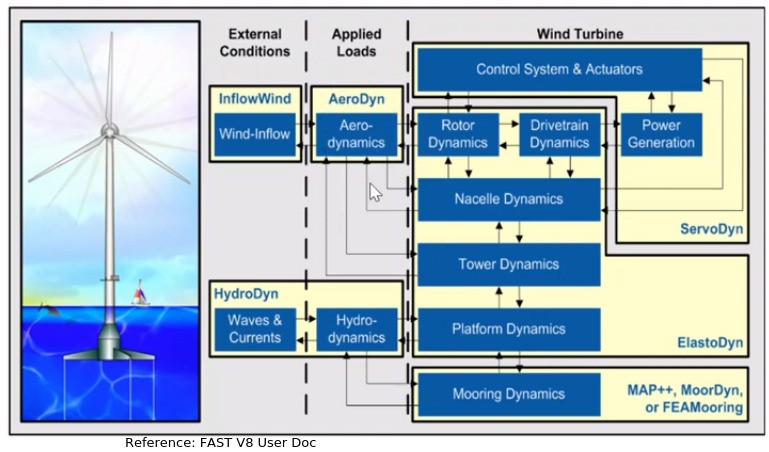
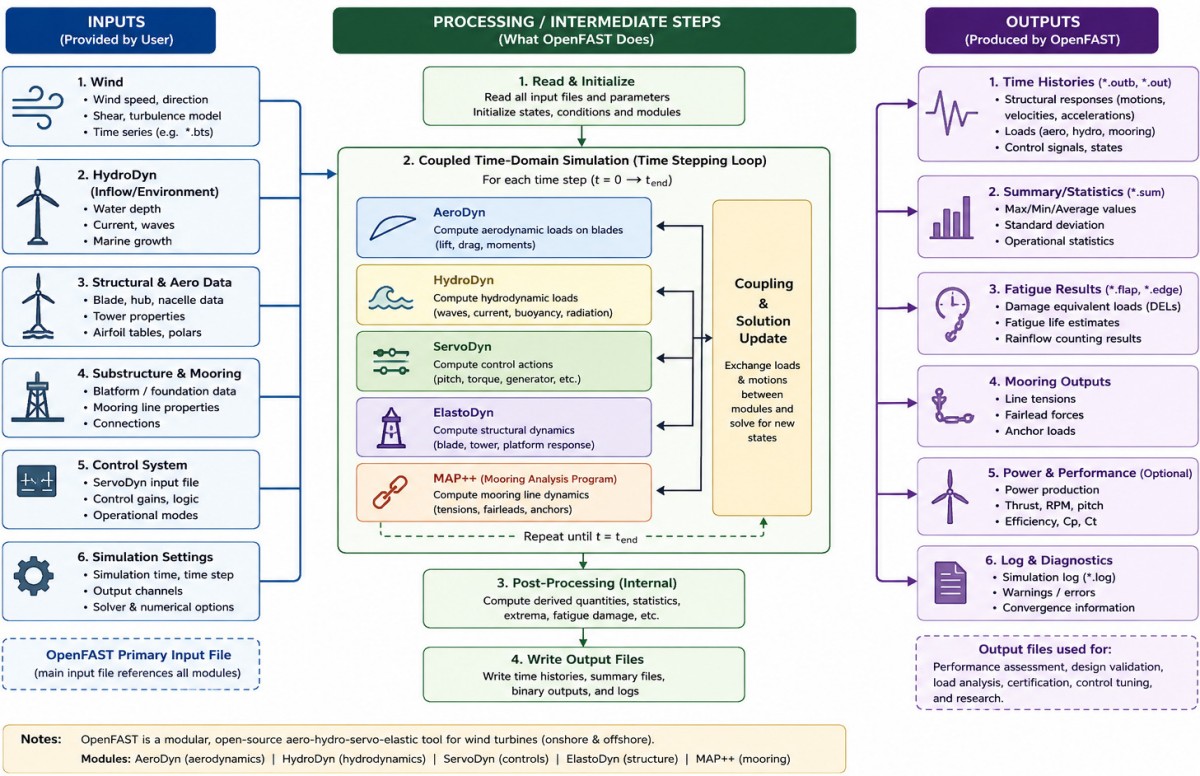
Given below is the dependency map or parent-child relation between the inputs required by OpenFAST. The reference files for IEA-15-240-RWT-Monopile are hyperlinked appropriately. BAR in file names mean Big Adaptive Rotor.
                                       .------------ Sensors / Output Channels
                     _                \|/
Gravity, Air Density  |   ┌────────────'──────────┐       .---------------------------.
Speed of Sound        |--►|   OpenFAST Main File  │◄------| BeamDyn, HydroDyn         |
Viscosity, Water Depth|--►│      *.fst            │◄------| SubDyn, MoorDyn, SeaState |
Water Density        _!   └───────────┬───────────┘       '---------------------------'
                                      | { INPUT FILES } section
          ┌───────────────────────────┼───────────────────────────┐
          ▼                           ▼                           ▼
   ┌─────────────┐             ┌─────────────┐             ┌─────────────┐
   │ ElastoDyn   │             │   AeroDyn   │             │ InflowWind  │
   │   *.dat     │             │   *.dat     │             │   *.dat     │
   └──────┬──────┘             └──────┬──────┘             └──────┬──────┘
    ┌─────┴─────┐              ┌──────┴──────┐             ┌──────┴──────┐
    ▼           ▼              ▼             ▼             ▼             ▼
Tower       Blade         Airfoil         Blade geom,   Wind files   TurbSim ◄-Random seed
*.dat       *.dat         files *.dat     prop: *.dat   *.wnd        *.bts
    │                          │
    ▼                          ▼
Structural                Aerodynamic ◄-Airfoil_00.dat, Airfoil_01.dat...Airfoil_49.dat
properties                properties    [Lift, drag. pitching-moment coeff. vs AoA]
    │                           │
    └──────────────┬────────────┘
                   ▼
             ┌────────────┐
             │  ServoDyn  │
             │    *.dat   │
             └─────┬──────┘
          ┌────────┴─────────┐
          ▼                  ▼
     Controller DLL      Control/actuator
     *.dll / *.so        parameters
OpenFAST relies on a hierarchical, modular file system. A master "glue-code" (framework) configuration file handles the overarching simulation logic, which then references distinct input text files dedicated to specific physical domains (structural dynamics, aerodynamics, control loops, and environmental conditions). From User Guide: "The OpenFAST glue code is the layer of software that initializes each physics module, manages the flow of data between them, orchestrates the time-stepping loop, and optionally linearizes the assembled system."
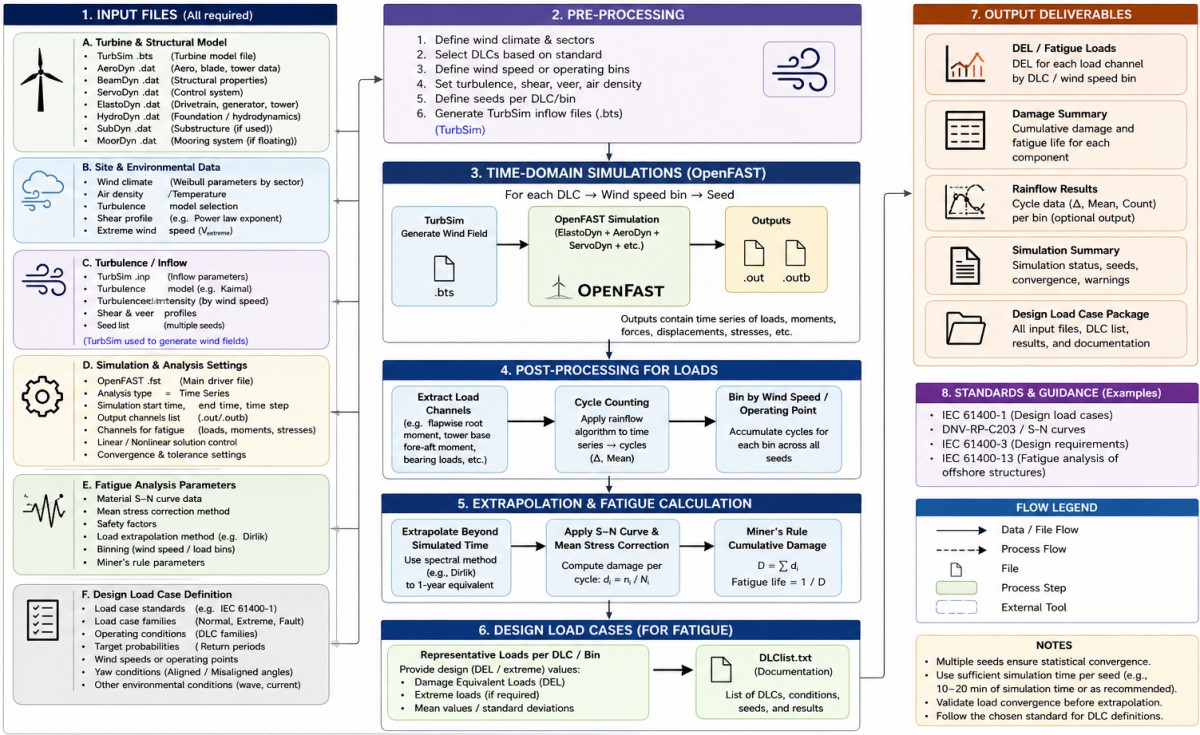
The primary input sample file *.fst here is the central driver for the simulation - it references and calls all module input files. All modules are tightly coupled in time and exchanges load + motions at every communication step. Controls simulation math (total runtime TMax, time step DT, solver orders) and contains logical true/false toggle switches determining which physical modules to loop into the solution matrix.
Settings: TMax (Total Run Time): Set based on test goals - typically 60 [s] for startup transients or 600 [s] for turbulent wind analysis. InflowWind Module: WindType is set to 3 for full 3D turbulent field (*.bts binary file). Use starting value of turbulence to be 0% for deterministic testing. WindType = 1 specifies a steady, uniform wind condition (does not need external time-series file), while WindType = 2 specifies a uniform wind time series that allows for changes in speed or direction over time (requires a separate formatted uniform wind file containing time-dependent data column) - but at any given instant, the wind speed is uniform across the entire rotor plane. This case is useful for evaluating bulk controller responses, yaw maneuvers, or specific deterministic gusts where spatial turbulence across the rotor disc is not required.
Input file format -- The first two columns are read in key + value input files. One of these two columns must contain the exact keyword, and the other must contain the value that corresponds to it. For example, an input line
20 TMax - Total run time (s)is equivalent to
TMax 20 - Total run time (s)
AeroDyn Module:
This module handles aerodynamic forces via blade element momentum (BEM) theory or free-wake vortex methods. DTAero is set to DEFAULT or a value ensuring at least 200 azimuth steps per rotor revolution for stability. WakeMod is set to 1 for standard Induction (BEM) or 2 for Generalized Dynamic Wake (GDW).AeroDyn (a time-domain wind turbine aerodynamics module) input files:
- AeroDyn.dvr: main driver, environmental conditions are specified here
- AeroDyn Driver Timeseries: allows the parameters to vary with time
- input.dat: the primary input file
- blade.dat: contains nodal discretization, geometry, twist, chord, airfoil identifier, and buoyancy properties for a blade
- airfoil.dat: contains the airfoil AoA, lift, drag, moment/pressure coefficients
The primary AeroDyn input file defines modeling options, environmental conditions (except freestream flow), airfoils, tower nodal discretization and properties, tower, hub, and nacelle properties, as well as output file specifications. AeroDyn consists of seven submodels: (1) rotor wake/induction, (2) blade airfoil aerodynamics, (3) tower influence on the fluid local to the blade nodes, (4) tower and nacelle drag, (5) aeroacoustics, (6) buoyancy on the blades, hub, nacelle, and tower (for MHK - Marine HydroKinetic turbines), and (7) added mass and fluid inertia on the blades and tower (for MHK turbines).
AeroDyn uses the SI system (kg, m, s, N). Angles are assumed to be in radians unless otherwise specified. No lines should be added or removed from the input files, except in tables where the number of rows is specified and comment lines in the AeroDyn airfoil data files. A tar file of sample input files available in User Documentation is attached here.AeroDyn does not simulate incoming wind by itself. At every time step, it requests the wind velocity vector at specific geometric coordinates (such as blade nodes and tower points) from InflowWind, which evaluates the ambient and disturbed flow field. During a simulation, OpenFAST passes the spatial coordinates of AeroDyn's computational nodes (blade elements, tower segments) to InflowWind. AeroDyn can output aerodynamic and kinematic quantities at up to nine nodes specified along the tower and up to nine nodes along each blade.
InflowWind Input Files: exceprts from openfast.readthedocs.io/.../inflowwind/appendix.html
- Driver input file is needed only for the standalone version of InflowWind. It contains inputs regarding the InflowWind file, interpolation parameters, and the desired output files. The InflowWind driver can also be run without this file by using command-line arguments instead. Refer to this sample input file.
- The primary InflowWind input file (often ending in .dat) defines the inflow that is generated or read from other files. The InflowWind file contains sections for each type of wind-file format. Refer to this sample input file.
- Native Bladed Scaling File includes lines that determine how to scale the non-dimensional full-field turbulence files from Bladed. Refer to this sample input file.
- Uniform Wind Data File includes lines that define uniform (deterministic) wind data files. Refer to this sample input file.
An air ramp load (or ramp wind profile) is not typically used directly for standard life-cycle fatigue calculations in OpenFAST. An air ramp load is strategically utilized within fatigue and design workflows to check how the controller handles transitions between operational regions. Improperly tuned control loops may create structural resonances or excessive blade pitching that could accelerate fatigue.
Ref: Sometimes ramp profile is used for Model Verification and Quick Benchmarking. This is to test new structural or aerodynamic sub-models without the computational expense of large turbulent wind grids. Application includes setting up initial structural parameters or debugging a new turbine variant, running a fast, deterministic ramp test ensures that the global sensitivities behave expectedly across a wide spectrum of wind speeds in a single simulation run.
ElastoDyn Module:
This module defines structural degrees of freedom (DOF) and initial conditions for the turbine. ElastoDyn is based on Euler–Bernoulli beam theory in bending, meaning that no axial or torsional degrees of freedom (DOF) and no shear deformation are considered better suited to straight beams with isotropic material. The primary input file defines geometries for tower, nacelle, drivetrain, and blades. Note mode shapes of the tower are input to this module and not output from it. ElastoDyn takes mass per unit length (density * cross-section area) as input for tower elements.ElastoDyn is used for modeling the rotor, drivetrain, nacelle and tower in OpenFAST. It applies a modal representation of the blades and tower together with multibody representation of the nacelle and hub. The drivetrain is represented by means of a torsional linear spring-and-damper model in the low-speed shaft.
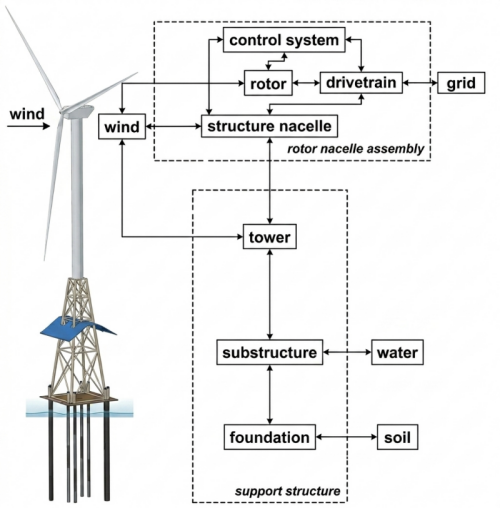
- TowerBtMk: Defines the elevation of the tower base relative to the transition piece (TP) or Mean Sea Level (MSL) or SWL (Still Water Level), in meters.
- TowerHt: The total height of the tower from its base flange (TowerBtMk) to the top yaw bearing, in meters.
ServoDyn Module:
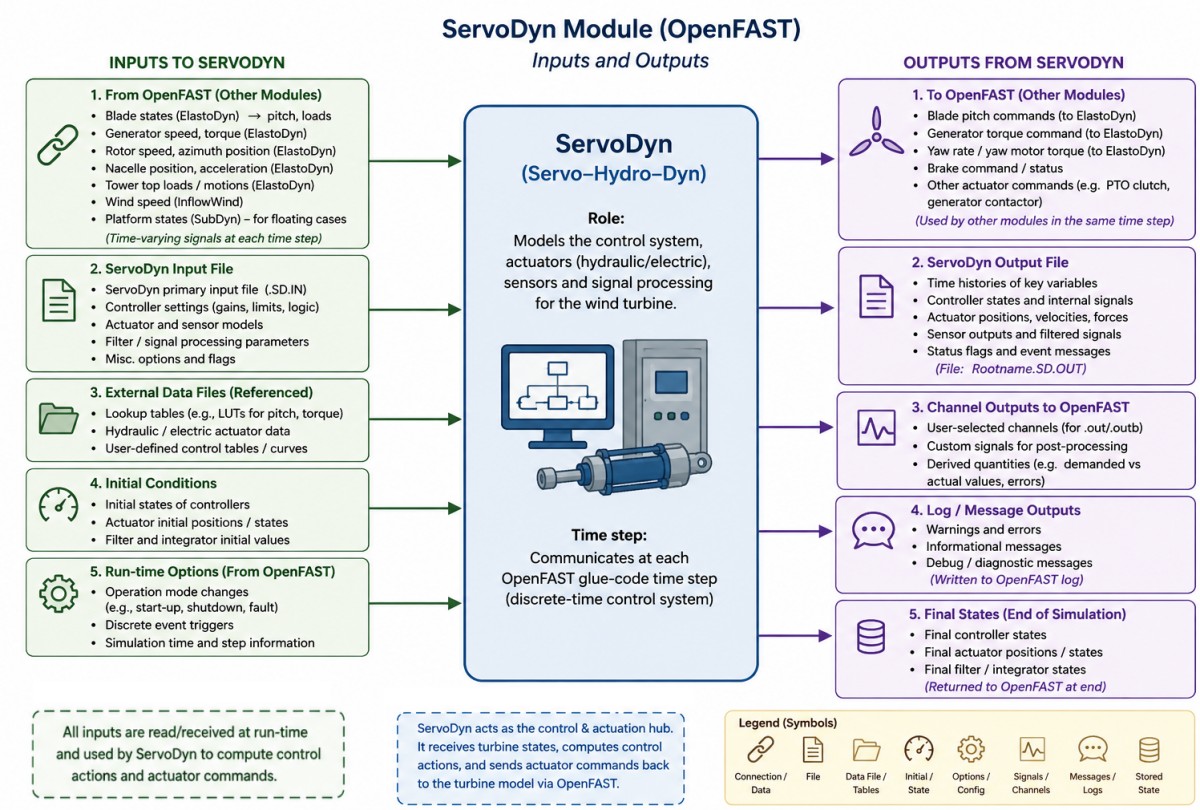
HydroDyn (Hydrodynamics) Module:
This module is applicable to offshore fixed-bottom turbine (e.g. monopile or jacket foundation). This module calculates wave and current loading on the fixed substructure.
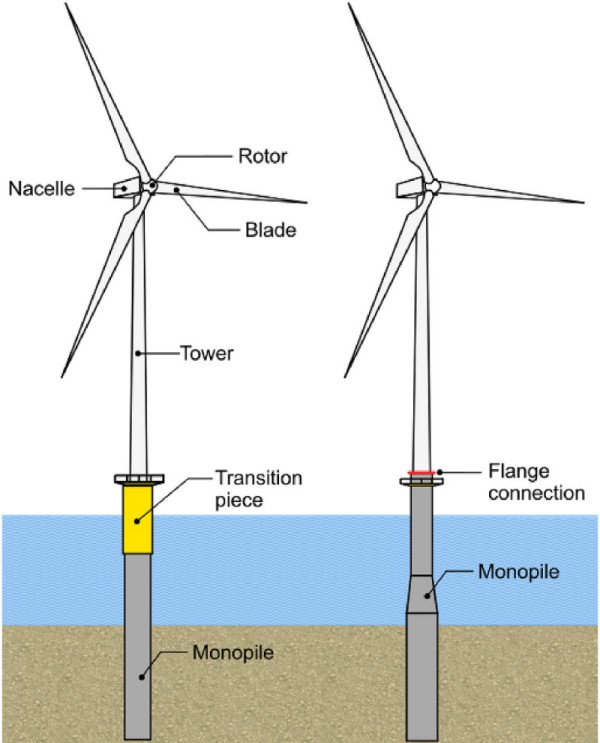
---------------------- MEMBER JOINTS -------------------------------------------
             2   NJoints        - Number of joints (-)   [must be exactly 0 or at least 2]
JointID   Jointxi     Jointyi     Jointzi  JointAxID   JointOvrlp
   (-)     (m)         (m)         (m)        (-)       (switch)
   1      0.00000     0.00000   -30.1000       1            0
   2      0.00000     0.00000    15.0000       1            0
---------------- CYLINDRICAL MEMBER CROSS-SECTION PROPERTIES -------------------
             1   NPropSetsCyl    - Number of cylindrical member property sets (-)
PropSetID    PropD         PropThck
   (-)        (m)            (m)
   1        10.0            0.055341
Monopile: Offshore Code Comparison Collaboration (OC3) - acts as an open-source validation tool for researchers studying aero-hydro-servo-elastic responses under combined wind and wave loads. Tower Height: Supports a 77.6-meter linearly tapered steel tubular tower with a hub height of 90 meters above Mean Sea Level (MSL). Monopile total length of 30 meters for the baseline definition.
IEA 15 MW RWT: The monopile has a constant outer diameter of 10 meters. The monopile has a constant outer diameter of 10 meters. In the benchmark design, the 75-meter total length is split into two primary zones relative to the mudline (seabed): Embedment Depth = 45 [m] and Water Column / Submerged length = 30 [m].
Its geometry needs to be defined in two separate modules: SubDyn (for structural dynamics) and HydroDyn (for hydrodynamic loading). Both modules use a global Cartesian coordinate system where Z=0 is at the Mean Sea Level (MSL), and Z points upward. The monopile is modeled as a series of interconnected beam elements defined by the material properties, structural joints (coordinates), and the elements connecting them. In SubDyn.dat, NJoints is the user-specified number of joints, and determines the number of rows in the subsequent table.Reaction Joints: The bottom-most joint at the seabed is clamped: JointType = 1. Interface Joint: The highest joint connects directly to the ElastoDyn tower base. Cantilever joints (JointType = 1), Universal joint (JointType = 2), Pin joint (JointType = 3), Ball joint (JointType = 4). Note that only cantilever joints can serve as interface joints.
For IEA 15 MW RWT, following inputs can be used: here the last 4 columns specify vector coordinates of the direction around which rotation is free for a pin joints and a value of additional stiffness to be added to the free rotational DOFs of Ball, Pin and Universal joints.
Following tables are taken from SubDyn.dat file. Each joint listed in the table is identified by a unique integer, JointID. Each integer between one and NJoints must be present in the table, but they need not be sequential.
11   NJoints     - Number of joints (-)
---- STRUCTURE JOINTS: joints connect structure members (~Hydrodyn Input File) --------
 JointID    JointXss    JointYss    JointZss    JointType   JointDirX   JointDirY   JointDirZ  JointStiff
    (-)        (m)         (m)         (m)          (-)         (-)         (-)         (-)      (Nm/rad)
     1      0.00000     0.00000    -30.000           1          0.0         0.0         0.0        0.0
     2      0.00000     0.00000    -29.999           1          0.0         0.0         0.0        0.0
     3      0.00000     0.00000    -20.000           1          0.0         0.0         0.0        0.0
     4      0.00000     0.00000    -19.999           1          0.0         0.0         0.0        0.0
     5      0.00000     0.00000    -10.000           1          0.0         0.0         0.0        0.0
     6      0.00000     0.00000     -9.999           1          0.0         0.0         0.0        0.0
     7      0.00000     0.00000      0.000           1          0.0         0.0         0.0        0.0
     8      0.00000     0.00000      0.001           1          0.0         0.0         0.0        0.0
     9      0.00000     0.00000     10.000           1          0.0         0.0         0.0        0.0
    10      0.00000     0.00000     10.001           1          0.0         0.0         0.0        0.0
    11      0.00000     0.00000     15.000           1          0.0         0.0         0.0        0.0
SubDyn requires the user to specify the boundary joints. NReact should be set equal to the number of joints (defined earlier) at the bottom of the structure (i.e. seabed) that are fully constrained. TD = three translations, RD = three rotations, SS = coordinate system (global inertial-frame coordinate system). One denotes fixed and zero denotes free (instead of TRUE/FALSE).
------------------- BASE REACTION JOINTS ------------------------------
  1   NReact      - Number of Joints with reaction forces
RJointID RctTDXss RctTDYss RctTDZss RctRDXss RctRDYss RctRDZss  SSIfile
  (-)     (flag)   (flag)   (flag)   (flag)   (flag)   (flag)   (string)
   7         1        1        1        1        1        1     " "
[MType={1c:beam circ., 1r:beam rect., 2:cable, 3:rigid, 4:beam arb., 5:spring}. COMSID={-1:none}]
- Beams with circular cross sections (MType=1c or MType=1), Euler-Bernoulli (FEMMod=1) or Timoshenko (FEMMod=3)
- Beams with rectangular cross sections (MType=1r), Euler-Bernoulli (FEMMod=1) or Timoshenko (FEMMod=3)
- Pretension cables (MType=2)
- Rigid link (MType=3)
- Beam with arbitrary user-defined cross-section properties (MType=4), Euler-Bernoulli (FEMMod=1) or Timoshenko (FEMMod=3)
- Spring element (MType=5)
----------------------------------- MEMBERS --------------------------------------
             10   NMembers    - Number of frame members
 MemberID    MJointID1   MJointID2  MPropSetID1 MPropSetID2    MType      MSpin/COSMID
    (-)         (-)         (-)         (-)         (-)         (-)         (deg/-)
     1           1           2           1           1           1c            0
     2           2           3           1           1           1c            0
     3           3           4           1           2           1c            0
     4           4           5           2           2           1c            0
     5           5           6           2           3           1c            0
     6           6           7           3           3           1c            0
     7           7           8           3           4           1c            0
     8           8           9           4           4           1c            0
     9           9          10           4           5           1c            0
    10          10          11           5           5           1c            0
The member property sets are referred to by their PropSetID in the MEMBERS table above. Note that setting XsecT to a value less than or equal to zero implies a solid section. ↴
------------------ CIRCULAR BEAM CROSS-SECTION PROPERTIES -----------------------------
             5   NPropSets   - Number of structurally unique cross-sections
PropSetID     YoungE          ShearG          MatDens          XsecD           XsecT
  (-)         (N/m2)          (N/m2)          (kg/m3)           (m)             (m)
   1        2.00000e+11       79.3e9          7800.0           10.0             0.055341
   2        2.00000e+11       79.3e9          7800.0           10.0             0.051509
   3        2.00000e+11       79.3e9          7800.0           10.0             0.047517
   4        2.00000e+11       79.3e9          7800.0           10.0             0.043527
   5        2.00000e+11       79.3e9          7800.0           10.0             0.041058
WavesIrr refers to the modeling of irregular (stochastic) sea states. This configuration is primarily managed through the SeaState or HydroDyn modules. The approach superimposes a spectrum of random linear wave components to simulate realistic, chaotic ocean waves instead of simple, uniform regular waves. HydroDyn or SeaState input file -- WaveMod = 2 : Irregular (stochastic) waves based on a standard frequency spectrum (e.g. JONSWAP or Pierson-Moskowitz). WaveMod = 3 : Irregular waves based on a white-noise frequency spectrum.
SubDyn (Fixed-Bottom Structural Dynamics) Module: SubDyn handles the structural modeling of the jacket or monopile using finite element frame elements. SubDyn is well integrated into OpenFast, and the stand-alone form is also available.
Module SubDyn is for modeling slender substructures such as jackets. It uses a linear finite-element beam framework, together with a Craig-Bampton dynamic system reduction and a static improvement method. This allows for a large reduction in the number of modes while retaining an accurate solution. The flexibility of the finite-element framework facilitates unconventional geometries. The structural model in SubDyn is purely linear (necessitating small deformations).
SoilDyn (Soil-Structure Interaction Module):
This is an entirely separate module to handle advanced soil-pile interaction physics beyond basic spring matrices. SubDyn tracks the motion and displacement of the jacket or monopile foundation → It sends that displacement data to SoilDyn → SoilDyn calculates the complex nonlinear soil resistance/damping and sends those forces right back to SubDyn to solve the structural equations.Design Load Cases - DLC
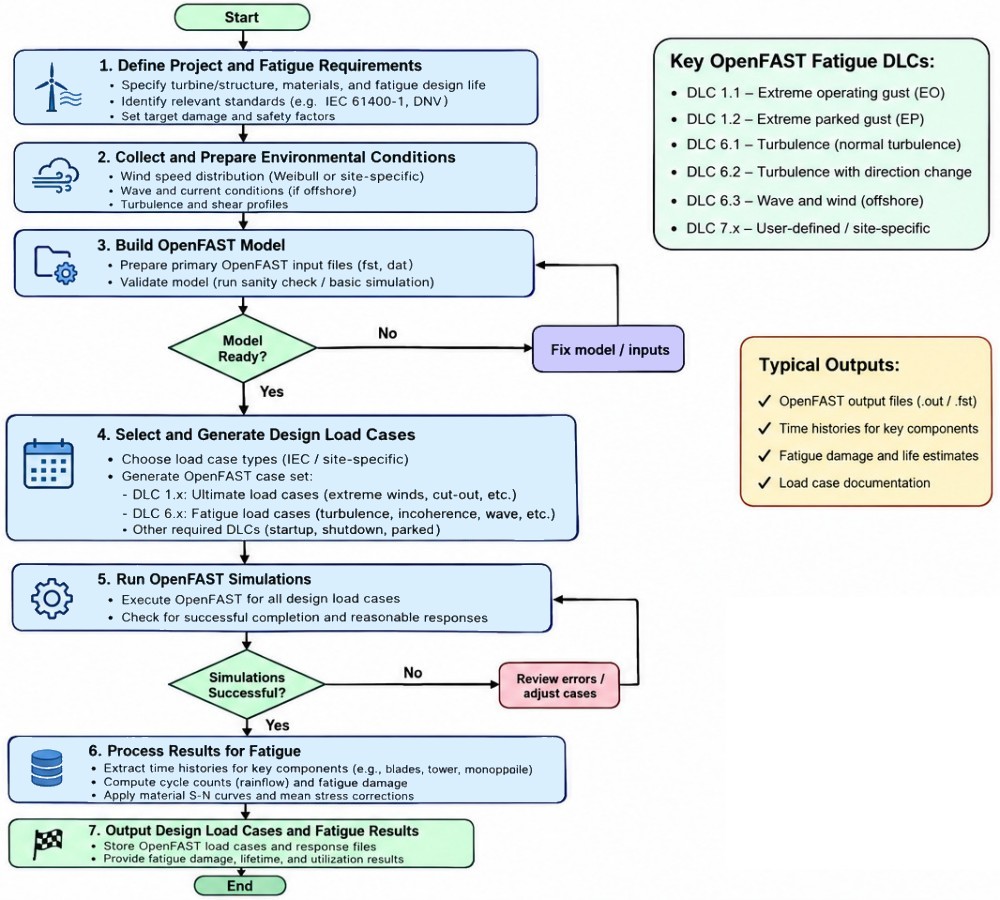
As per this reference: "Design Load Case (DLC) 1.2, describing fatigue loading for a power producing offshore wind turbine under regular environmental conditions. As the time span of this load case is the full lifetime of the turbine, a large number of model runs is necessary to assess the statistics of the fatigue loading. "
From previous reference: DLC 6.4 describes similar environmental conditions as in DLC 1.2, with the sole exception that the turbine is idling due to too small or too large wind speeds. DLC 6.4 covers the cases where the wind speed at hub height averaged over 10 minutes is smaller than the cut-in speed or larger than the cut-out speed. DLC 6.4 simulates the turbine standing still or idling with the blades pitched out of the wind during normal non-extreme weather over long durations. DLC 1.2 covers all other cases.
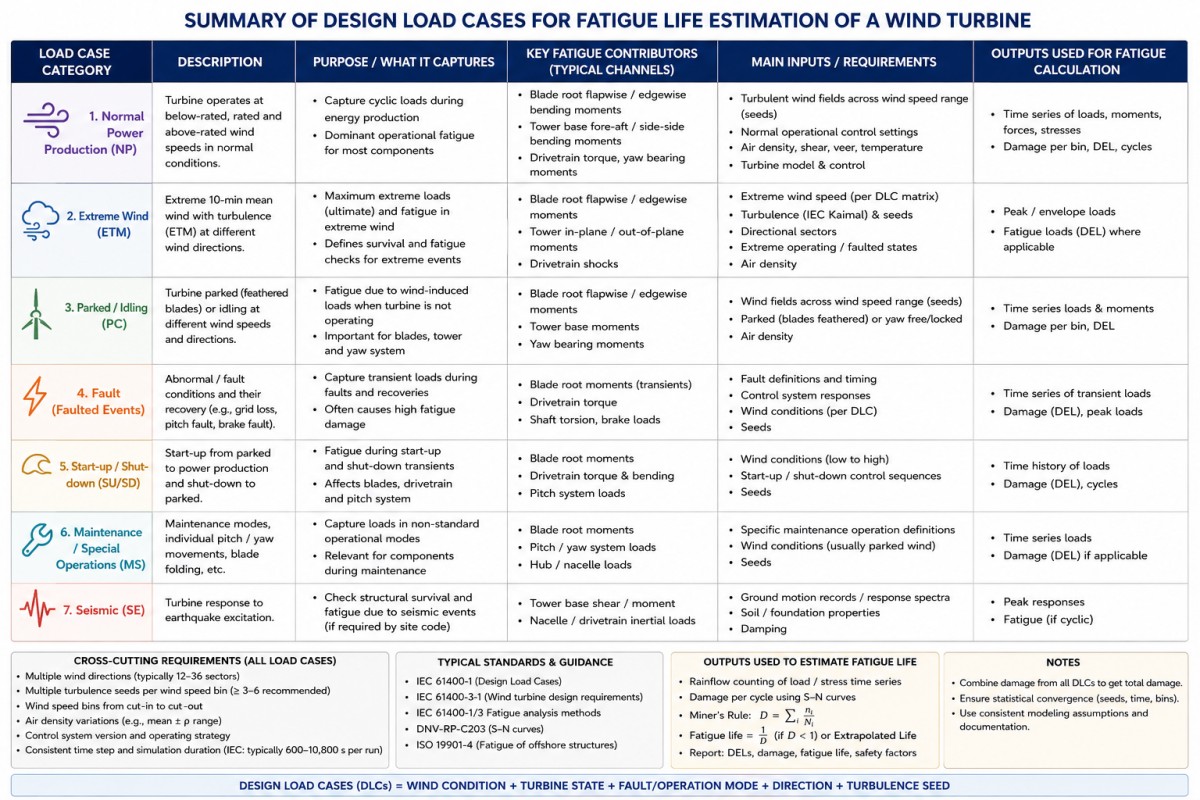
For statistical convergence, the IEC standard recommends at least 6 different random turbulence seeds per wind speed bin for critical stochastic load conditions. For a range of speeds (from cut-in to cut-out speed) between 3 ~ 25 [m/s] and bin step of 2 [m/s], total wind speeds are 15. These many wind speeds multiplied by 6 seeds per wind speed, DLC 1.2 alone accounts for 15 x 6 = 90 simulations.
For offshore turbines, Wind/Wave Directions are considered often aligned. If there are more alignment scenarios say 3 conditions, total number of load cases shall increase to 3 x 90 = 270. Based on "Design Load Basis Guidance for Distributed Wind Turbines" from NREL, calculating all load cases would require approximately 2,000 simulations.Other DLC are: start up (DLC 3.1) - simulates routine transition phases from a standstill or idling state up to normal power production speed, shutdown (DLC 4.1) - Simulates standard, non-emergency stops where the turbine pitches out of the wind and brakes to a standstill, and fault occurrence (DLC 2.4) - significantly less computationally costly as compared to DLC 1.2 and 6.4.
The IEC 61400-13 standard describes how to measure mechanical loads on wind turbine components, including measurement systems, data processing, and statistical convergence. The new IEC PAS 61400-60 standard describes the computational model validation process.
Wind Speed Binning: This reference specifies wind speeds in step of 2 [m/s]. Divide operating wind speeds between cut-in and cut-out into 2 [m/s] bins e.g. 3, 5, 7 ... 25 [m/s]. Wind Seeds: Assign at least 6 random turbulence seeds per wind speed bin to account for stochastic variation. For offshore conditions, pair each wind speed bin with joint probability distributions for Significant Wave Height, Peak Period, and Directional Offset (DLC 1.2 / 2.4).
TurbSim
It is a stochastic, full-field, turbulence simulator primarily for use with InflowWind-based simulation tools. TurbSim is a stochastic, full-field, turbulent-wind simulator. It uses a statistical model (as opposed to a physics-based model) to numerically simulate time series of three-component wind-speed vectors at points in a two-dimensional vertical rectangular grid that is fixed in space. To run TurbSim: turbsim turbsim.inp which starts TurbSim and opens the input file. The numbering convention between TurbSim v1.50 and TurbSim v1.06.00 was changed by adding an extra period and increasing the digits to two. Thus, TurbSim v1.06.00 is newer than TurbSim v1.50. The source code for TurbSim is stored inside modules/ folder in the root folder of OpenFAST.The executable for Linux is not published by NRL though it provides CMakeLists.txt files along with source code. CMake reads this file to generate native build files specific to the operating system and compiler — such as Makefiles for Linux. The compilation requires NWTC Library Module which is available as nwtc-library under openfast/modules folder. The text file here is the log of installation steps through command line in Ubuntu.
"Warning: Fortran 2018 deleted feature: Arithmetic IF statement at (1)" can be corrected by changing statements like "IF (J-4) 102, 102, 103" to following explicit IF-ELSE IF-ELSE blocks. Note that this error/warning may not be reported while using Intel compiler for Fortran.
IF (J-4 < 0) THEN
  GOTO 102
ELSE IF (J-4 == 0) THEN
  GOTO 102
ELSE
  GOTO 103
ENDIF
A warning means the compiler understands exactly what the code is trying / expected to do and successfully built the executable, but it is letting the programmers know that they are using an outdated practice. The compiled code may run successfully and produce accurate results.
TurbSim can generate several different sets of output files. They have the root name of the TurbSim input file, and their extensions indicate what type of files they are. Parameter TurbModel should be set to IECKAI which is compatible with OpenFAST. To change wind speed in TurbSim, under the "Meteorological Boundary Conditions", set the value of Uref to required value. Change this value to the desired input,
- TurbSim generates a summary file for all runs. This summary file is a text file with a '.sum' extension.
- TurbSim generates output files based on a specified <RootName> defined in its input file.
- TurbSim prints out many statistics for the run.
- The hub-height formatted files contain values of a series of parameters written in columns in human-readable form. These files have a '.dat' extension. Time from start of the simulation, Horizontal wind speed |vectorial U + V|, [U, V, W]-components and fluctuating [u, v, w]-components of wind speed (total 6), Reynolds stress component (3), Turbulent kinetic energy and Coherent TKE.
- Hub-Height AeroDyn Formatted Files: These human-readable files are in a format compatible with InflowWind. They have the '.hh' extension containing 8 parameters.
- Full-Field TurbSim Binary Files: These binary files are designed to be read by InflowWind. They have a '.bts' extension. Set the value of parameter WrADFF to 'True' to generate .bts file. This binary format has been designed so that InflowWind does not need to read any other file to properly convert the data to floating-point form.
- Inside primary InflowWind configuration file (often ending in .dat), the parameter FileName_BTS points to the relative or absolute path of your .bts file (for example, "WindDat/TurbSim.bts").
- This .bts file contains parameters such as hub height, wind speed, grid length and grid width, number of grid nodes, and how long to move wind across the blade.
- Grid width and Grid length refers to the size of the section of wind that will flow across the wind turbine.
- This grid contains all the necessary wind information such as vector fields, velocities, wind turbulence type...
- Full-Field Bladed-Style Binary Files: These binary files are designed to be read by both InflowWind and GH Bladed. They have a '.wnd' extension.
- The tower data binary files contain data for points in a single line at the grid center—going from the bottom of the grid to the ground. These files have a '.twr' extension.
Sample input file for TurbSim can be found here. Set WrACT to False to not compute coherent turbulence (generating this requires Events.les or Events.dns or Events.xtm files available inside test folder of OpenFAST). Keeping RandSeed1 and RandSeed2 unchanged allows recreating the exact same turbulent wind speed field across multiple simulation runs. For user time series input file, refer this file. The profile input file is attached here. RandSeed2 = "RanLux" invokes Lüscher's level 3 high-quality "Luxury pseudo-random number" generator that performs better than other built-in random number generator options.
Setting AnalysisTime = 600 (for a 10-minute simulation) and UsableTime = "ALL" is recommended - AnalysisTime cannot be less than UsableTime. This lets OpenFAST/InflowWind treat the data as periodic, allowing you to run simulations longer than 600 seconds by looping the wind file seamlessly to account for startup transients. For every 10-minute simulation (600 seconds) evaluated, generate 700 [s] of wind in TurbSim, discarding the first 100 seconds of transient data during OpenFAST or aeroelastic simulation run to remove initial start-up solver artefacts.Some of the variables in TurbSim.in file directly map to and dictate structural boundaries, time limits, and fluid behaviours in other OpenFAST modules. GridWidth / GridHeight: These define the dimensions of the rectangular turbulence grid and must be large enough to encapsulate all structural aerodynamic nodes of the turbine blades as they rotate. HubHt (Hub Height) defines the central elevation point of the wind grid grid. This value must match the tower top/hub elevation specified in ElastoDyn to prevent the wind field from being physically shifted or misaligned with the actual structural model. InflowWind interprets TurbSim grids as periodic by default, AnalysisTime and UsableTime should ensure the aerodynamic simulation has a non-repeating or continuous wind profile for the full test matrix.
Example:
The IEA 15-MW RWT features a massive 240-metre rotor diameter (D) and hub height of 150 metres. TurbSim spatial grid must completely cover the rotor disk, having a safety margin for blade deflection and tower clearance.- HubHt = 150.0 [m] → Why: Matches the structural distance from the mean sea level (or ground) to the shaft axis in ElastoDyn (HubHt).
- GridHeight = 260.0 and GridWidth = 260.0 [m] as per "Rotor Dia + margin" → Why: A 260m grid provides a 10 [m] buffer around the entire rotor sweep. This guarantees that AeroDyn nodes never move outside the wind field when the blade flexes or deflates forward under heavy aerodynamic thrust.
- RefHt = 150.0 [m] → Why: Positions the exact center of the generated turbulence grid at the turbine hub height.
Standard Configuration Matrix (Per Wind Speed Bin)
| Analysis Type | IEC Minimum Required | Recommended for Accuracy | Simulation Length |
| Fatigue Loads (DEL) | 6 seeds | 10 – 12 seeds | 10 minutes (600 s) |
| Ultimate Loads (Extreme) | 6 seeds | 20 – 50 seeds | 10 minutes (600 s) |
| Site Specific / Complex Terrain | 6 seeds | 50+ seeds | 10 minutes (600 s) |
The random seeds only affect the turbulence fluctuations, not the means. Changing the seed number changes the sequence of random numbers, giving a completely different pattern of wind gusts, eddies, and turbulence while keeping the same overall statistical properties (like mean wind speed and turbulence intensity).
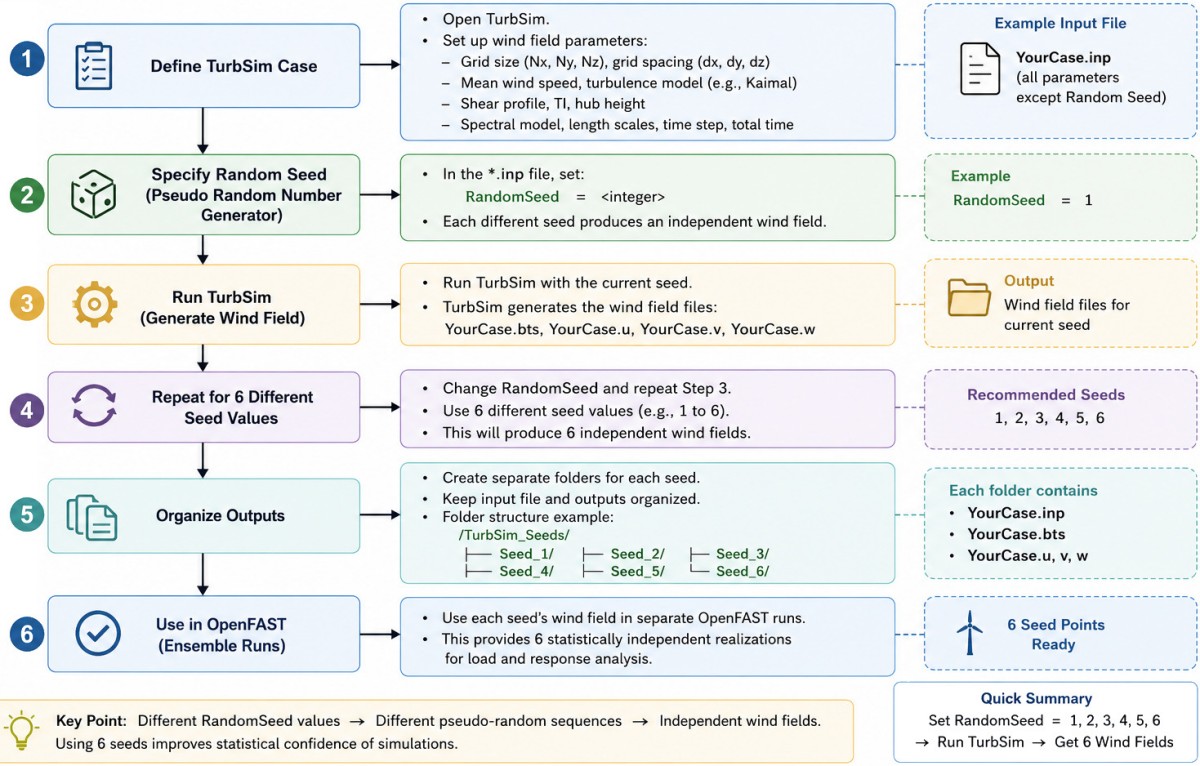
A loop count cannot be specified for TurbSim to automatically generate multiple random seeds within a single file. An external script is required to change seed integer per run inside the TurbSim Input File (.inp) and execute TurbSim multiple times.
Do not simply use 101, 234, 333, 468... for RandSeed1 to construct statistically independent realizations (such as pseudo-random number generator - PRNG). Use well-separated reproducible seeds, and a record mapping is required. rng = random.Random(13579) and seeds = [rng.randint(1, 2_147_483_646) for _ in range(6)] always generates same list of 6 random numbers. The built-in random module in Python is not designed for scientific or statistical applications requiring massive arrays of independent numbers though it is good enough of few tens of random numbers.Can OpenFAST simulation be performed without soil data?
OpenFAST simulations can be run entirely without soil data. Primarily focus area of OpenFAST is the upper turbine structure (blades, tower, aerodynamics, control systems), soil mechanics are not mandatory for a simulation to execute successfully. This can be achieved by simply fixing the base nodes to the ground or seabed inside the structural modules (like SubDyn for fixed-bottom offshore or ElastoDyn for land-based turbines). If site-specific soil curves is not available, OpenFAST allows users to apply generic stiffness and mass matrices at the base nodes.
When simulating a fixed-bottom offshore turbine where structural dynamics are handled exclusively through ElastoDyn (without SubDyn), it is equivalent to treating the entire tower as a structural beam cantilevered directly from a rigid base. In this configuration, the soil module does not need to be bypassed because ElastoDyn possesses no built-in native soil or pile-flexibility parameters.
To tell ElastoDyn that the turbine is fixed-bottom rather than onshore or floating, configure the Platform section: setting PtfmModel = 0 or 1 treats the tower base as fixed at the transition piece, but 2 explicitly tells OpenFAST it is a fixed-bottom offshore structure. Ensure all Platform Degrees of Freedom (DOFs) are disabled.
Set CompElast = 1 (ElastoDyn controls the tower structure). Set CompSub = 0 (Disable SubDyn entirely). Set CompHydro = 1 (Enable HydroDyn to apply wave loads to the base structure). ElastoDyn does not track a flexible pile below the seabed, adjust the reference coordinates to capture the full structural height. Using ElastoDyn alone means OpenFAST assumes foundation is completely stiff (rigid). This layout will overestimate the natural frequencies (eigenfrequencies) of the turbine because it ignores the softening effect of the soil.To approximate soil flexibility without soil data by utilizing the Apparent Fixity Length approach. To achieve this, increase the length of tower in the ElastoDyn_tower.dat file so it fictively extends slightly below the actual transition piece, effectively lowering the overall stiffness.
Sensor Location examples: In OpenFAST, b1 and c1 refer to two different coordinate systems used to define and evaluate blade loads, deflections, and moments. The character strings Rootx1 / Rootxb1 and Rootxc1 represent output channels evaluating forces or moments at the blade root projected onto these respective coordinate frames.
Spn1MLxb1: for the local spanwise bending moment at blade node 1, aerodynamic power (RtAeroPwr), thrust (RtAeroFxh), torque (RtAeroMxh), overall power/thrust coefficients (RtCp, RtCt), Rotor speed (RotSpeed), generator speed (GenSpeed), azimuth angle (Azimuth).- RootFx1, RootFy1, RootFz1 - Blade 1 root forces
- RootMx1, RootMy1, RootMz1 - Blade 1 root moments
- YawBrFx, YawBrFy, YawBrFz - Nacelle / Tower-top forces
- YawBrMx, YawBrMy, YawBrMz - Nacelle / Tower-top moments
- TwrBsFx, TwrBsFy, TwrBsFz - Tower base forces
- TwrBsMx, TwrBsMy, TwrBsMz - Tower base moments
Reference OpenSource COntroller (ROSCO):
This is a reference controller framework that facilitates design and implementation of wind turbine and wind farm controllers for fixed and floating offshore wind turbines.The version of the ROSCO controller can be found in the header of the DISCON.IN. The repository github.com/NatLabRockies/ROSCO contains many examples including the sample input files. One of the sample input files can be referenced here.From user doc: "The ROSCO framework also includes a python based toolbox that primarily enables tuning the controllers. It is not necessary to run aeroelastic simulations or provide linearized state-space models to tune the controllers. The ROSCO controller is implemented in FORTRAN, while the remainder of the toolset is a mostly-python code base with a number of functionalities including parsing of OpenFAST input and output files."
Ref: The primary control objective of a wind turbine is to extract the maximum amount of power in regime 2 (when the wind speed is below the rated value) by operating the turbine at an optimum tip-speed ratio and to maintain the rated rotor speed in regime 3 (when wind speed is above the rated value). To achieve these primary control objectives, a controller consisting of a torque controller for regime 2 and a blade pitch controller for regime 3 is required to minimize abrupt thrust changes, maximum rotor thrust, and power fluctuations by incorporating tip-speed ratio tracking generator torque control, minimum pitch saturation, and a smoothing algorithm for near-rated operation. This is the ROSCO controller recognized as the industry-standard controller for wind turbines.
For installing only the ROSCO controller binary, download most recent tagged version release of the controller and point to them in their simulation tools (e.g. through DLL_FileName in the ServoDyn input file of OpenFAST). Other methods include Anaconda Download and Compile using CMake.
A standard file structure is used as an input to the ROSCO controller. This is, generically named as DISCON.IN file, though it can be renamed (in OpenFAST, this file is pointed to by DLL_InFile in the ServoDyn file). ROSCO requires the power and thrust coefficients for tuning control inputs and running the extended Kalman filter wind speed estimator. The Cp_Cq_Ct.txt (or similar) file contains the rotor performance tables that are necessary to run the ROSCO controller. This file can be located anywhere, the file needs to be pointed properly with the PerfFileName parameter in DISCON.IN file.
WEIS, Wind Energy with Integrated Servo-control, performs multifidelity co-design of wind turbines. WEIS is a framework that combines multiple NLR-developed tools to enable design optimization of floating offshore wind turbines. It also contains: 'pCrunch' which is a collection of tools to ease the process of parsing large amounts of OpenFAST output data and conduct loads analysis, and 'pyOptSparse' which is a framework for formulating and efficiently solving non-linear constrained optimization problems.
Running OpenFAST Simulations: To run an aeroelastic simulation with ROSCO, the input file DISCON.IN must point to a properly formatted Cp_Cq_Ct.txt file using the PerfFileName parameter. If called from OpenFAST, the main OpenFAST input points to the ServoDyn input, which points to the DISCON.IN file and the libdiscon.* dynamic library.
A wind turbine ontology is a structured semantic framework that defines the physical components, operational states, data streams, and relationships within a wind energy system.
Input files of OpenFAST
These file also contain file paths that reference other input files. These file paths are either relative to the current file or can be absolute paths. The reference information provided by IEA Wind Systems is available at github.com/IEAWindSystems. OpenFAST Turbine Models are available at github.com/natlabrockies/openfast-turbine-models. More information can be found in the regression test folder at github.com/OpenFAST/openfast.All the input files required by OpenFAST are:
- InflowWind.dat — InflowWind primary input file contains information such as WindType, reference height for horizontal wind speed, Horizontal wind speed, link to full field wind file (*.bts), mean u-component wind speed at the reference height, Wind profile type
- TurbSim.inp — TurbSim input file used to generate the wind field
- TurbSim.wnd or TurbSim.bts or TurbSim.h5 — Wind velocity time series file (e.g. generated via TurbSim)
- SeaState.dat — SeaState input file for wave/current definitions
- ElastoDyn.dat — Primary structural dynamics input file for the turbine (tower, nacelle, rotor) - TURBINE CONFIGURATION, integration time step (DT), links to *ElastoDyn_blade.dat and *ElastoDyn_tower.dat files
- Blade.dat (e.g. Blade1.dat, Blade2.dat, Blade3.dat) — Blade structural property files
- Tower.dat — Tower structural property file
- BeamDyn.dat — Advanced blade structural dynamic file (alternative to ElastoDyn for highly flexible blades)
- AeroDyn15.dat — Primary AeroDyn input file (for BEM or free-vortex wake OLAF solver - cOnvecting LAgrangian Filaments - Free Vortex Wake) - contains Environmental Conditions, links to *polar_xx.dat and *AeroDyn15_blade.dat files
- Airfoil_*.dat — Individual airfoil aerodynamic coefficient tables (lift, drag, moment)
- *.dat - Airfoil aerodynamic data
- *.dat - Blade airfoil definitions
- Cp_Cq_Ct.txt - Lift/drag/moment coefficient data - linked to DISCON.IN
- HydroDyn.dat — Primary hydrodynamic input file for wave/current/restoring loads
- *.SMD / spectral data - Wave spectrum data, if externally supplied
- *.dat - HydroDyn platform/member definitions
- *.hst - HydroDyn hydrodynamic coefficients, depending on model
- SubDyn.dat — Substructure structural dynamics input file (required for monopole, jacket frames, tripod, or multi-member fixed/floating substructures)
- MoorDyn.dat — Primary input file for dynamic lumped-mass mooring lines (floating offshore turbines only)
- ExtPtfm.dat — External platform stiffness/damping matrix model file (simplified alternative to MoorDyn/HydroDyn)
- ServoDyn.dat — Primary ServoDyn control and electrical drive input file
- DISCON.IN — Primary control setting for ROSCO - requires blade length and link to Cp_Cq_Ct.txt file
- DISCON.dll (Windows) or DISCON.so (Linux/Mac) — Compiled dynamic link library for the pitch/torque controller (often Bladed-style).
Solution:
Use Python wrappers such as openfast-toolbox to auto-generate .fst files for every combination of [Wind Speed Bin x Turbulence Seed x Wave Condition / Direction]. Run batch simulations across parallel CPU threads. Discard the first 100 [s] of output to eliminate startup numerical transients, leaving a clean 600 [s] dataset per run. In test case, default inputs are 12 [m/s] for wind speed, 63 [m] blade length with tower height of 90 [m].Ref openfast.readthedocs.io/en/dev/source/working.html -- As a minimal working example, place these 4 files in working directory (where the OpenFAST executable is located and where terminal is at), the simulation can be run as: ./openfast Main.fst
- MinimalExample.fst : the main OpenFAST input file
- ElastoDyn.dat : the input file for the ElastoDyn module
- ElastoDyn_Blade.dat : the input file defining the structural properties of the blade to be used by the ElastoDyn module
- ElastoDyn_Tower.dat : the input file defining the structural properties of the tower to be used by the ElastoDyn module
DLC Index, Operational State, Hub Height, Rotor Diameter, Dynamic Wake, Wind Speed, Turbulent Intensity, Air Density, Temperature, Shear Exponent, Yaw Alignment, Water Density, Water Wave Condition, Wind-Wave Alignment, Sea Wave Current, Water Depth, Substructure Type, Thickness, Young Modulus, Shear Modulus, TurbSim WindType, Seed Number, Duration - Total Run Time, Integration Time Step,
Operational state can be: Normal production, Start-up, Shut-down, Parked, Idling, Fault, Grid loss, Emergency stop, Yaw misalignment, Extreme gust, Extreme wind shear, Extreme turbulence, Extreme operating gust
      ┌────────────────────────┐     ┌────────────────────────┐     ┌────────────────────────┐
      │ TurbSim -> OpenFAST    │ --> │   Design Load Cases    │ --> │Set Channels in OutList │
      └────────────────────────┘     └────────────────────────┘     └────────────────────────┘
                                                                               │
 .-----------------------------------------------------------------------------'
 │
 │    ┌────────────────────────┐     ┌────────────────────────┐     ┌────────────────────────┐
 '--> │  Run for 600 seconds   │ --> │ Python post-processing │ --> │  Select load channels  │
      └────────────────────────┘     └────────────────────────┘     └────────────────────────┘
                                                                                │
 .------------------------------------------------------------------------------'
 │
 │    ┌────────────────────────┐     ┌────────────────────────┐     ┌────────────────────────┐
 '--> │ Remove 100[s]transients│ --> │ Count Rainflow cycle   │ --> │  Get load ranges       │
      └────────────────────────┘     └────────────────────────┘     └────────────────────────┘
                                                                                │
 .------------------------------------------------------------------------------'
 │
 │    ┌────────────────────────┐     ┌────────────────────────┐     ┌────────────────────────┐
 '--> │  Apply Wöhler curve    │ --> │ Calculate Miner damage │ --> │    Calculate DEL       │
      └────────────────────────┘     └────────────────────────┘     └────────────────────────┘
There are many reference data under regression-test folder of OpenFAST repository. Following are some with explanations of their features.
- 5MW_Baseline - This directory contains the inputs for the NREL 5MW reference turbine, no .outb file.
- 5MW_ITIBarge_DLL_WTurb_WavesIrr - NREL 5.0 MW Baseline Wind Turbine with ITI Barge Configuration, for use in offshore analysis, contains .outb file, the .csv version converted using python-toolbox is here.
- 5MW_Land_AeroMap - NREL 5.0 MW Baseline Wind Turbine (Land = Onshore), contains .outb file
- 5MW_Land_BD_DLL_WTurb: Utilizes the advanced BeamDyn (BD) structural module, DLL - Implements a external dynamic link library for the controller, WTurb - Runs with a turbulent wind profile. The .csv version of .outb file converted using python-toolbox is here.
- 5MW_Land_BD_DLL_WTurb_StC: Implements a Structural Control (StC) mechanism, meaning the model is equipped with a Structural Controller (like a tuned mass damper in the tower or nacelle) to mitigate vibrations. The .csv version of .outb file converted using python-toolbox is here.
- 5MW_Land_BD_Linear: BD may also mean Blade Decomposition
- 5MW_Land_BD_Linear_Aero: Linear Aero (Linearized Aerodynamics)
- 5MW_Land_DLL_WTurb_ADsk: Specifies that the simulation uses the AeroDisk (ADsk) module
- 5MW_Land_DLL_WTurb_ADsk_SED: Simplified ElastoDyn (SED) utilizing a specialized, rigid, or highly simplified structural structural-dynamics module instead of the full multi-degree-of-freedom ElastoDyn or BeamDyn models
- 5MW_Land_DLL_WTurb_wBlPDyn: Blade Pitch Dynamics explicitly flags that the simulation accounts for the physical and electrical actuator delays, response lag, and dynamic structural coupling associated with pitch-regulating the blades
- 5MW_Land_DLL_WTurb_wNacDrag: With Nacelle Drag, the .csv version of .outb file converted using python-toolbox is here.
Flowchart diagram of inputs and outputs for modules of OpenFAST to compute turbine fatigue life (version-1):
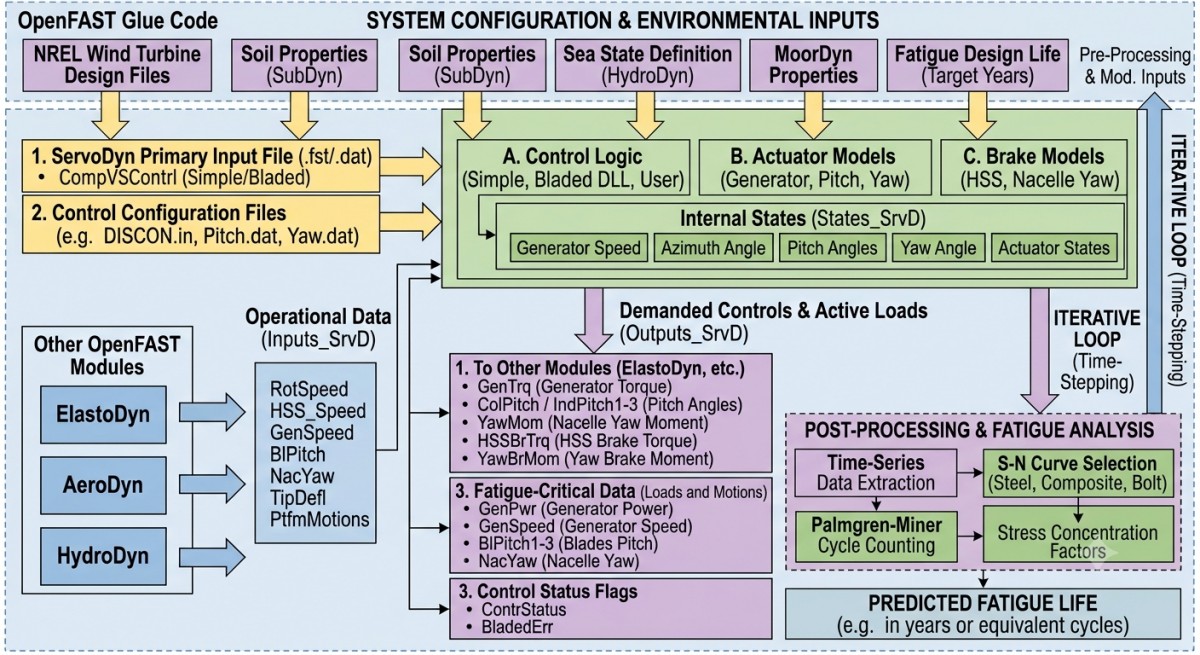
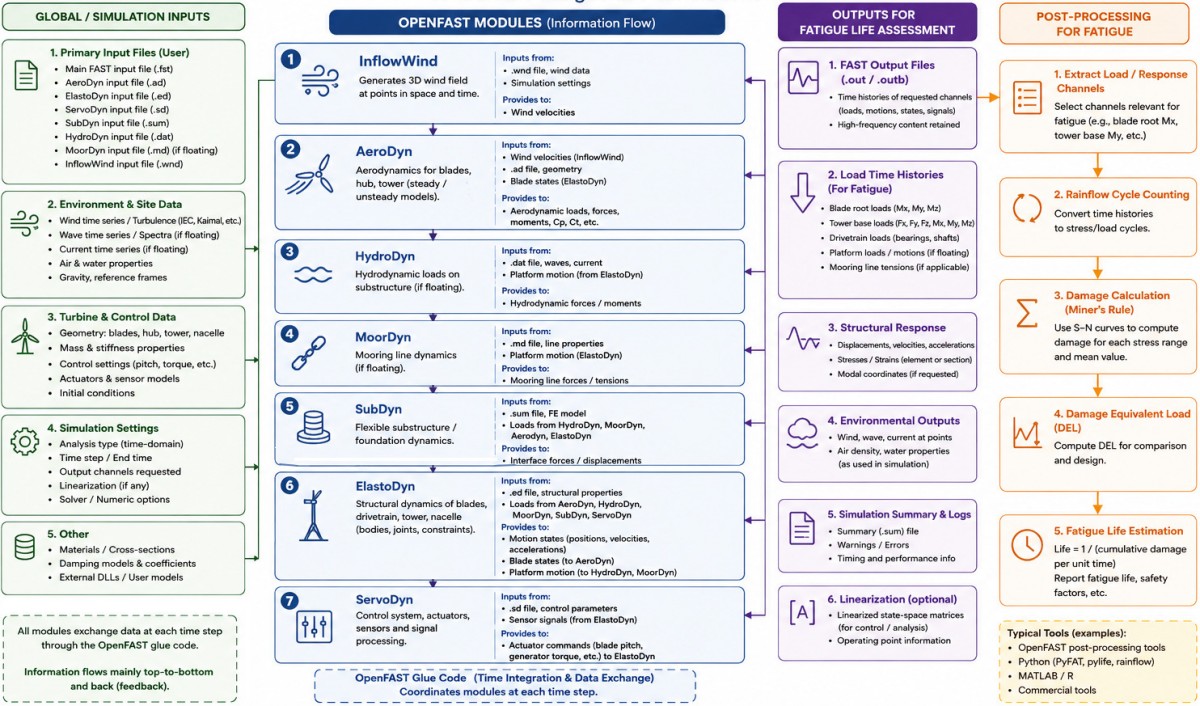
Output from OpenFAST:
Output file names are determined dynamically based on the name of the primary input file. Summary output files are given a .sum extension. OpenFAST writes a .out (or binary .outb) file with time-series results for all requested output channels (total 43 columns as csv file). The list of output channels in the output files is determined by the OutList specified in the OUTPUT sections from the primary input file of each module. OpenFAST has 1003 ElastoDyn and 520 ServoDyn channels.MATLAB, Python (e.g. the pyFAST or openfast_toolbox package) can be used to load, plot, and analyze loads, deflections, and power. The output produced in minimum example run is shown below.
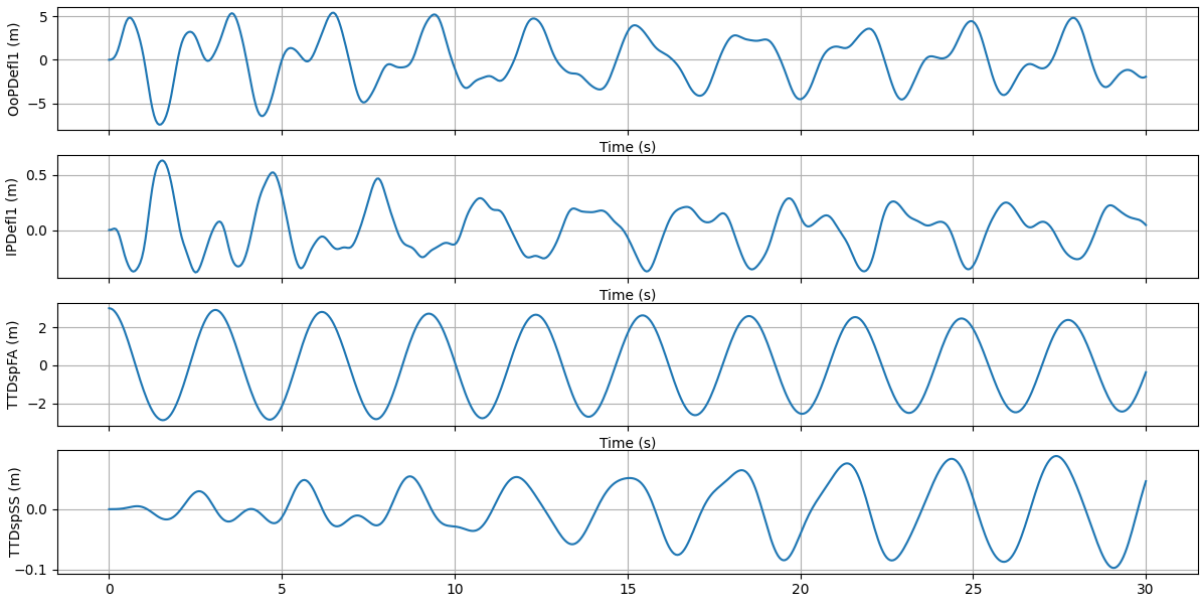
- input_output: read/write OpenFAST/FAST.Farm/OLAF input and output files
- postpro: post-process OpenFAST outputs (extract radial data, compute fatigue loads)
- linearization: tools to deal with OpenFAST linearization, e.g. generate a Campbell diagram
- aeroacoustics: tools for aero-acoustics (generate BL files and plot outputs)
- case_generation: tools to generate and run a set of input of OpenFAST input files
- The fatigue.py script in the pyFAST/tools directory has many lines of code that calculates the DEL based on information found in generated .outb file.
- To analyze fatigue, engineers often use the concept of an "equivalent load." This is a single static load that, if applied continuously, would result in the same damage to the structure as the actual cyclic loading that it experiences. The damage is typically quantified using a fatigue life estimation method, such as the stress-life (S-N) curve or Wöhler curve, which relates the number of cycles to failure for a given stress range.
- Note that fatigue behaviour involves a super-proportional relationship (often referred to as a super-linear relationship when a change in one variable results in a disproportionately larger change in another variable), the Wöhler line is usually plotted on a double-logarithmic scale.
- It uses the idea of a counting algorithm named "Rainflow Count". This is a mathematical way to calculate the fatigue life of a component to convert a uniaxial loading (along the primary axis) of stresses into an equivalent set of constant amplitude and constant loading conditions.
- The Damage Equivalent Load (DEL) is a concept used in fatigue analysis, particularly in the context of wind turbines and other mechanical components subjected to variable loads over time.
- By converting a variable load history into a DEL, engineers use fatigue data (such as S-N curves) to predict the life of a component.
- MLife is a specialized MATLAB-based software tool developed by the National Renewable Energy Laboratory (NREL) to calculate lifetime fatigue damage, damage equivalent loads (DELs), and time-to-failure statistics from load time-series data
Note: Fatigue life is the total number of loading cycles a material or component can endure before failing, while fatigue damage is the progressive, cumulative structural degradation (like microcracks) that accumulates during each loading cycle.
| Fatigue Life: The total capacity or lifespan, measured in total applied load cycles (or time) until a fracture or critical crack size occurs. | Fatigue Damage (D): The fraction of consumption of fatigue life caused by applied stress cycles. It is often quantified on a scale from 0 (no damage) to 1 (complete failure). |
| Role in Design: | |
| Fatigue Life: The target goal or endpoint FE analysts / designers are trying to predict for a part (e.g. designing a component to last 1 million cycles). | Fatigue Damage: The running tally or accumulation metric used to track how much life has been spent under variable operating loads, often calculated using tools like [Miner's Rule] |
| Relationship: They are inversely related. As fatigue damage increases with each repeating load cycle, the remaining fatigue life decreases proportionally. | |
Steps to calculate DEL:
Step-1: Read the CSV file as Pandas dataframe.
Step-2: Get the names of channels (sensors) e.g. RootMyc1 for which DEL is to be estimated. Optionally, create a function to check if the selected channels exist in the output file or not.
Step-3: Perform rainflow counting using the Python 'rainflow' package. It returns a dataframe containing: range, mean, count, start, end. The 'rainflow' is a Python implementation of the ASTM E1049-85 rainflow cycle counting algorithm for fatigue analysis.
cycles = list(rainflow.extract_cycles(time_series))
    rows = []
    for cycle in cycles:
        cycle_range = cycle[0]
        cycle_mean  = cycle[1]
        cycle_count = cycle[2]
        i_start     = cycle[3]
        i_end       = cycle[4]

        rows.append(
            {
                "range": cycle_range,
                "mean" : cycle_mean,
                "count": cycle_count,
                "start_index": i_start,
                "end_index"  : i_end,
            }
        )
    return pd.DataFrame(rows)
Step-4: OpenFAST outputs forces and moments (loads), not structural stresses. To perform a Rainflow counting or fatigue analysis on a specific cross-section (like the tower base or blade root), convert those loads into axial or bending stresses using standard mechanics of materials formulas such as \(\sigma = y . \frac{M}{I}\)
Step-5: Calculate Palmgren-Miner's damage as per Wöhler (S-N) curve relationship: N = A / Sm and Damage D as \[ D = \sum\frac{n_i}{N_i} = \sum \frac{n_i * S_i^m}{A}\] where i is summed over cycles (Rainflow cycles), and A is S-N constant (material intercept constant). Multiply the damage rate found at a given wind speed by its annual probability from Weibull distribution at the actual site.
Because Si is raised to the power of m, the Wöhler exponent acts as an exponential penalty on higher stresses:- For Steel (m = 3): Doubling the stress range increases the damage per cycle by a factor of 2^3 = 8
- For Aluminium (m = 5): Doubling the stress range increases the damage by a factor of 2^5 = 32
- For Wind Turbine Composites (m = 10): Doubling the stress range increases the damage by a factor of 2^10 = 1024
- Wöhler exponent = 1 implies fatigue life is inversely proportional to stress amplitude.
Step-6: Calculate Damage Equivalent Load using \[\left [\frac{\Sigma (n_i * S_i^m)}{N_{REF}}\right ]^\frac{1}{m}\] where: ni = rainflow cycle count, Si = stress cycle range or amplitude (Δσ or the stress bins), m = Wohler or S-N curve slope (also called the fatigue exponent which is typically 3 to 5 for steel, 8 to 12 for composites) and NREF = reference number of cycles, typically allowable cycles to failure for that stress range.
Step-7: Calculate Fatigue Life - Once the DEL is derived from aeroelastic simulation data, match it against the reference material strength of that material. Using the inverse slope equation of the Wöhler S-N curve, the allowable number of cycles to failure for that equivalent load is calculated. A qualitative depiction of (order of magnitude) relative contribution of operation state to fatigue life is shown below.
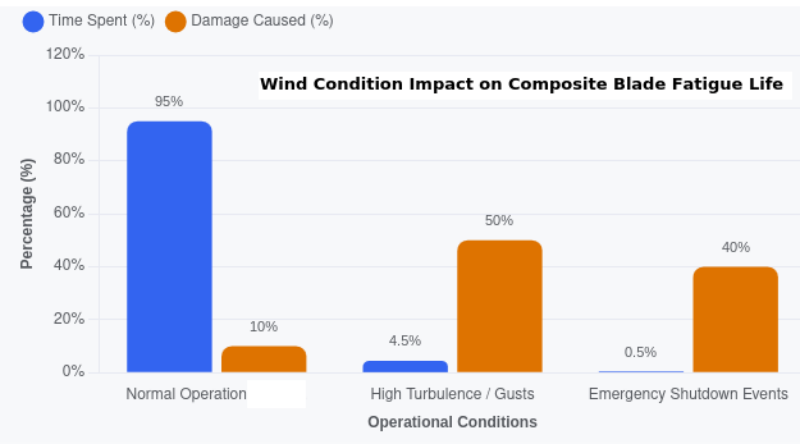
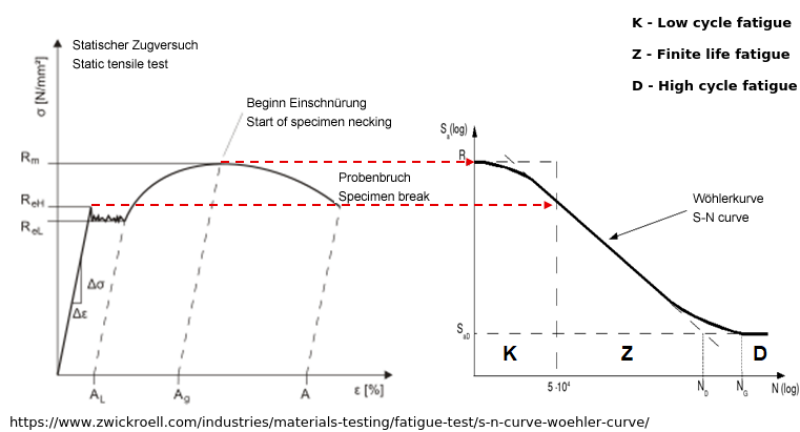
Additionally (optional), calculate basic load statistics such as minimum, maximum, mean, standard deviation, range, duration, number of samples and number of rainflow cycles. Plots for load time history and Rainflow range histogram can be generated using Matplotlib for visualization.
The table below demonstrates a sample operational fatigue accumulation profile over a 20-year design life. Using the cumulative damage value: Life = Design Years / D, the estimated Component Fatigue Life: 20 / 0.4584 = 43.6 years (Safety Factor Margin: 2.18). Failure is predicted theoretically when D ≥ 1.| Stress Range (MPa) | Counted Cycles | Allowable Cycles | Damage Fraction |
| 20 | 1.50E+07 | 2.10E+08 | 0.0714 |
| 40 | 4.20E+06 | 2.60E+07 | 0.1615 |
| 60 | 8.50E+05 | 7.80E+06 | 0.1090 |
| 80 | 2.10E+05 | 3.30E+06 | 0.0636 |
| 90 | 9.00E+04 | 1.70E+06 | 0.0529 |
| Total Accumulation | D = 0.4584 | ||
Overall Flowchart: the following method to carry out simulations for any number of DLC saves only the output files. The inputs are updated in-place and overwritten. The default names of output generated after each run is moved and renamed based on DLC index and seed number. Note that the seed numbers are reused across speed bins but not within the bins. The statistical independence remains valid as (the random) numbers scale according to a completely different wind speed and turbulence energy spectrum resulting in altered wind velocity fluctuations and spatial phase structures.
          Get OpenFAST Input Files and Variables
                    |
                    ▼
          Generate 6 Random Seeds (reused across speed bins)
                    |
                    ▼                         OUTER LOOP
 .------> iDLC = 1 to NDLC ----------------------------------------------------------.
 |                  │                                                                |
 |                  ▼                                                                |
 |  .---> iSeed = 1 to 6                                                             |
 |  |               │                                                                |
 |  |               ▼                                                                |
 |  |     Open TurbSim Input File    ⇒  Update RandSeed1 Values --------.            |
 |  |                                                                   | INNER LOOP |
 |  |      .---------------------------Overwrite Input File-------------'            |
 |  |      |                                                                         |
 |  |      '---->   Run TurbSim ⇒  Generate .bts (this is called in  InflowWind.dat) |
 |  |                                │                                               |
 |  |      Turbine Data--.           ▼                                               |
 |  |      Tower Data----|--⇒ Run OpenFAST  ⇒  Output Files with Default Names       |
 |  |      Soil Data-----|                       │                                   |
 |  |      Foundation----'                       ▼                                   |
 |  |                                         Move and Rename Files                  |
 |  |                                            |                                   |
 |  |                            .---------------o----------------.                  |
 |  |                            |                                |                  |
 |  |           ./Results/Out_{iDLC}_{iSeed}.out      ./Logs/Log_{iDLC}_{iSeed}.sum  |
 |  |                            |                                |                  |
 |  |                            '----------------o---------------'                  |
 |  |                                             |                                  |
 |  '--------iSeed = iSeed + 1 -------------------'                                  |
 |                                                                                   |
 '------ iDLC = iDLC + 1 -----  Update OpenFAST Input Files  <-----------------------'
Python code to update the seed value in TurbSim input file and overwrite the file is given below.
def update_turbsim_seed(file_path, seed_number):
  with open(file_path, 'r') as file:
    lines = file.readlines()

  # Loop through and find the line containing RandSeed1
  for i, line in enumerate(lines):
    if "RandSeed1" in line:
      # Split the line by comments or spaces to preserve the descriptor
      parts = line.split(maxsplit=1)

      if parts and "RandSeed1" in parts[1]:
        # Reconstruct the line: new seed value + rest of the original line
        lines[i] = f"{seed_number:<14}{parts[1]}"
        break

  # Overwrite the existing file with modified lines
  with open(file_path, 'w') as file:
    file.writelines(lines)
The above function can be generalized to update any variable one at a time and called multiple times. Alternatively, a function to update multiple variables simultaneously using a key-value mapping built from two input lists can be used.
def update_turbsim_variables(file_path, var_names, var_values):
    """
    Updates multiple variables in a TurbSim input file. Extracts the
    specific token right after the value to avoid false positives with
    trailing commentary. The code can handle a mix of integers, floats,
    and strings without throwing any error.

    file_path: Path to the TurbSim input file
    var_names: List of variable names
    var_values: List of corresponding new values
    """
    if len(var_names) != len(var_values):
        err_str = "Lists for variable names and values must have same lengths."
        sys.ext(err_str)

    # Create a lookup mapping (dictionary) for quick variable matching
    updates = {
        name.lower(): str(val) for name, val in zip(var_names, var_values)
    }
    with open(file_path, 'r') as file:
        lines = file.readlines()

    for i, line in enumerate(lines):
        # Extract line parts to identify the descriptor/variable name. Split at
        # first occurrence of whitespace: maxsplit=1
        parts = line.strip().split(maxsplit=1)
        if len(parts) > 1:
            # Get the variable name by splitting second part of previous split
            descriptor = parts[1].split()[0] if parts[1].split() else ""

            # Check if the descriptor matches any requested variable
            if descriptor.lower() in updates:
                new_val = updates[descriptor.lower()]
                lines[i] = f"{new_val:<14}{parts[1]}\n"

    with open(file_path, 'w') as file:
        file.writelines(lines)
Recommended config file can be:
from pathlib import Path
ROOT_DIR       = Path(__file__).resolve().parent
TURBSIM_EXE    = ROOT_DIR / "TurbSim/TurbSim.exe"
TURBSIM_INP    = ROOT_DIR / "TurbSim/TurbSim.in"

TIME_STEP      = 0.50       # DT
TOTAL_RUN_TIME = 300        # TMax
GRAVITY        = 9.81       # Gravity
AIR_DENSITY    = 1.225      # AirDens
WATER_DENSITY  = 1025       # WtrDens
KINEMATIC_VISC = 1.464e-05  # KinVisc
WATER_DEPTH    = 30.0       # WtrDpth
SPEED_BINS     = 12
NUM_SEEDS      = 6
WIND_TYPE      = 3
OUTPUT_DIR     = "results"
Using dataclass, separate the common simulation settings from the individual simulation case.
# config.py
from dataclasses import dataclass, field
from pathlib import Path
from typing import List, Optional
@dataclass
class SimulationConfig:
    """Common settings shared by all simulations."""

    speed_bins: List[float]
    wind_type: int
    num_seeds: int

    # TurbSim
    turbsim_dir: Path = Path("TurbSim")

    # OpenFAST
    fast_file: Path = Path("Model/Main.fst")

    # Simulation settings
    simulation_time: float = 60.0
    time_step: float = 0.10
@dataclass
class SimulationCase:
    """Parameters defining one individual simulation."""

    wind_speed: float
    seed: int

    bts_file: Path
    output_file: Path

    dlc_id: str = "DLC_1_2_Uref_08_mps_seed_01"
Sample file to use the config.py
# run_config.py
from config import SimulationConfig
from pathlib import Path

# Create one shared configuration (variable names much match those in config)
ref_config = SimulationConfig(
    speed_bins  = [6, 8, 10, 12, 14, 16, 18, 20],
    wind_type   = 3,
    num_seeds   = 6,
    turbsim_dir = Path("TurbSim"),
    fast_file   = Path("RWT_15MW.fst"),
)
def run_turbsim(ref_config: SimulationConfig):
    print("Wind type:",   ref_config.wind_type)
    print("Wind speeds:", ref_config.speed_bins)
    print("Seeds:",       ref_config.num_seeds)

run_turbsim(ref_config)

# Output
Wind type: 3
Wind speeds: [6, 8, 10, 12, 14, 16, 18, 20]
Seeds: 6
Loop over speeds and number of seeds using following script.
# run_loadcases.py
from config import SimulationConfig, SimulationCase
from pathlib import Path

ref_config = SimulationConfig(
    speed_bins  = [8, 10],
    wind_type   = 3,
    num_seeds   = 2,
    turbsim_dir = Path("TurbSim"),
    fast_file   = Path("RWT_15MW.fst"),
)
load_cases = []
for speed in ref_config.speed_bins:
    for seed in range(1, ref_config.num_seeds + 1):

        bts_file = (ref_config.turbsim_dir /
            f"dlc_{ref_config.wind_type}_{speed:02d}mps_seed{seed:02d}.bts"
        )
        output_file = Path(f"Results/Out_{speed}mps_Seed{seed:02d}.out")
        load_case = SimulationCase(
            wind_speed  = speed,
            seed        = seed,
            bts_file    = bts_file,
            output_file = output_file
        )
        load_cases.append(load_case)
        print(bts_file)
# Output
TurbSim/dlc_3_08mps_seed01.bts
TurbSim/dlc_3_08mps_seed02.bts
TurbSim/dlc_3_10mps_seed01.bts
TurbSim/dlc_3_10mps_seed02.bts
The sample configuration, load cases and run files are described in tabs below.
 # config.py
from dataclasses import dataclass, field
from pathlib import Path

@dataclass
class OpenFASTConfig:
    """
    Global configuration for the OpenFAST parametric simulation framework.
    All paths are relative to PROJECT_ROOT unless  explicitly specified
    as absolute paths.
    """
    # Directory containing this config.py file
    project_root: Path  = field(
        default_factory = lambda: Path(__file__).resolve().parent
    )
    project_name: str   = "Offshore_15MW_RWT"

    # EXECUTABLES
    # Change to point to OpenFAST installation
    openfast_exe: Path = Path("bin/OpenFAST_x64.exe")
    turbsim_exe: Path  = Path("bin/TurbSim_x64.exe")

    # MODEL / INPUT / RESULTS DIRECTORIES
    fst_file: str     = "RWT_15MW.fst"

    model_dir: Path   = Path("OpenFAST")
    inputs_dir: Path  = Path("Inputs")

    # BTS files are generated separately. This directory contains
    the already-generated BTS files.
    bts_dir: Path    = Path("TurbSim/BTS")

    # Case-specific OpenFAST files will be generated here
    case_dir: Path   = Path("Load_Cases")

    result_dir: Path = Path("Results")
    log_dir: Path    = Path("Logs")
    out_prefix: str  = "Out"

    # SIMULATION SETTINGS
    analysis_time: float   = 300.0
    transient_time: float  = 60.0
    time_step: float       = 0.10
    number_of_seeds: int   = 6
    default_wind_type: int = 3
    default_turbulence_class: str = "A"
 # load_cases.csv
dlc_id,wind_speed,wind_type,turb_class,wind_dir,yaw_angle,wave_condition,wave_ht,wave_period,current_speed
DLC1.2,         8,      NTM,         A,       0,        0,        NoWave,      0,          0,     0
DLC1.2,         8,      NTM,         A,       0,        0,        NoWave,      0,          0,     0
DLC1.2,        12,      NTM,         A,       0,        0,        NoWave,      0,          0,     0
DLC1.2,        12,      NTM,         A,       0,        0,        NoWave,      0,          0,     0
DLC6.4,        16,      ETM,         A,      15,       15,       JONSWAP,    5.0,       11.0,   0.5
# simulation_case.py
from dataclasses import dataclass
from pathlib import Path

@dataclass
class SimulationCase:
    """One row from cases.csv representing one OpenFAST run."""

    dlc_id: str

    # Wind
    wind_speed: float
    wind_type: str
    turb_class: str
    wind_dir: float
    yaw_angle: float

    # Waves
    wave_condition: str
    wave_ht: float
    wave_period: float

    # Current
    current_speed: float

    # Resolved/generated paths
    bts_file: Path | None = None
    case_fst_file: Path | None = None
    output_file: Path | None = None
# case_generator.py
import csv
from pathlib import Path
from simulation_case import SimulationCase

def read_cases(csv_file: Path):
    load_cases = []
    with open(csv_file, "r", newline="", encoding="utf-8") as f:

        reader = csv.DictReader(f)
        for row in reader:
            load_case = SimulationCase(
                dlc_id         = row["dlc_id"],
                wind_speed     = float(row["wind_speed"]),
                wind_type      = row["wind_type"],
                turb_class     = row["turb_class"],
                wind_dir       = float(row["wind_dir"]),
                yaw_angle      = float(row["yaw_angle"]),
                wave_condition = row["wave_condition"],
                wave_ht        = float(row["wave_height"]),
                wave_period    = float(row["wave_period"]),
                current_speed  = float(row["current_speed"])
            )
            load_cases.append(load_case)
return load_cases# run_cases.py
import subprocess
from pathlib import Path
from config import OpenFASTConfig
from case_generator import read_cases
def run_openfast(of_config, bts_file, output_file):
print("=" * 70)
print(f"Running case : {case.case_id}")
# Run OpenFAST
command = [ str(of_config.openfast_exe), str(fst_file) ]
result = subprocess.run(
command, capture_output=True, text=True
)
return False
def main():
ref_config = OpenFASTConfig()
load_cases = read_cases(Path("load_cases.csv"))
print(f"Number of cases: {len(cases)}")
pass, fail = 0, 0
for case in load_cases:
success = run_openfast(ref_config, case )
if success:
pass += 1
else:
fail += 1
print("\n----------SIMULATION SUMMARY-----------")
print(f"Successful: {pass}")
print(f"Failed : {fail}")
if __name__ == "__main__":
main()
The folder structure shall be like shown below.
                       OpenFAST Project
                              │
             ┌────────────────┴────────────────┐
             │                                 │
             ▼                                 ▼
        config.py                         load_cases.csv
             │                                 │
     Project root                        Simulation matrix
             │                                 │
     ┌───────┼────────┐                 ┌──────┼───────┐
     │       │        │                 │      │       │
     ▼       ▼        ▼                 ▼      ▼       ▼
  Model    BTS      Results            DLC   Wind    Waves
     │       │        │                 └──────┼───────┘
     │       │        │                        │
     │       │        │                        ▼
     │       │        │                SimulationCase config
     │       │        │                        │
     │       │        │                        ▼
     │       │        │                 Case generation
     │       │        │                        │
     │       │        │                        ▼
     │       └────────┼──────────────:>     OpenFAST
     │                │                        │
     └────────────────┼────────────────────────┘
                      │
                      ▼
                   Results
An alternate configuration file (all in one) can be found here.
Post-Processing
The post-processing activity on OpenFAST results include plotting such as time vs. output power or changing the format to suit a particular tool such as pyDatView.Use this code to generate sample load data shown below. The fatigue code linked earlier can be used to generated the equivalent load. The plot for dummy data generated can be create using this code.
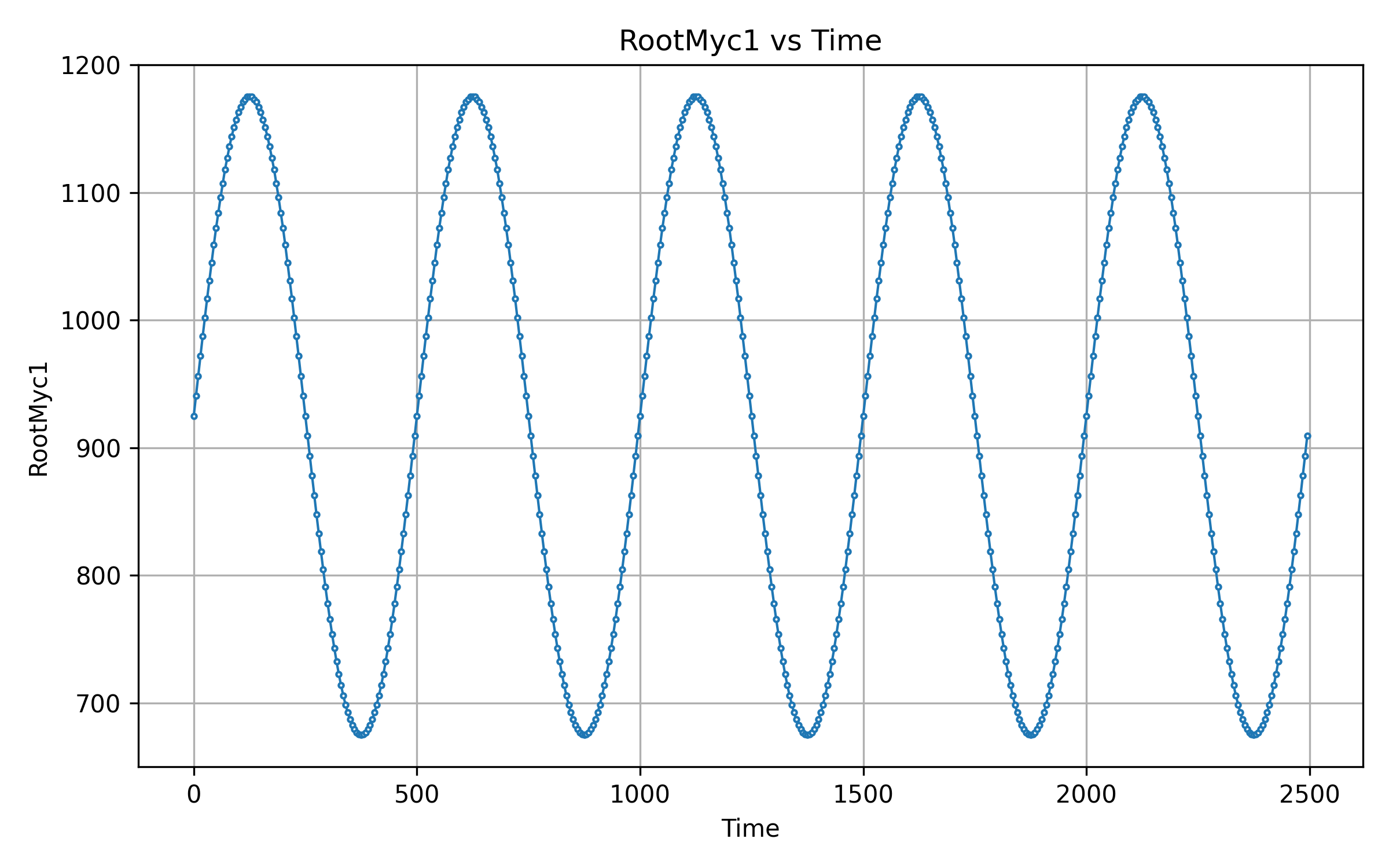
Output from rainflow calculation:
---The amplitudes of specified channel are:
[250.  500.  500.  500.  500.  500.  500.  500.  500.  500.  234.3]

---Printing counts N ---
[0.5 0.  0.5 0.  0.  0.  0.  0.  0.  0.  0.  0.  0.  0.  0.  0.  0.  0.
 0.  0.  0.  0.  0.  0.  0.  0.  0.  0.  0.  0.  0.  0.  0.  0.  0.  0.
 0.  0.  0.  0.  0.  0.  0.  0.  0.  0.  0.  0.  0.  4.5]

---Printing range  S ---
[234.3   0.  250.    0.    0.    0.    0.    0.    0.    0.    0.    0.
   0.    0.    0.    0.    0.    0.    0.    0.    0.    0.    0.    0.
   0.    0.    0.    0.    0.    0.    0.    0.    0.    0.    0.    0.
   0.    0.    0.    0.    0.    0.    0.    0.    0.    0.    0.    0.
   0.  500. ]

---Equivalent Load =  141.487
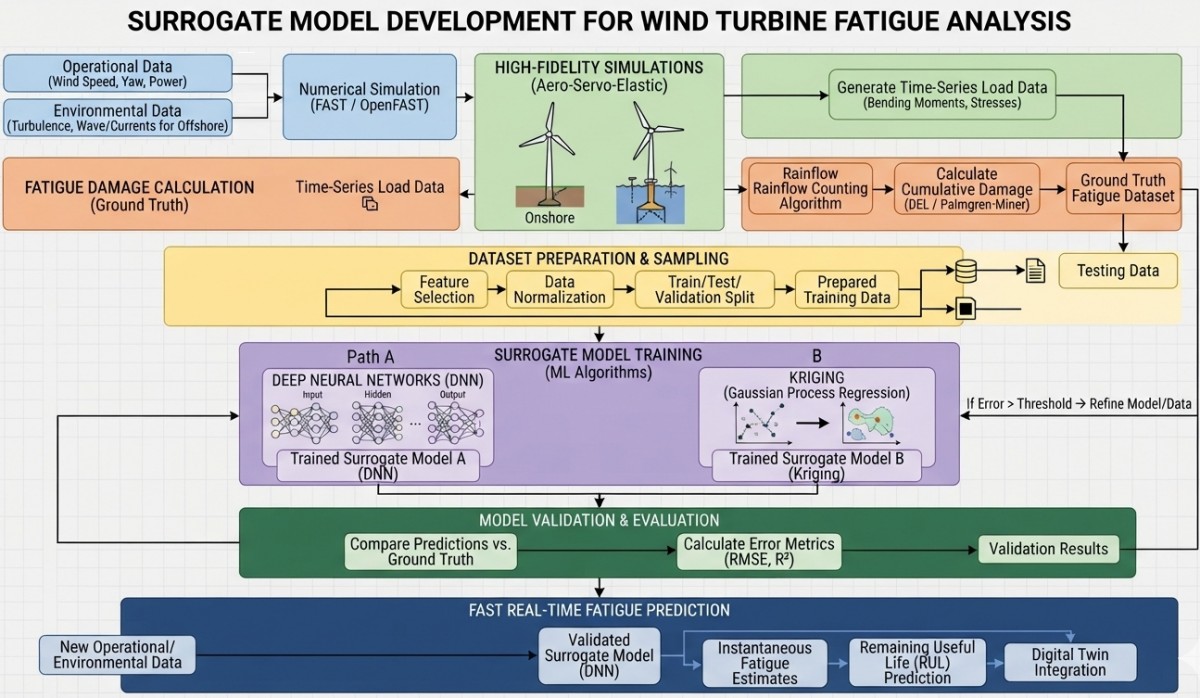
Computer implementations calculate rainflow counts using a standardized Four-Point Algorithm (defined in ASTM E1049). Before counting cycles, the raw load-time history must be simplified into essential turning points using methods like Peak-Valley Filtering or Hysteresis filtering.
In fatigue analysis, reordering the sequence so that it begins and ends at the absolute maximum peak (or minimum valley) is often called making the history periodic. In this process, stress-vs-time history is converted to just peaks and valleys and rearranged so it starts either with the highest peak or the lowest valley (whichever is greater in absolute magnitude).
Refer "help.altair.com/.../fatigue_rainflow_cycle_counting_r.htm" for a numerical demo of rainflow counting method. Another research paper is mentioned here.weio: Library to read and write files, in particular files used by the Wind Energy community. This library is for instance used by the GUI tool pyDatView to plot, export and compare these different files. It reads the input files as dictionary or Pandas dataframes. For example:
import weio
ED = weio.read('ElastoDyn.dat')
ED['HubMass'] = 10000            # changing hub mass value
ED.write('ElastoDyn_2.dat')
Jensen Empirical Model for Wake in Wind Farms: also known as 'Park' model. The main factor in Jensen model is Wake decay coefficient (determines how quickly ambient air mixes into the wake) which is decided by turbulence intensity. Jensen models is derived based on linear expanding wake assumption. A simple Python code to implement Jensen formula for estimation of power output from a wind farm can be accessed here. This is based on power-curve described below.
Reference: "Best Practices for Wake Model and Optimization Algorithm Selection in Wind Farm Layout Optimization"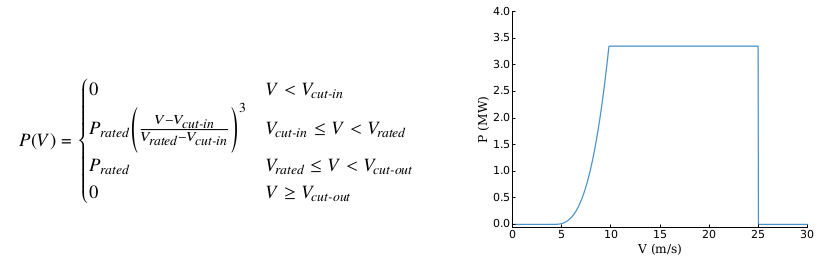
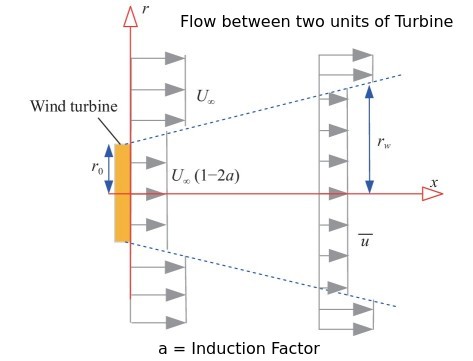
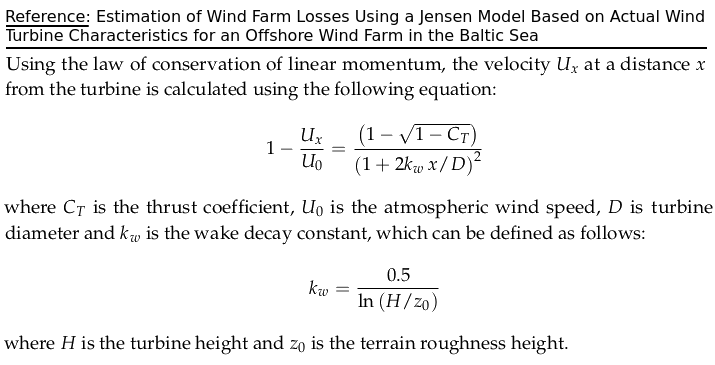
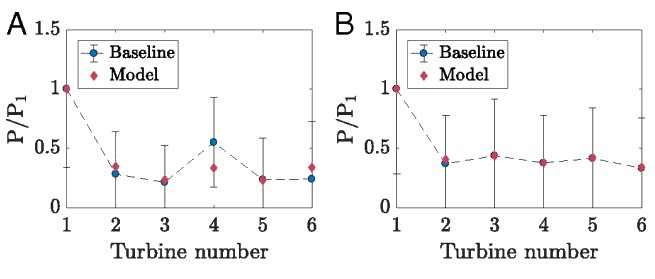
A multi-objective cost-power formulation is required for optimal placement of wind turbines (determination of number of turbines and their positions - also known as Micro-Siting of Wind Turbines) towards achieving the target of maximization of power (AEP: Annual Energy Production) and minimization of cost which requires consideration of wake effects. Wind farm analysis software is required for real-time monitoring of power exchange between wind turbines and the power grid.
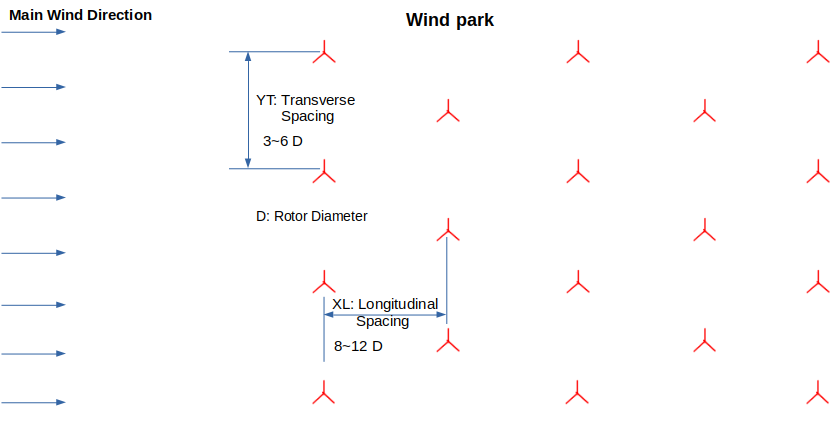
Not only the wake effect, the distance to the nearest residential building is important to not disturb the inhabitants by noise emission and shadow flickering of the turbine.
"Wake modeling and simulation" by Gunner C. Larsen et al.: The downstream advection of a wake from the emitting turbine describes a stochastic pattern known as wake meandering. It appears as an intermittent phenomenon, where winds at downwind positions may be undisturbed for part of the time, but interrupted by episodes of intense turbulence and reduced mean velocity as the wake hits the observation point. Summary of wake models can be found in this document.
"The revised FLORIDyn model: implementation of heterogeneous flow and the Gaussian wake" by Marcus Becker et al. "FLORIS and FLORIDyn are parametric models which can be used to simulate wind farms, evaluate controller performance and can serve as a control-oriented model." FLORIS model (FLOw Redirection and Induction in Steady state), Gebraad et al. FLORIDyn model: FLOw Redirection and Induction Dynamics - "The Flow redirection and induction dynamics model allows for the dynamic simulation of FLORIS wakes under heterogeneous conditions. Such conditions are changing wind speeds, directions, and ambient turbulence intensity over time and space. The model also includes wake interaction effects and an added turbulence model."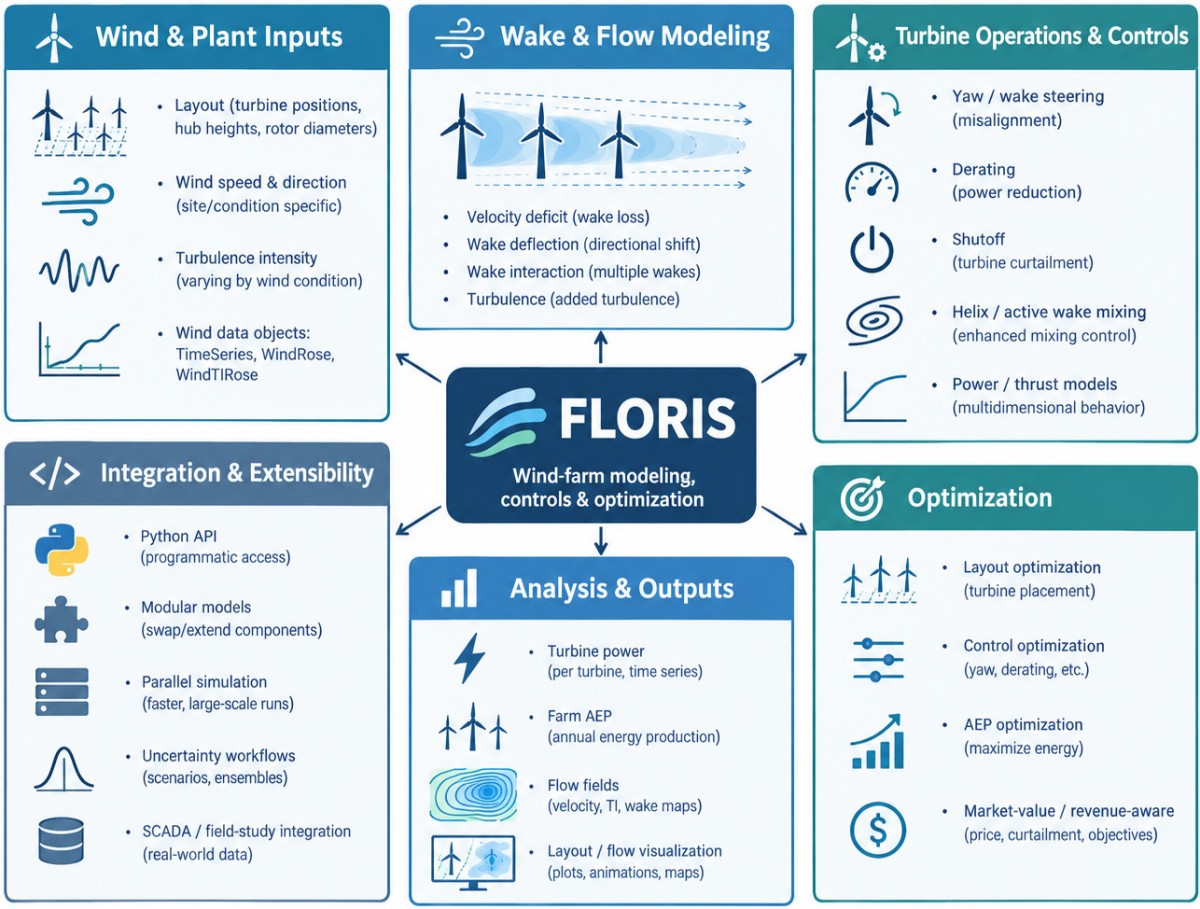
Simulator for Offshore Wind Farm Applications (SOWFA) is an NREL-developed high-fidelity, CFD-based wind farm simulation tool built on OpenFOAM. It models wake dynamics using Actuator Line (ALM) or Actuator Disk (ADM) models to simulate turbine-flow interaction, wake propagation, and deflection within turbulent Atmospheric Boundary Layers (ABL).
NREL 5 MW Reference Wind Turbine: Definition of a 5 [MW] Reference Wind Turbine for Offshore System Development by J. Jonkman, S. Butterfield, W. Musial, and G. Scott
| Rating | 5 MW |
| Rotor Diameter | 126 m |
| Hub Height | 90 m |
| Drivetrain | High-speed, multiple-stage gearbox |
| Minimum, Rated Rotor Speed | 6.9 rpm, 12.1 rpm |
| Cut-In, Rated, Cut-Out Wind Speed | 3.0 m/s, 11.4 m/s, 25 m/s |
| Overhang, Shaft Tilt, Pre-cone | 5.0 m, 5.0°, 2.5° |
| Rotor Mass | 110,000 kg |
| Nacelle Mass | 240,000 kg |
| Tower Mass | 347,460 kg |
| Coordinate Location of Overall CM | (-0.2 m, 0.0 m, 64.0 m) |
Enercon E–18 wind turbine specifications
| Rotor Diameter | Hub Height | Cut–In Speed | Cut–Out Speed | Survival Wind Speed | Rated Power | Rated Wind Speed |
| 18 m | 28.5 m | 2.5 m/s | 25.0 m/s | 67.0 m/s | 80 kW | 12.0 m/s |
Betz Limit: Albert Betz determined in 1919 that a wind turbine can extract at most 59% of the energy that would flow through the cross section of the turbines. The Betz limit applies regardless of the design of the turbine. More recent work by Gorlov shows a theoretical limit of about 30% for propeller-type turbines. Actual efficiencies range from 10% to 20% for propeller-type turbines, and higher up to 35% for three-dimensional vertical-axis turbines like Darrieus or Gorlov turbines.
Lifecycle of a Wind Farm:
Site Identification and Screening > Wind Resource Assessment > Environmental and Regulatory Approvals > Micro-siting and Layout Optimization > Turbine Selection > Engineering and Design > Financial Modeling and Investment > Procurement and Construction > Grid Connection > Commissioning > Operations and Maintenance > Power Generation and Supply > Performance Optimization.Main risks to wind farms are: (1) Poor wind resource estimation (2) Grid constraints and/or curtailment and (3)Wake losses due to non-optimal layout
Wind resource assessment (WRA) is the process of estimating the wind power potential around an area. The output usually is wind resource map showing the variation of the mean wind speed or power density over that area , for a given height above ground level.The wind speed distributions combined with the power curve of chosen wind turbines is used to obtain power production map. Another output from WRA is the wind direction probability distribution (wind rose) which shows the frequency distribution of wind directions.To decide siting of individual wind turbines, an assessment is carried out as per IEC 61400-1. This provides estimates for each wind turbine site of the 50-year extreme wind, shear of the vertical wind profile, flow and terrain inclination angles, free-stream turbulence, wind speed probability distribution and added wake turbulence.
Wind Power Density [W/m2]: A measurement used to assess wind energy potential in an area, often categorized from Class 1 (poor) to Class 7 (superb). IEC categorizes wind environment based on average annual wind speed: the categories named Class I, II, III and IV are assigned to average annual wind speeds 10 [m/s], 8.5 [m/s], 7.5 [m/s] and 6.0 [m/s] respectively. International Electrotechnical Commission (IEC) also sets standards for the wind speeds each wind class must withstand.
Wind power density (strictly speaking power flux) is the maximum available wind power per unit area expressed as P = ½·ρ·v3 and is divided into seven categories on the basis of wind speed and annual wind power density.| Class of Wind Power | Range of Mean Wind Speed [m/s] | Wind Power Density [W/m2] | Resource Potential |
| 1 | 3.5 - 5.6 | 50 - 200 | Poor |
| 2 | 5.6 - 6.4 | 200 - 300 | Marginal |
| 3 | 6.4 - 7.0 | 300 - 400 | Fair |
| 4 | 7.0 - 7.5 | 400 - 500 | Good |
| 5 | 7.5 - 8.0 | 500 - 600 | Excellent |
| 6 | 8.0 - 8.8 | 600 - 800 | Outstanding |
| 7 | > 8.8 | > 800 | Superb |
The Levelized Cost of Energy (LCOE) is elaborated as a measure of the average net present value of the generated electricity for a particular system over its lifespan. LCOE = "Average total cost to build and operate a power plant over its lifetime" / "Total power generated by the power plant over that lifetime". The capacity factor of the wind turbine is defined as the dimensionless ratio of the "average power output" and the "rated power output" over a certain period of time (usually over one year).
Meteodyn Forecast is a wind power production forecasting service coupled with a web application for monitoring and visualizing the generated data. Output is very short-term such as minutes, hours or short-term such as days, weeks or mid-term: months, seasons. Additional output includes "wind speed and direction" and "production probability distribution" such as P10, P25.
Wind Modeling Approaches: (1) Time-Series Method - Uses measured hourly wind data, Computes power at each time step, Aggregate energy. Assumes steady-state wind at each time step. (2) Statistical Method (Weibull Distribution) - requires Shape parameter (k) - a dimensionless value between 1 and 3, Scale parameter (A) in [m/s], Integrates turbine power curve (turbine manufacturer power curves) over distribution.
The two–parameter Weibull probability distribution is frequently used in calculations to describe the wind speed histogram. The probability distribution function (PDF) of Weibull distribution is defined as: f(u) = [k/A] * (U/A)k-1 * e-(u/A)k. Weibull shape parameter k describes the variations of wind speed where small values of k shows higher variations in wind variables and large values of k indicate a rather constant wind speed. Corresponding cumulative probability function (integral of the PDF with respect to speed) for the Weibull distribution can be expressed as F(u) = 1 - e-(u/A)k.P50 represents the median estimated energy yield. It is the level of energy production that has a 50% probability of being exceeded (projected to surpass 50% of the time throughout the lifespan of the project) and a 50% probability of not being reached over a given period, typically a year. P90 is a more conservative estimate (90% probability of being exceeded) often used by banks and investors for financing to manage risk. The MWhr value for P90 will be lower than MWhr value for P50: P90 = P50 - 1.282 × σ where the total uncertainty = σ. Similarly, P75 = P50 - 0.6745 × σ where 1.282 and 0.6745 are standard normal distribution Z-scores, the value is 1.645 for P95.
Common Variables Used in AEP Calculations are (1) Wind Resource Variables: Mean wind speed, Wind direction, Air density, Turbulence intensity, Shear exponent, Veer - change in wind direction with height, (2) Turbine Variables: Power curve, Hub height, Rotor diameter, Cut-in speed, Rated speed, Cut-out speed and (3) Site Variables: Elevation, Roughness length, Terrain slope, Obstacle effects.
Major Sources of Uncertainty - (i) Wind Resource Assessment: Wind speed measurements, Anemometer calibration, Sensor mounting/orientation, Data recovery and quality, Long-term correction, Inter-annual variability (ii) Flow Modeling: Terrain complexity, Surface roughness, Wake modeling, Linear model assumptions (iii) Turbine Performance: Power curve accuracy, Turbine availability, Electrical losses, Blade degradation and (iv) Operational Losses: Wake losses, Curtailment, Grid losses, Environmental shutdowns.
Uncertainty Combination Methods: Root Sum Square - assumes uncertainties are independent, Monte Carlo Simulation - used when uncertainties are non-linear or correlated, Bayesian Methods - used when limited site measurements exist, historical operating data is available and prior information from nearby wind farms exists, Bootstrap Resampling - used to estimate statistical confidence intervals when limited data exists.
Comparison of Tools Related to Wind Energy
| S. No. | Feature | Name of the Tool | ||||||
| WAsP | Openwind | windPRO | FLORIS | OpenFAST | Meteodyn | WindFarmer | ||
| 00 | Licensing | Subscription | Subscription | Subscription | Open-source | Open-source | Subscription | Subscription |
| 01 | Fixed-bottom offshore | - | - | - | - | - | - | - |
| 02 | Floating offshore | - | - | - | - | - | - | - |
| 03 | Onshore: land-based | - | - | - | - | - | - | - |
| 04 | Wake modeling | Linear | - | - | - | - | - | - |
| 05 | Wake algorithm | Jensen | - | - | - | - | - | - |
| 06 | Coupling with CFD | EllipSysD | - | - | - | - | - | - |
| 07 | Curtailment analysis | - | - | - | - | - | - | - |
| 08 | GIS Mapping | - | - | - | - | - | - | - |
| 09 | AEP Calculation | - | - | - | - | - | - | - |
| 10 | API Available? | - | - | - | - | - | - | - |
| 11 | Scripting options | - | - | - | - | - | - | - |
| 12 | Input import formats | - | - | - | - | - | - | - |
| 13 | Output export formats | - | - | - | - | - | - | - |
| 14 | Time domain analysis | - | - | - | - | - | - | - |
| 15 | Fatigue load on Turbine | - | - | - | - | - | - | - |
| 16 | Operating System | Windows | - | - | - | - | - | - |
| 17 | Licensing type | Internet-based | - | - | - | - | - | - |
| 18 | Terrain analyses | Empirical, CFD | - | - | - | - | - | - |
Working example / workflow from WAsP help document:
A complete wind turbine siting operation requires activities starting with some measured wind data and ending up with a prediction of the power yield from erecting turbine(s) at a specific site. The problem statement could be like: "The company ABC plans to erect a multiple 2.5 [MW] wind turbines at location XYZ to meet peak demand of P [MW]. No wind measurements have been taken at the turbine site itself, but data have been collected from a nearby weather (meteorological) stations. The scope is to provide a prediction of the power yield from locating the wind turbines including the losses caused by the rotor wakes."As can be inferred, the proposed turbine site is completely different from the nearby meteorological station: the properties of the meteorological station itself will affect the wind data recorded there. In addition, the properties of the turbine site will have an effect on the way that the wind behaves near the turbine. It is also unlikely that the hub height of the turbine would be the same as the height of the anemometer installed at the meteorological station. What you need is a way to take the wind climate recorded at the meteorological station, and use it to predict the wind climate at the turbine site. That is what WAsP does.
Using WAsP, the recorded wind data the site-independent characterization of the local wind climate can be achieved by correcting for the site effects. This site-independent characterization of the local wind climate is called a wind atlas data set or generalised wind climate. WAsP can also be used to apply site effects to wind atlas data to produce a site-specific interpretation of the local wind climate. Providing a prediction of annual energy production rate will therefore be a two-stage process. First, the data from the meteorological station need to be analysed to produce a wind atlas, and then the resulting wind atlas needs to be applied to the proposed turbine site to estimate the wind power.
Inputs required are: vector map of the site, anemometer location on the map, anemometer height above ground level (a.g.l.), obstacles around the anemometer, the power production characteristics of the turbine, thrust curve characteristics of each turbine...GIS: Geographic Information System in Wind Energy
Excerpts from IBM.com: "GIS perform spatial analysis of geospatial datasets—consisting of vector data (points, lines and polygons) and raster data (cells with spatial information)—to produce connected visualizations. These maps, graphs, statistics and cartograms display geographical features like location, natural resources, streets and buildings as well as demographics. In its most recognizable form, a GIS visualization is what you see when you route a trip on Google Maps. Geographic information systems help organizations make sense of seemingly disconnected datasets."
GIS Workflow for Wind Farm Planning
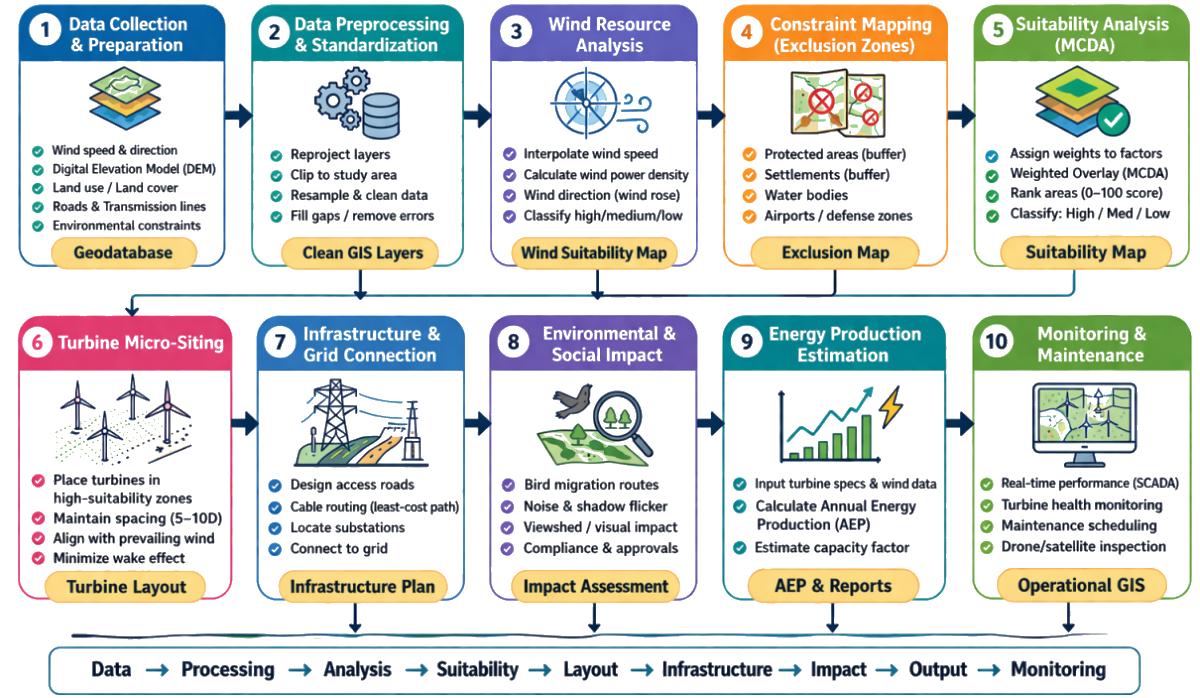
GIS data: Vector format vs Raster format
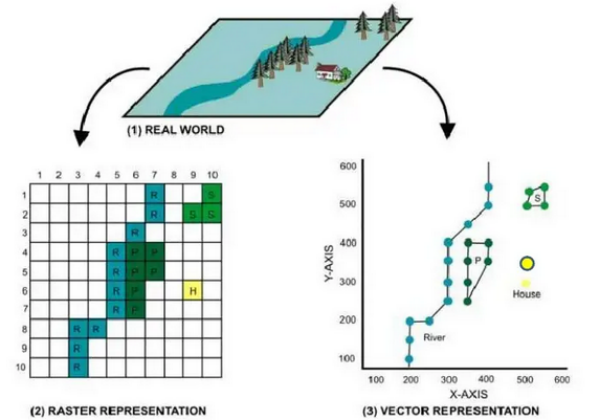
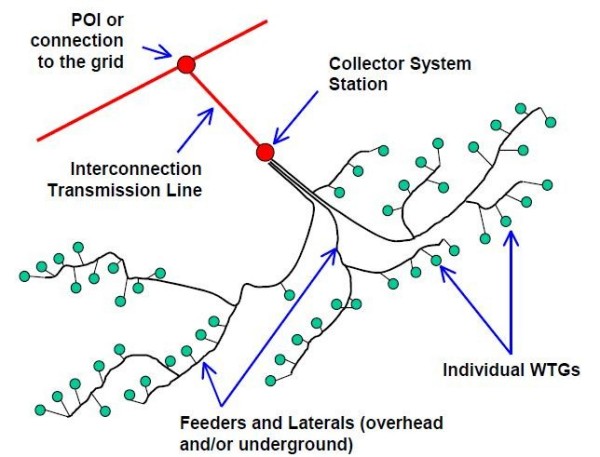
Wind Rose Diagram
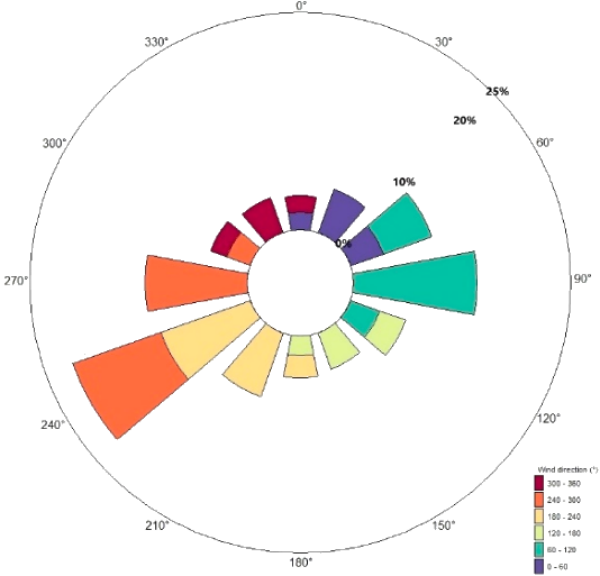
Architecture of a wind-farm optimizer: turbine-position optimization + wake calculation using PyWake
                 10-year wind time series
                           │
                           ▼
                 Data quality control
                           │
                           ├── Missing data
                           ├── Invalid direction
                           ├── Calm periods
                           ├── Outliers
                           ├── Measurement height
                           │
              ┌────────────┴────────────┐
              │                         │
              ▼                         ▼
       Wind direction              Wind speed
              │                         │
              └────────────┬────────────┘
                           ▼
                 Wind climate model
                           │
              ┌────────────┴──────────┐
              │                       │
              ▼                       ▼
       Directional frequency    Speed distribution
              │                       │
              │               ┌───────┴───────┐
              │               │               │
              │               ▼               ▼
              │            Weibull k,A      Discrete speeds
              │               │               │
              └───────────────┴───────────────┘
                              │
                              ▼
                    PyWake WindClimate
                              │
                              ▼
              Turbine Layout, Wake calculation
                              │
                              ▼
                    Annual energy yield
                              │
                              ▼
                    Genetic Algorithm
                              │
                    ┌─────────┴─────────┐
                    │                   │
              Turbine positions    Substation
                    │                   │
                    └─────────┬─────────┘
                              ▼
                         Objective
                              │
                              ▼
                     Next GA generation
A sample Python code to generate Wind Rose diagram plot and Weibull Distribution curve is attached here. PyWake defines aep() in GWh and allows option "with_wake_loss=False" to calculate the corresponding no-wake result. This makes the wake-loss calculation straightforward. A sample data for year 2015 can be downloaded from here. A Python code to convert wind time-series CSV data into a PyWake-style directional Weibull wind resource and calculate wind-farm AEP is attached here.
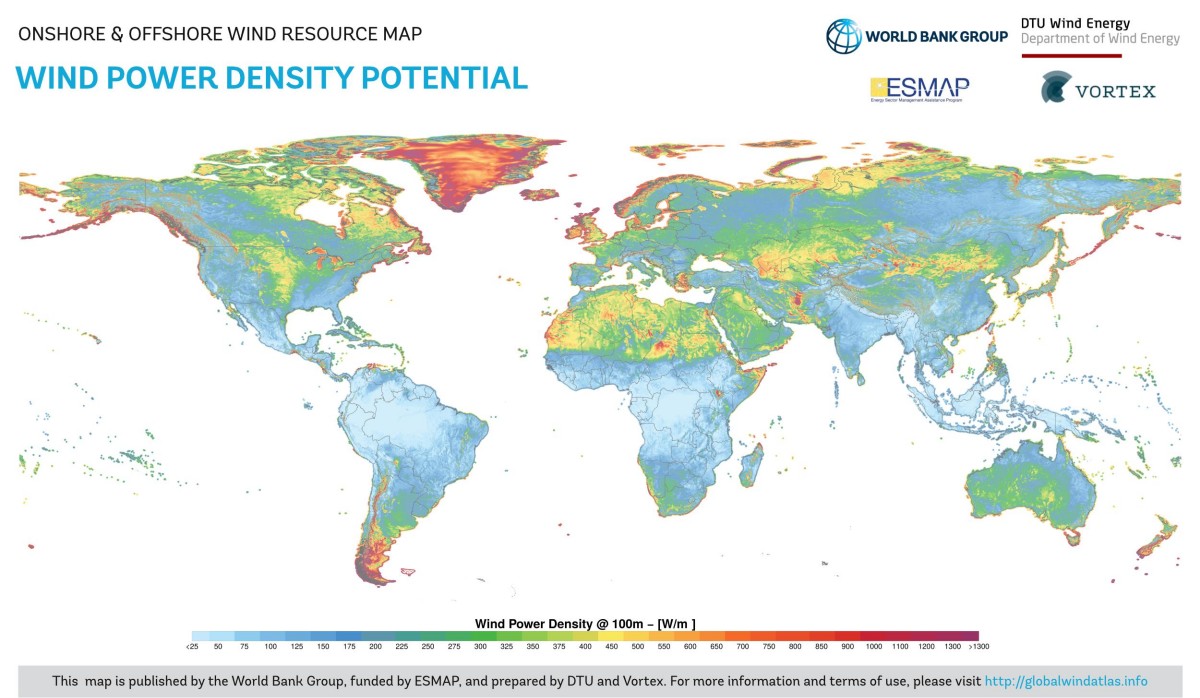
Interview questions related to wind-yield engineer
- How do you create a wind rose diagram?
- Name the inputs which most strongly affect AEP.
- What are P50, P75 and P90 and what are their use/importance?
- How do you respond to a situation where modeled AEP is consistently underestimates or overestimates the AEP?
- How do you use Geographical Information System data during site identification and feasibility studies?
- How do you handle sparse measurement data for complex terrain sites?
- What GIS checks are critical before finalizing micro-siting of turbines?
- Explain the role of MCP (Measure-Correlate-Predict) methods. Which techniques have you used?
- How do you handle missing or noisy wind data?
Mesoscale Meteorology
As per atmos.uw.edu/academic/mesoscale.html: "Mesoscale meteorology is the study of atmospheric phenomena with typical spatial scales between 10 and 1000 km. Examples of mesoscale phenomena include thunderstorms, gap winds, downslope windstorms, land-sea breezes, and squall lines. Many of the weather phenomena that most directly impact human activity occur on the mesoscale."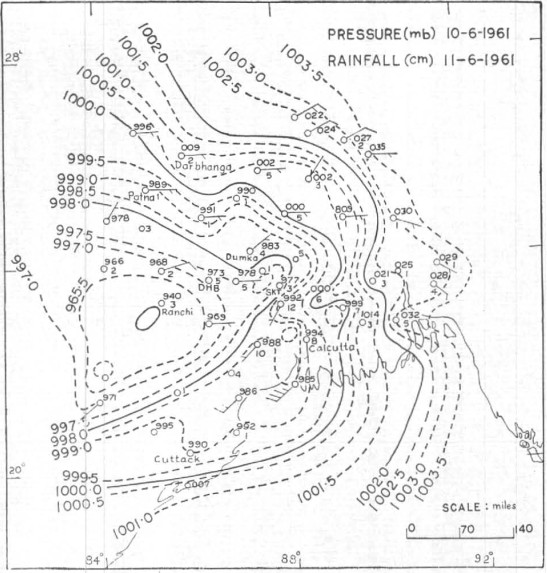
SCADA: Supervisory Control and Data Acquisition
This is a method or system to monitor, gather, and process data real-time by directly interacting with devices such as sensors, valves, pumps, motors... through human-machine interface (HMI) software. It record events into a log file. For example, the power producers or original equipment manufacturers (OEM) can monitor the performance of their turbines real time. The Programmable Logic Controllers (PLC) are hardware devices used for real-time control of individual machines or assets, operating at a smaller scale. SCADA systems include both software and hardware providing the visualization and analysis of data real-time.Fluid Pressure in Rotating Reference Frame
Bernoulli’s equation in the rotating frame where rotation is around z-axis: p(r, z) + ρgz + V(r) = p(r, z) + ρgz − ρω2r2. For a container open to atmosphere, gauge pressure at all points on the interface is zero i.e. p(r, z) = 0. Elevation of the free surface to the radial location: z = ω2r2/2/g.For a container rotating cylindrical about its axis: the shape of the free surface is a parabola and fluid inside the rotating cylinder forms a paraboloid of revolution, whose volume is one-half of the volume of the "circumscribing cylinder". To calculate angular velocity at which the liquid at the center reaches the bottom of the cylinder just as the liquid at the curved wall reaches the top of the cylinder: ωspill = (2gH)0.5/R.
Ball in rotating tube
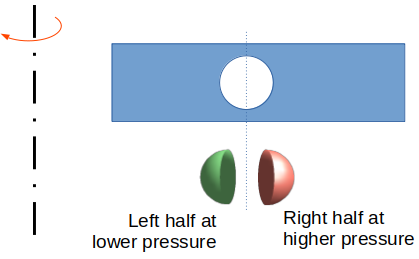
The centroid of a hemi-sphere is at 3R/8 from the base. Using this value, pressure on the left half of the ball = 1/2.ρF ω2(r-3R/8)2. The pressure on the right half of the ball = 1/2.ρF ω2(r+3R/8)2. Net force acting on the ball towards the axis of rotation = 1/2.ρF ω2(4.r.3R/8)2 × π*R2 where projected area = π*R2.
Net force due to fluid pressure towards axis of rotation, FF = 1/2.πR2.ρF ω2(r.3R/2) = 3/4πR3.ρF ω2r
Centrifugal force due to own mass of the ball, FB = 4/3.πR3.ρB ω2r
The position of the ball can be estimated using inequality FB ≤ FF. Will the ball get pushed towards inner radius for all densities of the ball? This method yielded incorrect conclusion as the pressure on the surface of spherical ball was assumed to be varying linearly with radius instead of parabolic variation as per formula p(r) = p(r = r0) + 1/2.ρFω2r2. The correct derivation of net fluid forces acting on the ball are given below: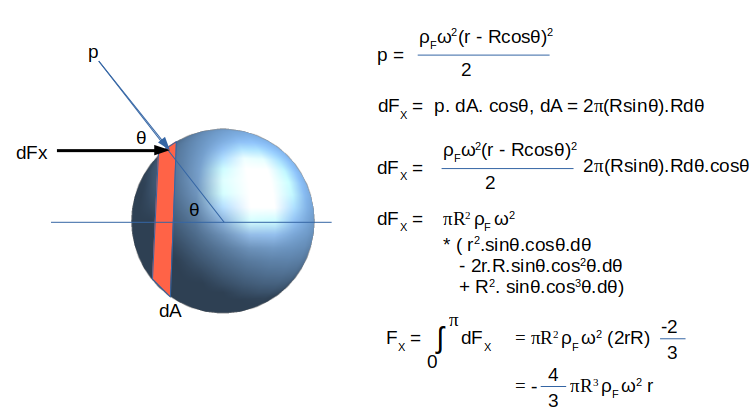
Root or Lobe Pump and Blowers
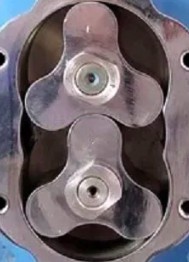
References
- ANSYS FLUENT User Manual
- Study of mesh deformation features of an open source CFD package and application to a gear pump simulation: Alejandro Roger Ull, ETSEIAT 2012
- NASA TM-73890: Gas Path Sealing in Turbine Engines
- Blade-Resolved, Single-Turbine Simulations Under Atmospheric Flow: by Michael Lawson et. al.
- Predictive model for fatigue evaluation of floating wind turbines validated with experimental data by Francisco Pimenta et. al.
- Investigation of Main Bearing Fatigue Estimate Sensitivity to Synthetic Turbulence Models Using a Novel Drivetrain Model Implemented in OpenFAST by Veronica Liverud Krathe et. al.
- Time-domain fatigue reliability analysis for floating offshore wind turbine substructures using coupled nonlinear aero-hydro-servo-elastic simulations by Fengshen Zhu et. al.
- Fatigue design load calculations of the offshore NREL 5 MW benchmark turbine using quadrature rule techniques by Laurent van den Bos et. al.
- Design Guidelines for Deployable Wind Turbines for Military Operational Energy Applications by Brian Naughton et. al.
- Design Load Basis for Offshore Wind turbines by DTU Wind Energy Report No. E-0133
- Vertical Axis Wind Turbine Design Load Cases Investigation and Comparison with Horizontal Axis Wind Turbine by Christos Galinos et. al.
- A Survey of Numerical Simulation Tools for Offshore Wind Turbine Systems by Saeid Fadaei et. al.
- Dynamically allocated individual pitch control for fatigue load reduction in wind turbines by Mohsin et. al.
- Load Estimation in Onshore Wind Farms Using Surrogate Modeling and Generic Turbine Models by Alexander Mönnig et. al.
- Review and application of Rainflow residue processing techniques for accurate fatigue damage estimation - by Gabriel Marsh et. al.
- IEA Wind TCP Task 37: Definition of the UMaine VolturnUS-S Reference Platform Developed for the IEA Wind 15-Megawatt Offshore Reference Wind Turbine
- IEA Wind TCP Task 37: Definition of the IEA Wind 15-Megawatt Offshore Reference Wind Turbine
- "A new FounDyn module in OpenFAST to consider foundation dynamics of monopile supported wind turbines using a site-specific soil reaction framework" by Lilin Wang and Takeshi Ishihara
- "Geotechnical challenges in monopile foundations and performance assessment of current design methodologies" by Sachin Jindal et. al.
The content on CFDyna.com is being constantly refined and improvised with on-the-job experience, testing, and training. Examples might be simplified to improve insight into the physics and basic understanding. Linked pages, articles, references, and examples are constantly reviewed to reduce errors, but we cannot warrant full correctness of all content.
All Rights Reserved - CFDyna.com
Template by OS Templates