- Artificial Intelligence, Machine Learning, Python, Web Scraping: Feedbacks/Queries -

World Wide Web
Table of Contents
Web Technology |:| Agile, Scrum and Jira |:| Example User Stories: Web App Dev. Projects |:| Methods to Estimate Story PointsAgile methods and use of Jira
Simple web app development Gantt Chart
| Task                              |  W1 |  W2 |  W3 |  W4 |  W5 |  W6 |  W7 |  W8 |  W9 | W10 | W11 | W12 |
| ----------------------------------|-:-:-|-:-:-|-:-:-|-:-:-|-:-:-|-:-:-|-:-:-|-:-:-|-:-:-|-:-:-|-:-:-|-:-:-|
| Project Planning and Requirements | ■■■ | ■■■ |     |     |     |     |     |     |     |     |     |     |
| ----------------------------------|-----+-----+-----+-----+-----+-----+-----+-----+-----+-----+-----+-----+
| UI/UX Design                      |     | ■■■ | ■■■ | ■■■ |     |     | ■■■ |     |     |     |     |     |
| Solution Architecture             |     |     | ■■■ | ■■■ |     |     |     |     |     |     |     |     |
| Database and API Design           |     |     |     | ■■■ | ■■■ |     |     |     |     |     |     |     |
| Dev. Environment + CI/CD Setup    |     | ■■■ | ■■■ | ■■■ |     |     |     | ■■■ |     |     | ■■■ |     |
| ----------------------------------|-----+-----+-----+-----+-----+-----+-----+-----+-----+-----+-----+-----+
| Front-end Development             |     |     |     | ■■■ | ■■■ | ■■■ | ■■■ |     |     |     |     |     |
| Back-end Development              |     |     |     | ■■■ | ■■■ | ■■■ | ■■■ |     | ■■■ |     | ■■■ |     |
| Integration                       |     |     |     |     |     |     | ■■■ | ■■■ |     |     |     |     |
| System and Integration Testing    |     |     |     |     |     |     |     | ■■■ | ■■■ | ■■■ |     |     |
| ----------------------------------|-----+-----+-----+-----+-----+-----+-----+-----+-----+-----+-----+-----+
| Security and Performance Testing  |     |     |     |     |     |     |     |     | ■■■ | ■■■ |     |     |
| AWS Infrastructure and Deployment |     |     |     |     |     |     |     |     |     | ■■■ | ■■■ |     |
| User Acceptance Testing (UAT)     |     |     |     |     |     |     |     |     |     | ■■■ | ■■■ |     |
| Production Deployment             |     |     |     |     |     |     |     |     |     |     | ■■■ | ■■■ |
The plan above have schedule length of 12 calendar weeks and effort of 38 calender-weeks.
Agile Development Hierarchy
It is typically structured as Initiatives > Epics > User Stories > Tasks. Functional Team Structure: Product Owner (Defines the product vision, manages the backlog, and prioritizes work) > Scrum Master (Facilitates processes, removes impediments, and ensures Agile practices are followed) > Development Team (Cross-functional members namely designers, engineers, testers who build the product).
Product Managers: decide what products to build and why (strategy). Product Owners: ensure products get built correctly (execution). Analogy: Product Manager ≡ Architect (designs the building), Product Owner ≡ Site Manager (ensures it is built correctly).From atlassian.com/agile/scrum/agile-vs-scrum: "Agile is a project management philosophy emphasizing adaptability and customer value, while Scrum is a specific Agile framework with defined roles and ceremonies. In other words, Scrum is one way to practice Agile, but not the only way. Scrum is an agile framework that helps teams structure their work into short development cycles called sprints."
Agile process backlog hierarchy: An initiative in Jira is a high-level work item that sits above epics in the issue hierarchy to group related goals across multiple teams and projects. Jira traditionally organizes work from smallest to largest: subtasks > stories/tasks > epics > initiatives. An epic, a user story, and a sub-task form a hierarchy in Scrum ↴
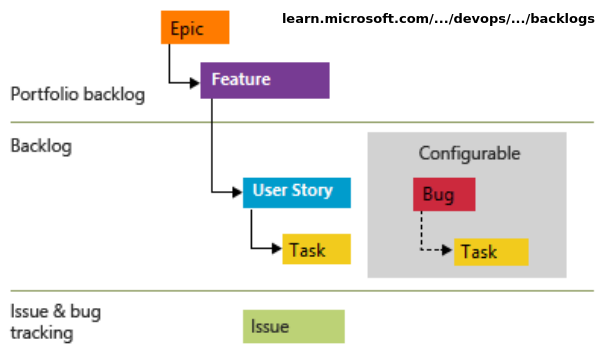
A user 'story' and a 'task' (as defined in Jira) are at same level of hierarchy. Following image referred from atlassian.com/software/jira/guides/issues/overview explains this. "Any work type can be both a parent and a child work item — the only exception being subtasks, which can only be a child since there are not any work types below it in the hierarchy."
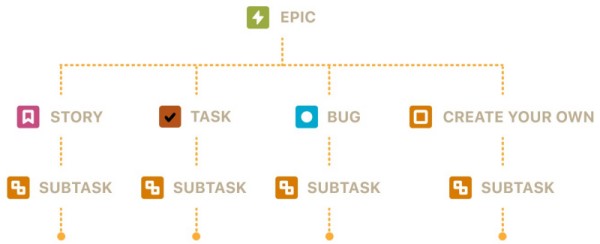
Linked work items: dependencies between work items are represented in Jira by linking work items together. Associations that come out-of-the-box are: blocks/is blocked by, clones/is cloned by, duplicates/is duplicated by, relates to.
The relationship between a sprint, a user story, and a task can be understood as a hierarchy of time, value, and execution. A sprint is the time container (can hold multiple user stories ), a user story is the package (broken down into tasks) of value delivered inside that container, and task are the building blocks needed to construct that package. Tasks belong to a parent user story and do not mean anything on their own. Project creation in Jira is simply referred as setting up a new project and the terminology is progressively transitioning towards "creating a space".
An epic, a user story, and a sub-task form a hierarchy in Scrum that breaks large business goals down into small, actionable steps. An epic is a large body of work that is too big to finish in a single sprint. It spans multiple sprints or months and represents a major strategic goal or product initiative.
As per atlassian.com/agile/project-management/user-stories: "For development teams new to Agile, user stories sometimes seem like an added step. Why not just break the big project (the epic) into a series of steps and get on with it? But stories give the team important context and associate tasks with the value those tasks bring. Generally a story is written by the product owner, product manager, or program manager and submitted for review."
A backlog in Scrum is an ordered, living list of everything needed to build, improve, or maintain a product. There are two main types of backlogs: the Product Backlog (maintained by product owner) and the Sprint Backlog (maintained by developers). Ref: atlassian.com/agile/scrum/backlogs: "A product backlog contains a prioritized list of work items, including user stories, features, bug fixes, technical tasks, and research activities needed to improve the product. Each item in the product backlog should be clearly described, estimated, and prioritized based on business value and urgency."
In Jira, work items (earlier known as Issues) are individual tasks or tickets which are tracked as pieces of work that must be completed. Components are sub-sections or functional categories used to group those items within a project.
Work Items: ↴- Definition: The fundamental building blocks of a Jira project that represent a specific piece of work, such as a user story, task, bug, or support request.
- Hierarchy: Organized into levels like Epics (large initiatives), standard work items (stories, tasks, bugs), and subtasks (smaller steps).
- Details: Each item holds core data like an assignee, description, status, priority, and attachments to monitor progress.
Components: Project-level sub-divisions or "buckets" used to categorize work items by specific product areas, modules, or teams (such as Frontend, Back-end, Database, Infrastructure, Deployment, Support Functions).
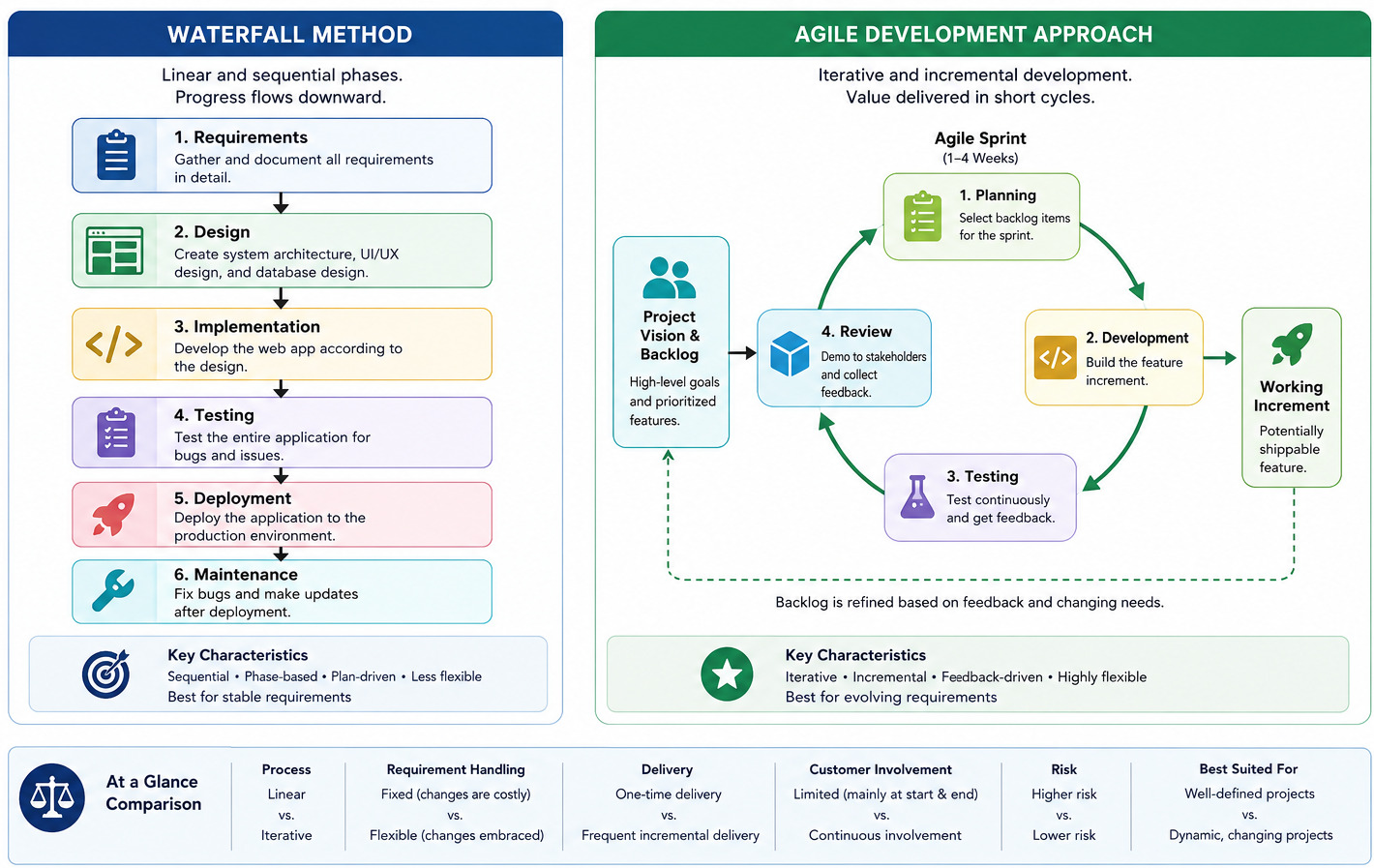
Comparative Flowchart for Waterfall vs Agile Approach for Web App Development ↴
Team-managed vs. Company-managed Spaces
| Topic | Team-managed | Company-managed |
| Setup | Full autonomy to set up and change their own workflows and fields without a system admin | Uses centralized, shared schemes controlled by Jira administrators to ensure standardization across the whole organization |
| Control | Settings, workflows, and custom fields apply only to that single project and do not affect others | Workflows, issue types, screens, and permissions are reused across multiple projects for consistency |
| Best for | Autonomous, standalone teams, new users, or short-term experiments that need quick setup | Growing companies, large organizations, or cross-team collaboration that requires strict governance and reporting |
| Limitations | Cannot easily share configurations, pull issues from multiple projects onto one board | Requires administrator involvement to make changes to global settings and schemas |
A story point is a unit of measure used in Agile estimation to express the relative effort required to complete a user story or task. Story points consider complexity, risk, and the amount of work, rather than specific hours or days. Story points should not be mistaken for a measure of productivity. Instead, teams should use story points to understand the size of the work and the prioritization of the work. Reference: atlassian.com/agile/project-management/estimation
Note that an epic can contain both user stories and tasks simultaneously. Do not force technical work into user story phrasing: user stories should focus on the 'why' and 'who'. If project demands back-end work like infrastructure clean-up, setting up pipelines, or compliance tasks required to complete the Epic, log them explicitly as Tasks, not fake Stories.
Example: 1. Epic (The Big Goal) - Title: Cloud-Based Simulation Engine and Dashboard
Description: Build a web interface that allows researchers to upload data files, configure simulation parameters, run intensive calculations in the cloud, and view visual results.
Business Value: Eliminates the need for researchers to install heavy software locally, speeds up calculation times via cloud scaling, and standardizes data reporting.
Child Stories: Includes user authentication, data file upload, configuration dashboard, and CSV report export.
1.1 📄 The User Story (The Value to the User): One of the child stories rolling up into the epic above. ⤴
Story Statement: As a climate researcher, I want to upload my CSV data files and configure variables (like temperature and pressure range), so that I can customize my atmospheric simulation runs.
Acceptance Criteria:
- System must accept .csv and .txt files up to 100MB
- System must display an error message if the file format is invalid
- User must see numeric input fields for minimum and maximum temperature
- Clicking "Run" must lock inputs and show a loading spinner
Estimation: 15 Story Points
1.1.1 🛠️ The Sub-Tasks (The Technical To-Dos): The specific, bite-sized engineering steps required to complete the user story above. ⤴
- 1.1.1.a - Sub-Task 1 (Design): Create Figma wireframe / mock-ups for the file upload drag-and-drop area and the numeric parameter form
- 1.1.1.b - Sub-Task 2 (Frontend): Build the UI component for the parameters form and file upload using React, including file extension validation
- 1.1.1.c - Sub-Task 3 (Back-end): Create an API endpoint (/api/v1/simulations/upload) in Python/FastAPI to receive the file and securely store it in an AWS S3 bucket
- 1.1.1.d - Sub-Task 4 (DevOps): Configure the background worker queue (e.g. Redis) to accept the uploaded file path and user parameters
- 1.1.1.e - Sub-Task 5 (QA/Testing): Write integration tests ensuring that a 105MB file is rejected and a valid 10MB CSV successfully triggers the back-end queue.
Methods to Estimate Story Points
"Story points" are not tangible like hours and days, developers need to use mental or team-agreed benchmarks. If the team do not have historical data yet, they must collectively agree on a benchmark task that represents a known, manageable amount of effort. This can be found by looking through the product backlog to find a user story that is neither too simple nor too complex.
Look for a standard, well-understood feature that the whole team feels comfortable building (e.g. "As a user, I want to reset my password via an email link"). Before assigning a point value, the developers should talk through what it actually takes to get this specific story to the Definition of Done (DoD) which may encompass activities related to front-end, back-end, testing and deployment.Example of activities and corresponding story points need to be agreed can be as described below. Normally, the PO calculates the sprint "budget" based on the team's historical performance, if available.
- Standard, trivial bug fix, changing buttons (colour, shape, size) or text change: 1 SP
- Adding a feature with a bit of frontend and backend work: 3 SP
- Creating user registration, password reset feature: 5 SP
- User Password Reset via Email: 3 SP
- Creating a drop-down, user input fields: 2 SP
- Creating APIs to store input from front-end: 8 SP
- Visualizing results in front-end after retrieving from back-end: 8 SP
- Creating CI/CD pipeline using GitHub actions: 13 SP
- Making functional tests: 21 SP
A sample Planning Poker session after the team has established their baseline story. For this scenario, the team's agreed-upon baseline is: "User Password Reset via Email" = 3 Points. The team consists of three developers (Dev_A, Dev_B, and Dev_C), a Product Owner (PO), and a Scrum Master (SM). The setup comprise of every developer holding a deck of Planning Poker cards featuring the Fibonacci sequence (1, 2, 3, 5, 8, 13...). They are estimating a new ticket from the backlog: "As a user, I want to upload a profile picture."
Step 1: The Product Owner Presents the Story - "Next up is profile picture uploads. Users should be able to upload a JPEG or PNG up to 5 MB. It needs to crop automatically into a square and display on their dashboard. Any questions?"- Dev_A (Dev): "Where are we storing the images?"
- PO: "We have an existing AWS S3 bucket configured for other assets."
- Dev_B (Dev): "Do we need to scan for malware or just check the file extension?"
- PO: "Just validate the file extension and size for now. Keep it simple."
Step 3: The Reveal (First Round of Voting) - The Scrum Master counts down: "3, 2, 1, reveal!" All developers lay down their cards simultaneously so they don't bias each other and the scores were: Dev_A plays: 5, Dev_B plays: 3, Dev_C plays: 8
Step 4: Discussing the Outliers -- Because the votes do not match, the team does not average the numbers. Instead, the Scrum Master invites the lowest voter (Dev_B) and the highest voter (Dev_C) to explain their thinking.- Dev_B (3): "I voted a 3 because we already have the S3 bucket connected. I envisioned using a standard frontend library to handle the image cropping before upload. To me, it feels exactly like the same amount of effort as the password reset."
- Dev_C (8): "I see your point, Dev_B, but image manipulation always has hidden edge cases. What if a user uploads a weird resolution? Also, we have to handle API error states if the S3 upload times out or fails. That adds a lot of uncertainty and risk that our password reset baseline didn't have. That's why I think it's significantly larger."
- Dev_A (5): "Dev_C is right about the error handling. I originally voted a 5 because I forgot about the cropping aspect, but hearing Dev_C talk about the S3 timeout risks makes me lean closer to his side."
The Outcome: The team reaches a consensus. The "Profile Picture Upload" story is officially estimated at 5 Points. The Scrum Master records the points, and the team moves to the next ticket.
Poker planning is not a rule or principle in Scrum (mandatory elements of the Scrum framework), only a recommended method. Relative estimate (such as story points) is beneficial when team is new and it is not known who will be assigned which tasks. If team is matured and roles are well defined, absolute estimate (man hours or man days) works equally well.Sprint retrospective is a review conducted after completion of a sprint to determine what went well, where the team had challenges and identify areas where things can be improved. Sprint retrospectives are about improving the next sprint, so the feedback(s) that would not impact the rest of the project can take lower priority. It should be attended by the full Scrum Team which includes Developers, Product Owner, and Scrum Master.
Gherkin (Given-When-Then) Acceptance Criteria: Gherkin format turns user story requirements into clear, testable scenarios. During Sprint Planning, the team estimates User Stories using relative effort (Story Points) and breaks them into Tasks estimated in hours. Once the story is estimated at say 5 points, the team breaks it down into actionable tasks. Tasks should ideally take between 2 to 12 hours of work.
There is no direct way to convert number of story points into number of calendars days. Though an estimate can be made as story point to day ratio using following methods: Find total dev-days or dev-hours in a sprint = D → Get the total story points completed in the sprint = S → Get the ratio R = S/D which is in units "dev-days or dev-hours per story point".
Another method is to use velocity (which is number of story points completed per sprint) and sprint length (which is number of working days). If the velocity is 25 story points / sprint and backlog size is 75 sprints, it would required 75/25 = 3 sprints. If each sprint has length of 10 work days, total number of days required to finish the project is 3 x 10 = 30 days (6 calendar weeks).
The need of converting story points to man days is very much real and is absolute necessity for organizations to deal with Stakeholder Communication, Budgeting and Forecasting, and Risk Management. Using historical data and establishing a baseline velocity may help get a better time-based or effort-based metric.Tracking On-Time Delivery
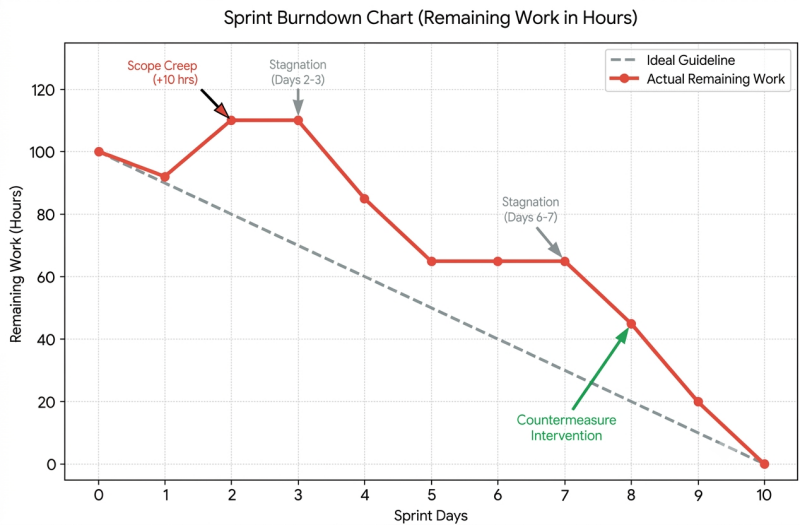
- Sprint Velocity: Measures the amount of work (in story points) a team completes per sprint to predict future delivery dates. Ref: atlassian.com/agile/project-management/velocity-scrum -- New Scrum teams usually average 5–10 story points per person per two-week sprint. Forecasting project timelines: If the project backlog has 200 story points and the team's average velocity is 50 story points per sprint, it can be confidently forecasted that the team will likely need around four more sprints to complete the project.
- Burndown Chart: Shows the remaining work in the current sprint day-by-day to see if the team will finish on time - the guideline or ideal effort line is a straight, planned trajectory from the total workload to completion. It serves as a benchmark for comparing actual progress. The position of the actual line relative to the ideal line shows whether team is ahead of schedule or falling behind.
- Release Burnup Chart: Tracks total scope versus completed work across multiple sprints toward a fixed deadline
- Cycle Time and Lead Time: Measures how long it takes from starting work on an item (Cycle Time) or creation (Lead Time) to its completion.
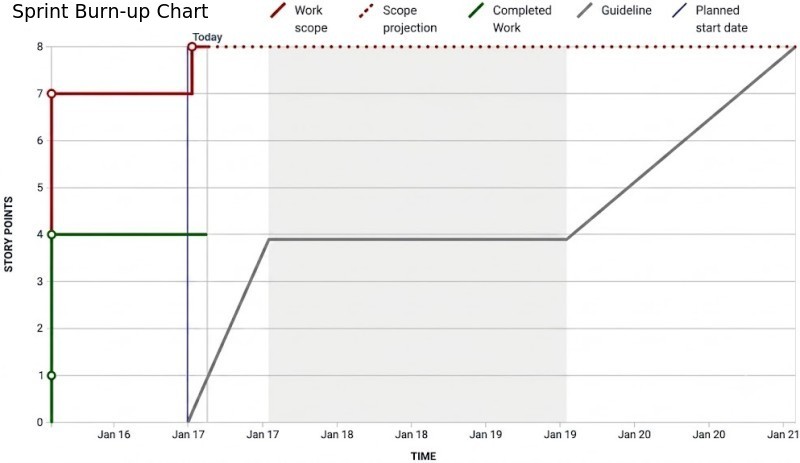
Summary of Progress in Sprints:
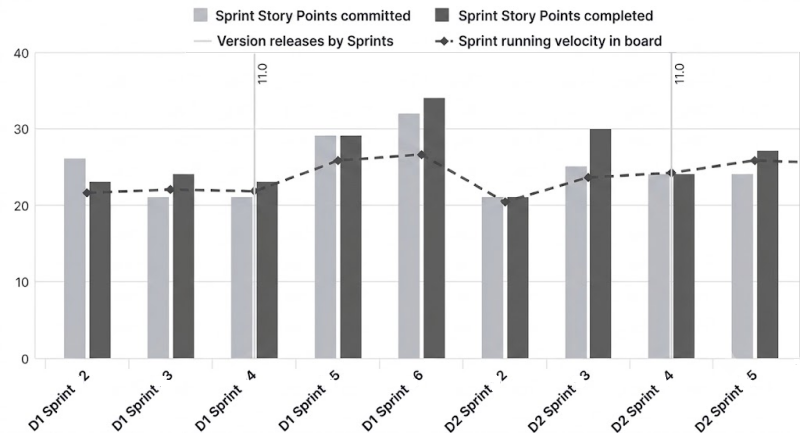
Sprint ID | User Story ID | Planned Story Points | Story Points Completed |   Velocity  |
----------+---------------+----------------------+------------------------+-------------|
          |               |                      |                        |             |
----------|---------------|----------------------|------------------------|-------------|
          |               |                      |                        |             |
----------|---------------|----------------------|------------------------|-------------|
          |               |                      |                        |             |
----------^---------------^----------------------^------------------------^-------------'
Jira allows to view data for one individual sprint at a time from a drop-down menu. There is no native report to get total story points across all historical, active, and future sprints. The Jira Query Language can be used to get custom summary. A reference document can be found here.
A search query (run in the issue navigator) that gathers all issues assigned to any sprint in a project: sprint_summary = "PROJECT_KEY" AND sprint IS NOT EMPTY AND "Story Points" IS NOT EMPTY → Click Save filter at the top, name it as PRJ_SPR_SP.Set Up the Dashboard Gadget
- Go to Dashboards in the top navigation bar and select Create dashboard (or open an existing one).
- Click Edit or Add gadget in the top right corner.
- Search for Two-Dimensional Filter Statistics and click Add.
- Configure the gadget settings exactly like this:
- Filter: Search for and select the saved filter created above (PRJ_SPR_SP).
- XAxis: Set this to Sprint.
- YAxis: Set this to Status (or Project, if you are tracking just one project).
- Number of Results: Enter a number higher than total number of sprints (e.g. 50 or 100) so none are cut off.
- Sort By: Set to Natural and Ascending (this will arrange sprints chronologically from oldest historical to active, then future).
Daily Scrum: Dos and Don'ts
For software teams, the stand-up also known as the daily scrum, and objective is to keep everyone aware of the team’s landscape and progress.- Don't use it as a planning session - Reference your scrum board
- Don't problem-solve during the stand-up - Do highlight blockers
- Don't make it a status report meeting - Keep stand-up efficient to finish in 15 minutes.
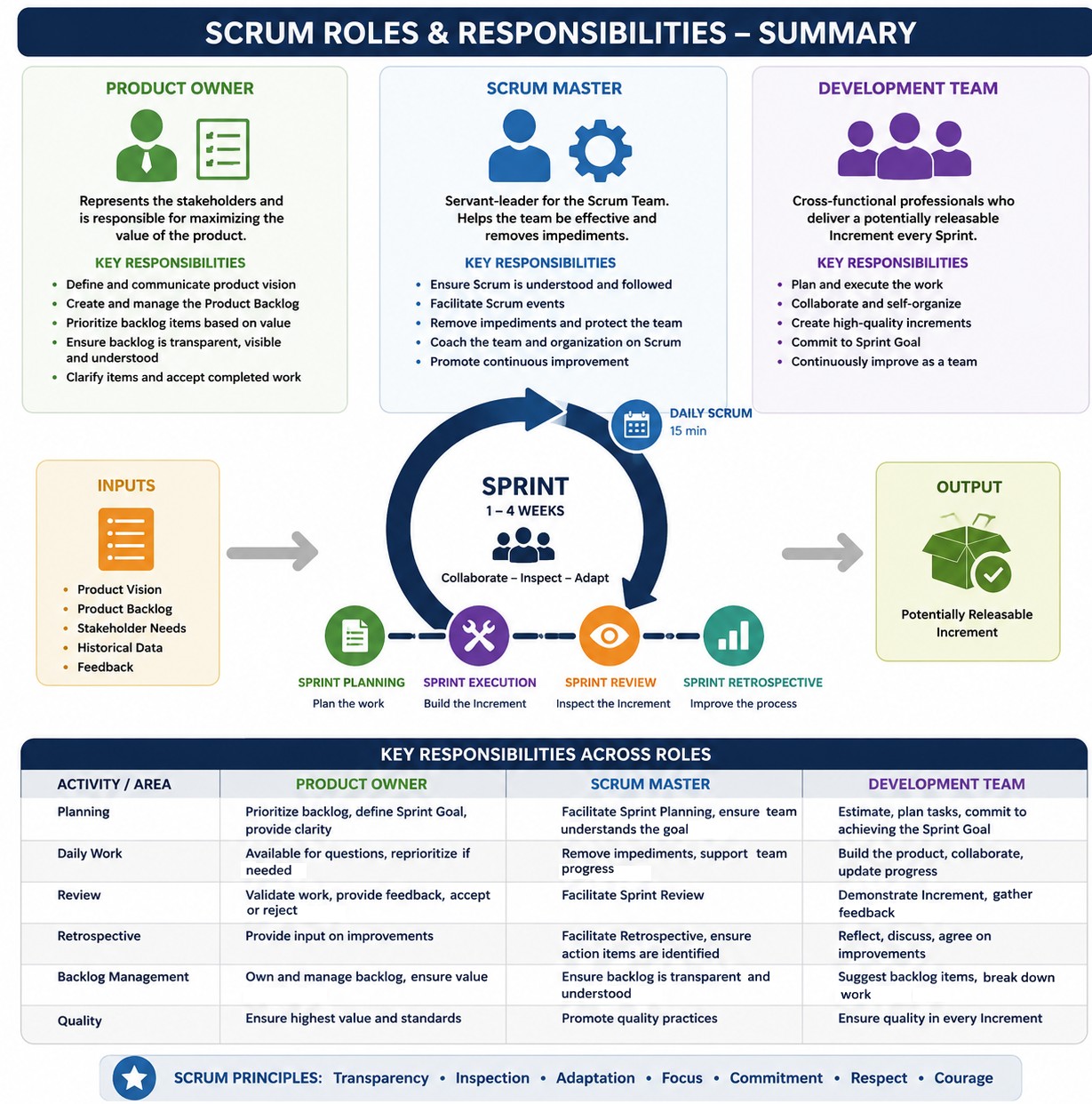
Reference - atlassian.com/agile/scrum/scrum-metrics: "The scrum way of working is characterized by the sprint, which is a measured amount of time a scrum team works to complete a set amount of work. Scrum metrics alone cannot measure customer value or show if the team even delivered the right thing. Stand-ups, or daily scrum, are short meetings held each day where team members check in about their work. A sprint burndown chart tracks the completion of work throughout a sprint. Velocity is how much work it can accomplish during a given time, and capacity refers to how much availability it has."
Jira Roles and Activities
Core admin creates users and groups including project administrators → Project admin creates a project, epic and adds users to the project → Create custom roles with specific permissions → Create tasks and assign to users.In Jira, roles are project specific - adding a user affects only the project s/he is added to. In other words, a user can have different permission levels in different projects.
In a dual-track Agile framework, UI/UX designers operate in the Discovery track, working exactly one or two sprints ahead of the developers' Delivery track. In this track, a Definition of Ready (DoR) ensures that when a Jira ticket moves from the Discovery Track to the Delivery Track, developers have absolutely everything they need to start writing code without hitting blockers.Example User Stories for a Web App Development Projects: This Agile structure, single user stories have been used to encompass the epic. Typically, each epic should have multiple or at least couple of user stories.
- 📂 Epic 1: UI/UX Discovery & Wireframing → Business Value: Ensures a user-centric design, minimizes development rework by validating layouts early, and aligns stakeholders on the visual direction.
Component: Design and Prototyping
User Story 1: As a User, I want to view a clean, intuitive dashboard so that I can easily navigate between file uploads and parameter inputs.
- Sub-Task 1: Create low-fidelity wireframes for the input dashboard and results screen, layouts for pages with zero data or initial onboarding states are included
- Sub-Task 2: Design high-fidelity UI mock-ups with interactive states (hover, loading, error) - the 'Happy' and 'Unhappy' paths
- Sub-Task 3: Apply colors, typography, color contrast, and branding to UI
- Sub-Task 4: Create interactive prototype by connecting screens to demonstrate expected user journeys
- Sub-Task 5: Conduct a design review with stakeholders for final sign-off or to gather feedbacks
- Design the multi-file drag-and-drop zone interface
- Design the input parameter forms and validation tooltips
- Design data visualization charts for the results screen
- Inspect implemented code against original mockups
- Sub-Task 6: Export SVG icons, images, and finalize the Figma handoff link in the Jira ticket
- Sub-Task 7: Audit the developer's staging environment to ensure alignment with padding, typography, and responsiveness.
- 📂 Epic 2: Frontend Input Interface and File Management → Business Value: Allows users to easily input custom parameters and upload multiple datasets seamlessly, providing immediate validation before processing.
Component: Frontend UI
User Story 2: As a User, I want to upload multiple files simultaneously and configure processing parameters so that the application has the correct data to generate results.
- Sub-Task 1: Implement a drag-and-drop file upload component
- Sub-Task 2: Build the dynamic form for input parameters with client-side validation
- Sub-task 3: Agree on an API Contract with back-end developer
- Sub-Task 4: Connect the frontend to the back-end file upload API
- Implement file type and size restriction alerts
- Add a progress bar UI for active file uploads.
- 📂 Epic 3: Back-end Processing Engine and API Layer → Business Value: Forms the core computational brain of the app, handling complex business logic, parsing files, and managing the processing flow.
Component: Back-end Core
User Story 3: As the System, I need to validate, parse, and process uploaded files alongside user parameters so that I can execute the core calculation logic accurately.
- Sub-Task 1: Develop API endpoints
- Sub-Task 2: Write the data parsing logic to extract information from multiple file formats
- Sub-Task 3: Implement the core business logic algorithm using the input parameters
- Create error-handling mechanisms for corrupted or malformed files
- Secure the API endpoints using token-based authentication.
- 📂 Epic 4: Database Architecture and Data Persistence → Business Value: Ensures secure, reliable storage of historical user inputs, operational logs, and generated results for future retrieval.
Component: Database (DB)
User Story 4: As a Developer, I need to store user inputs and generated results in a database so that users can retrieve their historical runs without reprocessing.- Sub-Task 1: Design the appropriate database schema
- Sub-Task 2: Set up database connection pools within the back-end application
- Sub-Task 3: Create Read/Write queries for user parameters and generated outputs
- Write database migration scripts
- Implement data encryption at rest for sensitive data fields.
- 📂 Epic 5: AWS Cloud Infrastructure and Deployment → Business Value: Provides a scalable, secure, and highly available hosting environment that automatically handles fluctuations in user traffic.
Component: DevOps / Infrastructure
User Story 5: As a DevOps Engineer, I need to deploy the application on AWS infrastructure so that the application is secure, scalable, and publicly accessible.- Sub-Task 1: Provision AWS compute resources (EC2 instances or ECS containers)
- Sub-Task 2: Configure an Amazon S3 bucket for secure file storage
- Sub-Task 3: Set up a CI/CD pipeline (e.g. GitHub Actions) for automated deployment
- Configure AWS IAM roles and security policies for least-privilege access
- Integrate linting and code validation tool such as SonarQube
- Write the build and test stages in Jenkinsfile or GitHub Actions YAML
- Set threshold rules to fail builds on high/critical vulnerabilities
- Configure webhook triggers for pull requests and main branch merges
- Test pipeline execution with a dummy commit
- Set up an Application Load Balancer (ALB) and SSL certificates.
- 📂 Epic 6: Results Display and Data Visualization → Business Value: Transforms raw database outputs into clean, readable, and actionable insights for the end-user.
Component: Frontend UI / Reporting
User Story 6: As a User, I want to see my generated results clearly displayed in tables and charts so that I can easily analyze the output.- Sub-Task 1: Build the results dashboard page based on approved wireframes
- Sub-Task 2: Integrate a data visualization library (such as Chart.js or D3.js) to render graphical data
- Sub-Task 3: Add an export feature (for example Download as PDF/CSV) for the displayed results
- Implement a polling or WebSocket mechanism to update the UI once the backend finishes processing
- Create responsive layout fixes for different monitor screen resolutions.
"When importing a file, the summary field is always required. It provides an overview of the work item. The CSV importer uses the file header row to determine how to map data from the file's second row and beyond to fields in Jira. Use email addresses when adding people as assignees, reporters, or creators to your CSV file. If you’d like to import work types and parent-child relationships between work items, along with the work type column, include the work item ID and parent columns in your CSV file."
From support.atlassian.com/ ... /import-data-from-a-csv-file: "Use double-quote marks (") in your CSV file to capture data that spans multiple lines." A Jira Admin privilege is required in order to use the option to specify the Space within the CSV data.
Work Type,  Summary,      Assignee, Description,        Priority, Status, Work item ID, Parent, Reporter, Story Points
Initiative,"UI Upgrade",  a@ex.com, "UI Enhancements",      High,  To Do,          101,       , r@ex.com,
Epic,      "Create UI",   a@ex.com, "Use Material UI",      High,  To Do,          105,    101, r@ex.com,
Story,     "First screen",a@ex.com, "Create user form",   Medium,  To Do,          110,    105, r@ex.com, 5
Sub-task,  "First task",  a@ex.com, "Create dropdown",       Low,  To Do,          115,    110, r@ex.com,
Bug,       "First bug",   d@ex.com, "Incorrect value",   Highest,  To Do,          120,       , b@ex.com, 5
A sample spreadsheet file (which can be easily saved into CSV format) for full backlog of a web project can be downloaded from here.
Note: Jira excludes the Story Points field for sub-task issue types. Agile methodology recommends estimating effort only at the parent work item level (such as Stories, Tasks, or Bugs), while sub-tasks are typically estimated in time (hours or days). White story-points can still be manually added to sub-tasks, adding story points to sub-tasks will not change the burndown chart.
An Epic Link in Jira is a special custom field used to connect child issues—such as stories, tasks, or bugs—to their parent Epic. Unlike general issue links (e.g. "relates to"), the Epic Link specifically structures work so Jira can group items together on boards, backlogs, and reports.When creating a new Epic, the Epic Name custom field is a short name field used to identify the Epic. By default it is available only to Epic work item. It is intended to be used to label any work item that belong to the Epic.
Immediate Configuration after Project Creation:
- Add Team Members: Go to Project settings > Access, click Add people, and assign them roles (Viewer, Member, or Administrator).
- Enable/Disable Features: Go to Project settings > Features to turn on or off modules like Sprints, Backlog, Deployments, or Releases depending on workflow adopted by the team.
- Customize Issue Types: Go to Project settings > Issue types to add custom fields (like drop-downs or text boxes) or modify the workflow statuses (e.g. adding a "In Review" step) just for this project.
- For a team-managed Scrum project, the main goal is to activate the backlog and sprint tracking features so that team can plan their fixed time blocks.
- Verify Agile Features: Go to Project settings > Features and ensure both Backlog and Sprints are toggled ON (these are required for Scrum but can sometimes be toggled off by default).
- Set Up the Scrum Board and Workspace
- Customize Workflow Statuses: Go to Project settings > Issue types > Task/Story. Click Edit workflow to add or rename columns on your board (e.g. To Do, In Progress, In Review, Done).
- Define Estimation: In Project settings > Features > Estimation, choose whether the team will estimate work using Story Points or Time (Hours).
- Initialize the First Sprint
- Access the Backlog: Click Backlog in the left sidebar.
- Create Issues: Click + Create issue to populate backlog with initial user stories, tasks, or bugs.
- Plan the first sprint: Click Create sprint at the top of the backlog page. Drag and drop the prioritized issues from the backlog into this new sprint section.
- Start Sprint: Click Start sprint, set fixed time block duration (e.g. 2 weeks), define the start/end dates, enter a Sprint goal, and click Start.
Active Sprint → Icon with axes and upward bent arrow → Sprint insight: it gives spring summary as All / Due / Stuck / Blocked / Flagged.
Reports → Work items by type → Click on … → View data table: get count of work items namely Story, Sub-task, Epic and Initiative.
Reports → Work item details → Click on … → Get tabular data containing headers Work Item Key, Work Type, Work Item Priority and Issue Summary. The Work Type includes Epic, Story, Sub-task and Initiative.
Backlog tab as the name suggests gives information about active and future sprints. Each sprint has 3 boxes [Not started], [In progress], [Completed] and mouse hover on any of the box displays X of Y (story points).
Summary → Status overview → Pie chart: shows count of work items In progress, Backlog and Done. Summary → Type of work: displays list of items under categories Epic, Story, Sub-task, Initiative, Task, Bug, Incident, and Security.
FAQ:
1) How to get story points completed within the sprint? Sprint Report: it shows the issues and the number of story points completed.2) How to account for partially allocated team member? By reducing their individual capacity (available hours or story points) during sprint planning, assign smaller self-contained tasks.
3) How is concurrent development handled? How to prevent frontend and back-end developers from waiting on each other, or DevOps from blocking deployment? Agree on API contract, and once the data structure is agreed upon, the frontend uses mock data while the back-end builds the actual logic. DevOps engineers embed automated CI/CD pipelines early.
4) How to manage the parallel tasks of a single feature without creating a complex Jira board? Use Single-Story Sub-task approach where the story represents the user-facing feature. Sub-tasks can be created for each discipline (e.g. [UI/UX] Design login wireframe, [BE] Create auth endpoints, [FE] Integrate auth UI, [DevOps] Configure SSL/CI pipeline).
The content on CFDyna.com is being constantly refined and improvised with on-the-job experience, testing, and training. Examples might be simplified to improve insight into the physics and basic understanding. Linked pages, articles, references, and examples are constantly reviewed to reduce errors, but we cannot warrant full correctness of all content.
Template by OS Templates